The MediaPipe Image Segmenter task lets you divide images into regions based on predefined
categories. You can use this functionality to identify specific objects or
textures, and then apply visual effects such as background blurring. This task
includes several models specifically trained for segmenting people and their
features within image data, including:
- Person and background
- Person's hair only
- Person's hair, face, skin, clothing, and accessories
This task operates on image data with a machine learning (ML) model with single
images or a continuous video stream. It outputs a list of segmented regions,
representing objects or areas in an image, depending on the [model](https://developers.google.com/edge/mediapipe/solutions/vision/image_segmenter.md.txt#models) you
choose.
[Open in Web Demos](https://google-ai-edge.github.io/mediapipe-samples-web/#/vision/image_segmenter)[Edit in StackBlitz](https://stackblitz.com/github/google-ai-edge/mediapipe-samples-web?file=src/tasks/image-segmenter.ts)
## Quickstart
Install the SDK for your platform,
[prepare input data](https://developers.google.com/edge/mediapipe/solutions/prepare_data.md.txt#vision), choose a
running mode, and run inference.
### Web
npm`npm install @mediapipe/tasks-vision`[Web demo](https://google-ai-edge.github.io/mediapipe-samples-web/#/vision/image_segmenter)·[Edit in StackBlitz](https://stackblitz.com/github/google-ai-edge/mediapipe-samples-web?file=src/tasks/image-segmenter.ts)·[Setup guide](https://developers.google.com/edge/mediapipe/solutions/setup_web.md.txt)
#### Image
`IMAGE`Stateless · single frameSynchronous call on independent still images. Resets temporal tracking state on every call.
```typescript
import { FilesetResolver, ImageSegmenter } from "@mediapipe/tasks-vision";
const vision = await FilesetResolver.forVisionTasks(
"https://cdn.jsdelivr.net/npm/@mediapipe/tasks-vision@latest/wasm"
);
const imageSegmenter = await ImageSegmenter.createFromOptions(vision, {
baseOptions: { modelAssetPath: "deeplab_v3.tflite", delegate: "GPU" },
runningMode: "IMAGE",
outputCategoryMask: true,
outputConfidenceMasks: false,
});
// Synchronous single-frame call (stateless across images)
const image = document.getElementById("image") as HTMLImageElement;
imageSegmenter.segment(image, (result) => { const mask = result.categoryMask?.getAsUint8Array(); });
```
#### Video
`VIDEO`Every frame · no dropsSynchronous tracking across decoded video frames with monotonic timestamps. Processes every frame in order and never drops frames.
```typescript
import { FilesetResolver, ImageSegmenter } from "@mediapipe/tasks-vision";
const vision = await FilesetResolver.forVisionTasks(
"https://cdn.jsdelivr.net/npm/@mediapipe/tasks-vision@latest/wasm"
);
const imageSegmenter = await ImageSegmenter.createFromOptions(vision, {
baseOptions: { modelAssetPath: "deeplab_v3.tflite", delegate: "GPU" },
runningMode: "VIDEO",
outputCategoryMask: true,
outputConfidenceMasks: false,
});
// Synchronous across decoded frames with monotonic timestamps (never drops frames)
for (const { frame, timestampMs } of decodedVideoFrames) {
imageSegmenter.segmentForVideo(frame, timestampMs, (result) => { const mask = result.categoryMask?.getAsUint8Array(); });
}
```
#### Livestream
`VIDEO + rAF`Live camera · latest frameWeb tasks run synchronously---pair `runningMode: "VIDEO"` with `requestAnimationFrame` so each paint inspects only the latest camera frame (skipping intermediate frames when busy).
```typescript
import { FilesetResolver, ImageSegmenter } from "@mediapipe/tasks-vision";
const vision = await FilesetResolver.forVisionTasks(
"https://cdn.jsdelivr.net/npm/@mediapipe/tasks-vision@latest/wasm"
);
// On Web, live camera loops pair runningMode: "VIDEO" with requestAnimationFrame
const imageSegmenter = await ImageSegmenter.createFromOptions(vision, {
baseOptions: { modelAssetPath: "deeplab_v3.tflite", delegate: "GPU" },
runningMode: "VIDEO",
outputCategoryMask: true,
outputConfidenceMasks: false,
});
const video = document.getElementById("webcam") as HTMLVideoElement;
video.srcObject = await navigator.mediaDevices.getUserMedia({ video: true });
await video.play();
let lastVideoTime = -1;
function renderLoop() {
if (video.readyState >= 2 && video.currentTime !== lastVideoTime) {
lastVideoTime = video.currentTime;
imageSegmenter.segmentForVideo(video, performance.now(), (result) => { const mask = result.categoryMask?.getAsUint8Array(); });
}
requestAnimationFrame(renderLoop);
}
renderLoop();
```
### Android (Kotlin)
Gradle`implementation("com.google.mediapipe:tasks-vision:latest.release")`[Sample code](https://github.com/google-ai-edge/mediapipe-samples/tree/main/examples/image_segmentation/android)·[Setup guide](https://developers.google.com/edge/mediapipe/solutions/setup_android.md.txt)
#### Image
`IMAGE`Stateless · single frameSynchronous call on independent still images. Resets temporal tracking state on every call.
```kotlin
import com.google.mediapipe.framework.image.BitmapImageBuilder
import com.google.mediapipe.framework.image.MPImage
import com.google.mediapipe.tasks.core.BaseOptions
import com.google.mediapipe.tasks.vision.core.RunningMode
import com.google.mediapipe.tasks.vision.imagesegmenter.ImageSegmenter
val baseOptions = BaseOptions.builder()
.setModelAssetPath("deeplab_v3.tflite")
.build()
val options = ImageSegmenter.ImageSegmenterOptions.builder()
.setBaseOptions(baseOptions)
.setRunningMode(RunningMode.IMAGE)
.setOutputCategoryMask(true)
.setOutputConfidenceMasks(false)
.build()
val imageSegmenter = ImageSegmenter.createFromOptions(context, options)
// Synchronous single-image call (no temporal tracking across calls)
val mpImage = BitmapImageBuilder(bitmap).build()
val result = imageSegmenter.segment(mpImage)
```
#### Video
`VIDEO`Every frame · no dropsSynchronous tracking across decoded video frames with monotonic timestamps. Processes every frame in order and never drops frames.
```kotlin
import com.google.mediapipe.framework.image.BitmapImageBuilder
import com.google.mediapipe.framework.image.MPImage
import com.google.mediapipe.tasks.core.BaseOptions
import com.google.mediapipe.tasks.vision.core.RunningMode
import com.google.mediapipe.tasks.vision.imagesegmenter.ImageSegmenter
val baseOptions = BaseOptions.builder()
.setModelAssetPath("deeplab_v3.tflite")
.build()
val options = ImageSegmenter.ImageSegmenterOptions.builder()
.setBaseOptions(baseOptions)
.setRunningMode(RunningMode.VIDEO)
.setOutputCategoryMask(true)
.setOutputConfidenceMasks(false)
.build()
val imageSegmenter = ImageSegmenter.createFromOptions(context, options)
// Synchronous: processes every frame in order with monotonic timestamps (no frame drops)
val mpImage = BitmapImageBuilder(frameBitmap).build()
val result = imageSegmenter.segmentForVideo(mpImage, frameTimestampMs)
```
#### Livestream
`LIVE_STREAM`Async · drops frames when busyAsynchronous camera pipeline with a result callback. Automatically drops incoming frames when busy so results stay current with low latency.
```kotlin
import android.os.SystemClock
import android.util.Log
import com.google.mediapipe.framework.image.BitmapImageBuilder
import com.google.mediapipe.framework.image.MPImage
import com.google.mediapipe.tasks.core.BaseOptions
import com.google.mediapipe.tasks.vision.core.RunningMode
import com.google.mediapipe.tasks.vision.imagesegmenter.ImageSegmenter
val baseOptions = BaseOptions.builder()
.setModelAssetPath("deeplab_v3.tflite")
.build()
val options = ImageSegmenter.ImageSegmenterOptions.builder()
.setBaseOptions(baseOptions)
.setRunningMode(RunningMode.LIVE_STREAM)
.setOutputCategoryMask(true)
.setOutputConfidenceMasks(false)
.setResultListener { result, _ -> val categoryMask = result.categoryMask() }
.setErrorListener { error -> Log.e("MediaPipe", error.message.orEmpty()) }
.build()
val imageSegmenter = ImageSegmenter.createFromOptions(context, options)
// Async: automatically drops incoming camera frames when busy so results stay current
imageSegmenter.segmentAsync(mpImage, SystemClock.uptimeMillis())
```
### Android (Java)
Gradle`implementation 'com.google.mediapipe:tasks-vision:latest.release'`[Sample code](https://github.com/google-ai-edge/mediapipe-samples/tree/main/examples/image_segmentation/android)·[Setup guide](https://developers.google.com/edge/mediapipe/solutions/setup_android.md.txt)
#### Image
`IMAGE`Stateless · single frameSynchronous call on independent still images. Resets temporal tracking state on every call.
```java
import com.google.mediapipe.framework.image.BitmapImageBuilder;
import com.google.mediapipe.framework.image.MPImage;
import com.google.mediapipe.tasks.core.BaseOptions;
import com.google.mediapipe.tasks.vision.core.RunningMode;
import com.google.mediapipe.tasks.vision.imagesegmenter.ImageSegmenter;
import com.google.mediapipe.tasks.vision.imagesegmenter.ImageSegmenterResult;
BaseOptions baseOptions = BaseOptions.builder()
.setModelAssetPath("deeplab_v3.tflite")
.build();
ImageSegmenter.ImageSegmenterOptions options = ImageSegmenter.ImageSegmenterOptions.builder()
.setBaseOptions(baseOptions)
.setRunningMode(RunningMode.IMAGE)
.setOutputCategoryMask(true)
.setOutputConfidenceMasks(false)
.build();
ImageSegmenter imageSegmenter = ImageSegmenter.createFromOptions(context, options);
// Synchronous single-image call (no temporal tracking across calls)
MPImage mpImage = new BitmapImageBuilder(bitmap).build();
ImageSegmenterResult result = imageSegmenter.segment(mpImage);
```
#### Video
`VIDEO`Every frame · no dropsSynchronous tracking across decoded video frames with monotonic timestamps. Processes every frame in order and never drops frames.
```java
import com.google.mediapipe.framework.image.BitmapImageBuilder;
import com.google.mediapipe.framework.image.MPImage;
import com.google.mediapipe.tasks.core.BaseOptions;
import com.google.mediapipe.tasks.vision.core.RunningMode;
import com.google.mediapipe.tasks.vision.imagesegmenter.ImageSegmenter;
import com.google.mediapipe.tasks.vision.imagesegmenter.ImageSegmenterResult;
BaseOptions baseOptions = BaseOptions.builder()
.setModelAssetPath("deeplab_v3.tflite")
.build();
ImageSegmenter.ImageSegmenterOptions options = ImageSegmenter.ImageSegmenterOptions.builder()
.setBaseOptions(baseOptions)
.setRunningMode(RunningMode.VIDEO)
.setOutputCategoryMask(true)
.setOutputConfidenceMasks(false)
.build();
ImageSegmenter imageSegmenter = ImageSegmenter.createFromOptions(context, options);
// Synchronous: processes every frame in order with monotonic timestamps (no frame drops)
MPImage mpImage = new BitmapImageBuilder(frameBitmap).build();
ImageSegmenterResult result = imageSegmenter.segmentForVideo(mpImage, frameTimestampMs);
```
#### Livestream
`LIVE_STREAM`Async · drops frames when busyAsynchronous camera pipeline with a result callback. Automatically drops incoming frames when busy so results stay current with low latency.
```java
import android.os.SystemClock;
import android.util.Log;
import com.google.mediapipe.framework.image.BitmapImageBuilder;
import com.google.mediapipe.framework.image.MPImage;
import com.google.mediapipe.tasks.core.BaseOptions;
import com.google.mediapipe.tasks.vision.core.RunningMode;
import com.google.mediapipe.tasks.vision.imagesegmenter.ImageSegmenter;
BaseOptions baseOptions = BaseOptions.builder()
.setModelAssetPath("deeplab_v3.tflite")
.build();
ImageSegmenter.ImageSegmenterOptions options = ImageSegmenter.ImageSegmenterOptions.builder()
.setBaseOptions(baseOptions)
.setRunningMode(RunningMode.LIVE_STREAM)
.setOutputCategoryMask(true)
.setOutputConfidenceMasks(false)
.setResultListener((result, inputImage) -> { var categoryMask = result.categoryMask(); })
.setErrorListener(error -> Log.e("MediaPipe", String.valueOf(error.getMessage())))
.build();
ImageSegmenter imageSegmenter = ImageSegmenter.createFromOptions(context, options);
// Async: automatically drops incoming camera frames when busy so results stay current
imageSegmenter.segmentAsync(mpImage, SystemClock.uptimeMillis());
```
### iOS
SwiftPM`https://github.com/google-ai-edge/mediapipe → MediaPipeTasksVision`[Package.swift](https://developers.google.com/edge/mediapipe/solutions/setup_ios.md.txt#package_swift)·[Sample code](https://github.com/google-ai-edge/mediapipe-samples/tree/main/examples/image_segmentation/ios)·[Setup guide](https://developers.google.com/edge/mediapipe/solutions/setup_ios.md.txt)
#### Image
`IMAGE`Stateless · single frameSynchronous call on independent still images. Resets temporal tracking state on every call.
```swift
import Foundation
import MediaPipeTasksVision
guard let modelPath = Bundle.main.path(forResource: "deeplab_v3", ofType: "tflite") else { return }
let options = ImageSegmenterOptions()
options.baseOptions.modelAssetPath = modelPath
options.runningMode = .image
options.outputCategoryMask = true
options.outputConfidenceMasks = false
let imageSegmenter = try ImageSegmenter(options: options)
// Synchronous single-image call (stateless across images)
let mpImage = try MPImage(uiImage: image)
let result = try imageSegmenter.segment(image: mpImage)
```
#### Video
`VIDEO`Every frame · no dropsSynchronous tracking across decoded video frames with monotonic timestamps. Processes every frame in order and never drops frames.
```swift
import Foundation
import MediaPipeTasksVision
guard let modelPath = Bundle.main.path(forResource: "deeplab_v3", ofType: "tflite") else { return }
let options = ImageSegmenterOptions()
options.baseOptions.modelAssetPath = modelPath
options.runningMode = .video
options.outputCategoryMask = true
options.outputConfidenceMasks = false
let imageSegmenter = try ImageSegmenter(options: options)
// Synchronous: processes every frame in order with monotonic timestamps (no frame drops)
let mpImage = try MPImage(pixelBuffer: pixelBuffer)
let result = try imageSegmenter.segment(videoFrame: mpImage, timestampInMilliseconds: timestampMs)
```
#### Livestream
`LIVE_STREAM`Async · drops frames when busyAsynchronous camera pipeline with a result callback. Automatically drops incoming frames when busy so results stay current with low latency.
```swift
import Foundation
import MediaPipeTasksVision
final class ImageSegmenterStreamService: NSObject {
private var imageSegmenter: ImageSegmenter?
func setUp() throws {
guard let modelPath = Bundle.main.path(forResource: "deeplab_v3", ofType: "tflite") else { return }
let options = ImageSegmenterOptions()
options.baseOptions.modelAssetPath = modelPath
options.runningMode = .liveStream
options.outputCategoryMask = true
options.outputConfidenceMasks = false
options.imageSegmenterLiveStreamDelegate = self
imageSegmenter = try ImageSegmenter(options: options)
}
func segmentAsync(mpImage: MPImage, timestampMs: Int) throws {
// Async: automatically drops incoming camera frames when busy so results stay current
try imageSegmenter?.segmentAsync(image: mpImage, timestampInMilliseconds: timestampMs)
}
}
extension ImageSegmenterStreamService: ImageSegmenterLiveStreamDelegate {
func imageSegmenter(
_ imageSegmenter: ImageSegmenter,
didFinishSegmentation result: ImageSegmenterResult?,
timestampInMilliseconds: Int,
error: (any Error)?
) {
guard let result else { return }
DispatchQueue.main.async {
let categoryMask = result.categoryMask
}
}
}
```
### Python
pip`pip install mediapipe`[Sample code](https://colab.research.google.com/github/google-ai-edge/mediapipe-samples/blob/main/examples/image_segmentation/python/image_segmentation.ipynb)·[Setup guide](https://developers.google.com/edge/mediapipe/solutions/setup_python.md.txt)
#### Image
`IMAGE`Stateless · single frameSynchronous call on independent still images. Resets temporal tracking state on every call.
```python
import mediapipe as mp
BaseOptions = mp.tasks.BaseOptions
ImageSegmenter = mp.tasks.vision.ImageSegmenter
ImageSegmenterOptions = mp.tasks.vision.ImageSegmenterOptions
VisionRunningMode = mp.tasks.vision.RunningMode
options = ImageSegmenterOptions(
base_options=BaseOptions(model_asset_path="deeplab_v3.tflite"),
running_mode=VisionRunningMode.IMAGE,
output_category_mask=True,
output_confidence_masks=False,
)
with ImageSegmenter.create_from_options(options) as segmenter:
# Synchronous single-image call (stateless across images)
mp_image = mp.Image.create_from_file("input.jpg")
result = segmenter.segment(mp_image)
```
#### Video
`VIDEO`Every frame · no dropsSynchronous tracking across decoded video frames with monotonic timestamps. Processes every frame in order and never drops frames.
```python
import mediapipe as mp
BaseOptions = mp.tasks.BaseOptions
ImageSegmenter = mp.tasks.vision.ImageSegmenter
ImageSegmenterOptions = mp.tasks.vision.ImageSegmenterOptions
VisionRunningMode = mp.tasks.vision.RunningMode
options = ImageSegmenterOptions(
base_options=BaseOptions(model_asset_path="deeplab_v3.tflite"),
running_mode=VisionRunningMode.VIDEO,
output_category_mask=True,
output_confidence_masks=False,
)
with ImageSegmenter.create_from_options(options) as segmenter:
# Synchronous: processes every frame in order with monotonic timestamps (no frame drops)
for mp_image, timestamp_ms in decoded_video_frames:
result = segmenter.segment_for_video(mp_image, timestamp_ms)
```
#### Livestream
`LIVE_STREAM`Async · drops frames when busyAsynchronous camera pipeline with a result callback. Automatically drops incoming frames when busy so results stay current with low latency.
```python
import mediapipe as mp
BaseOptions = mp.tasks.BaseOptions
ImageSegmenter = mp.tasks.vision.ImageSegmenter
ImageSegmenterOptions = mp.tasks.vision.ImageSegmenterOptions
VisionRunningMode = mp.tasks.vision.RunningMode
def on_result(result, output_image: mp.Image, timestamp_ms: int):
print(f"Category mask shape at {timestamp_ms} ms: {result.category_mask.numpy_view().shape}")
options = ImageSegmenterOptions(
base_options=BaseOptions(model_asset_path="deeplab_v3.tflite"),
running_mode=VisionRunningMode.LIVE_STREAM,
output_category_mask=True,
output_confidence_masks=False,
result_callback=on_result,
)
with ImageSegmenter.create_from_options(options) as segmenter:
# Async: automatically drops incoming camera frames when busy so results stay current
mp_image = mp.Image(image_format=mp.ImageFormat.SRGB, data=rgb_frame)
segmenter.segment_async(mp_image, timestamp_ms)
```
### Flutter
pub`flutter pub add mediapipe_vision`[Live gallery](https://google.github.io/flutter-mediapipe/)·[Sample code](https://github.com/google/flutter-mediapipe/tree/main/samples/vision/image_segmenter)·[Setup guide](https://developers.google.com/edge/mediapipe/solutions/setup_flutter.md.txt)
#### Image
`RunningMode.image`Stateless · single frameOne call per independent still image. No tracking state carries over between calls.
```dart
import 'package:mediapipe_vision/mediapipe_vision.dart';
Future segmentScene(VisionImage image) async {
final segmenter = await ImageSegmenter.create(
ImageSegmenterOptions(
model: VisionModels.imageSegmenter,
outputCategoryMask: true,
outputConfidenceMasks: false,
),
);
try {
final result = await segmenter.segment(image);
final mask = result.categoryMask!;
final center =
mask.categories[mask.height ~/ 2 * mask.width + mask.width ~/ 2];
// Labels come from the model's metadata, which may have none.
final label = center < result.labels.length
? result.labels[center]
: 'category $center';
print('The center pixel is $label');
} finally {
await segmenter.dispose();
}
}
```
#### Video
`RunningMode.video`Every frame · no dropsTracking across decoded video frames with strictly increasing timestamps. Processes every frame in order and never drops frames.
```dart
import 'dart:typed_data';
import 'package:mediapipe_vision/mediapipe_vision.dart';
typedef Frame = ({Uint8List rgba, int width, int height, int milliseconds});
Future segmentSceneInVideo(Stream frames) async {
final segmenter = await ImageSegmenter.create(
ImageSegmenterOptions(
model: VisionModels.imageSegmenter,
runningMode: RunningMode.video,
outputCategoryMask: true,
outputConfidenceMasks: false,
),
);
try {
await for (final frame in frames) {
final result = await segmenter.segmentForVideo(
VisionImage.fromPixels(
pixels: frame.rgba,
width: frame.width,
height: frame.height,
format: VisionPixelFormat.rgba,
),
timestampMilliseconds: frame.milliseconds,
);
final ms = result.timestampMilliseconds;
final mask = result.categoryMask!;
final center =
mask.categories[mask.height ~/ 2 * mask.width + mask.width ~/ 2];
// Labels come from the model's metadata, which may have none.
final label = center < result.labels.length
? result.labels[center]
: 'category $center';
print('$ms ms: the center pixel is $label');
}
} finally {
await segmenter.dispose();
}
}
```
#### Livestream
`RunningMode.liveStream`Async · drops frames when busyEach call returns at once and results arrive on the task's `results` stream. One frame runs at a time; a newer frame replaces one that's waiting, so results stay current.
```dart
import 'dart:typed_data';
import 'package:mediapipe_vision/mediapipe_vision.dart';
typedef Frame = ({Uint8List rgba, int width, int height, int milliseconds});
Future segmentSceneLive(Stream frames) async {
final segmenter = await ImageSegmenter.create(
ImageSegmenterOptions(
model: VisionModels.imageSegmenter,
runningMode: RunningMode.liveStream,
outputCategoryMask: true,
outputConfidenceMasks: false,
),
);
// Listen before the first frame, as Google requires a result listener.
final results = segmenter.results.listen((result) {
final ms = result.timestampMilliseconds;
final mask = result.categoryMask!;
final center =
mask.categories[mask.height ~/ 2 * mask.width + mask.width ~/ 2];
// Labels come from the model's metadata, which may have none.
final label = center < result.labels.length
? result.labels[center]
: 'category $center';
print('$ms ms: the center pixel is $label');
});
try {
await for (final frame in frames) {
segmenter.segmentAsync(
VisionImage.fromPixels(
pixels: frame.rgba,
width: frame.width,
height: frame.height,
format: VisionPixelFormat.rgba,
),
timestampMilliseconds: frame.milliseconds,
);
}
} finally {
// Runs the frame in flight and the waiting one, then closes results.
await segmenter.dispose();
await results.cancel();
print('${segmenter.droppedFrames} frames dropped');
}
}
```
## Task details
This section describes the capabilities, inputs, outputs, and configuration
options of this task.
### Features
- **Input image processing** - Processing includes image rotation, resizing, normalization, and color space conversion.
Inputs The Image Segmenter accepts an input of one of the following data types:
- Still images
- Decoded video frames
- Live video feed
See [Prepare vision input data](https://developers.google.com/edge/mediapipe/solutions/prepare_data.md.txt#vision) for `MPImage`, `mp.Image`, `VisionImage`, and browser media examples.
Outputs The Image Segmenter outputs segmented image data, which can include one or both of the following, depending on the configuration options you set:
- `CATEGORY_MASK`: a list containing a segmented mask as a uint8 format image. Each pixel value indicates if it is part of a specific segment category supported by the model.
- `CONFIDENCE_MASK`: a list of channels containing a segmented mask with pixel values in float32 format. Each pixel value indicates the level of confidence that it is part of a specific category supported by the model.
### Configuration options
This task has the following configuration options:
### Web
| Option Name | Description | Value Range | Default Value |
|---|---|---|---|
| `runningMode` | Sets the running mode for the task: `IMAGE`: Single image inputs. `VIDEO`: Decoded video frames and live camera streams. | {`IMAGE`, `VIDEO`} | `IMAGE` |
| `outputCategoryMask` | If `true`, outputs a `uint8` category mask where each pixel value indicates the winning class index. | `Boolean` | `false` |
| `outputConfidenceMasks` | If `true`, outputs per-category floating-point confidence masks in `[0.0, 1.0]`. | `Boolean` | `true` |
| `displayNamesLocale` | Locale code for display names provided in the model metadata, if available. You can add localized labels to custom models with the [LiteRT Metadata Writer API](https://developers.google.com/edge/litert/conversion/tensorflow/metadata_writer_tutorial.md.txt). | Locale code | `"en"` |
### Android
| Option Name | Description | Value Range | Default Value |
|---|---|---|---|
| `runningMode` | Sets the running mode for the task: `IMAGE`: Single image inputs. `VIDEO`: Decoded frames of a video. `LIVE_STREAM`: Livestream of camera input data (requires asynchronous listener/delegate). | {`IMAGE`, `VIDEO`, `LIVE_STREAM`} | `IMAGE` |
| `outputCategoryMask` | If `true`, outputs a `uint8` category mask where each pixel value indicates the winning class index. | `Boolean` | `false` |
| `outputConfidenceMasks` | If `true`, outputs per-category floating-point confidence masks in `[0.0, 1.0]`. | `Boolean` | `true` |
| `displayNamesLocale` | Locale code for display names provided in the model metadata, if available. You can add localized labels to custom models with the [LiteRT Metadata Writer API](https://developers.google.com/edge/litert/conversion/tensorflow/metadata_writer_tutorial.md.txt). | Locale code | `"en"` |
| `resultListener` | Asynchronous callback for `LIVE_STREAM` mode results. | `OutputHandler.ResultListener` | Not set |
| `errorListener` | Optional error listener for `LIVE_STREAM` mode. | `ErrorListener` | Not set |
### iOS
| Option Name | Description | Value Range | Default Value |
|---|---|---|---|
| `runningMode` | Sets the running mode for the task: `IMAGE`: Single image inputs. `VIDEO`: Decoded frames of a video. `LIVE_STREAM`: Livestream of camera input data (requires asynchronous listener/delegate). | {`IMAGE`, `VIDEO`, `LIVE_STREAM`} | `IMAGE` |
| `outputCategoryMask` | If `true`, outputs a `uint8` category mask where each pixel value indicates the winning class index. | `Boolean` | `false` |
| `outputConfidenceMasks` | If `true`, outputs per-category floating-point confidence masks in `[0.0, 1.0]`. | `Boolean` | `true` |
| `displayNamesLocale` | Locale code for display names provided in the model metadata, if available. You can add localized labels to custom models with the [LiteRT Metadata Writer API](https://developers.google.com/edge/litert/conversion/tensorflow/metadata_writer_tutorial.md.txt). | Locale code | `"en"` |
| `imageSegmenterLiveStreamDelegate` | Asynchronous delegate for `LIVE_STREAM` mode results (invoked on a serial background queue). | `ImageSegmenterLiveStreamDelegate` | Not set |
### Python
| Option Name | Description | Value Range | Default Value |
|---|---|---|---|
| `running_mode` | Sets the running mode for the task: `IMAGE`: Single image inputs. `VIDEO`: Decoded frames of a video. `LIVE_STREAM`: Livestream of camera input data (requires `result_callback`). | {`IMAGE`, `VIDEO`, `LIVE_STREAM`} | `IMAGE` |
| `output_category_mask` | If `true`, outputs a `uint8` category mask where each pixel value indicates the winning class index. | `Boolean` | `False` |
| `output_confidence_masks` | If `true`, outputs per-category floating-point confidence masks in `[0.0, 1.0]`. | `Boolean` | `True` |
| `display_names_locale` | Locale code for display names provided in the model metadata, if available. You can add localized labels to custom models with the [LiteRT Metadata Writer API](https://developers.google.com/edge/litert/conversion/tensorflow/metadata_writer_tutorial.md.txt). | Locale code | `"en"` |
| `result_callback` | Asynchronous callback function for `LIVE_STREAM` mode results. | `Callable` | Not set |
### Flutter
| Option Name | Description | Value Range | Default Value |
|---|---|---|---|
| `runningMode` | Sets the running mode for the task: `RunningMode.image`: Single image inputs. `RunningMode.video`: Decoded frames of a video. `RunningMode.liveStream`: Livestream of camera input data (results arrive on the task's `results` stream). | {`RunningMode.image`, `RunningMode.video`, `RunningMode.liveStream`} | `RunningMode.image` |
| `outputCategoryMask` | If `true`, outputs a `uint8` category mask where each pixel value indicates the winning class index. Request at least one of the two mask kinds. | `bool` | `false` |
| `outputConfidenceMasks` | If `true`, outputs per-category floating-point confidence masks in `[0.0, 1.0]`. Request at least one of the two mask kinds. | `bool` | `true` |
| `displayNamesLocale` | Locale code for display names provided in the model metadata, if available. You can add localized labels to custom models with the [LiteRT Metadata Writer API](https://developers.google.com/edge/litert/conversion/tensorflow/metadata_writer_tutorial.md.txt). When `null`, the model's own locale applies. | Locale code | `null` |
### Task output
Each `ImageSegmenterResult` provides pixel-aligned masks matching the dimensions of the input image:
| Field | Type / Range | Description |
|---|---|---|
| `categoryMask` | `MPMask` (`Uint8` in `[0, 255]`) | Single-channel mask where each pixel value is the winning class index (`0..N-1`) with the highest score (`category_mask` in Python; in Dart, a nullable `CategoryMask` whose `categories` `Uint8List` is indexed `y * width + x`, with the model's labels in `result.labels`). |
| `confidenceMasks` | `MPMask[]` (`Float32` in `[0.0, 1.0]`) | Per-class float masks where each pixel value represents the probability that the pixel belongs to that category (`confidence_masks` in Python; in Dart, a nullable `List`, each with a `confidence` `Float32List`). |
| `qualityScores` | `float[]` (`[0.0, 1.0]`) | Optional model quality scores for each segmentation mask (`quality_scores` in Python; in Dart, a nullable `Float32List`). |
#### Example `ImageSegmenterResult` payload
The following example shows a `640×480` category mask and per-class confidence masks:
```javascript
{
categoryMask: {
width: 640,
height: 480,
data: Uint8Array(307200) [0, 0, 15, 15, 15 /* ... winning class index per pixel */]
},
confidenceMasks: [
{
width: 640,
height: 480,
data: Float32Array(307200) [0.992, 0.988, 0.014 /* ... class #0 probability per pixel */]
}
]
}
```
## Models
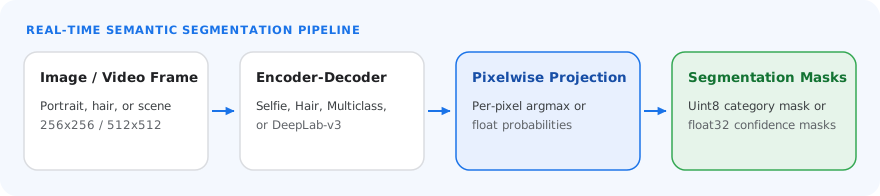
The Image Segmenter can be used with more than one ML model. Most of the following
segmentation models are built and trained to perform segmentation with images of
people. However, the [DeepLab-v3](https://developers.google.com/edge/mediapipe/solutions/vision/image_segmenter.md.txt#deeplab-v3) model is built as a general
purpose image segmenter. Select the model that fits best for your application.
### Selfie segmentation model
This model can segment the portrait of a person, and can be used for replacing
or modifying the background in an image. The model outputs two categories,
background at index 0 and person at index 1. This model has versions with
different input shapes, including a square version and a landscape version that
may be more efficient for applications where the input is always that shape,
such as video calls.
| Model name | Input shape | Quantization type | Model Card | Versions |
|---|---|---|---|---|
| [SelfieSegmenter (square)](https://storage.googleapis.com/mediapipe-models/image_segmenter/selfie_segmenter/float16/latest/selfie_segmenter.tflite) | 256 x 256 | float 16 | [info](https://storage.googleapis.com/mediapipe-assets/Model%20Card%20MediaPipe%20Selfie%20Segmentation.pdf) | [Latest](https://storage.googleapis.com/mediapipe-models/image_segmenter/selfie_segmenter/float16/latest/selfie_segmenter.tflite) |
| [SelfieSegmenter (landscape)](https://storage.googleapis.com/mediapipe-models/image_segmenter/selfie_segmenter_landscape/float16/latest/selfie_segmenter_landscape.tflite) | 144 x 256 | float 16 | [info](https://storage.googleapis.com/mediapipe-assets/Model%20Card%20MediaPipe%20Selfie%20Segmentation.pdf) | [Latest](https://storage.googleapis.com/mediapipe-models/image_segmenter/selfie_segmenter_landscape/float16/latest/selfie_segmenter_landscape.tflite) |
### Hair segmentation model
This model takes an image of a person, locates the hair on their head, and
outputs an image segmentation map for their hair. You can use this model for
recoloring hair or applying other hair effects. The model outputs the following
segmentation categories:
0background 1hair
| Model name | Input shape | Quantization type | Model Card | Versions |
|---|---|---|---|---|
| [HairSegmenter](https://storage.googleapis.com/mediapipe-models/image_segmenter/hair_segmenter/float32/latest/hair_segmenter.tflite) | 512 x 512 | None (float32) | [info](https://storage.googleapis.com/mediapipe-assets/Model%20Card%20-%20Hair%20Segmentation.pdf) | [Latest](https://storage.googleapis.com/mediapipe-models/image_segmenter/hair_segmenter/float32/latest/hair_segmenter.tflite) |
### Multi-class selfie segmentation model
This model takes an image of a person, locates regions for different categories
such as hair, skin, and clothing, and outputs an image segmentation map for
these items.
You can use this model for applying various effects to people in images or
video. The model outputs the following segmentation categories:
0background 1hair 2body-skin 3face-skin 4clothes 5others (accessories)
| Model name | Input shape | Quantization type | Model Card | Versions |
|---|---|---|---|---|
| [SelfieMulticlass (256 x 256)](https://storage.googleapis.com/mediapipe-models/image_segmenter/selfie_multiclass_256x256/float32/latest/selfie_multiclass_256x256.tflite) | 256 x 256 | None (float32) | [info](https://storage.googleapis.com/mediapipe-assets/Model%20Card%20Multiclass%20Segmentation.pdf) | [Latest](https://storage.googleapis.com/mediapipe-models/image_segmenter/selfie_multiclass_256x256/float32/latest/selfie_multiclass_256x256.tflite) |
### DeepLab-v3 model
This model identifies segments for a number of categories, including background,
person, cat, dog, and potted plant. The model uses atrous spatial pyramid
pooling to capture longer range information. For more information, see
[DeepLab-v3](https://www.kaggle.com/models/tensorflow/deeplabv3).
| Model name | Input shape | Quantization type | Versions |
|---|---|---|---|
| [DeepLab-V3](https://storage.googleapis.com/mediapipe-models/image_segmenter/deeplab_v3/float32/latest/deeplab_v3.tflite) | 257 x 257 | None (float32) | [Latest](https://storage.googleapis.com/mediapipe-models/image_segmenter/deeplab_v3/float32/latest/deeplab_v3.tflite) |
## Task benchmarks
Here are the task benchmarks for the whole pipeline based on the preceding
pre-trained models. The latency result is the average latency on Pixel 6 using
CPU / GPU.
| Model name | Device | CPU latency | GPU latency |
|---|---|---|---|
| SelfieSegmenter (square) | Pixel 6 | 33.46ms | 35.15ms |
| SelfieSegmenter (landscape) | Pixel 6 | 34.19ms | 33.55ms |
| HairSegmenter | Pixel 6 | 57.90ms | 52.14ms |
| SelfieMulticlass (256 x 256) | Pixel 6 | 217.76ms | 71.24ms |
| DeepLab-V3 | Pixel 6 | 123.93ms | 103.30ms |