The MediaPipe Gesture Recognizer task lets you recognize hand gestures in real time, and
provides the recognized hand gesture results along with the landmarks of the
detected hands. You can use this task to recognize specific hand gestures from a
user, and invoke application features that correspond to those gestures.
This task operates on image data with a machine learning (ML) model, and accepts
either static data or a continuous stream. The task outputs hand landmarks in
image coordinates, hand landmarks in world coordinates, handedness (left/right
hand), and the hand gesture categories of multiple hands.
[Open in Web Demos](https://google-ai-edge.github.io/mediapipe-samples-web/#/vision/gesture_recognizer)[Edit in StackBlitz](https://stackblitz.com/github/google-ai-edge/mediapipe-samples-web?file=src/tasks/gesture-recognizer.ts)
## Quickstart
Install the SDK for your platform,
[prepare input data](https://developers.google.com/edge/mediapipe/solutions/prepare_data.md.txt#vision), choose a
running mode, and run inference.
### Web
npm`npm install @mediapipe/tasks-vision`[Web demo](https://google-ai-edge.github.io/mediapipe-samples-web/#/vision/gesture_recognizer)·[Edit in StackBlitz](https://stackblitz.com/github/google-ai-edge/mediapipe-samples-web?file=src/tasks/gesture-recognizer.ts)·[Setup guide](https://developers.google.com/edge/mediapipe/solutions/setup_web.md.txt)
#### Image
`IMAGE`Stateless · single frameSynchronous call on independent still images. Resets temporal tracking state on every call.
```typescript
import { FilesetResolver, GestureRecognizer } from "@mediapipe/tasks-vision";
const vision = await FilesetResolver.forVisionTasks(
"https://cdn.jsdelivr.net/npm/@mediapipe/tasks-vision@latest/wasm"
);
const gestureRecognizer = await GestureRecognizer.createFromOptions(vision, {
baseOptions: { modelAssetPath: "gesture_recognizer.task", delegate: "GPU" },
runningMode: "IMAGE",
numHands: 2,
});
// Synchronous single-frame call (stateless across images)
const image = document.getElementById("image") as HTMLImageElement;
const result = gestureRecognizer.recognize(image);
```
#### Video
`VIDEO`Every frame · no dropsSynchronous tracking across decoded video frames with monotonic timestamps. Processes every frame in order and never drops frames.
```typescript
import { FilesetResolver, GestureRecognizer } from "@mediapipe/tasks-vision";
const vision = await FilesetResolver.forVisionTasks(
"https://cdn.jsdelivr.net/npm/@mediapipe/tasks-vision@latest/wasm"
);
const gestureRecognizer = await GestureRecognizer.createFromOptions(vision, {
baseOptions: { modelAssetPath: "gesture_recognizer.task", delegate: "GPU" },
runningMode: "VIDEO",
numHands: 2,
});
// Synchronous across decoded frames with monotonic timestamps (never drops frames)
for (const { frame, timestampMs } of decodedVideoFrames) {
const result = gestureRecognizer.recognizeForVideo(frame, timestampMs);
}
```
#### Livestream
`VIDEO + rAF`Live camera · latest frameWeb tasks run synchronously---pair `runningMode: "VIDEO"` with `requestAnimationFrame` so each paint inspects only the latest camera frame (skipping intermediate frames when busy).
```typescript
import { FilesetResolver, GestureRecognizer } from "@mediapipe/tasks-vision";
const vision = await FilesetResolver.forVisionTasks(
"https://cdn.jsdelivr.net/npm/@mediapipe/tasks-vision@latest/wasm"
);
// On Web, live camera loops pair runningMode: "VIDEO" with requestAnimationFrame
const gestureRecognizer = await GestureRecognizer.createFromOptions(vision, {
baseOptions: { modelAssetPath: "gesture_recognizer.task", delegate: "GPU" },
runningMode: "VIDEO",
numHands: 2,
});
const video = document.getElementById("webcam") as HTMLVideoElement;
video.srcObject = await navigator.mediaDevices.getUserMedia({ video: true });
await video.play();
let lastVideoTime = -1;
function renderLoop() {
if (video.readyState >= 2 && video.currentTime !== lastVideoTime) {
lastVideoTime = video.currentTime;
const result = gestureRecognizer.recognizeForVideo(video, performance.now());
console.log(result.gestures, result.landmarks);
}
requestAnimationFrame(renderLoop);
}
renderLoop();
```
### Android (Kotlin)
Gradle`implementation("com.google.mediapipe:tasks-vision:latest.release")`[Sample code](https://github.com/google-ai-edge/mediapipe-samples/tree/main/examples/gesture_recognizer/android)·[Setup guide](https://developers.google.com/edge/mediapipe/solutions/setup_android.md.txt)
#### Image
`IMAGE`Stateless · single frameSynchronous call on independent still images. Resets temporal tracking state on every call.
```kotlin
import com.google.mediapipe.framework.image.BitmapImageBuilder
import com.google.mediapipe.framework.image.MPImage
import com.google.mediapipe.tasks.core.BaseOptions
import com.google.mediapipe.tasks.vision.core.RunningMode
import com.google.mediapipe.tasks.vision.gesturerecognizer.GestureRecognizer
val baseOptions = BaseOptions.builder()
.setModelAssetPath("gesture_recognizer.task")
.build()
val options = GestureRecognizer.GestureRecognizerOptions.builder()
.setBaseOptions(baseOptions)
.setRunningMode(RunningMode.IMAGE)
.setNumHands(2)
.build()
val gestureRecognizer = GestureRecognizer.createFromOptions(context, options)
// Synchronous single-image call (no temporal tracking across calls)
val mpImage = BitmapImageBuilder(bitmap).build()
val result = gestureRecognizer.recognize(mpImage)
```
#### Video
`VIDEO`Every frame · no dropsSynchronous tracking across decoded video frames with monotonic timestamps. Processes every frame in order and never drops frames.
```kotlin
import com.google.mediapipe.framework.image.BitmapImageBuilder
import com.google.mediapipe.framework.image.MPImage
import com.google.mediapipe.tasks.core.BaseOptions
import com.google.mediapipe.tasks.vision.core.RunningMode
import com.google.mediapipe.tasks.vision.gesturerecognizer.GestureRecognizer
val baseOptions = BaseOptions.builder()
.setModelAssetPath("gesture_recognizer.task")
.build()
val options = GestureRecognizer.GestureRecognizerOptions.builder()
.setBaseOptions(baseOptions)
.setRunningMode(RunningMode.VIDEO)
.setNumHands(2)
.build()
val gestureRecognizer = GestureRecognizer.createFromOptions(context, options)
// Synchronous: processes every frame in order with monotonic timestamps (no frame drops)
val mpImage = BitmapImageBuilder(frameBitmap).build()
val result = gestureRecognizer.recognizeForVideo(mpImage, frameTimestampMs)
```
#### Livestream
`LIVE_STREAM`Async · drops frames when busyAsynchronous camera pipeline with a result callback. Automatically drops incoming frames when busy so results stay current with low latency.
```kotlin
import android.os.SystemClock
import android.util.Log
import com.google.mediapipe.framework.image.BitmapImageBuilder
import com.google.mediapipe.framework.image.MPImage
import com.google.mediapipe.tasks.core.BaseOptions
import com.google.mediapipe.tasks.vision.core.RunningMode
import com.google.mediapipe.tasks.vision.gesturerecognizer.GestureRecognizer
val baseOptions = BaseOptions.builder()
.setModelAssetPath("gesture_recognizer.task")
.build()
val options = GestureRecognizer.GestureRecognizerOptions.builder()
.setBaseOptions(baseOptions)
.setRunningMode(RunningMode.LIVE_STREAM)
.setNumHands(2)
.setResultListener { result, _ -> val topGesture = result.gestures().firstOrNull()?.firstOrNull() }
.setErrorListener { error -> Log.e("MediaPipe", error.message.orEmpty()) }
.build()
val gestureRecognizer = GestureRecognizer.createFromOptions(context, options)
// Async: automatically drops incoming camera frames when busy so results stay current
gestureRecognizer.recognizeAsync(mpImage, SystemClock.uptimeMillis())
```
### Android (Java)
Gradle`implementation 'com.google.mediapipe:tasks-vision:latest.release'`[Sample code](https://github.com/google-ai-edge/mediapipe-samples/tree/main/examples/gesture_recognizer/android)·[Setup guide](https://developers.google.com/edge/mediapipe/solutions/setup_android.md.txt)
#### Image
`IMAGE`Stateless · single frameSynchronous call on independent still images. Resets temporal tracking state on every call.
```java
import com.google.mediapipe.framework.image.BitmapImageBuilder;
import com.google.mediapipe.framework.image.MPImage;
import com.google.mediapipe.tasks.core.BaseOptions;
import com.google.mediapipe.tasks.vision.core.RunningMode;
import com.google.mediapipe.tasks.vision.gesturerecognizer.GestureRecognizer;
import com.google.mediapipe.tasks.vision.gesturerecognizer.GestureRecognizerResult;
BaseOptions baseOptions = BaseOptions.builder()
.setModelAssetPath("gesture_recognizer.task")
.build();
GestureRecognizer.GestureRecognizerOptions options = GestureRecognizer.GestureRecognizerOptions.builder()
.setBaseOptions(baseOptions)
.setRunningMode(RunningMode.IMAGE)
.setNumHands(2)
.build();
GestureRecognizer gestureRecognizer = GestureRecognizer.createFromOptions(context, options);
// Synchronous single-image call (no temporal tracking across calls)
MPImage mpImage = new BitmapImageBuilder(bitmap).build();
GestureRecognizerResult result = gestureRecognizer.recognize(mpImage);
```
#### Video
`VIDEO`Every frame · no dropsSynchronous tracking across decoded video frames with monotonic timestamps. Processes every frame in order and never drops frames.
```java
import com.google.mediapipe.framework.image.BitmapImageBuilder;
import com.google.mediapipe.framework.image.MPImage;
import com.google.mediapipe.tasks.core.BaseOptions;
import com.google.mediapipe.tasks.vision.core.RunningMode;
import com.google.mediapipe.tasks.vision.gesturerecognizer.GestureRecognizer;
import com.google.mediapipe.tasks.vision.gesturerecognizer.GestureRecognizerResult;
BaseOptions baseOptions = BaseOptions.builder()
.setModelAssetPath("gesture_recognizer.task")
.build();
GestureRecognizer.GestureRecognizerOptions options = GestureRecognizer.GestureRecognizerOptions.builder()
.setBaseOptions(baseOptions)
.setRunningMode(RunningMode.VIDEO)
.setNumHands(2)
.build();
GestureRecognizer gestureRecognizer = GestureRecognizer.createFromOptions(context, options);
// Synchronous: processes every frame in order with monotonic timestamps (no frame drops)
MPImage mpImage = new BitmapImageBuilder(frameBitmap).build();
GestureRecognizerResult result = gestureRecognizer.recognizeForVideo(mpImage, frameTimestampMs);
```
#### Livestream
`LIVE_STREAM`Async · drops frames when busyAsynchronous camera pipeline with a result callback. Automatically drops incoming frames when busy so results stay current with low latency.
```java
import android.os.SystemClock;
import android.util.Log;
import com.google.mediapipe.framework.image.BitmapImageBuilder;
import com.google.mediapipe.framework.image.MPImage;
import com.google.mediapipe.tasks.core.BaseOptions;
import com.google.mediapipe.tasks.vision.core.RunningMode;
import com.google.mediapipe.tasks.vision.gesturerecognizer.GestureRecognizer;
BaseOptions baseOptions = BaseOptions.builder()
.setModelAssetPath("gesture_recognizer.task")
.build();
GestureRecognizer.GestureRecognizerOptions options = GestureRecognizer.GestureRecognizerOptions.builder()
.setBaseOptions(baseOptions)
.setRunningMode(RunningMode.LIVE_STREAM)
.setNumHands(2)
.setResultListener((result, inputImage) -> { var gestures = result.gestures(); })
.setErrorListener(error -> Log.e("MediaPipe", String.valueOf(error.getMessage())))
.build();
GestureRecognizer gestureRecognizer = GestureRecognizer.createFromOptions(context, options);
// Async: automatically drops incoming camera frames when busy so results stay current
gestureRecognizer.recognizeAsync(mpImage, SystemClock.uptimeMillis());
```
### iOS
SwiftPM`https://github.com/google-ai-edge/mediapipe → MediaPipeTasksVision`[Package.swift](https://developers.google.com/edge/mediapipe/solutions/setup_ios.md.txt#package_swift)·[Sample code](https://github.com/google-ai-edge/mediapipe-samples/tree/main/examples/gesture_recognizer/ios)·[Setup guide](https://developers.google.com/edge/mediapipe/solutions/setup_ios.md.txt)
#### Image
`IMAGE`Stateless · single frameSynchronous call on independent still images. Resets temporal tracking state on every call.
```swift
import Foundation
import MediaPipeTasksVision
guard let modelPath = Bundle.main.path(forResource: "gesture_recognizer", ofType: "task") else { return }
let options = GestureRecognizerOptions()
options.baseOptions.modelAssetPath = modelPath
options.runningMode = .image
options.numHands = 2
let gestureRecognizer = try GestureRecognizer(options: options)
// Synchronous single-image call (stateless across images)
let mpImage = try MPImage(uiImage: image)
let result = try gestureRecognizer.recognize(image: mpImage)
```
#### Video
`VIDEO`Every frame · no dropsSynchronous tracking across decoded video frames with monotonic timestamps. Processes every frame in order and never drops frames.
```swift
import Foundation
import MediaPipeTasksVision
guard let modelPath = Bundle.main.path(forResource: "gesture_recognizer", ofType: "task") else { return }
let options = GestureRecognizerOptions()
options.baseOptions.modelAssetPath = modelPath
options.runningMode = .video
options.numHands = 2
let gestureRecognizer = try GestureRecognizer(options: options)
// Synchronous: processes every frame in order with monotonic timestamps (no frame drops)
let mpImage = try MPImage(pixelBuffer: pixelBuffer)
let result = try gestureRecognizer.recognize(videoFrame: mpImage, timestampInMilliseconds: timestampMs)
```
#### Livestream
`LIVE_STREAM`Async · drops frames when busyAsynchronous camera pipeline with a result callback. Automatically drops incoming frames when busy so results stay current with low latency.
```swift
import Foundation
import MediaPipeTasksVision
final class GestureRecognizerStreamService: NSObject {
private var gestureRecognizer: GestureRecognizer?
func setUp() throws {
guard let modelPath = Bundle.main.path(
forResource: "gesture_recognizer",
ofType: "task"
) else { return }
let options = GestureRecognizerOptions()
options.baseOptions.modelAssetPath = modelPath
options.runningMode = .liveStream
options.numHands = 2
options.gestureRecognizerLiveStreamDelegate = self
gestureRecognizer = try GestureRecognizer(options: options)
}
func recognizeAsync(mpImage: MPImage, timestampMs: Int) throws {
// Async: automatically drops incoming camera frames when busy so results stay current
try gestureRecognizer?.recognizeAsync(image: mpImage, timestampInMilliseconds: timestampMs)
}
}
extension GestureRecognizerStreamService: GestureRecognizerLiveStreamDelegate {
func gestureRecognizer(
_ gestureRecognizer: GestureRecognizer,
didFinishGestureRecognition result: GestureRecognizerResult?,
timestampInMilliseconds: Int,
error: (any Error)?
) {
guard let result else { return }
DispatchQueue.main.async {
let topGesture = result.gestures.first?.first
}
}
}
```
### Python
pip`pip install mediapipe`[Sample code](https://colab.research.google.com/github/google-ai-edge/mediapipe-samples/blob/main/examples/gesture_recognizer/python/gesture_recognizer.ipynb)·[Setup guide](https://developers.google.com/edge/mediapipe/solutions/setup_python.md.txt)
#### Image
`IMAGE`Stateless · single frameSynchronous call on independent still images. Resets temporal tracking state on every call.
```python
import mediapipe as mp
BaseOptions = mp.tasks.BaseOptions
GestureRecognizer = mp.tasks.vision.GestureRecognizer
GestureRecognizerOptions = mp.tasks.vision.GestureRecognizerOptions
VisionRunningMode = mp.tasks.vision.RunningMode
options = GestureRecognizerOptions(
base_options=BaseOptions(model_asset_path="gesture_recognizer.task"),
running_mode=VisionRunningMode.IMAGE,
num_hands=2,
)
with GestureRecognizer.create_from_options(options) as recognizer:
# Synchronous single-image call (stateless across images)
mp_image = mp.Image.create_from_file("input.jpg")
result = recognizer.recognize(mp_image)
```
#### Video
`VIDEO`Every frame · no dropsSynchronous tracking across decoded video frames with monotonic timestamps. Processes every frame in order and never drops frames.
```python
import mediapipe as mp
BaseOptions = mp.tasks.BaseOptions
GestureRecognizer = mp.tasks.vision.GestureRecognizer
GestureRecognizerOptions = mp.tasks.vision.GestureRecognizerOptions
VisionRunningMode = mp.tasks.vision.RunningMode
options = GestureRecognizerOptions(
base_options=BaseOptions(model_asset_path="gesture_recognizer.task"),
running_mode=VisionRunningMode.VIDEO,
num_hands=2,
)
with GestureRecognizer.create_from_options(options) as recognizer:
# Synchronous: processes every frame in order with monotonic timestamps (no frame drops)
for mp_image, timestamp_ms in decoded_video_frames:
result = recognizer.recognize_for_video(mp_image, timestamp_ms)
```
#### Livestream
`LIVE_STREAM`Async · drops frames when busyAsynchronous camera pipeline with a result callback. Automatically drops incoming frames when busy so results stay current with low latency.
```python
import mediapipe as mp
BaseOptions = mp.tasks.BaseOptions
GestureRecognizer = mp.tasks.vision.GestureRecognizer
GestureRecognizerOptions = mp.tasks.vision.GestureRecognizerOptions
VisionRunningMode = mp.tasks.vision.RunningMode
def on_result(result, output_image: mp.Image, timestamp_ms: int):
print(f"Gestures at {timestamp_ms} ms: {result.gestures}")
options = GestureRecognizerOptions(
base_options=BaseOptions(model_asset_path="gesture_recognizer.task"),
running_mode=VisionRunningMode.LIVE_STREAM,
num_hands=2,
result_callback=on_result,
)
with GestureRecognizer.create_from_options(options) as recognizer:
# Async: automatically drops incoming camera frames when busy so results stay current
mp_image = mp.Image(image_format=mp.ImageFormat.SRGB, data=rgb_frame)
recognizer.recognize_async(mp_image, timestamp_ms)
```
### Flutter
pub`flutter pub add mediapipe_vision`[Live gallery](https://google.github.io/flutter-mediapipe/)·[Sample code](https://github.com/google/flutter-mediapipe/tree/main/samples/vision/gesture_recognizer)·[Setup guide](https://developers.google.com/edge/mediapipe/solutions/setup_flutter.md.txt)
#### Image
`RunningMode.image`Stateless · single frameOne call per independent still image. No tracking state carries over between calls.
```dart
import 'package:mediapipe_vision/mediapipe_vision.dart';
Future recognizeGestures(VisionImage image) async {
final recognizer = await GestureRecognizer.create(
GestureRecognizerOptions(model: VisionModels.gestureRecognizer),
);
try {
final result = await recognizer.recognize(image);
for (final gestures in result.gestures) {
final top = gestures.first;
print('${top.categoryName} (${top.score.toStringAsFixed(2)})');
}
} finally {
await recognizer.dispose();
}
}
```
#### Video
`RunningMode.video`Every frame · no dropsTracking across decoded video frames with strictly increasing timestamps. Processes every frame in order and never drops frames.
```dart
import 'dart:typed_data';
import 'package:mediapipe_vision/mediapipe_vision.dart';
typedef Frame = ({Uint8List rgba, int width, int height, int milliseconds});
Future recognizeGesturesInVideo(Stream frames) async {
final recognizer = await GestureRecognizer.create(
GestureRecognizerOptions(
model: VisionModels.gestureRecognizer,
runningMode: RunningMode.video,
numHands: 2,
),
);
try {
await for (final frame in frames) {
final result = await recognizer.recognizeForVideo(
VisionImage.fromPixels(
pixels: frame.rgba,
width: frame.width,
height: frame.height,
format: VisionPixelFormat.rgba,
),
timestampMilliseconds: frame.milliseconds,
);
final ms = result.timestampMilliseconds;
for (final gestures in result.gestures) {
final top = gestures.first;
print('$ms ms: ${top.categoryName} (${top.score.toStringAsFixed(2)})');
}
}
} finally {
await recognizer.dispose();
}
}
```
#### Livestream
`RunningMode.liveStream`Async · drops frames when busyEach call returns at once and results arrive on the task's `results` stream. One frame runs at a time; a newer frame replaces one that's waiting, so results stay current.
```dart
import 'dart:typed_data';
import 'package:mediapipe_vision/mediapipe_vision.dart';
typedef Frame = ({Uint8List rgba, int width, int height, int milliseconds});
Future recognizeGesturesLive(Stream frames) async {
final recognizer = await GestureRecognizer.create(
GestureRecognizerOptions(
model: VisionModels.gestureRecognizer,
runningMode: RunningMode.liveStream,
numHands: 2,
),
);
// Listen before the first frame, as Google requires a result listener.
final results = recognizer.results.listen((result) {
final ms = result.timestampMilliseconds;
for (final gestures in result.gestures) {
final top = gestures.first;
print('$ms ms: ${top.categoryName} (${top.score.toStringAsFixed(2)})');
}
});
try {
await for (final frame in frames) {
recognizer.recognizeAsync(
VisionImage.fromPixels(
pixels: frame.rgba,
width: frame.width,
height: frame.height,
format: VisionPixelFormat.rgba,
),
timestampMilliseconds: frame.milliseconds,
);
}
} finally {
// Runs the frame in flight and the waiting one, then closes results.
await recognizer.dispose();
await results.cancel();
print('${recognizer.droppedFrames} frames dropped');
}
}
```
## Task details
This section describes the capabilities, inputs, outputs, and configuration
options of this task.
### Features
- **Input image processing** - Processing includes image rotation, resizing, normalization, and color space conversion.
- **Score threshold** - Filter results based on prediction scores.
- **Label allowlist and denylist** - Specify the gesture categories recognized by the model.
Inputs The Gesture Recognizer accepts an input of one of the following data types:
- Still images
- Decoded video frames
- Live video feed
See [Prepare vision input data](https://developers.google.com/edge/mediapipe/solutions/prepare_data.md.txt#vision) for `MPImage`, `mp.Image`, `VisionImage`, and browser media examples.
Outputs The Gesture Recognizer outputs the following results:
- Categories of hand gestures
- Handedness of detected hands
- Landmarks of detected hands in image coordinates
- Landmarks of detected hands in world coordinates
> [!NOTE]
> **Note:** Left and Right handedness correspond to the subject's hands, not the viewer. Passing a horizontally mirrored image will invert these outputs.
### Configuration options
This task has the following configuration options:
### Web
| Option Name | Description | Value Range | Default Value |
|---|---|---|---|
| `runningMode` | Sets the running mode for the task: `IMAGE`: Single image inputs. `VIDEO`: Decoded video frames and live camera streams. | {`IMAGE`, `VIDEO`} | `IMAGE` |
| `numHands` | The maximum number of hands detected by the `GestureRecognizer`. | Integer \> 0 | `1` |
| `minHandDetectionConfidence` | The minimum confidence score for palm detection to be considered successful. | Float `[0.0, 1.0]` | `0.5` |
| `minHandPresenceConfidence` | The minimum confidence score for hand presence in the hand landmark model. In `VIDEO` and `LIVE_STREAM` modes, a score lower than this threshold re-triggers palm detection. | Float `[0.0, 1.0]` | `0.5` |
| `minTrackingConfidence` | The minimum bounding-box IoU threshold between consecutive frames for hand tracking to be considered successful in `VIDEO` and `LIVE_STREAM` modes. | Float `[0.0, 1.0]` | `0.5` |
| `cannedGesturesClassifierOptions` | Classifier options for built-in gestures (`["None", "Closed_Fist", "Open_Palm", "Pointing_Up", "Thumb_Down", "Thumb_Up", "Victory", "ILoveYou"]`): - `displayNamesLocale`: locale for metadata display names. - `maxResults`: maximum top-scored results (`-1` returns all). - `scoreThreshold`: minimum score threshold. - `categoryAllowlist`: allowed gesture names (mutually exclusive with `categoryDenylist`). - `categoryDenylist`: excluded gesture names (mutually exclusive with `categoryAllowlist`). | `ClassifierOptions` | `displayNamesLocale: "en"`, `maxResults: -1`, `scoreThreshold: 0` |
| `customGesturesClassifierOptions` | Classifier options (`displayNamesLocale`, `maxResults`, `scoreThreshold`, `categoryAllowlist`, `categoryDenylist`) for a custom gesture classifier head, if present in the model bundle. | `ClassifierOptions` | `displayNamesLocale: "en"`, `maxResults: -1`, `scoreThreshold: 0` |
### Android
| Option Name | Description | Value Range | Default Value |
|---|---|---|---|
| `runningMode` | Sets the running mode for the task: `IMAGE`: Single image inputs. `VIDEO`: Decoded frames of a video. `LIVE_STREAM`: Livestream of camera input data (requires asynchronous listener/delegate). | {`IMAGE`, `VIDEO`, `LIVE_STREAM`} | `IMAGE` |
| `numHands` | The maximum number of hands detected by the `GestureRecognizer`. | Integer \> 0 | `1` |
| `minHandDetectionConfidence` | The minimum confidence score for palm detection to be considered successful. | Float `[0.0, 1.0]` | `0.5` |
| `minHandPresenceConfidence` | The minimum confidence score for hand presence in the hand landmark model. In `VIDEO` and `LIVE_STREAM` modes, a score lower than this threshold re-triggers palm detection. | Float `[0.0, 1.0]` | `0.5` |
| `minTrackingConfidence` | The minimum bounding-box IoU threshold between consecutive frames for hand tracking to be considered successful in `VIDEO` and `LIVE_STREAM` modes. | Float `[0.0, 1.0]` | `0.5` |
| `cannedGesturesClassifierOptions` | Classifier options for built-in gestures (`["None", "Closed_Fist", "Open_Palm", "Pointing_Up", "Thumb_Down", "Thumb_Up", "Victory", "ILoveYou"]`): - `displayNamesLocale`: locale for metadata display names. - `maxResults`: maximum top-scored results (`-1` returns all). - `scoreThreshold`: minimum score threshold. - `categoryAllowlist`: allowed gesture names (mutually exclusive with `categoryDenylist`). - `categoryDenylist`: excluded gesture names (mutually exclusive with `categoryAllowlist`). | `ClassifierOptions` | `displayNamesLocale: "en"`, `maxResults: -1`, `scoreThreshold: 0` |
| `customGesturesClassifierOptions` | Classifier options (`displayNamesLocale`, `maxResults`, `scoreThreshold`, `categoryAllowlist`, `categoryDenylist`) for a custom gesture classifier head, if present in the model bundle. | `ClassifierOptions` | `displayNamesLocale: "en"`, `maxResults: -1`, `scoreThreshold: 0` |
| `resultListener` | Asynchronous callback for `LIVE_STREAM` mode results. | `OutputHandler.ResultListener` | Not set |
| `errorListener` | Optional error listener for `LIVE_STREAM` mode. | `ErrorListener` | Not set |
### iOS
| Option Name | Description | Value Range | Default Value |
|---|---|---|---|
| `runningMode` | Sets the running mode for the task: `IMAGE`: Single image inputs. `VIDEO`: Decoded frames of a video. `LIVE_STREAM`: Livestream of camera input data (requires asynchronous listener/delegate). | {`IMAGE`, `VIDEO`, `LIVE_STREAM`} | `IMAGE` |
| `numHands` | The maximum number of hands detected by the `GestureRecognizer`. | Integer \> 0 | `1` |
| `minHandDetectionConfidence` | The minimum confidence score for palm detection to be considered successful. | Float `[0.0, 1.0]` | `0.5` |
| `minHandPresenceConfidence` | The minimum confidence score for hand presence in the hand landmark model. In `VIDEO` and `LIVE_STREAM` modes, a score lower than this threshold re-triggers palm detection. | Float `[0.0, 1.0]` | `0.5` |
| `minTrackingConfidence` | The minimum bounding-box IoU threshold between consecutive frames for hand tracking to be considered successful in `VIDEO` and `LIVE_STREAM` modes. | Float `[0.0, 1.0]` | `0.5` |
| `cannedGesturesClassifierOptions` | Classifier options for built-in gestures (`["None", "Closed_Fist", "Open_Palm", "Pointing_Up", "Thumb_Down", "Thumb_Up", "Victory", "ILoveYou"]`): - `displayNamesLocale`: locale for metadata display names. - `maxResults`: maximum top-scored results (`-1` returns all). - `scoreThreshold`: minimum score threshold. - `categoryAllowlist`: allowed gesture names (mutually exclusive with `categoryDenylist`). - `categoryDenylist`: excluded gesture names (mutually exclusive with `categoryAllowlist`). | `ClassifierOptions` | `displayNamesLocale: "en"`, `maxResults: -1`, `scoreThreshold: 0` |
| `customGesturesClassifierOptions` | Classifier options (`displayNamesLocale`, `maxResults`, `scoreThreshold`, `categoryAllowlist`, `categoryDenylist`) for a custom gesture classifier head, if present in the model bundle. | `ClassifierOptions` | `displayNamesLocale: "en"`, `maxResults: -1`, `scoreThreshold: 0` |
| `gestureRecognizerLiveStreamDelegate` | Asynchronous delegate for `LIVE_STREAM` mode results (invoked on a serial background queue). | `GestureRecognizerLiveStreamDelegate` | Not set |
### Python
| Option Name | Description | Value Range | Default Value |
|---|---|---|---|
| `running_mode` | Sets the running mode for the task: `IMAGE`: Single image inputs. `VIDEO`: Decoded frames of a video. `LIVE_STREAM`: Livestream of camera input data (requires `result_callback`). | {`IMAGE`, `VIDEO`, `LIVE_STREAM`} | `IMAGE` |
| `num_hands` | The maximum number of hands detected by the `GestureRecognizer`. | Integer \> 0 | `1` |
| `min_hand_detection_confidence` | The minimum confidence score for palm detection to be considered successful. | Float `[0.0, 1.0]` | `0.5` |
| `min_hand_presence_confidence` | The minimum confidence score for hand presence in the hand landmark model. In `VIDEO` and `LIVE_STREAM` modes, a score lower than this threshold re-triggers palm detection. | Float `[0.0, 1.0]` | `0.5` |
| `min_tracking_confidence` | The minimum bounding-box IoU threshold between consecutive frames for hand tracking to be considered successful in `VIDEO` and `LIVE_STREAM` modes. | Float `[0.0, 1.0]` | `0.5` |
| `canned_gestures_classifier_options` | Classifier options for built-in gestures (`["None", "Closed_Fist", "Open_Palm", "Pointing_Up", "Thumb_Down", "Thumb_Up", "Victory", "ILoveYou"]`): - `display_names_locale`: locale for metadata display names. - `max_results`: maximum top-scored results (`-1` returns all). - `score_threshold`: minimum score threshold. - `category_allowlist`: allowed gesture names (mutually exclusive with `category_denylist`). - `category_denylist`: excluded gesture names (mutually exclusive with `category_allowlist`). | `ClassifierOptions` | `display_names_locale: "en"`, `max_results: -1`, `score_threshold: 0` |
| `custom_gestures_classifier_options` | Classifier options (`display_names_locale`, `max_results`, `score_threshold`, `category_allowlist`, `category_denylist`) for a custom gesture classifier head, if present in the model bundle. | `ClassifierOptions` | `display_names_locale: "en"`, `max_results: -1`, `score_threshold: 0` |
| `result_callback` | Asynchronous callback function for `LIVE_STREAM` mode results. | `Callable` | Not set |
### Flutter
| Option Name | Description | Value Range | Default Value |
|---|---|---|---|
| `runningMode` | Sets the running mode for the task: `RunningMode.image`: Single image inputs. `RunningMode.video`: Decoded frames of a video. `RunningMode.liveStream`: Livestream of camera input data (results arrive on the task's `results` stream). | {`RunningMode.image`, `RunningMode.video`, `RunningMode.liveStream`} | `RunningMode.image` |
| `numHands` | The maximum number of hands detected by the `GestureRecognizer`. | Integer \> 0 | `1` |
| `minHandDetectionConfidence` | The minimum confidence score for palm detection to be considered successful. | Float `[0.0, 1.0]` | `0.5` |
| `minHandPresenceConfidence` | The minimum confidence score for hand presence in the hand landmark model. In `RunningMode.video` and `RunningMode.liveStream` modes, a score lower than this threshold re-triggers palm detection. | Float `[0.0, 1.0]` | `0.5` |
| `minTrackingConfidence` | The minimum bounding-box IoU threshold between consecutive frames for hand tracking to be considered successful in `RunningMode.video` and `RunningMode.liveStream` modes. | Float `[0.0, 1.0]` | `0.5` |
| `cannedGesturesClassifierOptions` | Classifier options for built-in gestures (`["None", "Closed_Fist", "Open_Palm", "Pointing_Up", "Thumb_Down", "Thumb_Up", "Victory", "ILoveYou"]`): - `displayNamesLocale`: locale for metadata display names. - `maxResults`: maximum top-scored results (a negative value returns all). - `scoreThreshold`: minimum score threshold. - `categoryAllowlist`: allowed gesture names (mutually exclusive with `categoryDenylist`). - `categoryDenylist`: excluded gesture names (mutually exclusive with `categoryAllowlist`). | `ClassifierOptions` | `displayNamesLocale: null`, `maxResults: -1`, `scoreThreshold: 0` |
| `customGesturesClassifierOptions` | Classifier options (`displayNamesLocale`, `maxResults`, `scoreThreshold`, `categoryAllowlist`, `categoryDenylist`) for a custom gesture classifier head, if present in the model bundle. | `ClassifierOptions` | `displayNamesLocale: null`, `maxResults: -1`, `scoreThreshold: 0` |
### Task output
Each `GestureRecognizerResult` contains four parallel arrays, where index `i` across each array corresponds to the `i`-th detected hand:
| Field | Type / Coordinate Space | Description |
|---|---|---|
| `gestures` | `Category[][]` (`score` in `[0.0, 1.0]`) | Recognized gesture category (`Thumb_Up`, `Victory`, `Open_Palm`, etc.) and confidence score for each detected hand (in Dart, a `List>` whose `index` is always `-1`). |
| `handedness` | `Category[][]` (`score` in `[0.0, 1.0]`) | `Left` or `Right` classification for each detected hand (`handednesses` on Web; in Dart, a `List>`). *Note: Handedness corresponds to the subject's hands, not the viewer; passing a horizontally mirrored image inverts these labels.* |
| `landmarks` | `NormalizedLandmark[][]` (`x, y` in `[0.0, 1.0]`) | 21 3D keypoints per hand normalized by image width and height, with `z` depth relative to the **wrist (`#0`)** (`hand_landmarks` in Python; `handLandmarks` in Dart). |
| `worldLandmarks` | `Landmark[][]` (meters) | 21 3D keypoints per hand in real-world **meters** with the origin at the hand's geometric center (`hand_world_landmarks` in Python; `handWorldLandmarks` in Dart). |
#### Example `GestureRecognizerResult` payload
The following example shows the output for a single detected left hand performing a `Thumb_Up` gesture:
```javascript
{
gestures: [
[{ index: 5, score: 0.7689, categoryName: "Thumb_Up" }]
],
handedness: [
[{ index: 1, score: 0.9840, categoryName: "Left" }]
],
landmarks: [
[
{ x: 0.6389, y: 0.6712, z: -0.00000034 }, // #0 WRIST (normalized [0.0, 1.0])
{ x: 0.6346, y: 0.5364, z: -0.06984 }, // #1 THUMB_CMC
// ... 21 normalized landmarks per detected hand (#0..#20)
]
],
worldLandmarks: [
[
{ x: 0.0675, y: 0.0311, z: 0.0552 }, // #0 WRIST (3D meters from hand center)
{ x: 0.0632, y: -0.0038, z: 0.0209 }, // #1 THUMB_CMC
// ... 21 world landmarks per detected hand (#0..#20)
]
]
}
```
## Models
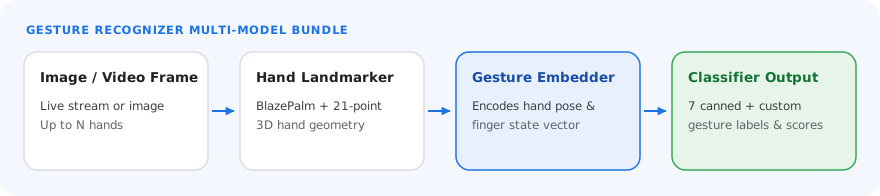
The Gesture Recognizer uses a model bundle that contains two packaged model bundles: a
hand landmark model bundle and a gesture classification model bundle. The
landmark model detects the presence of hands and hand geometry, and the gesture
recognition model recognizes gestures based on hand geometry.
| Model name | Input shape | Quantization type | Model Card | Versions |
|---|---|---|---|---|
| [HandGestureClassifier](https://storage.googleapis.com/mediapipe-models/gesture_recognizer/gesture_recognizer/float16/latest/gesture_recognizer.task) | 192 x 192, 224 x 224 | float 16 | [info](https://storage.googleapis.com/mediapipe-assets/gesture_recognizer/model_card_hand_gesture_classification_with_faireness_2022.pdf) | [Latest](https://storage.googleapis.com/mediapipe-models/gesture_recognizer/gesture_recognizer/float16/latest/gesture_recognizer.task) |
### Hand landmark model bundle
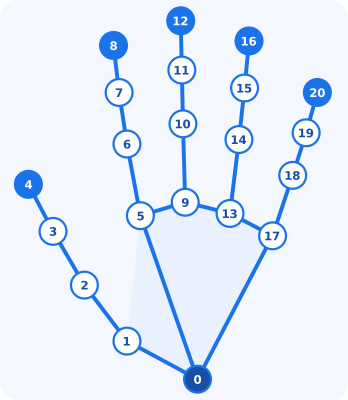
The hand landmark model bundle detects the keypoint localization of 21
hand-knuckle coordinates within the detected hand regions. The model was trained
on approximately 30K real-world images, as well as several rendered synthetic
hand models imposed over various backgrounds. See the following definition of
the 21 landmarks:
| ID | Landmark | ID | Landmark |
|---|---|---|---|
| `0` | `WRIST` | `11` | `MIDDLE_FINGER_DIP` |
| `1` | `THUMB_CMC` | `12` | `MIDDLE_FINGER_TIP` |
| `2` | `THUMB_MCP` | `13` | `RING_FINGER_MCP` |
| `3` | `THUMB_IP` | `14` | `RING_FINGER_PIP` |
| `4` | `THUMB_TIP` | `15` | `RING_FINGER_DIP` |
| `5` | `INDEX_FINGER_MCP` | `16` | `RING_FINGER_TIP` |
| `6` | `INDEX_FINGER_PIP` | `17` | `PINKY_MCP` |
| `7` | `INDEX_FINGER_DIP` | `18` | `PINKY_PIP` |
| `8` | `INDEX_FINGER_TIP` | `19` | `PINKY_DIP` |
| `9` | `MIDDLE_FINGER_MCP` | `20` | `PINKY_TIP` |
| `10` | `MIDDLE_FINGER_PIP` | | |
The hand landmarker model bundle contains a palm detection model and a hand
landmarks detection model. The palm detection model locates hands within the
input image, and the hand landmarks detection model identifies specific hand
landmarks on the cropped hand image defined by the palm detection model.
Because running the palm detection model is time consuming, in `VIDEO` and
`LIVE_STREAM` running modes the Gesture Recognizer uses the bounding box defined by
the hand landmarks detected in the current frame to localize the hands in the
next frame. This reduces how often the Gesture Recognizer runs the palm detection
model. The palm detection model runs again only when the hand landmarks model
no longer identifies the required number of hands, or when hand tracking
fails.
> [!NOTE]
> **Note:** If your app only requires hand landmark detection, use the [Hand Landmarker](https://developers.google.com/edge/mediapipe/solutions/vision/hand_landmarker.md.txt) task.
### Gesture classification model bundle
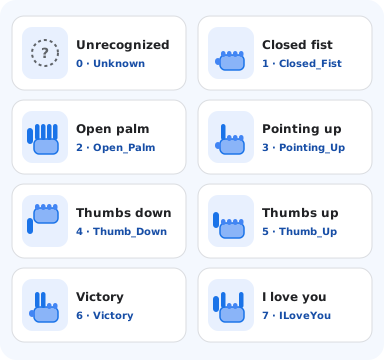
The Gesture classification model bundle can recognize these common hand
gestures:
| ID | Category Label | Gesture |
|---|---|---|
| `0` | `Unknown` / `None` | Unrecognized hand pose |
| `1` | `Closed_Fist` | Closed fist |
| `2` | `Open_Palm` | Open palm |
| `3` | `Pointing_Up` | Index finger pointing up |
| `4` | `Thumb_Down` | Thumb pointing down |
| `5` | `Thumb_Up` | Thumb pointing up |
| `6` | `Victory` | Peace / victory sign |
| `7` | `ILoveYou` | ASL "I Love You" sign |
If the model detects hands but does not recognize a gesture, the gesture
recognizer returns a result of "None". If the model does not detect hands, the
gesture recognizer returns empty.
The gesture classification model bundle contains two step neural network
pipeline with a gesture embedding model followed by a gesture classification
model. See more details in [Gesture classification model
card](https://storage.googleapis.com/mediapipe-assets/gesture_recognizer/model_card_hand_gesture_classification_with_faireness_2022.pdf).
The gesture embedding model encodes the image features into a feature vector,
and the classification model is a lightweight gesture classifier taking the
feature vector as input. The provided gesture classification model bundle
contains the canned gestures classifier, which detects the 7 common hand
gestures listed earlier. You can extend the model bundle to recognize more
gestures by bundling your own custom gesture classifier.
Gesture Recognizer with both canned gesture classifier and custom gesture classifier
prefers the custom gesture if both classifiers recognize the same gesture in
their categories. If only one gesture classifier recognizes the gesture,
Gesture Recognizer outputs the recognized gesture directly.
## Task benchmarks
Here are the task benchmarks for the whole pipeline based on the preceding
pre-trained models. The latency result is the average latency on Pixel 6 using
CPU / GPU.
| Model name | Device | CPU latency | GPU latency |
|---|---|---|---|
| GestureRecognizer | Pixel 6 | 16.76ms | 20.87ms |