The MediaPipe Face Detector task lets you detect faces in an image or video. You can use
this task to locate faces and facial features within a frame. This task uses a
machine learning (ML) model that works with single images or a continuous
stream of images. The task outputs face locations, along with the following
facial key points: left eye, right eye, nose tip, mouth, left eye tragion, and
right eye tragion.
[Open in Web Demos](https://google-ai-edge.github.io/mediapipe-samples-web/#/vision/face_detector)[Edit in StackBlitz](https://stackblitz.com/github/google-ai-edge/mediapipe-samples-web?file=src/tasks/face-detector.ts)
## Quickstart
Install the SDK for your platform,
[prepare input data](https://developers.google.com/edge/mediapipe/solutions/prepare_data.md.txt#vision), choose a
running mode, and run inference.
### Web
npm`npm install @mediapipe/tasks-vision`[Web demo](https://google-ai-edge.github.io/mediapipe-samples-web/#/vision/face_detector)·[Edit in StackBlitz](https://stackblitz.com/github/google-ai-edge/mediapipe-samples-web?file=src/tasks/face-detector.ts)·[Setup guide](https://developers.google.com/edge/mediapipe/solutions/setup_web.md.txt)
#### Image
`IMAGE`Stateless · single frameSynchronous call on independent still images. Resets temporal tracking state on every call.
```typescript
import { FilesetResolver, FaceDetector } from "@mediapipe/tasks-vision";
const vision = await FilesetResolver.forVisionTasks(
"https://cdn.jsdelivr.net/npm/@mediapipe/tasks-vision@latest/wasm"
);
const faceDetector = await FaceDetector.createFromOptions(vision, {
baseOptions: { modelAssetPath: "blaze_face_short_range.tflite", delegate: "GPU" },
runningMode: "IMAGE",
minDetectionConfidence: 0.5,
});
// Synchronous single-frame call (stateless across images)
const image = document.getElementById("image") as HTMLImageElement;
const result = faceDetector.detect(image);
```
#### Video
`VIDEO`Every frame · no dropsSynchronous tracking across decoded video frames with monotonic timestamps. Processes every frame in order and never drops frames.
```typescript
import { FilesetResolver, FaceDetector } from "@mediapipe/tasks-vision";
const vision = await FilesetResolver.forVisionTasks(
"https://cdn.jsdelivr.net/npm/@mediapipe/tasks-vision@latest/wasm"
);
const faceDetector = await FaceDetector.createFromOptions(vision, {
baseOptions: { modelAssetPath: "blaze_face_short_range.tflite", delegate: "GPU" },
runningMode: "VIDEO",
minDetectionConfidence: 0.5,
});
// Synchronous across decoded frames with monotonic timestamps (never drops frames)
for (const { frame, timestampMs } of decodedVideoFrames) {
const result = faceDetector.detectForVideo(frame, timestampMs);
}
```
#### Livestream
`VIDEO + rAF`Live camera · latest frameWeb tasks run synchronously---pair `runningMode: "VIDEO"` with `requestAnimationFrame` so each paint inspects only the latest camera frame (skipping intermediate frames when busy).
```typescript
import { FilesetResolver, FaceDetector } from "@mediapipe/tasks-vision";
const vision = await FilesetResolver.forVisionTasks(
"https://cdn.jsdelivr.net/npm/@mediapipe/tasks-vision@latest/wasm"
);
// On Web, live camera loops pair runningMode: "VIDEO" with requestAnimationFrame
const faceDetector = await FaceDetector.createFromOptions(vision, {
baseOptions: { modelAssetPath: "blaze_face_short_range.tflite", delegate: "GPU" },
runningMode: "VIDEO",
minDetectionConfidence: 0.5,
});
const video = document.getElementById("webcam") as HTMLVideoElement;
video.srcObject = await navigator.mediaDevices.getUserMedia({ video: true });
await video.play();
let lastVideoTime = -1;
function renderLoop() {
if (video.readyState >= 2 && video.currentTime !== lastVideoTime) {
lastVideoTime = video.currentTime;
const result = faceDetector.detectForVideo(video, performance.now());
console.log(result.detections);
}
requestAnimationFrame(renderLoop);
}
renderLoop();
```
### Android (Kotlin)
Gradle`implementation("com.google.mediapipe:tasks-vision:latest.release")`[Sample code](https://github.com/google-ai-edge/mediapipe-samples/tree/main/examples/face_detector/android)·[Setup guide](https://developers.google.com/edge/mediapipe/solutions/setup_android.md.txt)
#### Image
`IMAGE`Stateless · single frameSynchronous call on independent still images. Resets temporal tracking state on every call.
```kotlin
import com.google.mediapipe.framework.image.BitmapImageBuilder
import com.google.mediapipe.framework.image.MPImage
import com.google.mediapipe.tasks.core.BaseOptions
import com.google.mediapipe.tasks.vision.core.RunningMode
import com.google.mediapipe.tasks.vision.facedetector.FaceDetector
val baseOptions = BaseOptions.builder()
.setModelAssetPath("blaze_face_short_range.tflite")
.build()
val options = FaceDetector.FaceDetectorOptions.builder()
.setBaseOptions(baseOptions)
.setRunningMode(RunningMode.IMAGE)
.setMinDetectionConfidence(0.5f)
.build()
val faceDetector = FaceDetector.createFromOptions(context, options)
// Synchronous single-image call (no temporal tracking across calls)
val mpImage = BitmapImageBuilder(bitmap).build()
val result = faceDetector.detect(mpImage)
```
#### Video
`VIDEO`Every frame · no dropsSynchronous tracking across decoded video frames with monotonic timestamps. Processes every frame in order and never drops frames.
```kotlin
import com.google.mediapipe.framework.image.BitmapImageBuilder
import com.google.mediapipe.framework.image.MPImage
import com.google.mediapipe.tasks.core.BaseOptions
import com.google.mediapipe.tasks.vision.core.RunningMode
import com.google.mediapipe.tasks.vision.facedetector.FaceDetector
val baseOptions = BaseOptions.builder()
.setModelAssetPath("blaze_face_short_range.tflite")
.build()
val options = FaceDetector.FaceDetectorOptions.builder()
.setBaseOptions(baseOptions)
.setRunningMode(RunningMode.VIDEO)
.setMinDetectionConfidence(0.5f)
.build()
val faceDetector = FaceDetector.createFromOptions(context, options)
// Synchronous: processes every frame in order with monotonic timestamps (no frame drops)
val mpImage = BitmapImageBuilder(frameBitmap).build()
val result = faceDetector.detectForVideo(mpImage, frameTimestampMs)
```
#### Livestream
`LIVE_STREAM`Async · drops frames when busyAsynchronous camera pipeline with a result callback. Automatically drops incoming frames when busy so results stay current with low latency.
```kotlin
import android.os.SystemClock
import android.util.Log
import com.google.mediapipe.framework.image.BitmapImageBuilder
import com.google.mediapipe.framework.image.MPImage
import com.google.mediapipe.tasks.core.BaseOptions
import com.google.mediapipe.tasks.vision.core.RunningMode
import com.google.mediapipe.tasks.vision.facedetector.FaceDetector
val baseOptions = BaseOptions.builder()
.setModelAssetPath("blaze_face_short_range.tflite")
.build()
val options = FaceDetector.FaceDetectorOptions.builder()
.setBaseOptions(baseOptions)
.setRunningMode(RunningMode.LIVE_STREAM)
.setMinDetectionConfidence(0.5f)
.setResultListener { result, _ -> val detections = result.detections() }
.setErrorListener { error -> Log.e("MediaPipe", error.message.orEmpty()) }
.build()
val faceDetector = FaceDetector.createFromOptions(context, options)
// Async: automatically drops incoming camera frames when busy so results stay current
faceDetector.detectAsync(mpImage, SystemClock.uptimeMillis())
```
### Android (Java)
Gradle`implementation 'com.google.mediapipe:tasks-vision:latest.release'`[Sample code](https://github.com/google-ai-edge/mediapipe-samples/tree/main/examples/face_detector/android)·[Setup guide](https://developers.google.com/edge/mediapipe/solutions/setup_android.md.txt)
#### Image
`IMAGE`Stateless · single frameSynchronous call on independent still images. Resets temporal tracking state on every call.
```java
import com.google.mediapipe.framework.image.BitmapImageBuilder;
import com.google.mediapipe.framework.image.MPImage;
import com.google.mediapipe.tasks.core.BaseOptions;
import com.google.mediapipe.tasks.vision.core.RunningMode;
import com.google.mediapipe.tasks.vision.facedetector.FaceDetector;
import com.google.mediapipe.tasks.vision.facedetector.FaceDetectorResult;
BaseOptions baseOptions = BaseOptions.builder()
.setModelAssetPath("blaze_face_short_range.tflite")
.build();
FaceDetector.FaceDetectorOptions options = FaceDetector.FaceDetectorOptions.builder()
.setBaseOptions(baseOptions)
.setRunningMode(RunningMode.IMAGE)
.setMinDetectionConfidence(0.5f)
.build();
FaceDetector faceDetector = FaceDetector.createFromOptions(context, options);
// Synchronous single-image call (no temporal tracking across calls)
MPImage mpImage = new BitmapImageBuilder(bitmap).build();
FaceDetectorResult result = faceDetector.detect(mpImage);
```
#### Video
`VIDEO`Every frame · no dropsSynchronous tracking across decoded video frames with monotonic timestamps. Processes every frame in order and never drops frames.
```java
import com.google.mediapipe.framework.image.BitmapImageBuilder;
import com.google.mediapipe.framework.image.MPImage;
import com.google.mediapipe.tasks.core.BaseOptions;
import com.google.mediapipe.tasks.vision.core.RunningMode;
import com.google.mediapipe.tasks.vision.facedetector.FaceDetector;
import com.google.mediapipe.tasks.vision.facedetector.FaceDetectorResult;
BaseOptions baseOptions = BaseOptions.builder()
.setModelAssetPath("blaze_face_short_range.tflite")
.build();
FaceDetector.FaceDetectorOptions options = FaceDetector.FaceDetectorOptions.builder()
.setBaseOptions(baseOptions)
.setRunningMode(RunningMode.VIDEO)
.setMinDetectionConfidence(0.5f)
.build();
FaceDetector faceDetector = FaceDetector.createFromOptions(context, options);
// Synchronous: processes every frame in order with monotonic timestamps (no frame drops)
MPImage mpImage = new BitmapImageBuilder(frameBitmap).build();
FaceDetectorResult result = faceDetector.detectForVideo(mpImage, frameTimestampMs);
```
#### Livestream
`LIVE_STREAM`Async · drops frames when busyAsynchronous camera pipeline with a result callback. Automatically drops incoming frames when busy so results stay current with low latency.
```java
import android.os.SystemClock;
import android.util.Log;
import com.google.mediapipe.framework.image.BitmapImageBuilder;
import com.google.mediapipe.framework.image.MPImage;
import com.google.mediapipe.tasks.core.BaseOptions;
import com.google.mediapipe.tasks.vision.core.RunningMode;
import com.google.mediapipe.tasks.vision.facedetector.FaceDetector;
BaseOptions baseOptions = BaseOptions.builder()
.setModelAssetPath("blaze_face_short_range.tflite")
.build();
FaceDetector.FaceDetectorOptions options = FaceDetector.FaceDetectorOptions.builder()
.setBaseOptions(baseOptions)
.setRunningMode(RunningMode.LIVE_STREAM)
.setMinDetectionConfidence(0.5f)
.setResultListener((result, inputImage) -> { var detections = result.detections(); })
.setErrorListener(error -> Log.e("MediaPipe", String.valueOf(error.getMessage())))
.build();
FaceDetector faceDetector = FaceDetector.createFromOptions(context, options);
// Async: automatically drops incoming camera frames when busy so results stay current
faceDetector.detectAsync(mpImage, SystemClock.uptimeMillis());
```
### iOS
SwiftPM`https://github.com/google-ai-edge/mediapipe → MediaPipeTasksVision`[Package.swift](https://developers.google.com/edge/mediapipe/solutions/setup_ios.md.txt#package_swift)·[Sample code](https://github.com/google-ai-edge/mediapipe-samples/tree/main/examples/face_detector/ios)·[Setup guide](https://developers.google.com/edge/mediapipe/solutions/setup_ios.md.txt)
#### Image
`IMAGE`Stateless · single frameSynchronous call on independent still images. Resets temporal tracking state on every call.
```swift
import Foundation
import MediaPipeTasksVision
guard let modelPath = Bundle.main.path(forResource: "blaze_face_short_range", ofType: "tflite") else { return }
let options = FaceDetectorOptions()
options.baseOptions.modelAssetPath = modelPath
options.runningMode = .image
options.minDetectionConfidence = 0.5
let faceDetector = try FaceDetector(options: options)
// Synchronous single-image call (stateless across images)
let mpImage = try MPImage(uiImage: image)
let result = try faceDetector.detect(image: mpImage)
```
#### Video
`VIDEO`Every frame · no dropsSynchronous tracking across decoded video frames with monotonic timestamps. Processes every frame in order and never drops frames.
```swift
import Foundation
import MediaPipeTasksVision
guard let modelPath = Bundle.main.path(forResource: "blaze_face_short_range", ofType: "tflite") else { return }
let options = FaceDetectorOptions()
options.baseOptions.modelAssetPath = modelPath
options.runningMode = .video
options.minDetectionConfidence = 0.5
let faceDetector = try FaceDetector(options: options)
// Synchronous: processes every frame in order with monotonic timestamps (no frame drops)
let mpImage = try MPImage(pixelBuffer: pixelBuffer)
let result = try faceDetector.detect(videoFrame: mpImage, timestampInMilliseconds: timestampMs)
```
#### Livestream
`LIVE_STREAM`Async · drops frames when busyAsynchronous camera pipeline with a result callback. Automatically drops incoming frames when busy so results stay current with low latency.
```swift
import Foundation
import MediaPipeTasksVision
final class FaceDetectorStreamService: NSObject {
private var faceDetector: FaceDetector?
func setUp() throws {
guard let modelPath = Bundle.main.path(
forResource: "blaze_face_short_range",
ofType: "tflite"
) else { return }
let options = FaceDetectorOptions()
options.baseOptions.modelAssetPath = modelPath
options.runningMode = .liveStream
options.minDetectionConfidence = 0.5
options.faceDetectorLiveStreamDelegate = self
faceDetector = try FaceDetector(options: options)
}
func detectAsync(mpImage: MPImage, timestampMs: Int) throws {
// Async: automatically drops incoming camera frames when busy so results stay current
try faceDetector?.detectAsync(image: mpImage, timestampInMilliseconds: timestampMs)
}
}
extension FaceDetectorStreamService: FaceDetectorLiveStreamDelegate {
func faceDetector(
_ faceDetector: FaceDetector,
didFinishDetection result: FaceDetectorResult?,
timestampInMilliseconds: Int,
error: (any Error)?
) {
guard let result else { return }
DispatchQueue.main.async {
let detections = result.detections
}
}
}
```
### Python
pip`pip install mediapipe`[Sample code](https://colab.research.google.com/github/google-ai-edge/mediapipe-samples/blob/main/examples/face_detector/python/face_detector.ipynb)·[Setup guide](https://developers.google.com/edge/mediapipe/solutions/setup_python.md.txt)
#### Image
`IMAGE`Stateless · single frameSynchronous call on independent still images. Resets temporal tracking state on every call.
```python
import mediapipe as mp
BaseOptions = mp.tasks.BaseOptions
FaceDetector = mp.tasks.vision.FaceDetector
FaceDetectorOptions = mp.tasks.vision.FaceDetectorOptions
VisionRunningMode = mp.tasks.vision.RunningMode
options = FaceDetectorOptions(
base_options=BaseOptions(model_asset_path="blaze_face_short_range.tflite"),
running_mode=VisionRunningMode.IMAGE,
min_detection_confidence=0.5,
)
with FaceDetector.create_from_options(options) as detector:
# Synchronous single-image call (stateless across images)
mp_image = mp.Image.create_from_file("input.jpg")
result = detector.detect(mp_image)
```
#### Video
`VIDEO`Every frame · no dropsSynchronous tracking across decoded video frames with monotonic timestamps. Processes every frame in order and never drops frames.
```python
import mediapipe as mp
BaseOptions = mp.tasks.BaseOptions
FaceDetector = mp.tasks.vision.FaceDetector
FaceDetectorOptions = mp.tasks.vision.FaceDetectorOptions
VisionRunningMode = mp.tasks.vision.RunningMode
options = FaceDetectorOptions(
base_options=BaseOptions(model_asset_path="blaze_face_short_range.tflite"),
running_mode=VisionRunningMode.VIDEO,
min_detection_confidence=0.5,
)
with FaceDetector.create_from_options(options) as detector:
# Synchronous: processes every frame in order with monotonic timestamps (no frame drops)
for mp_image, timestamp_ms in decoded_video_frames:
result = detector.detect_for_video(mp_image, timestamp_ms)
```
#### Livestream
`LIVE_STREAM`Async · drops frames when busyAsynchronous camera pipeline with a result callback. Automatically drops incoming frames when busy so results stay current with low latency.
```python
import mediapipe as mp
BaseOptions = mp.tasks.BaseOptions
FaceDetector = mp.tasks.vision.FaceDetector
FaceDetectorOptions = mp.tasks.vision.FaceDetectorOptions
VisionRunningMode = mp.tasks.vision.RunningMode
def on_result(result, output_image: mp.Image, timestamp_ms: int):
print(f"Detected {len(result.detections)} face(s) at {timestamp_ms} ms")
options = FaceDetectorOptions(
base_options=BaseOptions(model_asset_path="blaze_face_short_range.tflite"),
running_mode=VisionRunningMode.LIVE_STREAM,
min_detection_confidence=0.5,
result_callback=on_result,
)
with FaceDetector.create_from_options(options) as detector:
# Async: automatically drops incoming camera frames when busy so results stay current
mp_image = mp.Image(image_format=mp.ImageFormat.SRGB, data=rgb_frame)
detector.detect_async(mp_image, timestamp_ms)
```
### Flutter
pub`flutter pub add mediapipe_vision`[Live gallery](https://google.github.io/flutter-mediapipe/)·[Sample code](https://github.com/google/flutter-mediapipe/tree/main/samples/vision/face_detector)·[Setup guide](https://developers.google.com/edge/mediapipe/solutions/setup_flutter.md.txt)
#### Image
`RunningMode.image`Stateless · single frameOne call per independent still image. No tracking state carries over between calls.
```dart
import 'package:mediapipe_vision/mediapipe_vision.dart';
Future findFaces(VisionImage image) async {
final detector = await FaceDetector.create(
FaceDetectorOptions(model: VisionModels.faceDetector),
);
try {
final result = await detector.detect(image);
for (final face in result.detections) {
final box = face.boundingBox;
print('Face at ${box.left},${box.top}, ${box.width}x${box.height} px');
print('Confidence ${face.categories.first.score.toStringAsFixed(2)}');
}
} finally {
await detector.dispose();
}
}
```
#### Video
`RunningMode.video`Every frame · no dropsTracking across decoded video frames with strictly increasing timestamps. Processes every frame in order and never drops frames.
```dart
import 'dart:typed_data';
import 'package:mediapipe_vision/mediapipe_vision.dart';
typedef Frame = ({Uint8List rgba, int width, int height, int milliseconds});
Future findFacesInVideo(Stream frames) async {
final detector = await FaceDetector.create(
FaceDetectorOptions(
model: VisionModels.faceDetector,
runningMode: RunningMode.video,
),
);
try {
await for (final frame in frames) {
final result = await detector.detectForVideo(
VisionImage.fromPixels(
pixels: frame.rgba,
width: frame.width,
height: frame.height,
format: VisionPixelFormat.rgba,
),
timestampMilliseconds: frame.milliseconds,
);
final ms = result.timestampMilliseconds;
for (final face in result.detections) {
final box = face.boundingBox;
final score = face.categories.first.score.toStringAsFixed(2);
print('$ms ms: face at ${box.left},${box.top}, confidence $score');
}
}
} finally {
await detector.dispose();
}
}
```
#### Livestream
`RunningMode.liveStream`Async · drops frames when busyEach call returns at once and results arrive on the task's `results` stream. One frame runs at a time; a newer frame replaces one that's waiting, so results stay current.
```dart
import 'dart:typed_data';
import 'package:mediapipe_vision/mediapipe_vision.dart';
typedef Frame = ({Uint8List rgba, int width, int height, int milliseconds});
Future findFacesLive(Stream frames) async {
final detector = await FaceDetector.create(
FaceDetectorOptions(
model: VisionModels.faceDetector,
runningMode: RunningMode.liveStream,
),
);
// Listen before the first frame, as Google requires a result listener.
final results = detector.results.listen((result) {
final ms = result.timestampMilliseconds;
for (final face in result.detections) {
final box = face.boundingBox;
final score = face.categories.first.score.toStringAsFixed(2);
print('$ms ms: face at ${box.left},${box.top}, confidence $score');
}
});
try {
await for (final frame in frames) {
detector.detectAsync(
VisionImage.fromPixels(
pixels: frame.rgba,
width: frame.width,
height: frame.height,
format: VisionPixelFormat.rgba,
),
timestampMilliseconds: frame.milliseconds,
);
}
} finally {
// Runs the frame in flight and the waiting one, then closes results.
await detector.dispose();
await results.cancel();
print('${detector.droppedFrames} frames dropped');
}
}
```
## Task details
This section describes the capabilities, inputs, outputs, and configuration
options of this task.
### Features
- **Input image processing** - Processing includes image rotation, resizing, normalization, and color space conversion.
- **Score threshold** - Filter results based on prediction scores.
Inputs The Face Detector accepts an input of one of the following data types:
- Still images
- Decoded video frames
- Live video feed
See [Prepare vision input data](https://developers.google.com/edge/mediapipe/solutions/prepare_data.md.txt#vision) for `MPImage`, `mp.Image`, `VisionImage`, and browser media examples.
Outputs The Face Detector outputs the following results:
- Bounding boxes for detected faces in an image frame.
- Coordinates for 6 face landmarks for each detected face.
### Configuration options
This task has the following configuration options:
### Web
| Option Name | Description | Value Range | Default Value |
|---|---|---|---|
| `runningMode` | Sets the running mode for the task: `IMAGE`: Single image inputs. `VIDEO`: Decoded video frames and live camera streams. | {`IMAGE`, `VIDEO`} | `IMAGE` |
| `minDetectionConfidence` | The minimum confidence score for face detection to be considered successful. | Float `[0.0, 1.0]` | `0.5` |
| `minSuppressionThreshold` | The minimum non-maximum-suppression IoU threshold for overlapping face detections. | Float `[0.0, 1.0]` | `0.3` |
### Android
| Option Name | Description | Value Range | Default Value |
|---|---|---|---|
| `runningMode` | Sets the running mode for the task: `IMAGE`: Single image inputs. `VIDEO`: Decoded frames of a video. `LIVE_STREAM`: Livestream of camera input data (requires asynchronous listener/delegate). | {`IMAGE`, `VIDEO`, `LIVE_STREAM`} | `IMAGE` |
| `minDetectionConfidence` | The minimum confidence score for face detection to be considered successful. | Float `[0.0, 1.0]` | `0.5` |
| `minSuppressionThreshold` | The minimum non-maximum-suppression IoU threshold for overlapping face detections. | Float `[0.0, 1.0]` | `0.3` |
| `resultListener` | Asynchronous callback for `LIVE_STREAM` mode results. | `OutputHandler.ResultListener` | Not set |
| `errorListener` | Optional error listener for `LIVE_STREAM` mode. | `ErrorListener` | Not set |
### iOS
| Option Name | Description | Value Range | Default Value |
|---|---|---|---|
| `runningMode` | Sets the running mode for the task: `IMAGE`: Single image inputs. `VIDEO`: Decoded frames of a video. `LIVE_STREAM`: Livestream of camera input data (requires asynchronous listener/delegate). | {`IMAGE`, `VIDEO`, `LIVE_STREAM`} | `IMAGE` |
| `minDetectionConfidence` | The minimum confidence score for face detection to be considered successful. | Float `[0.0, 1.0]` | `0.5` |
| `minSuppressionThreshold` | The minimum non-maximum-suppression IoU threshold for overlapping face detections. | Float `[0.0, 1.0]` | `0.3` |
| `faceDetectorLiveStreamDelegate` | Asynchronous delegate for `LIVE_STREAM` mode results (invoked on a serial background queue). | `FaceDetectorLiveStreamDelegate` | Not set |
### Python
| Option Name | Description | Value Range | Default Value |
|---|---|---|---|
| `running_mode` | Sets the running mode for the task: `IMAGE`: Single image inputs. `VIDEO`: Decoded frames of a video. `LIVE_STREAM`: Livestream of camera input data (requires `result_callback`). | {`IMAGE`, `VIDEO`, `LIVE_STREAM`} | `IMAGE` |
| `min_detection_confidence` | The minimum confidence score for face detection to be considered successful. | Float `[0.0, 1.0]` | `0.5` |
| `min_suppression_threshold` | The minimum non-maximum-suppression IoU threshold for overlapping face detections. | Float `[0.0, 1.0]` | `0.3` |
| `result_callback` | Asynchronous callback function for `LIVE_STREAM` mode results. | `Callable` | Not set |
### Flutter
| Option Name | Description | Value Range | Default Value |
|---|---|---|---|
| `runningMode` | Sets the running mode for the task: `RunningMode.image`: Single image inputs. `RunningMode.video`: Decoded frames of a video. `RunningMode.liveStream`: Livestream of camera input data (results arrive on the task's `results` stream). | {`RunningMode.image`, `RunningMode.video`, `RunningMode.liveStream`} | `RunningMode.image` |
| `minDetectionConfidence` | The minimum confidence score for face detection to be considered successful. | Float `[0.0, 1.0]` | `0.5` |
| `minSuppressionThreshold` | The minimum non-maximum-suppression IoU threshold for overlapping face detections. | Float `[0.0, 1.0]` | `0.3` |
### Task output
Each `FaceDetectorResult` contains a `detections` list where each `Detection` includes a pixel bounding box, confidence score, and 6 normalized facial keypoints:
| Field | Type / Coordinate Space | Description |
|---|---|---|
| `boundingBox` | `BoundingBox` (pixels) | Unnormalized pixel rectangle (`originX`, `originY`, `width`, `height`) around the detected face (`bounding_box` in Python; in Dart, `left`, `top`, `right`, `bottom` edges with `width` and `height` getters). |
| `categories` | `Category[]` (`score` in `[0.0, 1.0]`) | Detection confidence score (`index: 0`; in Dart, a `List`). |
| `keypoints` | `NormalizedKeypoint[]` (`x, y` in `[0.0, 1.0]`) | 6 facial keypoints (right eye, left eye, nose tip, mouth center, right ear tragion, left ear tragion) normalized by image width and height. |
#### Example `FaceDetectorResult` payload
The following example shows the output for two detected faces in an image:
```javascript
{
detections: [
{
boundingBox: { originX: 126, originY: 100, width: 463, height: 463 }, // pixel coordinates
categories: [{ index: 0, score: 0.9729 }],
keypoints: [
{ x: 0.1830, y: 0.2961 }, // #0 right eye (normalized [0.0, 1.0])
{ x: 0.3303, y: 0.2929 }, // #1 left eye
// ... 6 keypoints per detected face (#0..#5)
]
},
{
boundingBox: { originX: 616, originY: 193, width: 430, height: 430 },
categories: [{ index: 0, score: 0.9251 }],
keypoints: [
{ x: 0.6151, y: 0.3713 }, // #0 right eye
{ x: 0.7461, y: 0.3883 }, // #1 left eye
// ... 6 keypoints per detected face (#0..#5)
]
}
]
}
```
## Models
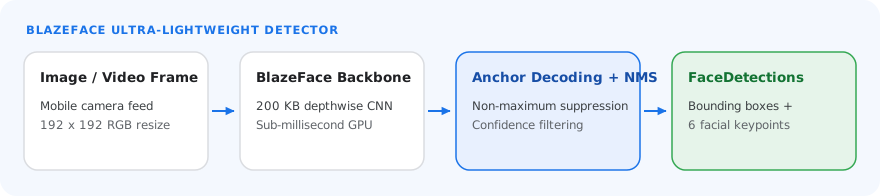
Face detection models can vary depending on their intended use cases, such as
short-range and long-range detection. Models also typically make trade-offs
between performance, accuracy, resolution, and resource requirements, and in
some cases, include additional features.
The models listed in this section are variants of BlazeFace, a lightweight and
accurate face detector optimized for mobile GPU inference. BlazeFace models are
suitable for applications like 3D facial keypoint estimation, expression
classification, and face region segmentation. BlazeFace uses a lightweight
feature extraction network similar to
[MobileNetV1/V2](https://arxiv.org/abs/1704.04861).
### BlazeFace (short-range)
A lightweight model for detecting single or multiple faces within selfie-like
images from a smartphone camera or webcam. The model is optimized for
front-facing phone camera images at short range. The model architecture uses a
Single Shot Detector (SSD) convolutional network technique with a custom
encoder. For more information, see the research paper on
[Single Shot MultiBox Detector](https://arxiv.org/abs/1512.02325).
| Model name | Input shape | Quantization type | Model Card | Versions |
|---|---|---|---|---|
| [BlazeFace (short-range)](https://storage.googleapis.com/mediapipe-models/face_detector/blaze_face_short_range/float16/latest/blaze_face_short_range.tflite) | 128 x 128 | float 16 | [info](https://storage.googleapis.com/mediapipe-assets/MediaPipe%20BlazeFace%20Model%20Card%20(Short%20Range).pdf) | [Latest](https://storage.googleapis.com/mediapipe-models/face_detector/blaze_face_short_range/float16/latest/blaze_face_short_range.tflite) |
### BlazeFace (full-range)
A relatively lightweight model for detecting single or multiple faces within
images from a smartphone camera or webcam. The model is optimized for full-range
images, like those taken with a back-facing phone camera. The model
architecture uses a technique similar to a
[CenterNet](https://arxiv.org/abs/1904.08189) convolutional network with a
custom encoder.
| Model name | Input shape | Quantization type | Model Card | Versions |
|---|---|---|---|---|
| [BlazeFace (full-range)](https://storage.googleapis.com/mediapipe-models/face_detector/blaze_face_full_range/float16/latest/blaze_face_full_range.tflite) | 128 x 128 | float 16 | [info](https://storage.googleapis.com/mediapipe-assets/MediaPipe%20BlazeFace%20Model%20Card%20(Full%20Range).pdf) | [Latest](https://storage.googleapis.com/mediapipe-models/face_detector/blaze_face_full_range/float16/latest/blaze_face_full_range.tflite) |
### BlazeFace Sparse (full-range)
A lighter version of the regular full-range BlazeFace model, roughly 60% smaller
in size. The model is optimized for full-range images, like those taken with a
back-facing phone camera. The model architecture uses a technique similar
to a [CenterNet](https://arxiv.org/abs/1904.08189) convolutional network with a
custom encoder.
| Model name | Input shape | Quantization type | Model Card | Versions |
|---|---|---|---|---|
| [BlazeFace Sparse (full-range)](https://storage.googleapis.com/mediapipe-models/face_detector/blaze_face_full_range/float16/latest/blaze_face_full_range_sparse.tflite) | 128 x 128 | float 16 | [info](https://storage.googleapis.com/mediapipe-assets/MediaPipe%20BlazeFace%20Sparse%20Model%20Card%20(Full%20Range).pdf) | [Latest](https://storage.googleapis.com/mediapipe-models/face_detector/blaze_face_full_range/float16/latest/blaze_face_full_range_sparse.tflite) |
## Task benchmarks
Here are the task benchmarks for the whole pipeline based on the preceding
pre-trained models. The latency result is the average latency on Pixel 6 using
CPU / GPU.
| Model name | Device | CPU latency | GPU latency |
|---|---|---|---|
| BlazeFace (short-range) | Pixel 6 | 2.94ms | 7.41ms |