The MediaPipe Semantic Retriever task manages vector embedding generation, on-device vector
storage, and query retrieval for text, image, and audio content. You can use
this task to build advanced search systems, personalized content retrieval, or
on-device knowledge retrieval pipelines (such as RAG) that operate completely
on-device.
[Open in Web Demos](https://google-ai-edge.github.io/mediapipe-samples-web/#/retrieval/semantic_retriever)[Edit in StackBlitz](https://stackblitz.com/github/google-ai-edge/mediapipe-samples-web?file=src/tasks/semantic-retriever.ts)
## Quickstart
Install the SDK for your platform, initialize the task with a model, and run
inference.
### Web
npm`npm install @mediapipe/tasks-retrieval`[Web demo](https://google-ai-edge.github.io/mediapipe-samples-web/#/retrieval/semantic_retriever)·[Edit in StackBlitz](https://stackblitz.com/github/google-ai-edge/mediapipe-samples-web?file=src/tasks/semantic-retriever.ts)·[Setup guide](https://developers.google.com/edge/mediapipe/solutions/setup_web.md.txt)
```typescript
import {
DefaultTextChunker,
FilesetResolver,
MemoryVectorStore,
SemanticRetriever,
SemanticRetrieverComponents,
UniversalEmbedder,
} from "@mediapipe/tasks-retrieval";
// 1. Create the task
const MODEL_URL = "https://huggingface.co/litert-community/embeddinggemma-2-text-vision-440m-litert-lm/resolve/main/embeddinggemma-2-text-vision-440m.litertlm";
const retrieval = await FilesetResolver.forRetrievalTasks(
"https://cdn.jsdelivr.net/npm/@mediapipe/tasks-retrieval@latest/wasm"
);
const embedder = await UniversalEmbedder.createFromOptions(retrieval, {
baseOptions: { modelAssetPath: MODEL_URL },
});
const chunker = await DefaultTextChunker.create(retrieval);
const components = new SemanticRetrieverComponents()
.setVectorStore(new MemoryVectorStore())
.addProvider(embedder.getProvider())
.setTextChunker(chunker);
const semanticRetriever = await SemanticRetriever.createFromComponents(components);
// 2. Run inference (with optional metadata and metadataFilter)
await semanticRetriever.insertDocument("doc_1", "The capital of France is Paris.", {
category: "geography",
});
const results = await semanticRetriever.retrieve("What is the capital of France?", {
limit: 3,
metadataFilter: { category: "geography" },
});
```
### Android (Kotlin)
Gradle`implementation("com.google.mediapipe:tasks-retrieval:latest.release")`[Sample code](https://github.com/google-ai-edge/mediapipe-samples/tree/main/examples/semantic_retriever/android)·[Setup guide](https://developers.google.com/edge/mediapipe/solutions/setup_android.md.txt)
```kotlin
import com.google.mediapipe.tasks.core.BaseOptions
import com.google.mediapipe.tasks.retrieval.components.SqliteVectorStore
import com.google.mediapipe.tasks.retrieval.semanticretriever.SemanticRetriever
import com.google.mediapipe.tasks.retrieval.semanticretriever.SemanticRetrieverComponents
import com.google.mediapipe.tasks.retrieval.universalembedder.UniversalEmbedder
import com.google.mediapipe.tasks.retrieval.universalembedder.UniversalEmbedderOptions
// 1. Create the task (or use AppSearchVectorStore with optional androidx.appsearch:appsearch)
val embedderOptions = UniversalEmbedderOptions.builder()
.setBaseOptions(
BaseOptions.builder()
.setModelAssetPath("embeddinggemma-2-text-vision-440m.litertlm")
.build()
)
.build()
val embedder = UniversalEmbedder.createFromOptions(context, embedderOptions)
val components = SemanticRetrieverComponents()
.setVectorStore(SqliteVectorStore(context, "semantic_db", 768))
.addProvider(embedder.provider)
val semanticRetriever = SemanticRetriever.createFromComponents(context, components)
// 2. Run inference (with optional metadata map and filter)
semanticRetriever.insertDocument("doc_1", "The capital of France is Paris.", mapOf("category" to "geography"))
val results = semanticRetriever.retrieve("What is the capital of France?", 3)
```
### Android (Java)
Gradle`implementation 'com.google.mediapipe:tasks-retrieval:latest.release'`[Sample code](https://github.com/google-ai-edge/mediapipe-samples/tree/main/examples/semantic_retriever/android)·[Setup guide](https://developers.google.com/edge/mediapipe/solutions/setup_android.md.txt)
```java
import com.google.mediapipe.tasks.core.BaseOptions;
import com.google.mediapipe.tasks.retrieval.components.SqliteVectorStore;
import com.google.mediapipe.tasks.retrieval.semanticretriever.RetrievalResult;
import com.google.mediapipe.tasks.retrieval.semanticretriever.SemanticRetriever;
import com.google.mediapipe.tasks.retrieval.semanticretriever.SemanticRetrieverComponents;
import com.google.mediapipe.tasks.retrieval.universalembedder.UniversalEmbedder;
import com.google.mediapipe.tasks.retrieval.universalembedder.UniversalEmbedderOptions;
import java.util.List;
// 1. Create the task
UniversalEmbedderOptions embedderOptions = UniversalEmbedderOptions.builder()
.setBaseOptions(
BaseOptions.builder()
.setModelAssetPath("embeddinggemma-2-text-vision-440m.litertlm")
.build()
)
.build();
UniversalEmbedder embedder = UniversalEmbedder.createFromOptions(context, embedderOptions);
SemanticRetrieverComponents components = new SemanticRetrieverComponents()
.setVectorStore(new SqliteVectorStore(context, "semantic_db", 768))
.addProvider(embedder.getProvider());
SemanticRetriever semanticRetriever = SemanticRetriever.createFromComponents(context, components);
// 2. Run inference
semanticRetriever.insertDocument("doc_1", "The capital of France is Paris.");
List results = semanticRetriever.retrieve("What is the capital of France?", 3);
```
### iOS
SwiftPM`https://github.com/google-ai-edge/mediapipe → MediaPipeTasksRetrieval`[Package.swift](https://developers.google.com/edge/mediapipe/solutions/setup_ios.md.txt#package_swift)·[Sample code](https://github.com/google-ai-edge/mediapipe-samples/tree/main/examples/semantic_retriever/ios)·[Setup guide](https://developers.google.com/edge/mediapipe/solutions/setup_ios.md.txt)
```swift
import Foundation
import MediaPipeTasksRetrieval
// 1. Create the task
guard let modelPath = Bundle.main.path(
forResource: "embeddinggemma-2-text-vision-440m",
ofType: "litertlm"
) else { return }
let embedderOptions = UniversalEmbedderOptions()
embedderOptions.baseOptions.modelAssetPath = modelPath
let embedder = try UniversalEmbedder(options: embedderOptions)
let databasePath = FileManager.default.temporaryDirectory.appendingPathComponent("semantic.db").path
let vectorStore = SqliteVectorStore(
databasePath: databasePath,
embeddingDimension: MPPSemanticRetrieverDefaultEmbeddingDimension
)
let components = try SemanticRetrieverComponents(vectorStore: vectorStore, chunker: nil, providers: [embedder])
let semanticRetriever = try SemanticRetriever(components: components)
// 2. Run inference
try semanticRetriever.insertDocument(withId: "doc_1", text: "The capital of France is Paris.")
let results = try semanticRetriever.retrieve(withText: "What is the capital of France?", limit: 3)
```
### Python
pip`pip install mediapipe`[Sample code](https://colab.research.google.com/github/google-ai-edge/mediapipe-samples/blob/main/examples/semantic_retriever/python/semantic_retriever.ipynb)·[Setup guide](https://developers.google.com/edge/mediapipe/solutions/setup_python.md.txt)
```python
import mediapipe as mp
BaseOptions = mp.tasks.BaseOptions
ChunkingMode = mp.tasks.retrieval.ChunkingMode
SemanticRetriever = mp.tasks.retrieval.SemanticRetriever
SemanticRetrieverOptions = mp.tasks.retrieval.SemanticRetrieverOptions
UniversalEmbedder = mp.tasks.retrieval.UniversalEmbedder
UniversalEmbedderOptions = mp.tasks.retrieval.UniversalEmbedderOptions
# 1. Create the task
embedder_options = UniversalEmbedderOptions(
base_options=BaseOptions(model_asset_path="embeddinggemma-2-text-vision-440m.litertlm"),
l2_normalize=True,
)
with UniversalEmbedder.create_from_options(embedder_options) as embedder:
retriever_options = SemanticRetrieverOptions(
embedder=embedder,
embedding_dimension=768,
chunk_size=512,
chunk_overlap=100,
chunking_mode=ChunkingMode.CHARACTER,
)
with SemanticRetriever.create_from_options(retriever_options) as retriever:
# 2. Run inference
retriever.insert_document(doc_id="doc_1", text="The capital of France is Paris.")
results = retriever.retrieve(query="What is the capital of France?", limit=3)
top_match = results[0].content
```
### Flutter
pub`flutter pub add mediapipe_retrieval`[Live gallery](https://google.github.io/flutter-mediapipe/)·[Sample code](https://github.com/google/flutter-mediapipe/tree/main/samples/retrieval/semantic_retriever)·[Setup guide](https://developers.google.com/edge/mediapipe/solutions/setup_flutter.md.txt)
```dart
import 'package:mediapipe_retrieval/mediapipe_retrieval.dart';
Future search() async {
final capabilities = await queryUniversalEmbedderCapabilities();
final embedder = await UniversalEmbedder.create(
UniversalEmbedderOptions(
model: RetrievalModels.embeddingGemma2TextVision,
// The CPU natively, the GPU in browsers.
delegate: capabilities.supportedDelegates.first,
),
);
final SemanticRetriever retriever;
try {
retriever = await SemanticRetriever.create(
SemanticRetrieverOptions(embedder: embedder),
);
} catch (_) {
await embedder.dispose();
rethrow;
}
try {
await retriever.insertDocument(
'dog',
'A dog chases a ball across the park on a sunny afternoon.',
metadata: {'topic': 'animals'},
);
await retriever.insertDocument(
'recipe',
'Whisk the eggs with sugar, then fold in the flour to make the batter.',
metadata: {'topic': 'cooking'},
);
final result = await retriever.retrieve('A puppy playing fetch.', limit: 1);
print('${result.records.first.id}: ${result.records.first.score}');
final a = await embedder.embedText('A dog chases a ball.');
final b = await embedder.embedText('A puppy plays fetch.');
print(
UniversalEmbedder.cosineSimilarity(
a.embeddings.first,
b.embeddings.first,
),
);
} finally {
await retriever.dispose();
await embedder.dispose();
}
}
```
## Task details
This section describes the capabilities, inputs, outputs, and configuration
options of this task.
### Features
- **On-device storage and search** - Leverages a built-in vector database (such as SQLite) to store, query, and manage embeddings locally on the device without cloud round-trips.
- **Multimodal ingestion** - Supports inserting diverse content types, including text documents, local images, and local audio files, converting them into embedded retrieval records.
- **Automated text chunking** - Divides long text documents into smaller chunks automatically using character-based boundaries, ensuring optimal embedding sequence lengths and maintaining parent-child relationships.
- **Flexible retrieval** - Queries stored records using either a query string or multimodal query parts to retrieve up to `limit` of the most semantically similar parent records or chunks.
Inputs The Semantic Retriever accepts the following inputs for ingestion or search:
- **Text documents** (`String`)
- **Local images** (`Uri` / File path)
- **Local audio** (`Uri` / File path)
- **Multimodal parts** (A list of parts combining text, image, and audio)
Outputs The Semantic Retriever outputs a sorted list of retrieval results containing:
- **Record ID**: The unique identifier of the matching record.
- **Content**: The original matching content or document chunks.
- **Metadata**: Key-value string properties associated with the record.
- **Score**: The similarity score (e.g. cosine similarity) compared to the query.
### Configuration options
This task has the following configuration options:
### Web
| Option Name | Description | Value Range | Default Value |
|---|---|---|---|
| `vectorStore` | Vector store instance used to store and search embeddings (such as `MemoryVectorStore`). | `VectorStore` | Required |
| `providers` | List of embedding providers (such as a `UniversalEmbedder` provider) used to embed text, images, or audio. | `EmbeddingProvider[]` | Required |
| `textChunker` | Chunker implementation used to partition long text documents (created with `DefaultTextChunker.create(...)`). | `TextChunker` | Required |
### Android
| Option Name | Description | Value Range | Default Value |
|---|---|---|---|
| `vectorStore` | Vector store instance used to persist embeddings (such as on-device `SqliteVectorStore`). | `VectorStore` | Required |
| `providers` | List of embedding providers (such as a `UniversalEmbedder` provider) used to embed text, images, or audio. | `List` | Required |
| `textChunker` | Optional chunker implementation used to partition long text documents. | `TextChunker` | Character chunker (size `512`, overlap `100`) |
### iOS
| Option Name | Description | Value Range | Default Value |
|---|---|---|---|
| `vectorStore` | Vector store instance used to persist embeddings (such as on-device `SqliteVectorStore`). | `VectorStore` | Required |
| `providers` | Array of embedding providers (such as a `UniversalEmbedder` provider) used to embed text, images, or audio. | `[EmbeddingProvider]` | Required |
| `chunker` | Optional chunker implementation used to partition long text documents. | `TextChunker` | Character chunker (size `512`, overlap `100`) |
### Python
| Option Name | Description | Value Range | Default Value |
|---|---|---|---|
| `embedder` | Configured `UniversalEmbedder` instance used to generate multimodal embeddings. | `UniversalEmbedder` | Required |
| `database_path` | File path for SQLite persistence, or `":memory:"` for an in-memory store. | `str` | `":memory:"` |
| `embedding_dimension` | Dimensionality of the embedding vectors stored in the index. | `int` | `768` |
| `chunk_size` | Maximum chunk length when splitting ingested documents. | `int` | `512` |
| `chunk_overlap` | Overlap between adjacent text chunks. | `int` | `100` |
| `chunking_mode` | Boundary mode used when splitting text documents. | `ChunkingMode` | `ChunkingMode.CHARACTER` |
### Flutter
| Option Name | Description | Value Range | Default Value |
|---|---|---|---|
| `embedder` | Configured `UniversalEmbedder` instance used to generate multimodal embeddings. The retriever runs on the embedder's worker, so dispose the retriever before the embedder. | `UniversalEmbedder` | Required |
| `databasePath` | File path for SQLite persistence on Android, iOS, macOS, Linux, and Windows, or `null` for an in-memory store. Browsers keep the index in memory only. | `String?` | `null` |
| `embeddingDimension` | Dimensionality of the embedding vectors stored in the index. | `int` \> 0 | `768` |
| `chunkSize` | Maximum chunk length when splitting ingested documents, in `chunkingMode` units. | `int` \> 0 | `512` |
| `chunkOverlap` | Overlap between adjacent text chunks. | `int` \>= 0 and \< `chunkSize` | `100` |
| `chunkingMode` | Boundary mode used when splitting text documents: characters or words. | {`ChunkingMode.character`, `ChunkingMode.word`} | `ChunkingMode.character` |
### Task output
Each `retrieve()` call returns a sorted list of up to `limit` `RetrievalResult`
items ordered by descending similarity score (in Dart, a `RetrievalResult` whose
`records` list holds `RetrievalRecord` items scoring at least `minSimilarity`,
default `0.5`):
| Field | Type / Range | Description |
|---|---|---|
| `id` | `string` | Unique identifier of the matching parent document or media record. |
| `content` | `string` | Matching document text chunk or media reference URI (`text` in Dart). |
| `score` | `float` (`[-1.0, 1.0]`) | Cosine similarity score between the query embedding and the indexed record. |
| `metadata` | `Record` | Key-value string metadata properties associated with the record. |
#### Example `RetrievalResult[]` payload
The following example shows the top retrieved record for a semantic query:
```javascript
[
{
id: "doc_1",
content: "The capital of France is Paris.",
score: 0.8742,
metadata: { category: "geography", source: "geography.txt" }
}
]
```
## Models
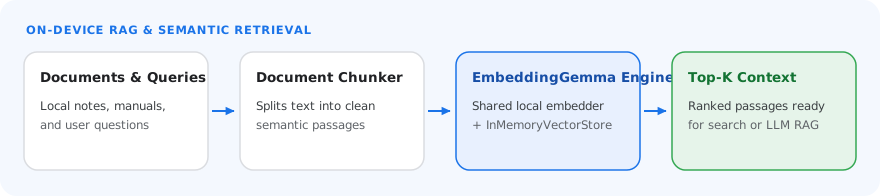
The Semantic Retriever supports the EmbeddingGemma V2 model, which is available
under the [Gemma license](https://ai.google.dev/gemma/terms).
### EmbeddingGemma V2
EmbeddingGemma V2 is a multimodal embedding model capable of projecting text,
images, and audio into a single shared vector space. This unified representation
is what allows for accurate cross-modal capabilities, such as semantic image
search based on natural language concepts.
You can download the `.litertlm` model bundles for each modality from the LiteRT
community on Hugging Face:
| Modality | Parameters | Model |
|---|---|---|
| Text | 270M | [`embeddinggemma-2-text-270m.litertlm`](https://huggingface.co/litert-community/embeddinggemma-2-text-270m-litert-lm/resolve/main/embeddinggemma-2-text-270m.litertlm) |
| Text / Vision | 440M | [`embeddinggemma-2-text-vision-440m.litertlm`](https://huggingface.co/litert-community/embeddinggemma-2-text-vision-440m-litert-lm/resolve/main/embeddinggemma-2-text-vision-440m.litertlm) |
| Text / Vision / Audio | 740M | [`embeddinggemma-2-740m.litertlm`](https://huggingface.co/litert-community/embeddinggemma-2-740m-litert-lm/resolve/main/embeddinggemma-2-740m.litertlm) |