# MediaPipe Tasks Live ML anywhere
Run vision, text, audio, retrieval, and decision models directly in your app across Web, Android, iOS, Python, and Flutter with on-device CPU and GPU acceleration.
[Browse 22 tasks](https://developers.google.com/edge/mediapipe/solutions.md.txt#tasks) [Web Demos](https://google-ai-edge.github.io/mediapipe-samples-web/) [GitHub Samples](https://github.com/google-ai-edge/mediapipe-samples) [Quickstart](https://developers.google.com/edge/mediapipe/solutions.md.txt#quickstart)
- Web, Android, iOS, Python \& Flutter
- CPU \& GPU acceleration
- On-device inference
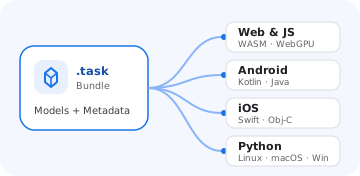 Consistent API across platforms
Build once with matching task options and result types across JavaScript, Kotlin/Java, Swift, and Python.
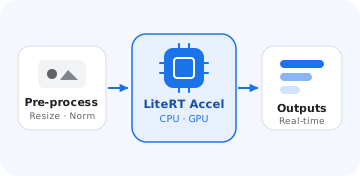 Hardware-accelerated pipelines
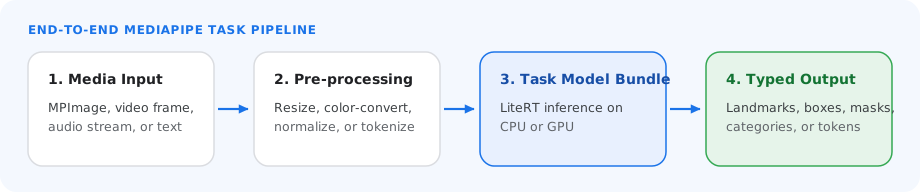
Each task bundles preprocessing, LiteRT model execution, and postprocessing on CPU or GPU.
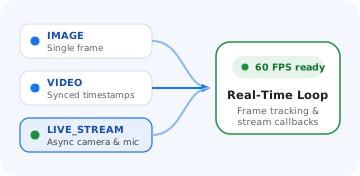 Real-time streaming modes
Process single images, decoded video files, or live camera and audio streams with low-latency on-device execution.
## Explore the tasks
22 on-device tasks across five categories. Pick a category to filter, or browse them all.
All **22** Audio **3** Decision **1** Retrieval **2** Text **5** Vision **11** [Demos](https://google-ai-edge.github.io/mediapipe-samples-web/) [SDK overview \& setup](https://developers.google.com/edge/mediapipe/solutions/tasks.md.txt)
## Audio
3 tasks
Classify sounds, transcribe speech, and synthesize voice on-device.
[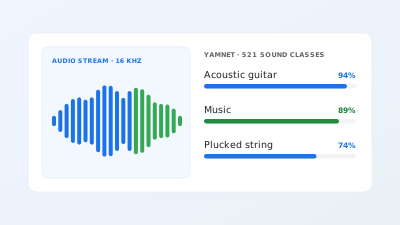
### Audio Classifier
Classify 521 everyday sound events with YAMNet.
WebAndroidiOSPythonFlutter](https://developers.google.com/edge/mediapipe/solutions/audio/audio_classifier) [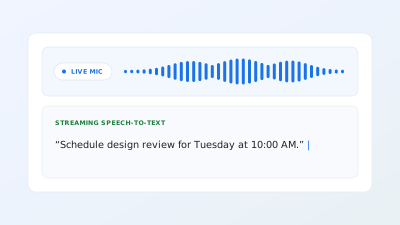New
### Audio Transcriber
Transcribe speech audio into text on-device with punctuation and capitalization.
WebAndroidiOSPythonFlutter](https://developers.google.com/edge/mediapipe/solutions/audio/audio_transcriber) [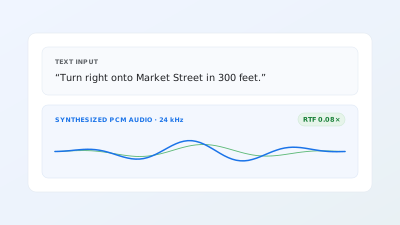New
### Text-to-Speech
Synthesize natural 24 kHz speech audio locally from text.
WebAndroidiOSPythonFlutter](https://developers.google.com/edge/mediapipe/solutions/audio/text_to_speech)
## Decision
1 task
Score choices and rubrics on-device.
[New
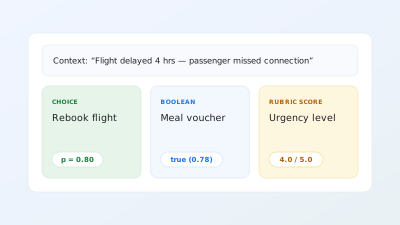
### Decision Maker
Score choices, booleans, and rubrics in a single forward pass.
WebAndroidiOSPythonFlutter](https://developers.google.com/edge/mediapipe/solutions/decision/decision_maker)
## Retrieval
2 tasks
Embed and search text and images for on-device RAG.
[New
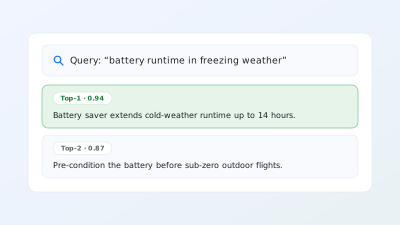
### Semantic Retriever
Index chunks and retrieve relevant context for on-device RAG.
WebAndroidiOSPythonFlutter](https://developers.google.com/edge/mediapipe/solutions/retrieval/semantic_retriever) [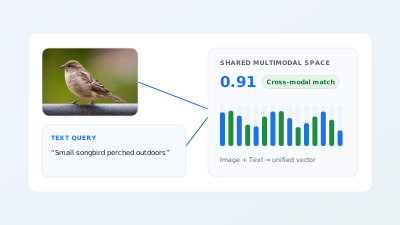New
### Universal Embedder
Embed text, images, and audio into a shared multimodal vector space.
WebAndroidiOSPythonFlutter](https://developers.google.com/edge/mediapipe/solutions/retrieval/universal_embedder)
## Text
5 tasks
Classify, detect languages, embed, proofread, and summarize text.
[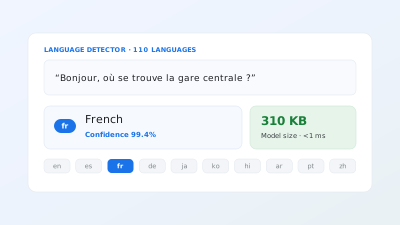
### Language Detector
Identify the language of text across 110+ languages.
WebAndroidiOSPythonFlutter](https://developers.google.com/edge/mediapipe/solutions/text/language_detector) [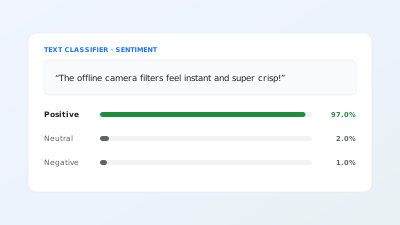
### Text Classifier
Classify sentiment and custom text categories on-device.
WebAndroidiOSPythonFlutter](https://developers.google.com/edge/mediapipe/solutions/text/text_classifier) [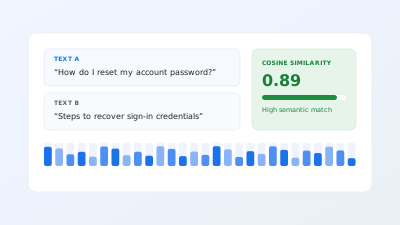
### Text Embedder
Compute semantic text embeddings for similarity and search.
WebAndroidiOSPythonFlutter](https://developers.google.com/edge/mediapipe/solutions/text/text_embedder) [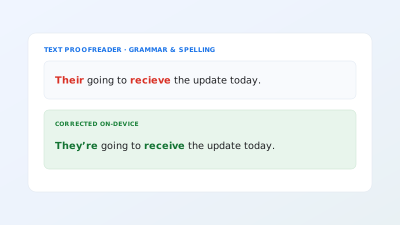New
### Text Proofreader
Check and correct grammar and spelling locally with Gemma.
AndroidiOSPythonFlutter](https://developers.google.com/edge/mediapipe/solutions/text/text_proofreader) [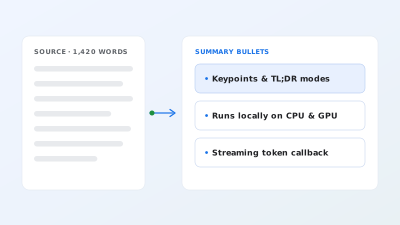New
### Text Summarizer
Summarize articles and notes into concise bullet points on-device.
AndroidiOSPythonFlutter](https://developers.google.com/edge/mediapipe/solutions/text/text_summarizer)
## Vision
11 tasks
Detect, track, segment, and classify in images, video, and camera streams.
[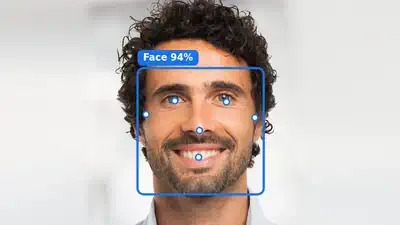
### Face Detector
Locate faces with bounding boxes and 6 facial keypoints.
WebAndroidiOSPythonFlutter](https://developers.google.com/edge/mediapipe/solutions/vision/face_detector) [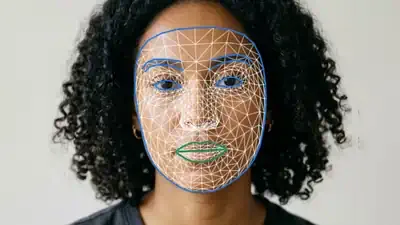
### Face Landmarker
Predict 478 3D facial landmarks and 52 expression blendshapes.
WebAndroidiOSPythonFlutter](https://developers.google.com/edge/mediapipe/solutions/vision/face_landmarker) [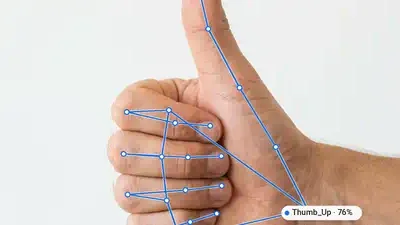
### Gesture Recognizer
Classify common hand gestures alongside 3D hand landmarks.
WebAndroidiOSPythonFlutter](https://developers.google.com/edge/mediapipe/solutions/vision/gesture_recognizer) [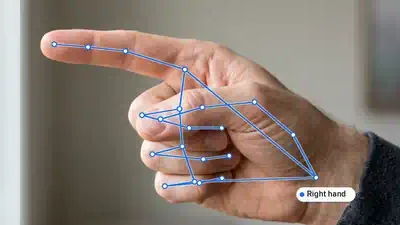
### Hand Landmarker
Detect 21 3D hand landmarks and handedness in real time.
WebAndroidiOSPythonFlutter](https://developers.google.com/edge/mediapipe/solutions/vision/hand_landmarker) [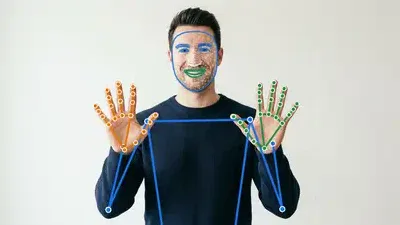
### Holistic Landmarker
Combine face, hand, and body pose landmarks in a single pipeline.
WebAndroidiOSPythonFlutter](https://developers.google.com/edge/mediapipe/solutions/vision/holistic_landmarker) [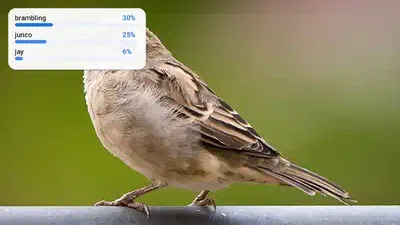
### Image Classifier
Classify images and video frames across 1,000+ categories.
WebAndroidiOSPythonFlutter](https://developers.google.com/edge/mediapipe/solutions/vision/image_classifier) [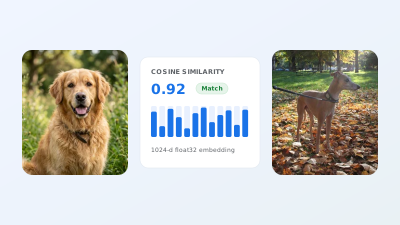
### Image Embedder
Extract feature vectors from images for visual similarity search.
WebAndroidiOSPythonFlutter](https://developers.google.com/edge/mediapipe/solutions/vision/image_embedder) [
### Image Segmenter
Segment people, hair, clothes, and backgrounds at pixel resolution.
WebAndroidiOSPythonFlutter](https://developers.google.com/edge/mediapipe/solutions/vision/image_segmenter) [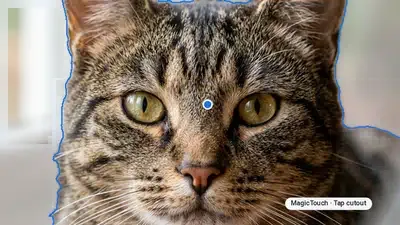
### Interactive Segmenter
Generate an object cutout mask around a user click or scribble.
WebAndroidiOSPythonFlutter](https://developers.google.com/edge/mediapipe/solutions/vision/interactive_segmenter) [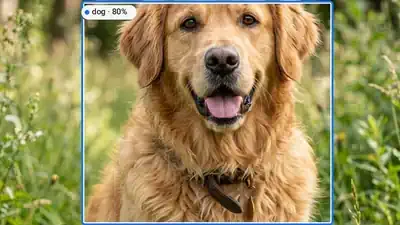
### Object Detector
Detect and label multiple objects with bounding boxes and scores.
WebAndroidiOSPythonFlutter](https://developers.google.com/edge/mediapipe/solutions/vision/object_detector) [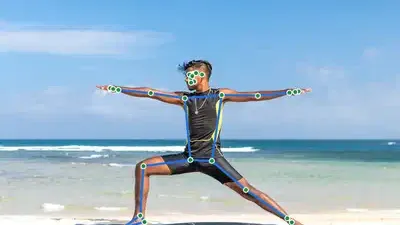
### Pose Landmarker
Track 33 full-body 3D landmarks and optional segmentation masks.
WebAndroidiOSPythonFlutter](https://developers.google.com/edge/mediapipe/solutions/vision/pose_landmarker)
## Quickstart
Install, configure, and run --- the same three steps on every platform.
1. **1**
### Install the SDK
Add the domain package from npm, Maven Central, Swift Package Manager, PyPI, or pub.dev.
2. **2**
### Configure the task
Point `baseOptions` at a model file and choose a running mode and hardware delegate. The examples below use the [Hand Landmarker model](https://storage.googleapis.com/mediapipe-models/hand_landmarker/hand_landmarker/float16/latest/hand_landmarker.task) (`hand_landmarker.task`).
3. **3**
### Run inference
[Prepare input data](https://developers.google.com/edge/mediapipe/solutions/prepare_data.md.txt)---images, video frames, live camera streams, text, or audio---and run inference.
### Web
npm`npm install @mediapipe/tasks-vision`[Web demo](https://google-ai-edge.github.io/mediapipe-samples-web/#/vision/hand_landmarker)·[Edit in StackBlitz](https://stackblitz.com/github/google-ai-edge/mediapipe-samples-web?file=src/tasks/hand-landmarker.ts)·[Setup guide](https://developers.google.com/edge/mediapipe/solutions/setup_web.md.txt)
#### Image
`IMAGE`Stateless · single frameSynchronous call on independent still images. Resets temporal tracking state on every call.
```typescript
import { FilesetResolver, HandLandmarker } from "@mediapipe/tasks-vision";
const vision = await FilesetResolver.forVisionTasks(
"https://cdn.jsdelivr.net/npm/@mediapipe/tasks-vision@latest/wasm"
);
const handLandmarker = await HandLandmarker.createFromOptions(vision, {
baseOptions: { modelAssetPath: "hand_landmarker.task", delegate: "GPU" },
runningMode: "IMAGE",
numHands: 2,
});
// Synchronous single-frame call (stateless across images)
const image = document.getElementById("image") as HTMLImageElement;
const result = handLandmarker.detect(image);
```
#### Video
`VIDEO`Every frame · no dropsSynchronous tracking across decoded video frames with monotonic timestamps. Processes every frame in order and never drops frames.
```typescript
import { FilesetResolver, HandLandmarker } from "@mediapipe/tasks-vision";
const vision = await FilesetResolver.forVisionTasks(
"https://cdn.jsdelivr.net/npm/@mediapipe/tasks-vision@latest/wasm"
);
const handLandmarker = await HandLandmarker.createFromOptions(vision, {
baseOptions: { modelAssetPath: "hand_landmarker.task", delegate: "GPU" },
runningMode: "VIDEO",
numHands: 2,
});
// Synchronous across decoded frames with monotonic timestamps (never drops frames)
for (const { frame, timestampMs } of decodedVideoFrames) {
const result = handLandmarker.detectForVideo(frame, timestampMs);
}
```
#### Livestream
`VIDEO + rAF`Live camera · latest frameWeb tasks run synchronously---pair `runningMode: "VIDEO"` with `requestAnimationFrame` so each paint inspects only the latest camera frame (skipping intermediate frames when busy).
```typescript
import { FilesetResolver, HandLandmarker } from "@mediapipe/tasks-vision";
const vision = await FilesetResolver.forVisionTasks(
"https://cdn.jsdelivr.net/npm/@mediapipe/tasks-vision@latest/wasm"
);
// On Web, live camera loops pair runningMode: "VIDEO" with requestAnimationFrame
const handLandmarker = await HandLandmarker.createFromOptions(vision, {
baseOptions: { modelAssetPath: "hand_landmarker.task", delegate: "GPU" },
runningMode: "VIDEO",
numHands: 2,
});
const video = document.getElementById("webcam") as HTMLVideoElement;
video.srcObject = await navigator.mediaDevices.getUserMedia({ video: true });
await video.play();
let lastVideoTime = -1;
function renderLoop() {
if (video.readyState >= 2 && video.currentTime !== lastVideoTime) {
lastVideoTime = video.currentTime;
const result = handLandmarker.detectForVideo(video, performance.now());
console.log(result.landmarks, result.handedness);
}
requestAnimationFrame(renderLoop);
}
renderLoop();
```
### Android (Kotlin)
Gradle`implementation("com.google.mediapipe:tasks-vision:latest.release")`[Sample code](https://github.com/google-ai-edge/mediapipe-samples/tree/main/examples/hand_landmarker/android)·[Setup guide](https://developers.google.com/edge/mediapipe/solutions/setup_android.md.txt)
#### Image
`IMAGE`Stateless · single frameSynchronous call on independent still images. Resets temporal tracking state on every call.
```kotlin
import com.google.mediapipe.framework.image.BitmapImageBuilder
import com.google.mediapipe.framework.image.MPImage
import com.google.mediapipe.tasks.core.BaseOptions
import com.google.mediapipe.tasks.vision.core.RunningMode
import com.google.mediapipe.tasks.vision.handlandmarker.HandLandmarker
val baseOptions = BaseOptions.builder()
.setModelAssetPath("hand_landmarker.task")
.build()
val options = HandLandmarker.HandLandmarkerOptions.builder()
.setBaseOptions(baseOptions)
.setRunningMode(RunningMode.IMAGE)
.setNumHands(2)
.build()
val handLandmarker = HandLandmarker.createFromOptions(context, options)
// Synchronous single-image call (no temporal tracking across calls)
val mpImage = BitmapImageBuilder(bitmap).build()
val result = handLandmarker.detect(mpImage)
```
#### Video
`VIDEO`Every frame · no dropsSynchronous tracking across decoded video frames with monotonic timestamps. Processes every frame in order and never drops frames.
```kotlin
import com.google.mediapipe.framework.image.BitmapImageBuilder
import com.google.mediapipe.framework.image.MPImage
import com.google.mediapipe.tasks.core.BaseOptions
import com.google.mediapipe.tasks.vision.core.RunningMode
import com.google.mediapipe.tasks.vision.handlandmarker.HandLandmarker
val baseOptions = BaseOptions.builder()
.setModelAssetPath("hand_landmarker.task")
.build()
val options = HandLandmarker.HandLandmarkerOptions.builder()
.setBaseOptions(baseOptions)
.setRunningMode(RunningMode.VIDEO)
.setNumHands(2)
.build()
val handLandmarker = HandLandmarker.createFromOptions(context, options)
// Synchronous: processes every frame in order with monotonic timestamps (no frame drops)
val mpImage = BitmapImageBuilder(frameBitmap).build()
val result = handLandmarker.detectForVideo(mpImage, frameTimestampMs)
```
#### Livestream
`LIVE_STREAM`Async · drops frames when busyAsynchronous camera pipeline with a result callback. Automatically drops incoming frames when busy so results stay current with low latency.
```kotlin
import android.os.SystemClock
import android.util.Log
import com.google.mediapipe.framework.image.BitmapImageBuilder
import com.google.mediapipe.framework.image.MPImage
import com.google.mediapipe.tasks.core.BaseOptions
import com.google.mediapipe.tasks.vision.core.RunningMode
import com.google.mediapipe.tasks.vision.handlandmarker.HandLandmarker
val baseOptions = BaseOptions.builder()
.setModelAssetPath("hand_landmarker.task")
.build()
val options = HandLandmarker.HandLandmarkerOptions.builder()
.setBaseOptions(baseOptions)
.setRunningMode(RunningMode.LIVE_STREAM)
.setNumHands(2)
.setResultListener { result, _ -> val hands = result.landmarks() }
.setErrorListener { error -> Log.e("MediaPipe", error.message.orEmpty()) }
.build()
val handLandmarker = HandLandmarker.createFromOptions(context, options)
// Async: automatically drops incoming camera frames when busy so results stay current
handLandmarker.detectAsync(mpImage, SystemClock.uptimeMillis())
```
### Android (Java)
Gradle`implementation 'com.google.mediapipe:tasks-vision:latest.release'`[Sample code](https://github.com/google-ai-edge/mediapipe-samples/tree/main/examples/hand_landmarker/android)·[Setup guide](https://developers.google.com/edge/mediapipe/solutions/setup_android.md.txt)
#### Image
`IMAGE`Stateless · single frameSynchronous call on independent still images. Resets temporal tracking state on every call.
```java
import com.google.mediapipe.framework.image.BitmapImageBuilder;
import com.google.mediapipe.framework.image.MPImage;
import com.google.mediapipe.tasks.core.BaseOptions;
import com.google.mediapipe.tasks.vision.core.RunningMode;
import com.google.mediapipe.tasks.vision.handlandmarker.HandLandmarker;
import com.google.mediapipe.tasks.vision.handlandmarker.HandLandmarkerResult;
BaseOptions baseOptions = BaseOptions.builder()
.setModelAssetPath("hand_landmarker.task")
.build();
HandLandmarker.HandLandmarkerOptions options = HandLandmarker.HandLandmarkerOptions.builder()
.setBaseOptions(baseOptions)
.setRunningMode(RunningMode.IMAGE)
.setNumHands(2)
.build();
HandLandmarker handLandmarker = HandLandmarker.createFromOptions(context, options);
// Synchronous single-image call (no temporal tracking across calls)
MPImage mpImage = new BitmapImageBuilder(bitmap).build();
HandLandmarkerResult result = handLandmarker.detect(mpImage);
```
#### Video
`VIDEO`Every frame · no dropsSynchronous tracking across decoded video frames with monotonic timestamps. Processes every frame in order and never drops frames.
```java
import com.google.mediapipe.framework.image.BitmapImageBuilder;
import com.google.mediapipe.framework.image.MPImage;
import com.google.mediapipe.tasks.core.BaseOptions;
import com.google.mediapipe.tasks.vision.core.RunningMode;
import com.google.mediapipe.tasks.vision.handlandmarker.HandLandmarker;
import com.google.mediapipe.tasks.vision.handlandmarker.HandLandmarkerResult;
BaseOptions baseOptions = BaseOptions.builder()
.setModelAssetPath("hand_landmarker.task")
.build();
HandLandmarker.HandLandmarkerOptions options = HandLandmarker.HandLandmarkerOptions.builder()
.setBaseOptions(baseOptions)
.setRunningMode(RunningMode.VIDEO)
.setNumHands(2)
.build();
HandLandmarker handLandmarker = HandLandmarker.createFromOptions(context, options);
// Synchronous: processes every frame in order with monotonic timestamps (no frame drops)
MPImage mpImage = new BitmapImageBuilder(frameBitmap).build();
HandLandmarkerResult result = handLandmarker.detectForVideo(mpImage, frameTimestampMs);
```
#### Livestream
`LIVE_STREAM`Async · drops frames when busyAsynchronous camera pipeline with a result callback. Automatically drops incoming frames when busy so results stay current with low latency.
```java
import android.os.SystemClock;
import android.util.Log;
import com.google.mediapipe.framework.image.BitmapImageBuilder;
import com.google.mediapipe.framework.image.MPImage;
import com.google.mediapipe.tasks.core.BaseOptions;
import com.google.mediapipe.tasks.vision.core.RunningMode;
import com.google.mediapipe.tasks.vision.handlandmarker.HandLandmarker;
BaseOptions baseOptions = BaseOptions.builder()
.setModelAssetPath("hand_landmarker.task")
.build();
HandLandmarker.HandLandmarkerOptions options = HandLandmarker.HandLandmarkerOptions.builder()
.setBaseOptions(baseOptions)
.setRunningMode(RunningMode.LIVE_STREAM)
.setNumHands(2)
.setResultListener((result, inputImage) -> { var hands = result.landmarks(); })
.setErrorListener(error -> Log.e("MediaPipe", String.valueOf(error.getMessage())))
.build();
HandLandmarker handLandmarker = HandLandmarker.createFromOptions(context, options);
// Async: automatically drops incoming camera frames when busy so results stay current
handLandmarker.detectAsync(mpImage, SystemClock.uptimeMillis());
```
### iOS
SwiftPM`https://github.com/google-ai-edge/mediapipe → MediaPipeTasksVision`[Package.swift](https://developers.google.com/edge/mediapipe/solutions/setup_ios.md.txt#package_swift)·[Sample code](https://github.com/google-ai-edge/mediapipe-samples/tree/main/examples/hand_landmarker/ios)·[Setup guide](https://developers.google.com/edge/mediapipe/solutions/setup_ios.md.txt)
#### Image
`IMAGE`Stateless · single frameSynchronous call on independent still images. Resets temporal tracking state on every call.
```swift
import Foundation
import MediaPipeTasksVision
guard let modelPath = Bundle.main.path(forResource: "hand_landmarker", ofType: "task") else { return }
let options = HandLandmarkerOptions()
options.baseOptions.modelAssetPath = modelPath
options.runningMode = .image
options.numHands = 2
let handLandmarker = try HandLandmarker(options: options)
// Synchronous single-image call (stateless across images)
let mpImage = try MPImage(uiImage: image)
let result = try handLandmarker.detect(image: mpImage)
```
#### Video
`VIDEO`Every frame · no dropsSynchronous tracking across decoded video frames with monotonic timestamps. Processes every frame in order and never drops frames.
```swift
import Foundation
import MediaPipeTasksVision
guard let modelPath = Bundle.main.path(forResource: "hand_landmarker", ofType: "task") else { return }
let options = HandLandmarkerOptions()
options.baseOptions.modelAssetPath = modelPath
options.runningMode = .video
options.numHands = 2
let handLandmarker = try HandLandmarker(options: options)
// Synchronous: processes every frame in order with monotonic timestamps (no frame drops)
let mpImage = try MPImage(pixelBuffer: pixelBuffer)
let result = try handLandmarker.detect(videoFrame: mpImage, timestampInMilliseconds: timestampMs)
```
#### Livestream
`LIVE_STREAM`Async · drops frames when busyAsynchronous camera pipeline with a result callback. Automatically drops incoming frames when busy so results stay current with low latency.
```swift
import Foundation
import MediaPipeTasksVision
final class HandLandmarkerStreamService: NSObject {
private var handLandmarker: HandLandmarker?
func setUp() throws {
guard let modelPath = Bundle.main.path(forResource: "hand_landmarker", ofType: "task") else { return }
let options = HandLandmarkerOptions()
options.baseOptions.modelAssetPath = modelPath
options.runningMode = .liveStream
options.numHands = 2
options.handLandmarkerLiveStreamDelegate = self
handLandmarker = try HandLandmarker(options: options)
}
func detectAsync(mpImage: MPImage, timestampMs: Int) throws {
// Async: automatically drops incoming camera frames when busy so results stay current
try handLandmarker?.detectAsync(image: mpImage, timestampInMilliseconds: timestampMs)
}
}
extension HandLandmarkerStreamService: HandLandmarkerLiveStreamDelegate {
func handLandmarker(
_ handLandmarker: HandLandmarker,
didFinishDetection result: HandLandmarkerResult?,
timestampInMilliseconds: Int,
error: (any Error)?
) {
guard let result else { return }
DispatchQueue.main.async {
let hands = result.landmarks
}
}
}
```
### Python
pip`pip install mediapipe`[Sample code](https://colab.research.google.com/github/google-ai-edge/mediapipe-samples/blob/main/examples/hand_landmarker/python/hand_landmarker.ipynb)·[Setup guide](https://developers.google.com/edge/mediapipe/solutions/setup_python.md.txt)
#### Image
`IMAGE`Stateless · single frameSynchronous call on independent still images. Resets temporal tracking state on every call.
```python
import mediapipe as mp
BaseOptions = mp.tasks.BaseOptions
HandLandmarker = mp.tasks.vision.HandLandmarker
HandLandmarkerOptions = mp.tasks.vision.HandLandmarkerOptions
VisionRunningMode = mp.tasks.vision.RunningMode
options = HandLandmarkerOptions(
base_options=BaseOptions(model_asset_path="hand_landmarker.task"),
running_mode=VisionRunningMode.IMAGE,
num_hands=2,
)
with HandLandmarker.create_from_options(options) as landmarker:
# Synchronous single-image call (stateless across images)
mp_image = mp.Image.create_from_file("input.jpg")
result = landmarker.detect(mp_image)
```
#### Video
`VIDEO`Every frame · no dropsSynchronous tracking across decoded video frames with monotonic timestamps. Processes every frame in order and never drops frames.
```python
import mediapipe as mp
BaseOptions = mp.tasks.BaseOptions
HandLandmarker = mp.tasks.vision.HandLandmarker
HandLandmarkerOptions = mp.tasks.vision.HandLandmarkerOptions
VisionRunningMode = mp.tasks.vision.RunningMode
options = HandLandmarkerOptions(
base_options=BaseOptions(model_asset_path="hand_landmarker.task"),
running_mode=VisionRunningMode.VIDEO,
num_hands=2,
)
with HandLandmarker.create_from_options(options) as landmarker:
# Synchronous: processes every frame in order with monotonic timestamps (no frame drops)
for mp_image, timestamp_ms in decoded_video_frames:
result = landmarker.detect_for_video(mp_image, timestamp_ms)
```
#### Livestream
`LIVE_STREAM`Async · drops frames when busyAsynchronous camera pipeline with a result callback. Automatically drops incoming frames when busy so results stay current with low latency.
```python
import mediapipe as mp
BaseOptions = mp.tasks.BaseOptions
HandLandmarker = mp.tasks.vision.HandLandmarker
HandLandmarkerOptions = mp.tasks.vision.HandLandmarkerOptions
VisionRunningMode = mp.tasks.vision.RunningMode
def on_result(result, output_image: mp.Image, timestamp_ms: int):
print(f"Detected {len(result.hand_landmarks)} hand(s) at {timestamp_ms} ms")
options = HandLandmarkerOptions(
base_options=BaseOptions(model_asset_path="hand_landmarker.task"),
running_mode=VisionRunningMode.LIVE_STREAM,
num_hands=2,
result_callback=on_result,
)
with HandLandmarker.create_from_options(options) as landmarker:
# Async: automatically drops incoming camera frames when busy so results stay current
mp_image = mp.Image(image_format=mp.ImageFormat.SRGB, data=rgb_frame)
landmarker.detect_async(mp_image, timestamp_ms)
```
### Flutter
pub`flutter pub add mediapipe_vision`[Live gallery](https://google.github.io/flutter-mediapipe/)·[Sample code](https://github.com/google/flutter-mediapipe/tree/main/samples/vision/hand_landmarker)·[Setup guide](https://developers.google.com/edge/mediapipe/solutions/setup_flutter.md.txt)
#### Image
`RunningMode.image`Stateless · single frameOne call per independent still image. No tracking state carries over between calls.
```dart
import 'package:mediapipe_vision/mediapipe_vision.dart';
Future findHands(VisionImage image) async {
final landmarker = await HandLandmarker.create(
HandLandmarkerOptions(model: VisionModels.handLandmarker, numHands: 2),
);
try {
final result = await landmarker.detect(image);
for (var i = 0; i < result.handLandmarks.length; i++) {
final side = result.handedness[i].first.categoryName;
final wrist = result.handLandmarks[i].first;
print('$side hand, wrist at ${wrist.x}, ${wrist.y}');
}
} finally {
await landmarker.dispose();
}
}
```
#### Video
`RunningMode.video`Every frame · no dropsTracking across decoded video frames with strictly increasing timestamps. Processes every frame in order and never drops frames.
```dart
import 'dart:typed_data';
import 'package:mediapipe_vision/mediapipe_vision.dart';
typedef Frame = ({Uint8List rgba, int width, int height, int milliseconds});
Future findHandsInVideo(Stream frames) async {
final landmarker = await HandLandmarker.create(
HandLandmarkerOptions(
model: VisionModels.handLandmarker,
runningMode: RunningMode.video,
numHands: 2,
),
);
try {
await for (final frame in frames) {
final result = await landmarker.detectForVideo(
VisionImage.fromPixels(
pixels: frame.rgba,
width: frame.width,
height: frame.height,
format: VisionPixelFormat.rgba,
),
timestampMilliseconds: frame.milliseconds,
);
final ms = result.timestampMilliseconds;
for (var i = 0; i < result.handLandmarks.length; i++) {
final side = result.handedness[i].first.categoryName;
final wrist = result.handLandmarks[i].first;
print('$ms ms: $side hand, wrist at ${wrist.x}, ${wrist.y}');
}
}
} finally {
await landmarker.dispose();
}
}
```
#### Livestream
`RunningMode.liveStream`Async · drops frames when busyEach call returns at once and results arrive on the task's `results` stream. One frame runs at a time; a newer frame replaces one that's waiting, so results stay current.
```dart
import 'dart:typed_data';
import 'package:mediapipe_vision/mediapipe_vision.dart';
typedef Frame = ({Uint8List rgba, int width, int height, int milliseconds});
Future findHandsLive(Stream frames) async {
final landmarker = await HandLandmarker.create(
HandLandmarkerOptions(
model: VisionModels.handLandmarker,
runningMode: RunningMode.liveStream,
numHands: 2,
),
);
// Listen before the first frame, as Google requires a result listener.
final results = landmarker.results.listen((result) {
final ms = result.timestampMilliseconds;
for (var i = 0; i < result.handLandmarks.length; i++) {
final side = result.handedness[i].first.categoryName;
final wrist = result.handLandmarks[i].first;
print('$ms ms: $side hand, wrist at ${wrist.x}, ${wrist.y}');
}
});
try {
await for (final frame in frames) {
landmarker.detectAsync(
VisionImage.fromPixels(
pixels: frame.rgba,
width: frame.width,
height: frame.height,
format: VisionPixelFormat.rgba,
),
timestampMilliseconds: frame.milliseconds,
);
}
} finally {
// Runs the frame in flight and the waiting one, then closes results.
await landmarker.dispose();
await results.cancel();
print('${landmarker.droppedFrames} frames dropped');
}
}
```
[JS**Web \& JavaScript** npm / CDN · WebGL, WebAssembly \& WebGPU](https://developers.google.com/edge/mediapipe/solutions/setup_web.md.txt) [KT**Android** Kotlin \& Java · Maven · CPU \& GPU](https://developers.google.com/edge/mediapipe/solutions/setup_android.md.txt) [SW**iOS** Swift \& Obj-C · Swift Package Manager](https://developers.google.com/edge/mediapipe/solutions/setup_ios.md.txt) [PY**Python** pip install mediapipe · Linux, macOS, Windows](https://developers.google.com/edge/mediapipe/solutions/setup_python.md.txt) [DT**Flutter** Dart · pub.dev · mobile, desktop \& web](https://developers.google.com/edge/mediapipe/solutions/setup_flutter.md.txt) [**Samples (Android, iOS, Python)**
Complete runnable Android, iOS, and Python sample apps for every MediaPipe task.](https://github.com/google-ai-edge/mediapipe-samples) [**Samples (Web)**
Explore WebGL/WebGPU TypeScript sample code and customize demos in StackBlitz or GitHub.](https://github.com/google-ai-edge/mediapipe-samples-web) [**Samples (Flutter)**
Runnable Dart samples for every task and running mode, plus the Flutter gallery and an object detection app.](https://github.com/google/flutter-mediapipe/tree/main/samples) [**API Reference**
Class and method documentation for Java, Swift, TypeScript/JS, and Python.](https://developers.google.com/edge/api) [**MediaPipe Framework**
Build custom C++ calculators and multi-stream perception graphs.](https://developers.google.com/edge/mediapipe/framework)
**Flutter:** [GitHub](https://github.com/google/flutter-mediapipe) · [Live gallery](https://google.github.io/flutter-mediapipe/) · [Samples](https://github.com/google/flutter-mediapipe/tree/main/samples) · [Object detection app](https://github.com/google/flutter-mediapipe/tree/main/samples/apps/object_detection) · pub.dev: [mediapipe_vision](https://pub.dev/packages/mediapipe_vision), [mediapipe_text](https://pub.dev/packages/mediapipe_text), [mediapipe_audio](https://pub.dev/packages/mediapipe_audio), [mediapipe_retrieval](https://pub.dev/packages/mediapipe_retrieval), [mediapipe_decision](https://pub.dev/packages/mediapipe_decision)