LiteRT metadata provides a standard for model descriptions. The metadata is an
important source of knowledge about what the model does and its input / output
information. The metadata consists of both
- human readable parts which convey the best practice when using the model, and
- machine readable parts that can be leveraged by code generators, such as the [LiteRT Android code generator](https://developers.google.com/edge/litert/android/metadata/codegen#generate_model_interfaces_with_tensorflow_lite_code_generator_codegen) and the [Android Studio ML Binding
feature](https://developers.google.com/edge/litert/android/metadata/codegen#use_android_studio_ml_model_binding_mlbinding).
All image models published on [Kaggle
Models](https://www.kaggle.com/models?framework=tfLite) have been populated with
metadata.
## Model with metadata format
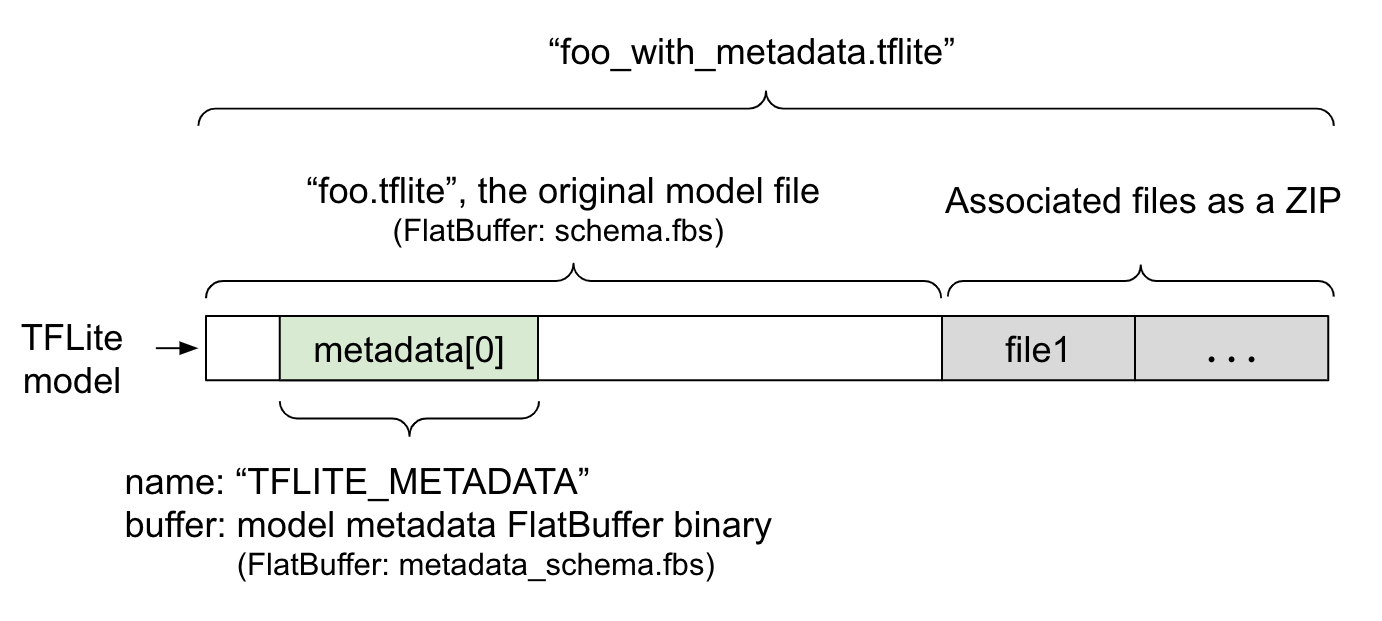 Figure 1. TFLite model with metadata and associated files.
Model metadata is defined in
[metadata_schema.fbs](https://github.com/tensorflow/tflite-support/blob/master/tensorflow_lite_support/metadata/metadata_schema.fbs),
a
[FlatBuffer](https://google.github.io/flatbuffers/index.html#flatbuffers_overview)
file. As shown in Figure 1, it is stored in the
[metadata](https://github.com/tensorflow/tensorflow/blob/bd73701871af75539dd2f6d7fdba5660a8298caf/tensorflow/lite/schema/schema.fbs#L1208)
field of the [TFLite model
schema](https://github.com/tensorflow/tensorflow/tree/master/tensorflow/lite/schema),
under the name, `"TFLITE_METADATA"`. Some models may come with associated files,
such as [classification label
files](https://github.com/tensorflow/examples/blob/dd98bc2b595157c03ac9fa47ac8659bb20aa8bbd/lite/examples/image_classification/android/models/src/main/assets/labels.txt#L1).
These files are concatenated to the end of the original model file as a ZIP
using the ZipFile ["append"
mode](https://pymotw.com/2/zipfile/#appending-to-files) (`'a'` mode). TFLite
Interpreter can consume the new file format in the same way as before. See [Pack
the associated files](https://developers.google.com/edge/litert/conversion/tensorflow/metadata#pack_the_associated_files) for more information.
See the instruction below about how to populate, visualize, and read metadata.
## Setup the metadata tools
Before adding metadata to your model, you will need to a Python programming
environment setup for running TensorFlow. There is a detailed guide on how to
set this up [here](https://www.tensorflow.org/install).
After setup the Python programming environment, you will need to install
additional tooling:
pip install tflite-support
LiteRT metadata tooling supports Python 3.
## Adding metadata using Flatbuffers Python API
There are three parts to the model metadata in the
[schema](https://github.com/tensorflow/tflite-support/blob/master/tensorflow_lite_support/metadata/metadata_schema.fbs):
1. **Model information** - Overall description of the model as well as items such as license terms. See [ModelMetadata](https://github.com/tensorflow/tflite-support/blob/4cd0551658b6e26030e0ba7fc4d3127152e0d4ae/tensorflow_lite_support/metadata/metadata_schema.fbs#L640). 2. **Input information** - Description of the inputs and pre-processing required such as normalization. See [SubGraphMetadata.input_tensor_metadata](https://github.com/tensorflow/tflite-support/blob/4cd0551658b6e26030e0ba7fc4d3127152e0d4ae/tensorflow_lite_support/metadata/metadata_schema.fbs#L590). 3. **Output information** - Description of the output and post-processing required such as mapping to labels. See [SubGraphMetadata.output_tensor_metadata](https://github.com/tensorflow/tflite-support/blob/4cd0551658b6e26030e0ba7fc4d3127152e0d4ae/tensorflow_lite_support/metadata/metadata_schema.fbs#L599).
Since LiteRT only supports single subgraph at this point, the [LiteRT code
generator](https://developers.google.com/edge/litert/android/metadata/codegen#generate_model_interfaces_with_tensorflow_lite_code_generator_codegen)
and the [Android Studio ML Binding
feature](https://developers.google.com/edge/litert/android/metadata/codegen#use_android_studio_ml_model_binding_mlbinding)
will use `ModelMetadata.name` and `ModelMetadata.description`, instead of
`SubGraphMetadata.name` and `SubGraphMetadata.description`, when displaying
metadata and generating code.
### Supported Input / Output types
LiteRT metadata for input and output are not designed with specific model types
in mind but rather input and output types. It does not matter what the model
functionally does, as long as the input and output types consists of the
following or a combination of the following, it is supported by TensorFlow Lite
metadata:
- Feature - Numbers which are unsigned integers or float32.
- Image - Metadata currently supports RGB and greyscale images.
- Bounding box - Rectangular shape bounding boxes. The schema supports [a
variety of numbering
schemes](https://github.com/tensorflow/tflite-support/blob/4cd0551658b6e26030e0ba7fc4d3127152e0d4ae/tensorflow_lite_support/metadata/metadata_schema.fbs#L214).
### Pack the associated files
LiteRT models may come with different associated files. For example, natural
language models usually have vocab files that map word pieces to word IDs;
classification models may have label files that indicate object categories.
Without the associated files (if there are), a model will not function well.
The associated files can now be bundled with the model through the metadata
Python library. The new LiteRT model becomes a zip file that contains both the
model and the associated files. It can be unpacked with common zip tools. This
new model format keeps using the same file extension, `.tflite`. It is
compatible with existing TFLite framework and Interpreter. See [Pack metadata
and associated files into the
model](https://developers.google.com/edge/litert/conversion/tensorflow/metadata#pack_metadata_and_associated_files_into_the_model) for more details.
The associated file information can be recorded in the metadata. Depending on
the file type and where the file is attached to (i.e. `ModelMetadata`,
`SubGraphMetadata`, and `TensorMetadata`), [the LiteRT Android code
generator](https://developers.google.com/edge/litert/android/metadata/codegen) may apply corresponding pre/post
processing automatically to the object. See [the \ section of
each associate file
type](https://github.com/tensorflow/tflite-support/blob/4cd0551658b6e26030e0ba7fc4d3127152e0d4ae/tensorflow_lite_support/metadata/metadata_schema.fbs#L77-L127)
in the schema for more details.
### Normalization and quantization parameters
Normalization is a common data preprocessing technique in machine learning. The
goal of normalization is to change the values to a common scale, without
distorting differences in the ranges of values.
[Model quantization](https://developers.google.com/edge/litert/conversion/tensorflow/quantization/model_optimization#model_quantization) is a technique
that allows for reduced precision representations of weights and optionally,
activations for both storage and computation.
In terms of preprocessing and post-processing, normalization and quantization
are two independent steps. Here are the details.
| | Normalization | Quantization |
|---|---|---|
| An example of the parameter values of the input image in MobileNet for float and quant models, respectively. | **Float model** : - mean: 127.5 - std: 127.5 **Quant model** : - mean: 127.5 - std: 127.5 | **Float model** : - zeroPoint: 0 - scale: 1.0 **Quant model** : - zeroPoint: 128.0 - scale:0.0078125f |
| When to invoke? | **Inputs** : If input data is normalized in training, the input data of inference needs to be normalized accordingly. **Outputs**: output data will not be normalized in general. | **Float models** does not need quantization. **Quantized model** may or may not need quantization in pre/post processing. It depends on the datatype of input/output tensors. - float tensors: no quantization in pre/post processing needed. Quant op and dequant op are baked into the model graph. - int8/uint8 tensors: need quantization in pre/post processing. |
| Formula | normalized_input = (input - mean) / std | **Quantize for inputs** : q = f / scale + zeroPoint **Dequantize for outputs** : f = (q - zeroPoint) \* scale |
| Where are the parameters | Filled by model creator and stored in model metadata, as `NormalizationOptions` | Filled automatically by TFLite converter, and stored in tflite model file. |
| How to get the parameters? | Through the `MetadataExtractor` API \[2\] | Through the TFLite `Tensor` API \[1\] or through the `MetadataExtractor` API \[2\] |
| Do float and quant models share the same value? | Yes, float and quant models have the same Normalization parameters | No, the float model does not need quantization. |
| Does TFLite Code generator or Android Studio ML binding automatically generate it in data processing? | Yes | Yes |
\[1\] The [LiteRT Java
API](https://github.com/tensorflow/tensorflow/blob/09ec15539eece57b257ce9074918282d88523d56/tensorflow/lite/java/src/main/java/org/tensorflow/lite/Tensor.java#L73)
and the [LiteRT C++
API](https://github.com/tensorflow/tensorflow/blob/09ec15539eece57b257ce9074918282d88523d56/tensorflow/lite/c/common.h#L391).
\[2\] The [metadata extractor library](https://developers.google.com/edge/litert/conversion/tensorflow/metadata#read_the_metadata_from_models)
When processing image data for uint8 models, normalization and quantization are
sometimes skipped. It is fine to do so when the pixel values are in the range of
\[0, 255\]. But in general, you should always process the data according to the
normalization and quantization parameters when applicable.
### Examples
> [!NOTE]
> **Note:** The export directory specified has to exist before you run the script; it does not get created as part of the process.
You can find examples on how the metadata should be populated for different
types of models here:
#### Image classification
Download the script
[here](https://github.com/tensorflow/examples/tree/master/lite/examples/image_classification/metadata/metadata_writer_for_image_classifier.py)
, which populates metadata to
[mobilenet_v1_0.75_160_quantized.tflite](https://www.kaggle.com/models/tensorflow/mobilenet-v1/tfLite/0-75-160-quantized/1).
Run the script like this:
python ./metadata_writer_for_image_classifier.py \
--model_file=./model_without_metadata/mobilenet_v1_0.75_160_quantized.tflite \
--label_file=./model_without_metadata/labels.txt \
--export_directory=model_with_metadata
To populate metadata for other image classification models, add the model specs
like
[this](https://github.com/tensorflow/examples/blob/master/lite/examples/image_classification/metadata/metadata_writer_for_image_classifier.py#L63-L74)
into the script. The rest of this guide will highlight some of the key sections
in the image classification example to illustrate the key elements.
### Deep dive into the image classification example
#### Model information
Metadata starts by creating a new model info:
from tflite_support import flatbuffers
from tflite_support import metadata as _metadata
from tflite_support import metadata_schema_py_generated as _metadata_fb
""" ... """
"""Creates the metadata for an image classifier."""
# Creates model info.
model_meta = _metadata_fb.ModelMetadataT()
model_meta.name = "MobileNetV1 image classifier"
model_meta.description = ("Identify the most prominent object in the "
"image from a set of 1,001 categories such as "
"trees, animals, food, vehicles, person etc.")
model_meta.version = "v1"
model_meta.author = "TensorFlow"
model_meta.license = ("Apache License. Version 2.0 "
"http://www.apache.org/licenses/LICENSE-2.0.")
#### Input / output information
This section shows you how to describe your model's input and output signature.
This metadata may be used by automatic code generators to create pre- and post-
processing code. To create input or output information about a tensor:
# Creates input info.
input_meta = _metadata_fb.TensorMetadataT()
# Creates output info.
output_meta = _metadata_fb.TensorMetadataT()
#### Image input
Image is a common input type for machine learning. LiteRT metadata supports
information such as colorspace and pre-processing information such as
normalization. The dimension of the image does not require manual specification
since it is already provided by the shape of the input tensor and can be
automatically inferred.
input_meta.name = "image"
input_meta.description = (
"Input image to be classified. The expected image is {0} x {1}, with "
"three channels (red, blue, and green) per pixel. Each value in the "
"tensor is a single byte between 0 and 255.".format(160, 160))
input_meta.content = _metadata_fb.ContentT()
input_meta.content.contentProperties = _metadata_fb.ImagePropertiesT()
input_meta.content.contentProperties.colorSpace = (
_metadata_fb.ColorSpaceType.RGB)
input_meta.content.contentPropertiesType = (
_metadata_fb.ContentProperties.ImageProperties)
input_normalization = _metadata_fb.ProcessUnitT()
input_normalization.optionsType = (
_metadata_fb.ProcessUnitOptions.NormalizationOptions)
input_normalization.options = _metadata_fb.NormalizationOptionsT()
input_normalization.options.mean = [127.5]
input_normalization.options.std = [127.5]
input_meta.processUnits = [input_normalization]
input_stats = _metadata_fb.StatsT()
input_stats.max = [255]
input_stats.min = [0]
input_meta.stats = input_stats
#### Label output
Label can be mapped to an output tensor via an associated file using
`TENSOR_AXIS_LABELS`.
# Creates output info.
output_meta = _metadata_fb.TensorMetadataT()
output_meta.name = "probability"
output_meta.description = "Probabilities of the 1001 labels respectively."
output_meta.content = _metadata_fb.ContentT()
output_meta.content.content_properties = _metadata_fb.FeaturePropertiesT()
output_meta.content.contentPropertiesType = (
_metadata_fb.ContentProperties.FeatureProperties)
output_stats = _metadata_fb.StatsT()
output_stats.max = [1.0]
output_stats.min = [0.0]
output_meta.stats = output_stats
label_file = _metadata_fb.AssociatedFileT()
label_file.name = os.path.basename("your_path_to_label_file")
label_file.description = "Labels for objects that the model can recognize."
label_file.type = _metadata_fb.AssociatedFileType.TENSOR_AXIS_LABELS
output_meta.associatedFiles = [label_file]
#### Create the metadata Flatbuffers
The following code combines the model information with the input and output
information:
# Creates subgraph info.
subgraph = _metadata_fb.SubGraphMetadataT()
subgraph.inputTensorMetadata = [input_meta]
subgraph.outputTensorMetadata = [output_meta]
model_meta.subgraphMetadata = [subgraph]
b = flatbuffers.Builder(0)
b.Finish(
model_meta.Pack(b),
_metadata.MetadataPopulator.METADATA_FILE_IDENTIFIER)
metadata_buf = b.Output()
#### Pack metadata and associated files into the model
Once the metadata Flatbuffers is created, the metadata and the label file are
written into the TFLite file via the `populate` method:
populator = _metadata.MetadataPopulator.with_model_file(model_file)
populator.load_metadata_buffer(metadata_buf)
populator.load_associated_files(["your_path_to_label_file"])
populator.populate()
You can pack as many associated files as you want into the model through
`load_associated_files`. However, it is required to pack at least those files
documented in the metadata. In this example, packing the label file is
mandatory.
## Visualize the metadata
You can use [Netron](https://github.com/lutzroeder/netron) to visualize your
metadata, or you can read the metadata from a LiteRT model into a json format
using the `MetadataDisplayer`:
displayer = _metadata.MetadataDisplayer.with_model_file(export_model_path)
export_json_file = os.path.join(FLAGS.export_directory,
os.path.splitext(model_basename)[0] + ".json")
json_file = displayer.get_metadata_json()
# Optional: write out the metadata as a json file
with open(export_json_file, "w") as f:
f.write(json_file)
Android Studio also supports displaying metadata through the [Android Studio ML
Binding
feature](https://developer.android.com/studio/preview/features#tensor-flow-lite-models).
## Metadata versioning
The [metadata
schema](https://github.com/tensorflow/tflite-support/blob/master/tensorflow_lite_support/metadata/metadata_schema.fbs)
is versioned both by the Semantic versioning number, which tracks the changes of
the schema file, and by the Flatbuffers file identification, which indicates the
true version compatibility.
### The Semantic versioning number
The metadata schema is versioned by the [Semantic versioning
number](https://github.com/tensorflow/tflite-support/blob/4cd0551658b6e26030e0ba7fc4d3127152e0d4ae/tensorflow_lite_support/metadata/metadata_schema.fbs#L53),
such as MAJOR.MINOR.PATCH. It tracks schema changes according to the rules
[here](https://github.com/tensorflow/tflite-support/blob/4cd0551658b6e26030e0ba7fc4d3127152e0d4ae/tensorflow_lite_support/metadata/metadata_schema.fbs#L32-L44).
See the [history of
fields](https://github.com/tensorflow/tflite-support/blob/4cd0551658b6e26030e0ba7fc4d3127152e0d4ae/tensorflow_lite_support/metadata/metadata_schema.fbs#L63)
added after version `1.0.0`.
### The Flatbuffers file identification
Semantic versioning guarantees the compatibility if following the rules, but it
does not imply the true incompatibility. When bumping up the MAJOR number, it
does not necessarily mean the backward compatibility is broken. Therefore, we
use the [Flatbuffers file
identification](https://google.github.io/flatbuffers/md__schemas.html),
[file_identifier](https://github.com/tensorflow/tflite-support/blob/4cd0551658b6e26030e0ba7fc4d3127152e0d4ae/tensorflow_lite_support/metadata/metadata_schema.fbs#L61),
to denote the true compatibility of the metadata schema. The file identifier is
exactly 4 characters long. It is fixed to a certain metadata schema and not
subject to change by users. If the backward compatibility of the metadata schema
has to be broken for some reason, the file_identifier will bump up, for example,
from "M001" to "M002". File_identifier is expected to be changed much less
frequently than the metadata_version.
### The minimum necessary metadata parser version
The [minimum necessary metadata parser
version](https://github.com/tensorflow/tflite-support/blob/4cd0551658b6e26030e0ba7fc4d3127152e0d4ae/tensorflow_lite_support/metadata/metadata_schema.fbs#L681)
is the minimum version of metadata parser (the Flatbuffers generated code) that
can read the metadata Flatbuffers in full. The version is effectively the
largest version number among the versions of all the fields populated and the
smallest compatible version indicated by the file identifier. The minimum
necessary metadata parser version is automatically populated by the
`MetadataPopulator` when the metadata is populated into a TFLite model. See the
[metadata extractor](https://developers.google.com/edge/litert/conversion/tensorflow/metadata#read_the_metadata_from_models) for more information on how
the minimum necessary metadata parser version is used.
## Read the metadata from models
The Metadata Extractor library is convenient tool to read the metadata and
associated files from a models across different platforms (see the [Java
version](https://github.com/tensorflow/tflite-support/tree/master/tensorflow_lite_support/metadata/java)
and the [C++
version](https://github.com/tensorflow/tflite-support/tree/master/tensorflow_lite_support/metadata/cc)).
You can build your own metadata extractor tool in other languages using the
Flatbuffers library.
### Read the metadata in Java
To use the Metadata Extractor library in your Android app, we recommend using
the [LiteRT Metadata AAR hosted at
MavenCentral](https://search.maven.org/artifact/org.tensorflow/tensorflow-lite-metadata).
It contains the `MetadataExtractor` class, as well as the FlatBuffers Java
bindings for the [metadata
schema](https://github.com/tensorflow/tflite-support/blob/master/tensorflow_lite_support/metadata/metadata_schema.fbs)
and the [model
schema](https://github.com/tensorflow/tensorflow/tree/master/tensorflow/lite/schema).
You can specify this in your `build.gradle` dependencies as follows:
dependencies {
implementation 'org.tensorflow:tensorflow-lite-metadata:0.1.0'
}
To use nightly snapshots, make sure that you have added [Sonatype snapshot
repository](https://developers.google.com/edge/litert/build/android#use_nightly_snapshots).
You can initialize a `MetadataExtractor` object with a `ByteBuffer` that points
to the model:
public MetadataExtractor(ByteBuffer buffer);
The `ByteBuffer` must remain unchanged for the entire lifetime of the
`MetadataExtractor` object. The initialization may fail if the Flatbuffers file
identifier of the model metadata does not match that of the metadata parser. See
[metadata versioning](https://developers.google.com/edge/litert/conversion/tensorflow/metadata#metadata_versioning) for more information.
With matching file identifiers, the metadata extractor will successfully read
metadata generated from all past and future schema due to the Flatbuffers'
forwards and backward compatibility mechanism. However, fields from future
schemas cannot be extracted by older metadata extractors. The [minimum necessary
parser version](https://developers.google.com/edge/litert/conversion/tensorflow/metadata#the_minimum_necessary_metadata_parser_version) of the metadata
indicates the minimum version of metadata parser that can read the metadata
Flatbuffers in full. You can use the following method to verify if the minimum
necessary parser version condition is met:
public final boolean isMinimumParserVersionSatisfied();
Passing in a model without metadata is allowed. However, invoking methods that
read from the metadata will cause runtime errors. You can check if a model has
metadata by invoking the `hasMetadata` method:
public boolean hasMetadata();
`MetadataExtractor` provides convenient functions for you to get the
input/output tensors' metadata. For example,
public int getInputTensorCount();
public TensorMetadata getInputTensorMetadata(int inputIndex);
public QuantizationParams getInputTensorQuantizationParams(int inputIndex);
public int[] getInputTensorShape(int inputIndex);
public int getoutputTensorCount();
public TensorMetadata getoutputTensorMetadata(int inputIndex);
public QuantizationParams getoutputTensorQuantizationParams(int inputIndex);
public int[] getoutputTensorShape(int inputIndex);
Though the [LiteRT model
schema](https://github.com/tensorflow/tensorflow/blob/aa7ff6aa28977826e7acae379e82da22482b2bf2/tensorflow/lite/schema/schema.fbs#L1075)
supports multiple subgraphs, the TFLite Interpreter currently only supports a
single subgraph. Therefore, `MetadataExtractor` omits subgraph index as an input
argument in its methods.
## Read the associated files from models
The LiteRT model with metadata and associated files is essentially a zip file
that can be unpacked with common zip tools to get the associated files. For
example, you can unzip
[mobilenet_v1_0.75_160_quantized](https://www.kaggle.com/models/tensorflow/mobilenet-v1/tfLite/0-75-160-quantized/1)
and extract the label file in the model as follows:
$ unzip mobilenet_v1_0.75_160_quantized_1_metadata_1.tflite
Archive: mobilenet_v1_0.75_160_quantized_1_metadata_1.tflite
extracting: labels.txt
You can also read associated files through the Metadata Extractor library.
In Java, pass the file name into the `MetadataExtractor.getAssociatedFile`
method:
public InputStream getAssociatedFile(String fileName);
Similarly, in C++, this can be done with the method,
`ModelMetadataExtractor::GetAssociatedFile`:
tflite::support::StatusOr GetAssociatedFile(
const std::string& filename) const;