The CM360 offline conversion API supports enhancing website tag-based
conversions with user identifiers.
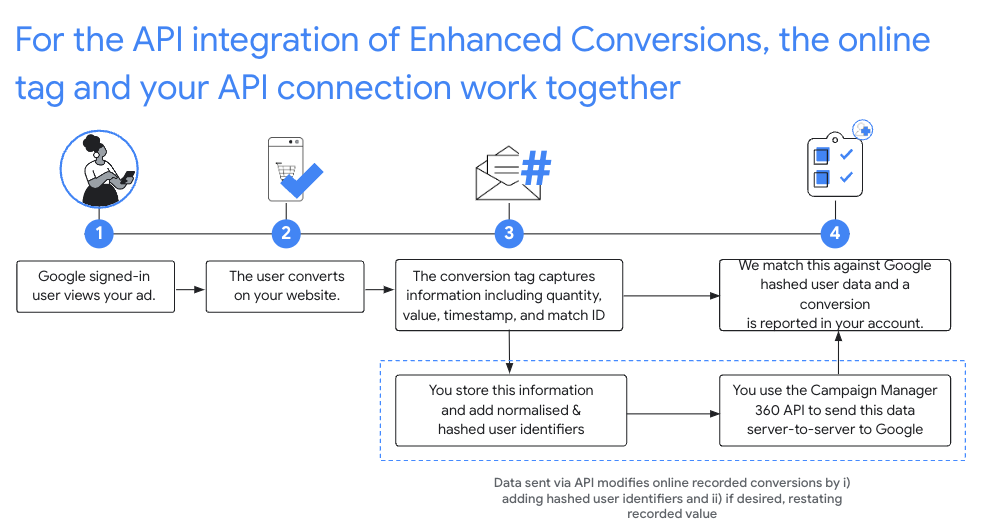
## Recommended setup
- Accept the [Enhanced Conversions Terms of
Service](https://support.google.com/sa360/answer/12863936) for your Floodlight configuration in CM360.
- Instrument your websites with [match ID](https://support.google.com/campaignmanager/answer/7554821#custom).
- Record Floodlight conversions that occur on your website. Make sure to record all of the following as they are required fields in subsequent API calls:
- `matchId`
- `ordinal`
- `timestampMicros`
- `floodlightActivityId`
- `floodlightConfigurationId`
- `quantity`
- `value`
- After 90 minutes have passed since the online tag captured the conversion, call [`conversions.batchupdate`](https://developers.google.com/doubleclick-advertisers/current/conversions/batchupdate) to enhance these conversions with user identifiers.
- User identifiers should be [formatted and hashed](https://developers.google.com/doubleclick-advertisers/guides/conversions_ec#hashing), and added to the `userIdentifiers` field on Conversion objects.
- Quantity and value must be specified. You can optionally adjust the quantity and value of the conversion in the same `conversions.batchupdate` call, or provide the original quantity and value.
- Each batch of inserts and updates can contain a mix of successes and failures. `NOT_FOUND` and `INTERNAL` failures should be retried in case there is a longer than usual delay in conversion processing, for up to 6 hours.
- Conversions must be enhanced with user identifiers within 24 hours after they're captured by online tags.
## Normalization and hashing
To help protect privacy, email addresses, phone numbers, first names, last
names, and street addresses must be hashed using the SHA-256 algorithm before
being uploaded. In order to standardize the hash results, prior to hashing one
of these values you must:
- Remove leading or trailing whitespaces.
- Convert the text to lowercase.
- Format phone numbers according to the [E164 standard](https://en.wikipedia.org/wiki/E.164). Include the plus sign (`+`) and the country code. For example, the US phone number `(800)555-0200` should be formatted and normalized to `+18005550200`
- Remove all periods (.) that precede the domain name in `gmail.com` and
`googlemail.com` email addresses.
### C#
///
/// Normalizes the email address and hashes it. For this use case, Campaign Manager 360
/// requires removal of any '.' characters preceding gmail.com or
/// googlemail.com.
///
/// The email address.
/// The hash code.
private string NormalizeAndHashEmailAddress(string emailAddress)
{
string normalizedEmail = emailAddress.ToLower();
string[] emailParts = normalizedEmail.Split('@');
if (emailParts.Length > 1 && (emailParts[1] == "gmail.com" ||
emailParts[1] == "googlemail.com"))
{
// Removes any '.' characters from the portion of the email address before
// the domain if the domain is gmail.com or googlemail.com.
emailParts[0] = emailParts[0].Replace(".", "");
normalizedEmail = $"{emailParts[0]}@{emailParts[1]}";
}
return NormalizeAndHash(normalizedEmail);
}
///
/// Normalizes and hashes a string value.
///
/// The value to normalize and hash.
/// The normalized and hashed value.
private static string NormalizeAndHash(string value)
{
return ToSha256String(digest, ToNormalizedValue(value));
}
///
/// Hash a string value using SHA-256 hashing algorithm.
///
/// Provides the algorithm for SHA-256.
/// The string value (e.g. an email address) to hash.
/// The hashed value.
private static string ToSha256String(SHA256 digest, string value)
{
byte[] digestBytes = digest.ComputeHash(Encoding.UTF8.GetBytes(value));
// Convert the byte array into an unhyphenated hexadecimal string.
return BitConverter.ToString(digestBytes).Replace("-", string.Empty);
}
///
/// Removes leading and trailing whitespace and converts all characters to
/// lower case.
///
/// The value to normalize.
/// The normalized value.
private static string ToNormalizedValue(string value)
{
return value.Trim().ToLower();
}
### Java
private String normalizeAndHash(MessageDigest digest, String s)
throws UnsupportedEncodingException {
// Normalizes by removing leading and trailing whitespace and converting all characters to
// lower case.
String normalized = s.trim().toLowerCase();
// Hashes the normalized string using the hashing algorithm.
byte[] hash = digest.digest(normalized.getBytes("UTF-8"));
StringBuilder result = new StringBuilder();
for (byte b : hash) {
result.append(String.format("%02x", b));
}
return result.toString();
}
/**
* Returns the result of normalizing and hashing an email address. For this use case, Campaign Manager 360
* requires removal of any '.' characters preceding {@code gmail.com} or {@code googlemail.com}.
*
* @param digest the digest to use to hash the normalized string.
* @param emailAddress the email address to normalize and hash.
*/
private String normalizeAndHashEmailAddress(MessageDigest digest, String emailAddress)
throws UnsupportedEncodingException {
String normalizedEmail = emailAddress.toLowerCase();
String[] emailParts = normalizedEmail.split("@");
if (emailParts.length > 1 && emailParts[1].matches("^(gmail|googlemail)\\.com\\s*")) {
// Removes any '.' characters from the portion of the email address before the domain if the
// domain is gmail.com or googlemail.com.
emailParts[0] = emailParts[0].replaceAll("\\.", "");
normalizedEmail = String.format("%s@%s", emailParts[0], emailParts[1]);
}
return normalizeAndHash(digest, normalizedEmail);
}
### PHP
private static function normalizeAndHash(string $hashAlgorithm, string $value): string
{
return hash($hashAlgorithm, strtolower(trim($value)));
}
/**
* Returns the result of normalizing and hashing an email address. For this use case, Campaign
* Manager 360 requires removal of any '.' characters preceding "gmail.com" or "googlemail.com".
*
* @param string $hashAlgorithm the hash algorithm to use
* @param string $emailAddress the email address to normalize and hash
* @return string the normalized and hashed email address
*/
private static function normalizeAndHashEmailAddress(
string $hashAlgorithm,
string $emailAddress
): string {
$normalizedEmail = strtolower($emailAddress);
$emailParts = explode("@", $normalizedEmail);
if (
count($emailParts) > 1
&& preg_match('/^(gmail|googlemail)\.com\s*/', $emailParts[1])
) {
// Removes any '.' characters from the portion of the email address before the domain
// if the domain is gmail.com or googlemail.com.
$emailParts[0] = str_replace(".", "", $emailParts[0]);
$normalizedEmail = sprintf('%s@%s', $emailParts[0], $emailParts[1]);
}
return self::normalizeAndHash($hashAlgorithm, $normalizedEmail);
}
### Python
def normalize_and_hash_email_address(email_address):
"""Returns the result of normalizing and hashing an email address.
For this use case, Campaign Manager 360 requires removal of any '.'
characters preceding "gmail.com" or "googlemail.com"
Args:
email_address: An email address to normalize.
Returns:
A normalized (lowercase, removed whitespace) and SHA-265 hashed string.
"""
normalized_email = email_address.lower()
email_parts = normalized_email.split("@")
# Checks whether the domain of the email address is either "gmail.com"
# or "googlemail.com". If this regex does not match then this statement
# will evaluate to None.
is_gmail = re.match(r"^(gmail|googlemail)\.com$", email_parts[1])
# Check that there are at least two segments and the second segment
# matches the above regex expression validating the email domain name.
if len(email_parts) > 1 and is_gmail:
# Removes any '.' characters from the portion of the email address
# before the domain if the domain is gmail.com or googlemail.com.
email_parts[0] = email_parts[0].replace(".", "")
normalized_email = "@".join(email_parts)
return normalize_and_hash(normalized_email)
def normalize_and_hash(s):
"""Normalizes and hashes a string with SHA-256.
Private customer data must be hashed during upload, as described at:
https://support.google.com/google-ads/answer/7474263
Args:
s: The string to perform this operation on.
Returns:
A normalized (lowercase, removed whitespace) and SHA-256 hashed string.
"""
return hashlib.sha256(s.strip().lower().encode()).hexdigest()
### Ruby
# Returns the result of normalizing and then hashing the string using the
# provided digest. Private customer data must be hashed during upload, as
# described at https://support.google.com/google-ads/answer/7474263.
def normalize_and_hash(str)
# Remove leading and trailing whitespace and ensure all letters are lowercase
# before hasing.
Digest::SHA256.hexdigest(str.strip.downcase)
end
# Returns the result of normalizing and hashing an email address. For this use
# case, Campaign Manager 360 requires removal of any '.' characters preceding
# 'gmail.com' or 'googlemail.com'.
def normalize_and_hash_email(email)
email_parts = email.downcase.split("@")
# Removes any '.' characters from the portion of the email address before the
# domain if the domain is gmail.com or googlemail.com.
if email_parts.last =~ /^(gmail|googlemail)\.com\s*/
email_parts[0] = email_parts[0].gsub('.', '')
end
normalize_and_hash(email_parts.join('@'))
end
## Add user identifiers to conversions
First prepare `Conversion` object for [uploading](https://developers.google.com/doubleclick-advertisers/guides/conversions_upload) or
[editing](https://developers.google.com/doubleclick-advertisers/guides/conversions_update) as normal, then attach user identifier as follows:
{
"matchId": "my-match-id-846513278",
"ordinal": "my-ordinal-12345678512",
"quantity": 1,
"value": 104.23,
"timestampMicros": 1656950400000000,
"floodlightConfigurationId": 99999,
"floodlightActivityId": 8888,
"userIdentifiers": [
{ "hashedEmail": "0c7e6a405862e402eb76a70f8a26fc732d07c32931e9fae9ab1582911d2e8a3b" },
{ "hashedPhoneNumber": "1fb1f420856780a29719b994c8764b81770d79f97e2e1861ba938a7a5a15dfb9" },
{
"addressInfo": {
"hashedFirstName": "81f8f6dde88365f3928796ec7aa53f72820b06db8664f5fe76a7eb13e24546a2",
"hashedLastName": "799ef92a11af918e3fb741df42934f3b568ed2d93ac1df74f1b8d41a27932a6f",
"hashedStreetAddress": "22b7e2d69b91e0ef4a88e81a73d897b92fd9c93ccfbe0a860f77db16c26f662e",
"city": "seattle",
"state": "washington",
"countryCode": "US",
"postalCode": "98101"
}
}
]
}
A successful response should look like this:
{
"hasFailures": false,
"status": [
{
"conversion": {
"floodlightConfigurationId": 99999,
"floodlightActivityId": 8888,
"timestampMicros": 1656950400000000,
"value": 104.23,
"quantity": 1,
"ordinal": "my-ordinal-12345678512",
"matchId": "my-match-id-846513278",
"userIdentifiers": [
{ "hashedEmail": "0c7e6a405862e402eb76a70f8a26fc732d07c32931e9fae9ab1582911d2e8a3b" },
{ "hashedPhoneNumber": "1fb1f420856780a29719b994c8764b81770d79f97e2e1861ba938a7a5a15dfb9" },
{
"addressInfo": {
"hashedFirstName": "81f8f6dde88365f3928796ec7aa53f72820b06db8664f5fe76a7eb13e24546a2",
"hashedLastName": "799ef92a11af918e3fb741df42934f3b568ed2d93ac1df74f1b8d41a27932a6f",
"hashedStreetAddress": "22b7e2d69b91e0ef4a88e81a73d897b92fd9c93ccfbe0a860f77db16c26f662e",
"city": "seattle",
"state": "washington",
"countryCode": "US",
"postalCode": "98101"
}
}
],
"kind": "dfareporting#conversion"
},
"kind": "dfareporting#conversionStatus"
}
]
}
## Common errors
Here are some errors you might see when enhancing a conversion with user
identifiers:
Field hashed_X is not a valid SHA-256 hash
: All fields prefixed with hashed only accept SHA-256 hashes encoded in
hexadecimals.
Field country_code has the wrong length
: `country_code` must be exactly 2 letters.
Floodlight configuration has not signed enhanced conversion terms of service
: The Enhanced Conversions Terms of Service has not been accepted for the
Floodlight configuration ID of the request.
More than five user_identifiers specified
: A conversion can only have up to 5 user identifiers.
## Frequently asked questions
Why is match ID recommended?
: Click ID based edits exclude conversions not preceded by a click and limits
the value of enhanced conversion integration.
Why should quantity and value be recorded?
: The CM360 Offline Conversions API requires quantity and value to be
specified.
Do I need to get the exact microsecond timestamp recorded by Google to edit an online tag-based conversion?
: For match ID based edits, the API now accepts an edit as long as the
timestamp provided in the request is within 1 minute of the Google recorded
timestamp.
Why do I need to wait 90 minutes after a conversion is captured by an online tag before enhancing it?
: It can take up to 90 minutes for the online conversion to be indexed by the
API and be available for edits.
What should I pay attention to in the API response?
: Even when the CM360 conversion API returns a successful response, some
individual conversions could have failed to upload or update. Inspect the
individual `ConversionStatus` fields for failures:
- `NOT_FOUND` and `INTERNAL` failures can and should be retried, up to 6 hours, in case there's a longer than usual delay in conversion processing.
- `INVALID_ARGUMENT` and `PERMISSION_DENIED` errors shouldn't be retried.
- Refer to [FAQ](https://developers.google.com/doubleclick-advertisers/guides/conversions_faq#error-handling) for more details.