# Crosshairs
1. [Overview](https://developers.google.com/chart/interactive/docs/crosshairs#overview)
2. [A Simple Example](https://developers.google.com/chart/interactive/docs/crosshairs#simple_example)
3. [Crosshair Options](https://developers.google.com/chart/interactive/docs/crosshairs#options)
## Overview
Crosshairs are thin vertical and horizontal lines centered on a
data point in a chart. When you, as a chart creator, enable crosshairs
in your charts, your users will then be able to target a single
element:
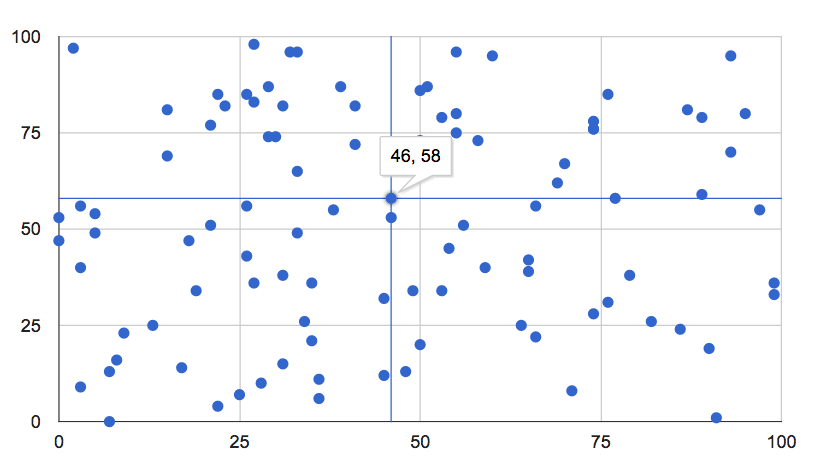
Crosshairs can appear on focus, selection, or both. They're
available for [scatter charts](https://developers.google.com/chart/interactive/docs/gallery/scatterchart),
[line charts](https://developers.google.com/chart/interactive/docs/gallery/linechart), [area charts](https://developers.google.com/chart/interactive/docs/gallery/areachart),
and for the line and area portions
of [combo
charts](https://developers.google.com/chart/interactive/docs/gallery/combochart).
## A Simple Example
Hover over the points below, or select them, to see crosshairs:
Here's a complete web page that creates the above chart, with the
line for crosshairs in bold:
```
```
## Crosshair Options
The following crosshair options are available:
|---|---|
| `crosshair: { trigger: 'both' }` | display on both focus and selection |
| `crosshair: { trigger: 'focus' }` | display on focus only |
| `crosshair: { trigger: 'selection' }` | display on selection only |
| `crosshair: { orientation: 'both' }` | display both horizontal and vertical hairs |
| `crosshair: { orientation: 'horizontal' }` | display horizontal hairs only |
| `crosshair: { orientation: 'vertical' }` | display vertical hairs only |
| `crosshair: { color: *color_string* }` | set crosshair color to *color_string*, e.g., `'red'` or `'#f00'` |
| `crosshair: { opacity: *opacity_number* }` | set crosshair opacity to *opacity_number*, with `0.0` being fully transparent and `1.0` fully opaque |
| `crosshair: { focused: { color: *color_string* } }` | set crosshair color to *color_string* on focus |
| `crosshair: { focused: { opacity: *opacity_number* } }` | set crosshair opacity to *opacity_number* on focus |
| `crosshair: { selected: { color: *color_string* } }` | set crosshair color to *color_string* on selection |
| `crosshair: { selected: { opacity: *opacity_number* } }` | set crosshair opacity to *opacity_number* on selection |