# Map template (deprecated)
The Map template presents a compact version of a list (as in the
[List template](https://developers.google.com/cars/design/create-apps/apps-for-drivers/templates/list-template))
or of a pane (detailed information with prominent actions, as in the
[Pane template](https://developers.google.com/cars/design/create-apps/apps-for-drivers/templates/pane-template))
next to a map.
> [!NOTE]
> **Note:** This template is deprecated in favor of the [Map + Content template](https://developers.google.com/cars/design/create-apps/apps-for-drivers/templates/map-content-template). Designers and developers should work to update their task flows to make use of the new template.
**Includes:**
- [Header](https://developers.google.com/cars/design/create-apps/apps-for-drivers/components/header) with optional [action strip](https://developers.google.com/cars/design/create-apps/apps-for-drivers/components/action-strip)
- [List rows](https://developers.google.com/cars/design/create-apps/apps-for-drivers/components/row) with optional small images OR list rows without images, augmented by up to 2 optional [buttons](https://developers.google.com/cars/design/create-apps/apps-for-drivers/components/button), where one can be designated as [primary](https://developers.google.com/cars/design/create-apps/apps-for-drivers/components/button#primary) (as as in the [Pane template](https://developers.google.com/cars/design/create-apps/apps-for-drivers/templates/pane-template))
- Base map (full-screen) drawn by the app
- Optional [map action strip](https://developers.google.com/cars/design/create-apps/apps-for-drivers/components/map-action-strip) with up to 4 buttons for map interactivity

> [!NOTE]
> **Note:** This template is for navigation apps only. To present similar information with no map, POI apps can use the [List template](https://developers.google.com/cars/design/create-apps/apps-for-drivers/templates/list-template) or the [Pane template](https://developers.google.com/cars/design/create-apps/apps-for-drivers/templates/pane-template).
## Map template examples
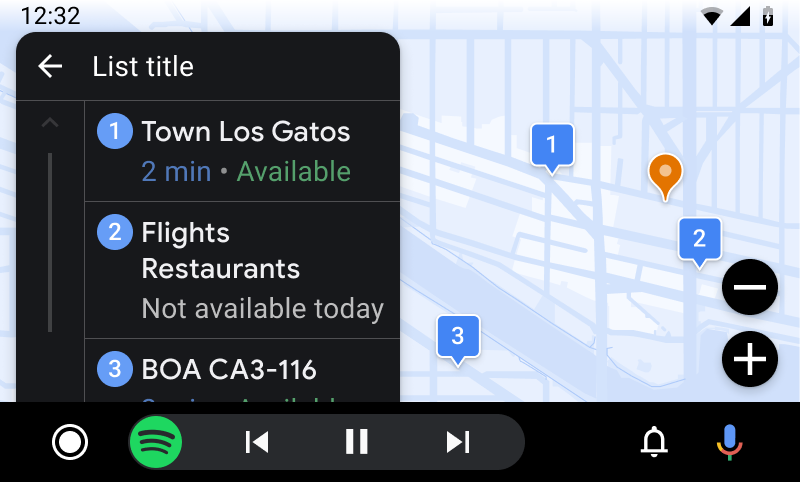 Map template with a list of items, next to a map showing the item locations (Android Auto example) 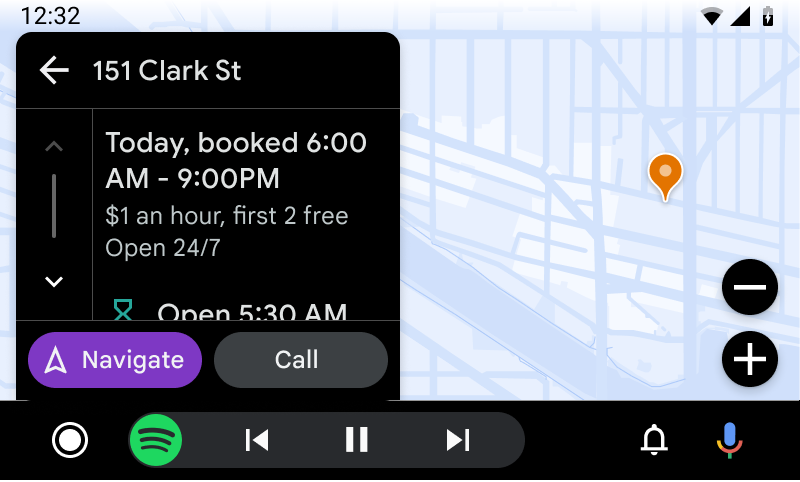 Map template with a pane view showing the details of a parking location with related actions, next to a map showing the parking lot location (Android Auto example)
## Map template UX requirements
App developers:
|---|---|
| **MUST** | Include at least one row of information if using a pane view. |
| **SHOULD** | Designate a [primary](https://developers.google.com/cars/design/create-apps/apps-for-drivers/components/button#primary) action when providing 2 actions. |
| **SHOULD** | Make navigation the primary action, when it's included as one of the actions. |
| **MAY** | Include up to 4 rows of information and 2 actions (in a pane view) OR up to the number of list rows allowed for the vehicle\* (in a list view). |
> [!NOTE]
> **\* Note:** To retrieve the list row limit for a given vehicle, use the [ConstraintManager API](https://developer.android.com/training/cars/apps#constraint-manager).