# Button
Buttons provide access to actions that drivers may need to take --- for example,
to confirm a choice or to return to the previous template.
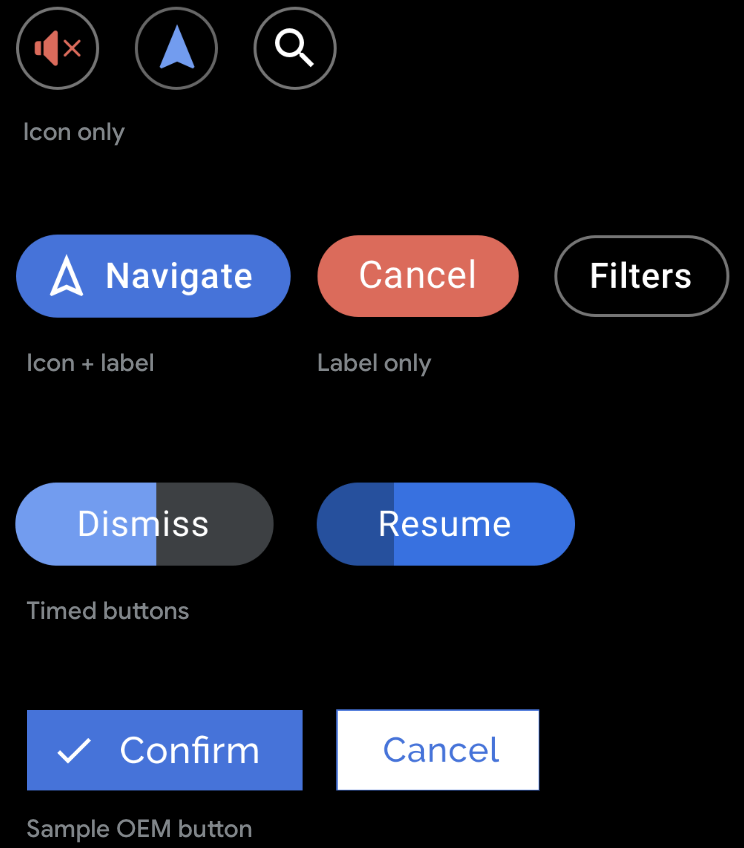
**Can include:**
- Icon only
- Label only
- Icon + label
## Template support
Buttons are supported by the
[Pane](https://developers.google.com/cars/design/create-apps/apps-for-drivers/templates/pane-template),
[Message](https://developers.google.com/cars/design/create-apps/apps-for-drivers/templates/message-template),
[Long Message](https://developers.google.com/cars/design/create-apps/apps-for-drivers/templates/long-message-template),
and [Sign-in](https://developers.google.com/cars/design/create-apps/apps-for-drivers/templates/sign-in-template) templates,
or on the [action strip](https://developers.google.com/cars/design/create-apps/apps-for-drivers/components/action-strip)
in any template.
## Guidance
You can supply foreground and background colors to replace the default colors.
However, note that vehicle OEMs can choose whether or not to use the colors you
supply in AAOS versions of your app. You can also specify which button is the
[primary button](https://developers.google.com/cars/design/create-apps/apps-for-drivers/components/button#primary) or create a [timed button](https://developers.google.com/cars/design/create-apps/apps-for-drivers/components/button#timed) with a built-in
timer.
Keep labels short to avoid truncation -- especially on the
[Navigation template](https://developers.google.com/cars/design/create-apps/apps-for-drivers/templates/navigation-template),
where there is less space than on other templates.
## Primary buttons
In certain templates that feature up to 2 buttons
([Message](https://developers.google.com/cars/design/create-apps/apps-for-drivers/templates/message-template),
[Long Message](https://developers.google.com/cars/design/create-apps/apps-for-drivers/templates/long-message-template),
and [Pane](https://developers.google.com/cars/design/create-apps/apps-for-drivers/templates/pane-template)),
you can optionally tag one button as primary to represent the primary
action. The primary button then gets special treatment in the UI, such as
highlighting with the app accent color, to enhance its prominence and usability.
> [!NOTE]
> **Note:** On AAOS, vehicle OEMs can apply their own color to the primary button and determine its horizontal order for the other button.
  In this Android Auto example, the primary button on
the Message template is colored with an accent color supplied by the app.
In this AAOS example, the vehicle OEM has applied its
own accent color and chosen to put the primary button on the right.
## Timed buttons
Apps can create buttons associated with default actions that are taken
automatically if the user doesn't act within a specified amount of time
(customizable by the app). For a sample flow using this strategy, see
[Respond to a timed alert](https://developers.google.com/cars/design/create-apps/sample-flows/respond-to-timed-alert).
To convey the countdown to the user, the button itself becomes a timer, with a
built-in progress indicator. The timer countdown is indicated by the shading
that moves horizontally across the button.
The app library determines the timer color based on the app's suggested
background color for the button, modifying it as needed to ensure sufficient
contrast.
To create a timed button, assign a
[default flag](https://developer.android.com/reference/androidx/car/app/model/Action#FLAG_DEFAULT())
to it.
 
In these examples, the **Resume** or **Accept** action will automatically be
taken if the user doesn't choose the other action before the shaded progress
indicator moves all the way across the button.