# Customization
OEMs can freely customize the portrait reference design. They should apply
global customizations to make the design consistent with their entire IVI
system, as described in
[Global styling and layout customization](https://developers.google.com/cars/design/automotive-os/product-experience/system-ui/portrait-reference/customization#global).
They can also customize specific aspects of the portrait reference design,
taking particular note of the guidance for the following:
- [Base layer](https://developers.google.com/cars/design/automotive-os/product-experience/system-ui/portrait-reference/customization#base-layer)
- [Status bar](https://developers.google.com/cars/design/automotive-os/product-experience/system-ui/portrait-reference/customization#status-bar)
- [System navigation bar](https://developers.google.com/cars/design/automotive-os/product-experience/system-ui/portrait-reference/customization#sys-nav-bar)
## Global styling and layout customization
Partner OEMs must customize the reference design to reflect their brand values,
optimize for their display configuration, and ensure consistency across their
IVI system.
Globally customizable aspects include:
- [Styling](https://developers.google.com/cars/design/automotive-os/product-experience/system-ui/portrait-reference/customization#style)
- [Layouts](https://developers.google.com/cars/design/automotive-os/product-experience/system-ui/portrait-reference/customization#layouts)
- [Interaction patterns](https://developers.google.com/cars/design/automotive-os/product-experience/system-ui/portrait-reference/customization#patterns)
> [!NOTE]
> **Note:** The IVI system includes, but is not limited to: setup screens, home screen, launcher, Notification Center, HUNs, system bars, system apps (such as Media, Dialer, Settings, and Calendar), and components (such as dialogs, buttons, sliders, and switches).
### Styling
Partner OEMs must customize styling of the portrait reference design to
differentiate their brand and maintain stylistic consistency with other parts of
their IVI system.
Customizable styling includes icon styles, font size and weight, application of
color, elevation, and other visual effects.
### Layouts
OEMs should customize layouts only when necessary --- for example, when needed to
adapt the UI to fit their hardware.
Customizable aspects of layouts for the portrait reference design include:
- **Location of components**, such as where the toolbar is placed within an app layout
- **Arrangement of elements within a component**, such as actions within a toolbar
### Interaction patterns
OEMs should **customize interaction patterns only when necessary**.
Interaction patterns in the portrait reference design include those provided for
navigation, search, and browse.
Situations where it might be necessary to customize interaction patterns might
include adapting them to specific hardware needs, such as different input
mechanisms or smaller screens that need to run full-size apps.
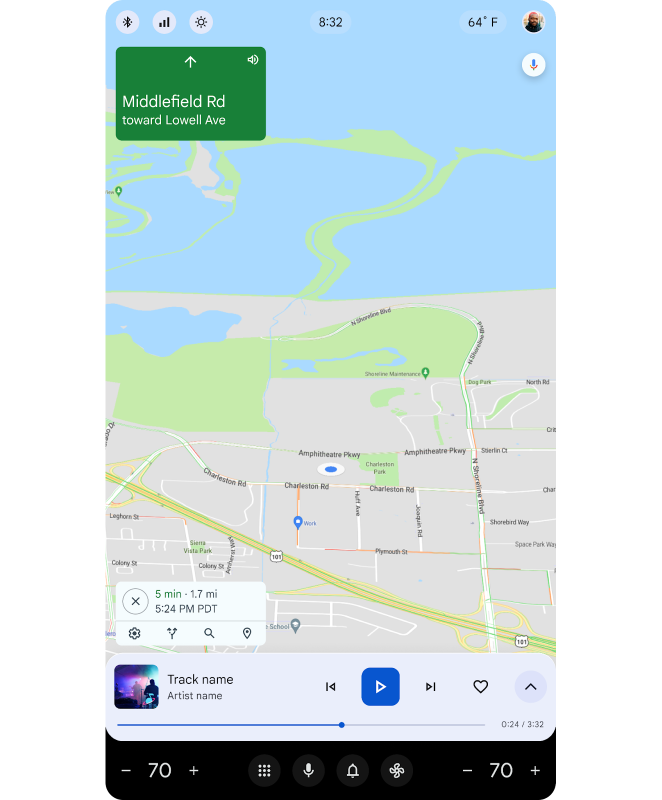
### Base layer customization
OEMs can choose the type of apps that can run on the base layer. For
example, navigation apps or parking apps.
Google Automotive strongly recommends running navigation apps on the base
layer and all other apps on the top layer.
### Status bar customization
**OEMs can customize** the following aspects of the status bar:
- **Contents of quick controls**: which settings are displayed in the drop-down menu
- **Position relative to apps**: whether apps appear entirely below or partly behind the status bar
- **Default opacity**: whether the status bar is opaque or transparent
- **Default color** (if the status bar is opaque)


App developers can override the following aspects of the status bar:
- **Opacity** (whether it's opaque or transparent)
- **Color** (if the status bar is opaque and the app is positioned entirely below the status bar)
### System navigation bar customization
OEMs and users can customize certain aspects of the system navigation bar,
including the comfort controls, notifications, app launcher, and voice
assistant.


**OEMs** can customize:
- **Digital assistant**: OEMs can customize the digital assistant to be used in the car. For example, the Google Assistant.
**Users** can customize:
- **App launcher**: Users can organize apps based on their preference.