
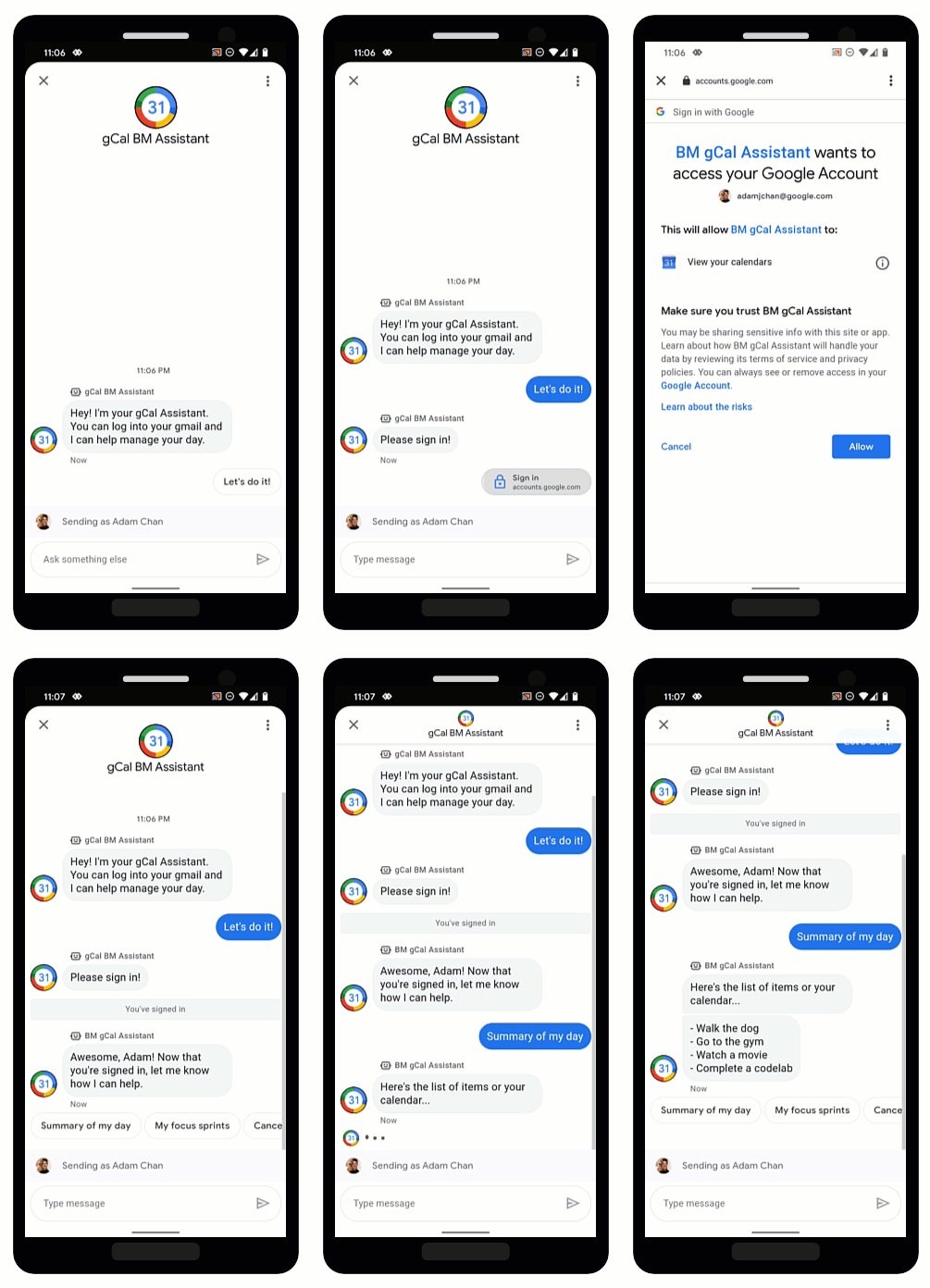
OAuth به نمایندگان اجازه میدهد تا هویت کاربران را تأیید کنند و اطلاعات شخصیسازیشده را به روشی امن در مکالمات ارائه دهند. با ورود کاربران به یک ارائهدهنده OAuth معتبر، نمایندگان میتوانند به دادههای کاربر دسترسی پیدا کنند که میتواند به ارائه پاسخهای سریع از طریق اتوماسیون کمک کند و در زمان نمایندگان زنده صرفهجویی کند.
پیامهای تجاری از OAuth 2.0 با پیشنهاد درخواست احراز هویت پشتیبانی میکنند، که کاربران را وادار میکند تا به یک ارائهدهنده OAuth که برای عامل پیکربندی میکنید، وارد شوند. پس از ورود موفقیتآمیز کاربر، پیامهای تجاری یک کد مجوز را به عنوان یک پیام به عامل ارسال میکند.
زمانی که کد مجوز را از ارائهدهنده OAuth دریافت کردید، میتوانید با APIهای آنها ادغام شوید و از جریانهای مکالمهای که به اطلاعات هویت کاربر نیاز دارند، پشتیبانی کنید. به خاطر داشته باشید که هر سرویسی که با آن تعامل دارید، شرایط استفاده خاص خود را دارد.
پیکربندی OAuth برای یک عامل
برای فعال کردن پیشنهاد درخواست احراز هویت برای یک عامل، ابتدا باید OAuth را پیکربندی کنید.
برای مشخص کردن پیکربندی OAuth، شما یک درخواست PATCH با رابط برنامهنویسی کاربردی ارتباطات تجاری (Business Communications API) ارسال میکنید تا فیلد endpointUrl عامل بهروزرسانی شود.
پس از مشخص کردن URL نقطه پایانی، باید URI های تغییر مسیر را برای عامل خود ذخیره کنید و URI های تغییر مسیر را در اطلاعات ارائه دهنده OAuth خود به روز کنید.
پیشنیازها
شما به اقلام زیر نیاز دارید:
- یک ارائهدهندهی OAuth که از مشخصات OAuth 2.0 پیروی میکند
- مسیر کلید حساب سرویس پروژه GCP شما در دستگاه توسعهتان
nameنماینده (برای مثال، "brands/12345/agents/67890")اگر
nameنماینده را نمیدانید، به فهرست همه نمایندگان یک برند مراجعه کنید.آدرس اینترنتی (URL) نقطه پایانی که کاربران از طریق آن وارد ارائهدهنده OAuth میشوند
درخواست بهروزرسانی را ارسال کنید
برای بهروزرسانی عامل، دستور زیر را اجرا کنید. متغیرها را با مقادیری که در پیشنیازها شناسایی کردهاید، جایگزین کنید.
curl -X PATCH \
"https://businesscommunications.googleapis.com/v1/brands/BRAND_ID/agents/AGENT_ID?updateMask=businessMessagesAgent.authorizationConfig" \
-H "Content-Type: application/json" \
-H "User-Agent: curl/business-communications" \
-H "$(oauth2l header --json PATH_TO_SERVICE_ACCOUNT_KEY businesscommunications)" \
-d "{
    'businessMessagesAgent': {
        'authorizationConfig': {
            'endpointUrl': 'ENDPOINT_URL',
        },
    },
}"
بهروزرسانی آدرسهای URL تغییر مسیر
اکنون که OAuth برای عامل پیکربندی شده است، باید چهار URI ریدایرکت به ارائهدهنده OAuth خود اضافه کنید:
-
https://business.google.com/callback -
https://business.google.com/callback? -
https://business.google.com/message?az-intent-type=1 -
https://business.google.com/message?az-intent-type=1&
شما باید تمام URL های تغییر مسیر را در اطلاعات ارائه دهنده OAuth خود وارد کنید.
فرآیند بهروزرسانی URLهای ریدایرکت بسته به ارائهدهندهی OAuth متفاوت است. برای دستورالعملها به ارائهدهندهی OAuth خود مراجعه کنید.
اکنون که OAuth برای عامل شما پیکربندی شده است، میتوانید کاربران را با پیشنهاد درخواست احراز هویت (Authentication request) احراز هویت کنید.
احراز هویت کاربر
پس از پیکربندی OAuth برای یک عامل، میتوانید با پیشنهاد درخواست احراز هویت ، کاربران را به ورود به سیستم ترغیب کنید.
پیشنیازها
شما به اقلام زیر نیاز دارید:
- مسیر کلید حساب سرویس پروژه GCP شما در دستگاه توسعهتان
nameنماینده (برای مثال، "brands/12345/agents/67890")اگر
nameنماینده را نمیدانید، به فهرست همه نمایندگان یک برند مراجعه کنید.شناسه کلاینت از ارائهدهنده OAuth شما
الزامات چالش کد از ارائه دهنده OAuth شما
محدودههای ارائهدهنده OAuth شما
ارسال پیشنهاد درخواست احراز هویت
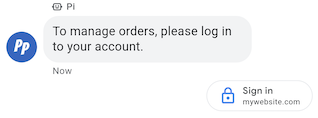
برای احراز هویت کاربر،
- رشتههای تأییدکننده کد و چالش کد را برای درخواست OAuth ایجاد کنید. برای الزامات و گزینهها به ارائهدهنده OAuth خود مراجعه کنید.
- پیامی حاوی پیشنهاد درخواست احراز هویت ارسال کنید.
حلقه
# Copyright 2021 Google LLC # # Licensed under the Apache License, Version 2.0 (the "License"); # you may not use this file except in compliance with the License. # You may obtain a copy of the License at # https://www.apache.org/licenses/LICENSE-2.0 # Unless required by applicable law or agreed to in writing, software # distributed under the License is distributed on an "AS IS" BASIS, # WITHOUT WARRANTIES OR CONDITIONS OF ANY KIND, either express or implied. # See the License for the specific language governing permissions and # limitations under the License. # This code sends a text message to the user with an authentication request suggestion # that allows the user to authenticate with OAuth. It also has a fallback text. # Read more: https://developers.google.com/business-communications/business-messages/guides/how-to/message/send?hl=en#authentication-request-suggestion # Replace the __CONVERSATION_ID__ with a conversation id that you can send messages to # Make sure a service account key file exists at ./service_account_key.json # Replace the __CLIENT_ID__ # Replace the __CODE_CHALLENGE__ # Replace the __SCOPE__ curl -X POST "https://businessmessages.googleapis.com/v1/conversations/__CONVERSATION_ID__/messages" \ -H "Content-Type: application/json" \ -H "User-Agent: curl/business-messages" \ -H "$(oauth2l header --json ./service_account_key.json businessmessages)" \ -d "{ 'messageId': '$(uuidgen)', 'text': 'Sign in to continue the conversation.', 'fallback': 'Visit support.growingtreebank.com to continue.', 'suggestions': [ { 'authenticationRequest': { 'oauth': { 'clientId': '__CLIENT_ID__', 'codeChallenge': '__CODE_CHALLENGE__', 'scopes': [ '__SCOPE__', ], }, }, }, ], 'representative': { 'avatarImage': 'https://developers.google.com/identity/images/g-logo.png', 'displayName': 'Chatbot', 'representativeType': 'BOT' } }"
نود جی اس
/** * This code sends a text message to the user with an authentication request suggestion * that allows the user to authenticate with OAuth. It also has a fallback text. * Read more: https://developers.google.com/business-communications/business-messages/guides/how-to/message/send?hl=en#authentication-request-suggestion * * This code is based on the https://github.com/google-business-communications/nodejs-businessmessages Node.js * Business Messages client library. */ /** * Before continuing, learn more about the prerequisites for authenticating * with OAuth at: https://developers.google.com/business-communications/business-messages/guides/how-to/integrate/oauth?hl=en * * Edit the values below: */ const PATH_TO_SERVICE_ACCOUNT_KEY = './service_account_key.json'; const CONVERSATION_ID = 'EDIT_HERE'; const OAUTH_CLIENT_ID = 'EDIT_HERE'; const OAUTH_CODE_CHALLENGE = 'EDIT_HERE'; const OAUTH_SCOPE = 'EDIT_HERE'; const businessmessages = require('businessmessages'); const uuidv4 = require('uuid').v4; const {google} = require('googleapis'); // Initialize the Business Messages API const bmApi = new businessmessages.businessmessages_v1.Businessmessages({}); // Set the scope that we need for the Business Messages API const scopes = [ 'https://www.googleapis.com/auth/businessmessages', ]; // Set the private key to the service account file const privatekey = require(PATH_TO_SERVICE_ACCOUNT_KEY); /** * Posts a message to the Business Messages API along with an authentication request. * * @param {string} conversationId The unique id for this user and agent. * @param {string} representativeType A value of BOT or HUMAN. */ async function sendMessage(conversationId, representativeType) { const authClient = await initCredentials(); if (authClient) { // Create the payload for sending a message along with an authentication request const apiParams = { auth: authClient, parent: 'conversations/' + conversationId, resource: { messageId: uuidv4(), representative: { representativeType: representativeType, }, fallback: 'Visit support.growingtreebank.com to continue.', text: 'Sign in to continue the conversation.', suggestions: [ { authenticationRequest: { oauth: { clientId: OAUTH_CLIENT_ID, codeChallenge: OAUTH_CODE_CHALLENGE, scopes: [OAUTH_SCOPE] } } }, ], }, }; // Call the message create function using the // Business Messages client library bmApi.conversations.messages.create(apiParams, {auth: authClient}, (err, response) => { console.log(err); console.log(response); }); } else { console.log('Authentication failure.'); } } /** * Initializes the Google credentials for calling the * Business Messages API. */ async function initCredentials() { // configure a JWT auth client const authClient = new google.auth.JWT( privatekey.client_email, null, privatekey.private_key, scopes, ); return new Promise(function(resolve, reject) { // authenticate request authClient.authorize(function(err, tokens) { if (err) { reject(false); } else { resolve(authClient); } }); }); } sendMessage(CONVERSATION_ID, 'BOT');
پایتون
"""Sends a text message to the user with an authentication request suggestion. It allows the user to authenticate with OAuth and has a fallback text. Read more: https://developers.google.com/business-communications/business-messages/guides/how-to/message/send?hl=en#authentication-request-suggestion This code is based on the https://github.com/google-business-communications/python-businessmessages Python Business Messages client library. """ import uuid from businessmessages import businessmessages_v1_client as bm_client from businessmessages.businessmessages_v1_messages import BusinessMessagesAuthenticationRequest from businessmessages.businessmessages_v1_messages import BusinessMessagesAuthenticationRequestOauth from businessmessages.businessmessages_v1_messages import BusinessmessagesConversationsMessagesCreateRequest from businessmessages.businessmessages_v1_messages import BusinessMessagesMessage from businessmessages.businessmessages_v1_messages import BusinessMessagesRepresentative from businessmessages.businessmessages_v1_messages import BusinessMessagesSuggestion from oauth2client.service_account import ServiceAccountCredentials # Before continuing, learn more about the prerequisites for authenticating # with OAuth at: https://developers.google.com/business-communications/business-messages/guides/how-to/integrate/oauth?hl=en # Edit the values below: path_to_service_account_key = './service_account_key.json' conversation_id = 'EDIT_HERE' oauth_client_id = 'EDIT_HERE' oauth_code_challenge = 'EDIT_HERE' oauth_scope = 'EDIT_HERE' credentials = ServiceAccountCredentials.from_json_keyfile_name( path_to_service_account_key, scopes=['https://www.googleapis.com/auth/businessmessages']) client = bm_client.BusinessmessagesV1(credentials=credentials) representative_type_as_string = 'BOT' if representative_type_as_string == 'BOT': representative_type = BusinessMessagesRepresentative.RepresentativeTypeValueValuesEnum.BOT else: representative_type = BusinessMessagesRepresentative.RepresentativeTypeValueValuesEnum.HUMAN # Create a text message with an authentication request message = BusinessMessagesMessage( messageId=str(uuid.uuid4().int), representative=BusinessMessagesRepresentative( representativeType=representative_type ), text='Sign in to continue the conversation.', fallback='Visit support.growingtreebank.com to continue.', suggestions=[ BusinessMessagesSuggestion( authenticationRequest=BusinessMessagesAuthenticationRequest( oauth=BusinessMessagesAuthenticationRequestOauth( clientId=oauth_client_id, codeChallenge=oauth_code_challenge, scopes=[oauth_scope]) ) ), ] ) # Create the message request create_request = BusinessmessagesConversationsMessagesCreateRequest( businessMessagesMessage=message, parent='conversations/' + conversation_id) # Send the message bm_client.BusinessmessagesV1.ConversationsMessagesService( client=client).Create(request=create_request)
- وقتی کاربر روی پیشنهاد ضربه میزند و با موفقیت وارد سیستم میشود، شما پیامی را در وبهوک نماینده خود دریافت میکنید . کد مجوز را از فیلد
authenticationResponse.codeبازیابی کنید.
پس از دریافت پیام، میتوانید کد مجوز و تأییدکننده کد را با یک توکن دسترسی از ارائهدهنده OAuth خود مبادله کنید. میتوانید با توکن دسترسی به دادههای کاربر دسترسی پیدا کنید.
برای نمونه مکالمه با احراز هویت، شامل نمونههای کد، به احراز هویت کاربر مراجعه کنید.