The optional ARCore Extensions for AR Foundation package adds functionality to Unity's [AR Foundation](https://developers.google.com/ar/develop/unity-arf) package, enabling you to use features such as [Cloud Anchors](https://developers.google.com/ar/develop/unity-arf/cloud-anchors/overview), [camera configuration filters](https://developers.google.com/ar/develop/unity-arf/camera-configs), and [Recording and Playback](https://developers.google.com/ar/develop/unity-arf/recording-and-playback) in your app.
## Requirements
To develop with ARCore Extensions for AR Foundation, you will need the following:
### Android
**Hardware**
- An [ARCore supported](https://developers.google.com/ar/discover/supported-devices) Android device
- A USB cable for connecting your device to your development machine
**Software**
- [Unity **2019.4.3f1 or later**](https://unity3d.com/get-unity/update) with [Android Build Support](https://docs.unity3d.com/Manual/android-sdksetup.html)
- [AR Foundation](https://docs.unity3d.com/Packages/com.unity.xr.arfoundation@4.2/manual) **4.1.5 or later** (automatically installed with the ARCore Extensions for AR Foundation SDK)
- [ARCore XR Plugin](https://docs.unity3d.com/Packages/com.unity.xr.arcore@4.2/manual) **4.1.5 or later** (automatically installed with the ARCore Extensions for AR Foundation SDK)
### iOS
**Hardware**
- An ARKit-compatible, [ARCore-supported device](https://developers.google.com/ar/discover/supported-devices)
- A USB cable for connecting your device to your development machine
**Software**
- [Unity **2019.4.3f1 or later**](https://unity3d.com/get-unity/update) with [iOS Build Support](https://docs.unity3d.com/Manual/UnityasaLibrary-iOS.html)
- [AR Foundation](https://docs.unity3d.com/Packages/com.unity.xr.arfoundation@4.2/manual) **4.1.5 or later** (automatically installed with the ARCore Extensions for AR Foundation SDK)
- [ARKit XR Plugin](https://docs.unity3d.com/Packages/com.unity.xr.arkit@4.2/manual) **4.1.5 or later** (automatically installed with the ARCore Extensions for AR Foundation SDK)
- [Xcode **16.0 or later**](https://developer.apple.com/xcode/)
## Install the ARCore Extensions package
ARCore Extensions for AR Foundation supports AR Foundation versions 4 and 5.
The installation instructions differ depending on AR Foundation's version.
To determine the version of AR Foundation, follow these steps:
1. Navigate to **Window \> Package Manager**.
2. Next to **Packages** , select **Unity Registry**.
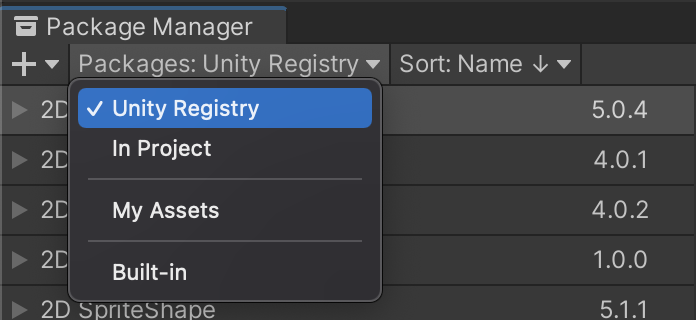
3. In the search bar, type "AR Foundation".

4. The installed version of AR Foundation is displayed.
Select the installed version of AR Foundation: