# Device admin deprecation
## Summary
Android originally introduced support for management of mobile devices in
Android 2.2. Since then, the needs of enterprises have evolved. Devices are
increasingly accessing more confidential resources and being used in a wider
variety of use cases than Android's original [device admin
API](https://developer.android.com/guide/topics/admin/device-admin.html) was
designed for. Some of these use cases include:
- Separation of work data from personal data in mixed use or BYOD deployments.
- Distribution of business applications and management of their data through Google Play and managing the Google Accounts needed for this.
- Locking devices into a kiosk to tailor them for specific application uses.
- Certificate management to allow for access to PKI secured resources.
- Establishment of per-app and per-profile VPNs to support remote enterprise applications while protecting privacy.
Simultaneously, enterprises have demanded a higher trust relationship than
device admin was designed to support. Because a device admin can be enabled by
any application that the user authorizes, it doesn't support several enterprise
use cases, such as:
- Setting factory reset protection (FRP) to ensure devices remain managed and can be recovered when employees leave.
- Secure reset of device passwords on encrypted devices.
- Prevent removal of the device administrator (removed in Nougat for security reasons).
- Establishment of admin defined passcodes to lock the user out of a device (removed in Android 7.0 Nougat for security reasons).
Device admin has been considered a legacy management approach since Android's
managed device (device owner) and work profile (profile owner) modes were
introduced in Android 5.0. Because device admin isn't well suited to support
today's enterprise requirements, we recommend customers and partners adopt
managed device and work profile modes to manage their devices from now on. To
support this transition and focus our resources toward Android's current
management features, we deprecated device admin for enterprise use in the
Android 9.0 release and we'll remove these functions in the Android 10.0
release.
## Deprecated policies
With the release of Android 9.0, the following policies are marked as
deprecated when invoked by a device admin, but the APIs otherwise continue to
function.
- [`USES_POLICY_DISABLE_CAMERA`](https://developer.android.com/reference/android/app/admin/DeviceAdminInfo.html#USES_POLICY_DISABLE_CAMERA)
- [`USES_POLICY_DISABLE_KEYGUARD_FEATURES`](https://developer.android.com/reference/android/app/admin/DeviceAdminInfo.html#USES_POLICY_DISABLE_KEYGUARD_FEATURES)
- [`USES_POLICY_EXPIRE_PASSWORD`](https://developer.android.com/reference/android/app/admin/DeviceAdminInfo.html#USES_POLICY_EXPIRE_PASSWORD)
- [`USES_POLICY_LIMIT_PASSWORD`](https://developer.android.com/reference/android/app/admin/DeviceAdminInfo.html#USES_POLICY_LIMIT_PASSWORD)
Starting with the release of Android 10.0, the above-mentioned policies will
throw a [`SecurityException`](https://developer.android.com/reference/java/lang/SecurityException)
when invoked by a device admin on apps targeting [API level 29](https://source.android.com/setup/start/build-numbers).
With the release of Android 11.0, the [`USES_POLICY_RESET_PASSWORD`](https://developer.android.com/reference/android/app/admin/DeviceAdminInfo.html#USES_POLICY_RESET_PASSWORD)
is marked as deprecated when invoked by a device admin and stops functioning.
It will throw a [`SecurityException`](https://developer.android.com/reference/java/lang/SecurityException)
on apps targeting [API level 24](https://source.android.com/setup/start/build-numbers#platform-code-names-versions-api-levels-and-ndk-releases) and above.
Some applications use the device admin for consumer device administration, e.g.
locking and wiping a lost device. The following policies will continue to be
available to enable this:
- [`USES_POLICY_WIPE_DATA`](https://developer.android.com/reference/android/app/admin/DeviceAdminInfo.html#USES_POLICY_WIPE_DATA)
- [`USES_POLICY_FORCE_LOCK`](https://developer.android.com/reference/android/app/admin/DeviceAdminInfo.html#USES_POLICY_FORCE_LOCK)
## Update your implementation
To replace the keyguard and password policies marked as deprecated in the
section above, apps---including those that manage Exchange ActiveSync
deployments---should use the method described in [Screen lock quality
check](https://developer.android.com/work/versions/android-10.0#screen_lock_quality_check).
## Timelines
**Android 9.0**: Device admin is marked deprecated for enterprise use
through updates to documentation. Existing functionality continues to work
for applications targeting the API level 28, though its use is discouraged. All
partners and customers should migrate to work profiles or fully managed devices
before the release of Android 10.0.
**Android 10.0** : The above policies will no longer be available to DPCs
targeting [API level 29](https://source.android.com/setup/start/build-numbers).
## What this means for IT administrators
We recommend partners and customers start to prepare now for this change. Usage
of device admin can be identified by a screen (See **Figure 1** for an example),
when activating management of your device:
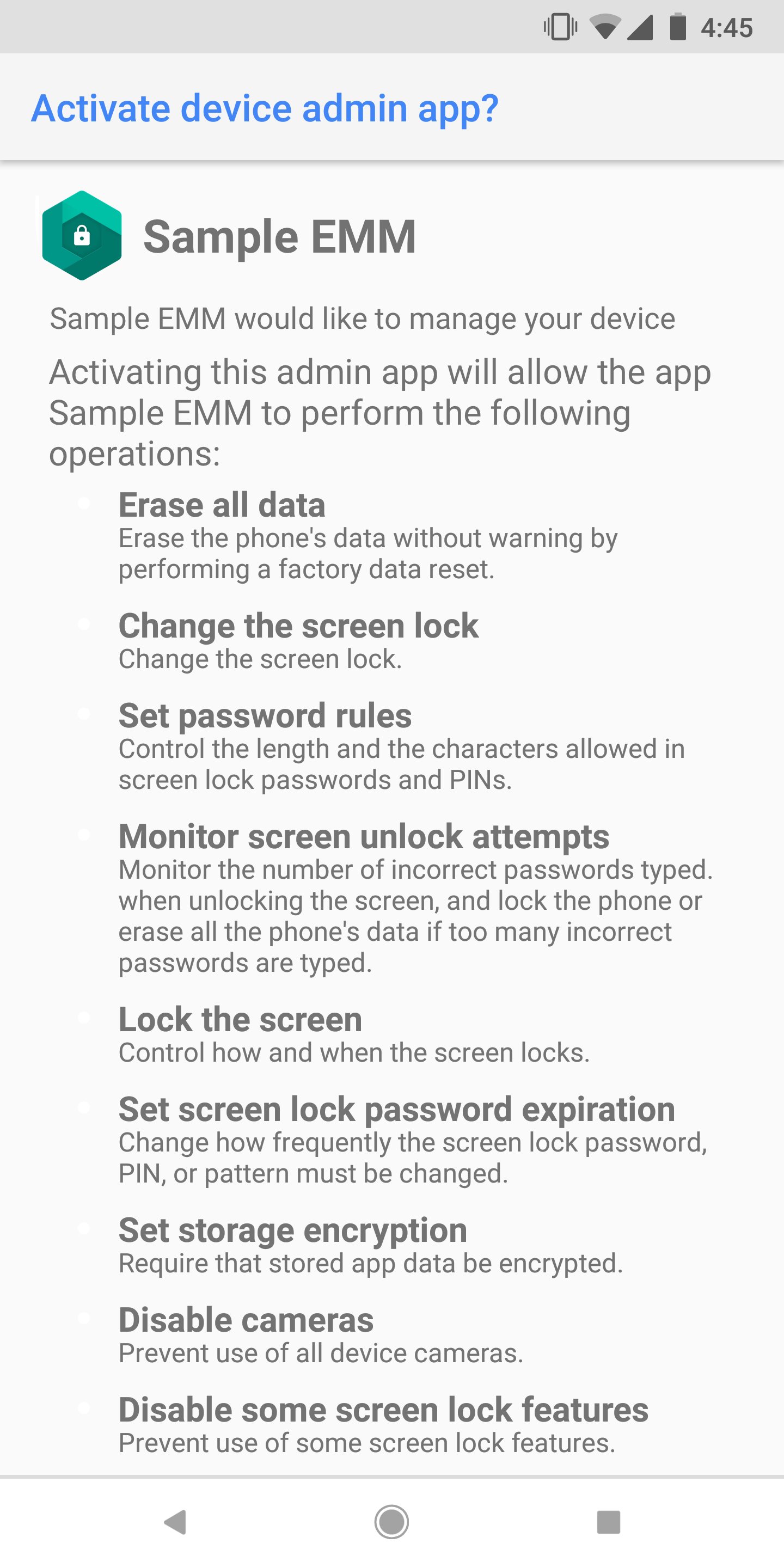 ***Figure 1.** An activity like this is shown by
the system when device admin is activated.*
If you currently use device admin to manage your devices, two strategies are
available to move to Android's current management APIs. To enroll a device for
management, you'll need an Enterprise Mobility Management (EMM) provider that
supports either Android's work profile (profile owner) or managed device (device
owner) mode. Customers should choose the management mode which best suits their
deployment. In some cases, both strategies may be employed simultaneously.
A list of compatible offerings is available
[here](https://androidenterprisepartners.withgoogle.com/emm/). Your
EMM software provider can provide specific guidance on their product offerings.
### Managing personal (bring-your-own) devices
Personal devices are supported with Android's work profile mode. A work profile
is deployed by an EMM to provide an OS level container that provides separation
between a user's work and personal applications and data on their devices.
Organizations benefit from the ability to deploy applications using managed
Google Play along with greater assurance that data isn't accidentally, or
purposefully shared with unauthorized applications. IT administrators can also
selectively wipe enterprise data independently from the user's own files should
they leave the organization.
### Managing company-owned devices
Company-owned Android devices are supported by deploying devices in managed
device mode. A managed device is enrolled using an EMM, which is able to provide
full lifecycle management over the Android device and its data. This includes
lockdown of hardware features, protection against factory reset and
unenrollment; administrative remote wipe and reset of the entire device; and
tailoring of applications including support for kiosk or single application
deployments. Generally, organizations using managed device mode will administer
at least one of three deployment types, though these can be mixed and matched
throughout an organization's fleet depending on their requirements:
- **Work only:** Work only deployments generally target workers who use a device for a variety of applications. Personal use isn't supported with this method.
- **Personally-enabled:** Personally enabled deployments generally target workers who have a device provided to them by their employer, but want the flexibility to also use personal applications on the device. The deployment of a work profile on a managed device allows the employee to run work applications alongside personal applications without compromising corporate data.
- **Dedicated device:** Dedicated device deployments generally encompass managed devices, sometimes called "corporate owned, single use," or "COSU," that lock down hardware and applications to tailor the device to the specific work functions an employee must perform.
We recommend that corporate-owned devices be deployed as a managed device, as it
allows for management of the whole device lifecycle including full device wipe
and factory reset protection policies.
### Migration guidance for customers
#### BYOD: Device admin to deployments of a work profile
We recommend work profiles be used for all personally-owned devices. Migration
from legacy device admin to a work profile can be handled with minimal
disruption. This can be handled either by pushing personal devices to install a
work profile, or by having new devices enroll with a work profile as existing
devices phase out of the fleet.
#### Company-owned devices: Device admin to managed device
We recommend that company-owned devices be set up as fully managed devices.
Migrating a device from device admin to managed device requires a factory reset.
Since this is more disruptive to users, we suggest a phased adoption, where new
devices are enrolled as fully managed devices but existing devices are left on
device admin.
### Types of migration
Some general migration strategies are briefly defined as:
- **Big bang:** Large populations of existing users are asked to upgrade to
either a managed device or work profile in one or more large waves of
upgrades.
- **Phased adoption:** New users and new devices are configured with the new
management modes as they are enrolled. Older device admin devices are aged out
of the fleet through natural attrition.
## FAQ
### What about older devices?
When Android 10.0 is released, we expect all devices running it to
support managed device or work profile modes. Older devices can be migrated as
described earlier or managed using device admin until they are replaced.
### What if I have non-EMM provided apps that uses device admin?
Sometimes, applications like an e-mail application can become a device admin in
response to enterprise policies enforced on email servers. These applications
will be subject to the same restrictions from the release of Android 10.0: They
may become device admins but won't be able to enforce password policies or
hardware restrictions. Depending on the use case, these applications may:
- Inflate a work profile themselves (become a DPC).
- Prompt the user to set the application up into another EMM (under the control of another DPC if needed).
- Choose to implement their own (in app) password restrictions.
We recommend that these apps have a mechanism to detect if a device is managed
by an EMM and defer to the EMM provider for management. This detection can be
achieved via a token exchange through Mobile Configuration Management (MCM).
### What happens when Android 10.0 is released?
The deprecated behaviors will stop working and will return a security exception
for apps running Android 10.0 and targeting that API level.