Google Play Protect offers built-in, proactive protection against malware and
unwanted software to help keep users' devices and data safe on Android devices
with Google Play services.
This page has more information about each of the various Play Protect warnings
that users may encounter, with guidance for developers to understand why an app
is being affected by a Play Protect warning, and some alternatives or commonly
utilized solutions to resolve an issue, before submitting an appeal to Google
Play Protect.
## App blocked to protect your device
> [!TIP]
> **Note:** This protection is active in select markets. If concerned that your app is blocked by this protection after reviewing the guidance, request an appeal of the Google Play Protect action
**Prompt Displayed:** "This app can request access to sensitive data. This can
increase the risk of identity theft or financial fraud."
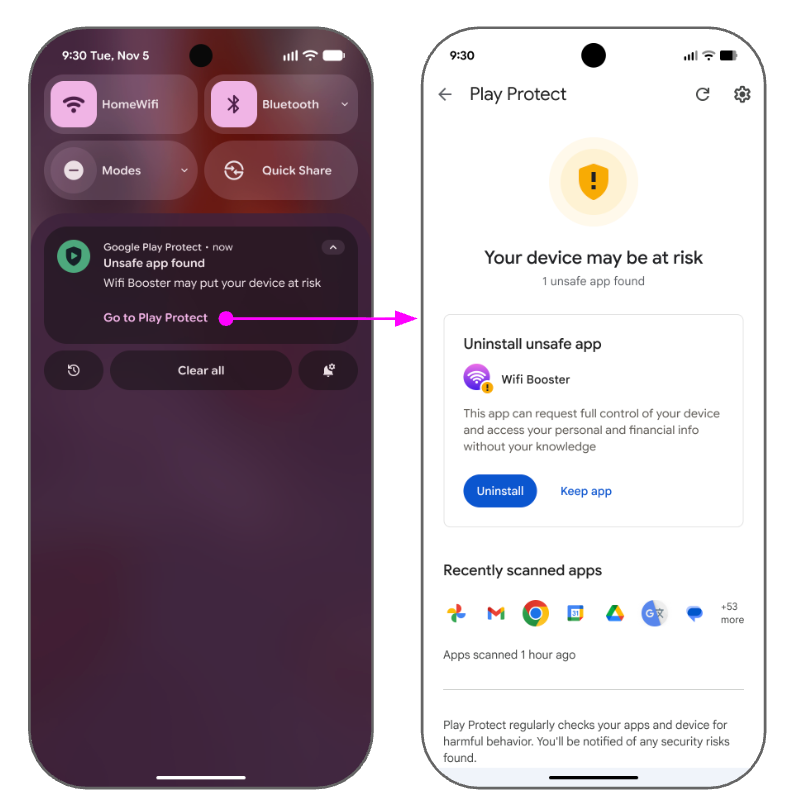 **Figure 1.** Message that appears when a deceptive accessibility tool is identified.
**Reason for this notification:** Applications that are downloaded directly from
online sources like web browsers, messaging apps, or file managers, are commonly
referred to as Internet-sideloading sources. If these applications also
use sensitive permissions---[`RECEIVE_SMS`](https://developer.android.com/reference/android/Manifest.permission#RECEIVE_SMS), [`READ_SMS`](https://developer.android.com/reference/android/Manifest.permission#READ_SMS),
[`NOTIFICATION_LISTENER`](https://developer.android.com/reference/android/Manifest.permission#BIND_NOTIFICATION_LISTENER_SERVICE), and
[`ACCESSIBILITY`](https://developer.android.com/reference/android/Manifest.permission#BIND_ACCESSIBILITY_SERVICE)---they're considered high-risk applications
because these permissions are frequently abused for financial fraud. When a user
attempts to install an application from these sources and any of these sensitive
permissions are declared, Google Play Protect will automatically block the
installation. Secondly, if attempting to enroll devices into enterprise
management, any apps from the same internet-sideloading sources with the same
sensitive permissions will also be blocked.
**Recommended Developer Actions:**
- Ensure that applications are following [developer guidelines](https://developer.android.com/guide) and [best
practices](https://developer.android.com/quality/privacy-and-security).
- Ensure that [APIs](https://developer.android.com/reference) and [permissions](https://developer.android.com/guide/topics/permissions/overview) are being used for their intended purposes.
- Make sure that your application is using only the [*minimum* permissions](https://developer.android.com/privacy-and-security/about#permissions) needed to carry out the required functions of your application.
- Ensure that your application is following responsible [privacy](https://developer.android.com/privacy-and-security/about) and [security](https://developer.android.com/privacy-and-security/security-tips) guidelines.
- Use the [SMS Retriever or User Consent APIs](https://developers.google.com/identity/sms-retriever/choose-an-api) rather than the READ_SMS permission when conducting an SMS-based verification process.
- Common (non-exhaustive) examples of permissions use cases:
- SMS examples:
- Allowed:
- Apps whose primary purpose is to handle SMS / MMS content.
- Apps that back up SMS content after prominent disclosure and user consent.
- Disallowed:
- Apps that access or send SMS content without explicit user consent.
- Apps that request SMS permissions for the sole purpose of validating SMS-based verification. (Use the allowed [SMS
Retriever or User Consent APIs](https://developers.google.com/identity/sms-retriever/choose-an-api) instead.)
- Bind Notification Listener examples:
- Allowed:
- Health and Fitness apps that relay notifications to their respective wearable hardware devices.
- Apps that aggregate notifications to help users focus.
- Apps that show notifications on alternate user interfaces---for example, using widgets or launchers.
- Disallowed:
- Apps that access notification content without explicit user consent.
- Apps that hide or prevent notifications from other apps without a user's prior consent.
- Accessibility examples:
- Allowed:
- Assistive apps that increase the usability of a device for users who are visually impaired.
- Utility screen-reading apps that support text translation with user consent.
- Disallowed:
- Apps that interact with other apps or the user's device in any way without explicit user consent.
- Apps used to extract credentials from the user.
After you've verified your app is in alignment with the preceding guidelines
(including [Mobile Unwanted Software principles](https://developers.google.com/android/play-protect/mobile-unwanted-software) and [Potentially Harmful
Application](https://developers.google.com/android/play-protect/potentially-harmful-applications) as defined by Google Play Protect), if you still feel your app
is erroneously blocked, you may [request an appeal](https://developers.google.com/android/play-protect/warning-dev-guidance#request-appeal).
## Harmful App Blocked
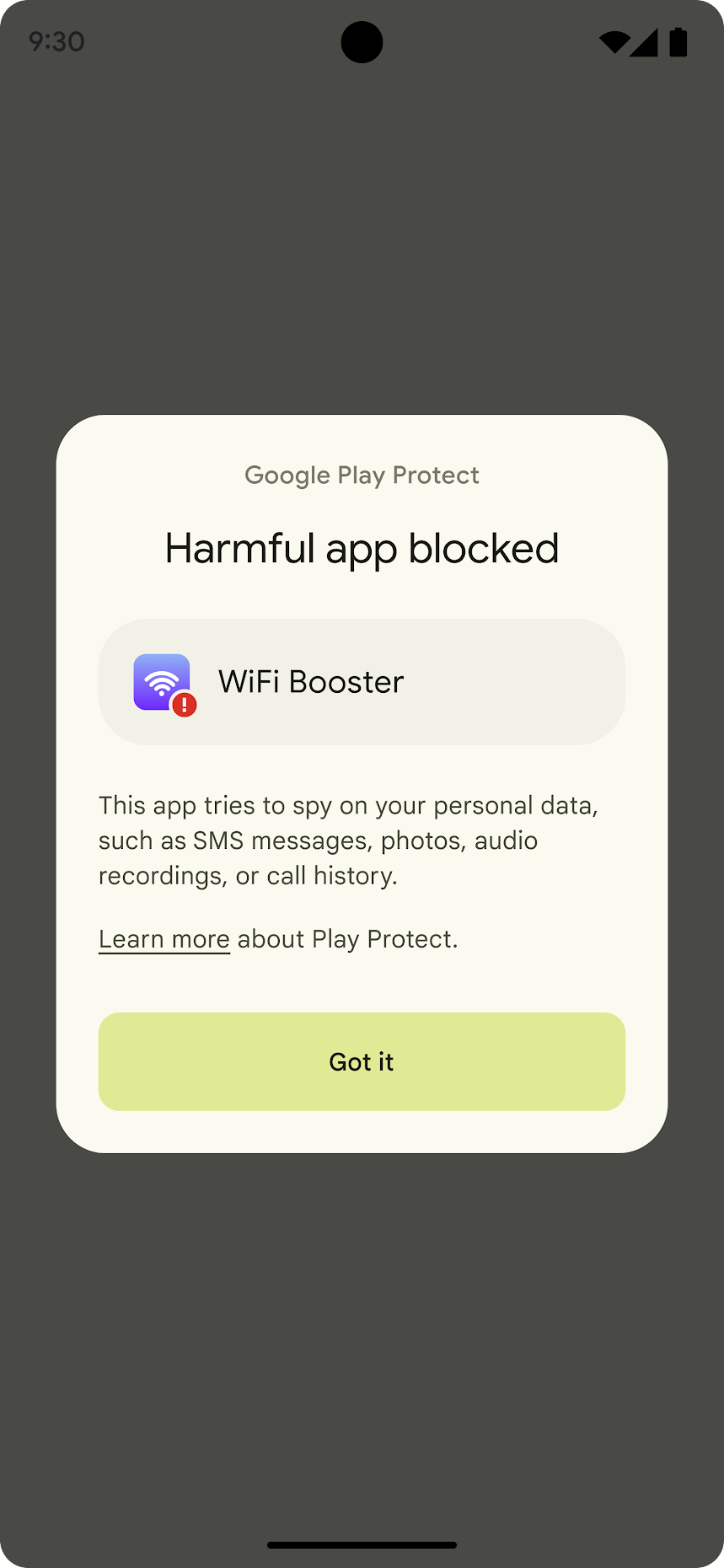 **Figure 2.** Message that appears when a harmful app is blocked.
**Prompts Displayed:** Details vary by violation depending on the [type of
malware or mobile unwanted software detected](https://developers.google.com/android/play-protect/phacategories).
**Reason for notification:** The Android ecosystem should be free from malicious
behaviors. The application has been identified as a [Potentially Harmful
Application](https://developers.google.com/android/play-protect/potentially-harmful-applications) and fits into a [malware category](https://developers.google.com/android/play-protect/phacategories) or [mobile unwanted
software category](https://developers.google.com/android/play-protect/mobile-unwanted-software).
**Recommended Developer Actions:**
- Verify your application is following [developer guidelines](https://developer.android.com/guide) and [best
practices](https://developer.android.com/quality/privacy-and-security).
- Review that [APIs](https://developer.android.com/reference) and [permissions](https://developer.android.com/guide/topics/permissions/overview) are being used for their intended purposes.
- Make sure that your application is using only the [*minimum* permissions](https://developer.android.com/privacy-and-security/about#permissions) needed to carry out the required functions of your application.
- Confirm that your application is following responsible [privacy](https://developer.android.com/privacy-and-security/about) and [security](https://developer.android.com/privacy-and-security/security-tips) guidelines
- Validate that your application and any SDKs used are free of malicious code and security issues putting users at risk.
- Ensure your APKs use valid standard APK/ZIP headers.
- After reviewing this guidance, if you conclude that your application is not a [Potentially Harmful Application](https://developers.google.com/android/play-protect/potentially-harmful-applications) as defined by Google Play Protect and complies with the [Unwanted Software Policy](https://www.google.com/about/unwanted-software-policy.html), [Software Policy](https://www.google.com/about/software-principles.html), and the preceding guidance, and you continue to receive warnings in error, you may [request an appeal](https://developers.google.com/android/play-protect/warning-dev-guidance#request-appeal) of the Google Play Protect action.
## Deceptive Accessibility Tool Warning
**Prompts Displayed:** "This app can request full control of your device and
access your personal and financial info without your knowledge."
 **Figure 3.** Message that appears when a deceptive accessibility tool is identified.
**Reason for notification:** The Android ecosystem should be free from
deceptive or misleading applications.
This Play Protect warning will show only if you declare
`isAccessibilityTool="true"` when your app isn't used to assist
users with disabilities.
**Recommended Developer Actions:**
- Review your use of the `isAccessibilityTool` attribute to ensure that it accurately reflects your use of the accessibility service.
- After reviewing this guidance, if you conclude that your application is not a [Potentially Harmful Application](https://developers.google.com/android/play-protect/potentially-harmful-applications) as defined by Google Play Protect and complies with the [Unwanted Software Policy](https://www.google.com/about/unwanted-software-policy.html), [Software Policy](https://www.google.com/about/software-principles.html), and the above guidance, and you continue to receive warnings in error, you may [request an appeal](https://developers.google.com/android/play-protect/warning-dev-guidance#request-appeal) of the Google Play Protect action.
## App Scan Recommended
 **Figure 4.** The **App scan recommended** dialog shown by Google Play Protect.
**Prompt Displayed:** "Play Protect hasn't seen this app before. To protect your
device and data, send some info about the app to Google for scanning before you
install."
**Reason for this notification:** Google Play Protect conducts security checks
at install time to help protect users by scanning apps for malicious code and
sensitive permissions from unknown applications that are being installed on your
device. By allowing scans to run on the application, Play Protect can help
reduce the chance that harmful applications are installed on a user's device.
**Recommended Developer Actions:**
- Ensure your application is following [developer guidelines](https://developer.android.com/guide) and [best
practices](https://developer.android.com/quality/privacy-and-security).
- Review that [APIs](https://developer.android.com/reference) and [permissions](https://developer.android.com/guide/topics/permissions/overview) are being used for their intended purposes.
- Make sure that your application is using only the [*minimum* permissions](https://developer.android.com/privacy-and-security/about#permissions) needed to carry out the required functions of your application.
- Confirm that your application is following responsible [privacy](https://developer.android.com/privacy-and-security/about) and [security](https://developer.android.com/privacy-and-security/security-tips) guidelines.
- Validate that your application and any SDKs used are free of malicious code and security issues putting users at risk.
- After reviewing this guidance, if you conclude that your application is not a [Potentially Harmful Application](https://developers.google.com/android/play-protect/potentially-harmful-applications) as defined by Google Play Protect and complies with the [Unwanted Software Policy](https://www.google.com/about/unwanted-software-policy.html), [Software Policy](https://www.google.com/about/software-principles.html), and the above guidance, and you continue to receive warnings in error, you may [request an appeal](https://developers.google.com/android/play-protect/warning-dev-guidance#request-appeal) of the Google Play Protect action.
## Android App Compatibility Too Low Warning
 **Figure 5.** A prompt from Google Play Protect notifying the user that the was designed for an older version of Android.
**Prompt Displayed:** "This app was built for an older version of Android and
does not include the latest privacy protections"
**Reason for this notification:** These Play Protect warnings will show only if
the app's [targetSdkVersion](https://developer.android.com/guide/topics/manifest/uses-sdk-element.html#target) is more than 2 versions lower than the current
Android API level. For example, a user with a device running Android 13 (current
API = 33) will be warned when installing any APK that targets API level lower
than 31. Android Versions and corresponding API levels can be reviewed on the
[API level page](https://developer.android.com/guide/topics/manifest/uses-sdk-element#ApiLevels).
If a device is below target API it won't get a warning.
Every new Android version introduces changes that bring security and
performance improvements and enhance the Android user experience. Some of these
changes only apply to apps that explicitly declare support through their
[targetSdkVersion](https://developer.android.com/guide/topics/manifest/uses-sdk-element.html#target) manifest attribute (also known as the target API level).
Configuring your app to target a recent API level ensures that users can
benefit from these improvements, while your app can still run on older Android
versions. Targeting a recent API level also allows your app to take advantage of
the platform's [latest features](https://developer.android.com/google/play/requirements/target-sdk#modernizing) to delight your users.
**Recommended Developer Actions:**
To ensure compatibility across Android versions, developers should make sure
that new versions of any apps target the latest API level. For advice on how to
change your app's target API level, take a look at the [migration guide](https://developer.android.com/distribute/best-practices/develop/target-sdk).
## Send App for Security Check
 **Figure 6.** A prompt from Google Play Protect to send the app for a security check.
**Prompt Displayed:** "This app is unknown to Play Protect. To protect yourself
and others, send it to Google for a security check."
**Reason for this notification:** Unknown applications can pose a risk to users.
For users, sending (one time or always) this application to Google Play Protect
to scan for potential malware will make this notification go away. [Appeals](https://developers.google.com/android/play-protect/warning-dev-guidance#request-appeal)
are not relevant and won't remove this message.
**Recommended Developer Actions:**
- Review your [device certification status](https://support.google.com/accounts/answer/2812853?sjid=6861392436332481231-NC).
- Ensure that Google Play Protect is aware of your application to avoid this dialog appearing for users.
## Android Enterprise DPC enrollment
 **Figure 7.** Message that appears when an unapproved DPC is blocked.
**Prompts Displayed:** "This app can request access to sensitive data. This can
increase the risk of identity theft or financial fraud."
**Reason for notification:** You can only provision new devices with Android
Enterprise methods using an approved Device Policy Controller (DPC). If a DPC is
not an Android Enterprise approved management app, its installation will be
blocked during enrollment.
**Recommended Developer Actions:** To get your DPC approved by Android
Enterprise for device management, visit [the DPC approval support page](https://support.google.com/work/android/answer/16694822).
## Appeals
### Appeal App Status on Play Store
You can appeal your app's removal from the Google Play Store. We will reinstate
apps in appropriate circumstances, including if an error was made and we find
that your app does not violate the Google [Play Developer Program Policies](https://play.google/developer-content-policy/)
and [Play Developer Distribution Agreement](https://play.google.com/about/developer-distribution-agreement.html). For more information on
appealing a policy violation, see [My app has been removed from Google
Play](https://support.google.com/googleplay/android-developer/answer/2477981).
### Appeal Play Protect Warning Status
You can appeal your app's Google Play Protect classification status.
Prior to submitting an appeal to Google Play Protect, we encourage you to use
the above guidance to understand why an app is being affected by a Play Protect
warning, and some alternatives or commonly utilized solutions to resolve an
issue.
We will correct classification of apps in appropriate circumstances, including
if an error was made and we find that your app does not violate [Mobile Unwanted
Software principles](https://developers.google.com/android/play-protect/mobile-unwanted-software) and is not a [Potentially Harmful Application](https://developers.google.com/android/play-protect/potentially-harmful-applications), as
defined by Google Play Protect.
After you've ensured your app is in alignment with the above policies, and if
you still feel your app is erroneously blocked, you can appeal the
classification by clicking the **File a Play Protect appeal** button below:
[File a Play Protect appeal](https://support.google.com/googleplay/android-developer/contact/protectappeals)
> [!NOTE]
> **Note:** If your app is published on the Google Play Store, refer to [My app has
> been removed from Google Play](https://support.google.com/googleplay/android-developer/answer/2477981) to file an appeal.