Monday, July 27, 2026
As part of improving security for Google Ads accounts, the [Google Ads API](https://developers.google.com/google-ads/api?utm_source=googleblog-adsdevs&utm_medium=blog&utm_campaign=adr-adsapi-passkeys-june2026&utm_content=learnmore-api) will start requiring [passkeys for Google Ads API users](https://developers.google.com/google-ads/api/docs/oauth/security-requirements.md.txt?utm_source=googleblog-adsdevs&utm_medium=blog&utm_campaign=adr-adsapi-passkeys-june2026&utm_content=learnmore-apidocs-authentication#what_are_passkeys). This is part of a broader change in Google Ads that requires [passkeys to authorize sensitive actions](https://support.google.com/google-ads/answer/16917887) in your Google Ads account. These important security updates will start rolling out from **August 5, 2026**, and will be enabled for all users over the next few weeks.
### What is changing?
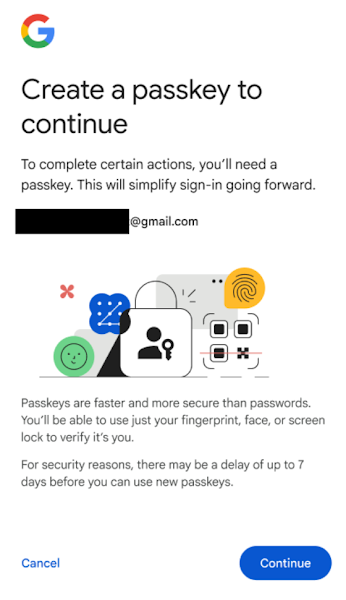
Once this change goes live, users following the [user authentication workflow](https://developers.google.com/google-ads/api/docs/oauth/user-authentication.md.txt?utm_source=googleblog-adsdevs&utm_medium=blog&utm_campaign=adr-adsapi-passkeys-june2026&utm_content=learnmore-apidocs-authentication) to generate new OAuth 2.0 refresh tokens for Google Ads API will always be required to authenticate using a passkey. If you haven't created a passkey, you will be asked to create one, and use it to complete the authentication workflow. Other forms of authentication that use password alone, or 2-factor authentication (2FA) mechanisms such as Time-based One-Time Password ([TOTP](https://en.wikipedia.org/wiki/Time-based_one-time_password)) or SMS-based codes will be disallowed.
### What action do I need to take?
You may be affected by this change, depending on the authentication workflow that your application uses.
- **[Service account workflow](https://developers.google.com/google-ads/api/docs/oauth/service-accounts.md.txt?utm_source=googleblog-adsdevs&utm_medium=blog&utm_campaign=adr-adsapi-passkeys-june2026&utm_content=learnmore-apidocs-authentication)**: Service account workflows are not affected by this change, so no action is required. We strongly recommend using service account workflow for applications that require automated or offline workflows.
- **[User authentication workflow](https://developers.google.com/google-ads/api/docs/oauth/user-authentication.md.txt?utm_source=googleblog-adsdevs&utm_medium=blog&utm_campaign=adr-adsapi-passkeys-june2026&utm_content=learnmore-apidocs-authentication)** : If your app generates OAuth 2.0 refresh tokens for users, you will be affected as follows:
- Existing OAuth refresh tokens are not affected by this change. They will continue to work as usual, and you won't be prompted for reauthorization when obtaining OAuth access tokens.
- New users will be challenged to authorize with a passkey. A 7-day security delay may apply before a new passkey becomes trusted and operational. To ensure it's ready for use when you need it, create your passkey at your earliest convenience.
To set up a passkey,
- Go to [g.co/passkeys](http://g.co/passkeys).
- Click **Create a Passkey** to sign in to the Security Key Manager.
- Create a passkey by following the steps provided by your device.
### What other platforms are affected by this change?
Google products that use Google Ads API, such as [Google Ads Editor](https://support.google.com/google-ads/editor/answer/2484521), [Google Ads scripts](https://developers.google.com/google-ads/scripts/docs/start.md.txt?utm_source=googleblog-adsdevs&utm_medium=blog&utm_campaign=adr-adsapi-passkeys-june2026&utm_content=learnmore-scripts), [BigQuery Data Transfer Service](https://docs.cloud.google.com/bigquery/docs/google-ads-transfer) or [Data Studio](https://docs.cloud.google.com/data-studio/connect-to-google-ads) to manage Google Ads will also start requiring a passkey-based authentication. If you don't have passkeys enabled, you will be prompted to add one.
To learn more about how to set up passkeys, visit the [Help Center](https://support.google.com/google-ads/answer/16917887). If you encounter issues, you can [contact support](https://support.google.com/google-ads/contact/google_ads_api).
For any questions or further discussion regarding this update, please connect with us on the ["Google Advertising and Measurement Community" Discord server](http://goo.gle/ads-and-measurement-discord).
[](https://g.dev/anash) - [Anash P. Oommen](https://g.dev/anash), Google Ads API Team
**Labels:**
[google-ads-api](https://developers.google.com/ads/blog/feeds/labels/google-ads-api.md.txt),
[google-ads-scripts](https://developers.google.com/ads/blog/feeds/labels/google-ads-scripts.md.txt),
[oauth](https://developers.google.com/ads/blog/feeds/labels/oauth.md.txt)