This guide shows you how to use Google Mobile Ads SDK to load and
display ads from Mintegral using [AdMob Mediation](https://developers.google.com/admob/ios/mediation.md.txt),
covering both waterfall and bidding integrations. It covers
how to add Mintegral to an ad unit's mediation configuration, and how to
integrate the Mintegral SDK and adapter into an iOS app.
## Supported integrations and ad formats
The mediation adapter for Mintegral has the following capabilities:
| Integration ||
|---|---|
| Bidding | Yes |
| Waterfall | Yes |
| App Open | Yes |
| Banner | Yes |
| Interstitial | Yes |
| Rewarded | Yes |
| Rewarded Interstitial | |
| Native | Yes |
## Prerequisites
Before you continue, verify the following:
- iOS deployment target of 13.0 or later.
- \[For bidding\]: To integrate all supported ad formats in bidding, use
Mintegral adapter 7.5.3.0 or later ([latest version recommended](https://developers.google.com/admob/ios/mediation/mintegral.md.txt#mintegral-ios-mediation-adapter-changelog)).
- Latest Google Mobile Ads SDK version.
- [Set up AdMob Mediation](https://developers.google.com/admob/ios/mediation.md.txt).
## Step 1: Set up configurations in Mintegral UI
[Sign up](https://dev.mintegral.com/user/signup) or
[Log in](https://dev.mintegral.com/user/login) to your Mintegral account.
### Locate the App Key
Navigate to the **APP Setting** tab and take note of the **APP Key**.

### Add a new application
From the **APP Setting** tab, click the **Add APP** button.

Select the **Platform** and fill out the rest of the form. Then, click
**Save**.

Take note of your application's **APP ID**.

### Create an ad placement
Once your application has been created, navigate to the **Placements \& Units**
tab and click on the **Add Placement** button as shown
below to create your ad placement.

Enter a **Placement Name** and **AD Format**.
> [!IMPORTANT]
> **Important:** For native ad format, select **Native (Custom Rendering)** as the **AD Format**.
### Bidding
Select **Header Bidding** as the **Bidding Type** . Fill out the rest of the
form and click **Save**.

### Waterfall
Select **Waterfall** as the **Bidding Type** . Fill out the rest of the form
and click **Save**.

Once your ad placement is created, take note of the **Placement ID**.

Click the **1 AD Units** drop down and take note of the **AD Unit ID**.

### Locate your Mintegral Reporting API Key
### Bidding
This step isn't required for bidding integrations.
### Waterfall
You will need your Mintegral Reporting API Key for setting up your
AdMob ad unit ID. Navigate to **Account** \>
**API Tools** . Take note of your **Skey** and **Secret**.

### Update your app-ads.txt
[Authorized Sellers for Apps app-ads.txt](https://iabtechlab.com/wp-content/uploads/2019/03/app-ads.txt-v1.0-final-.pdf) is an IAB Tech Lab initiative that helps ensure your
app ad inventory is only sold through channels you've identified as authorized. To prevent a
significant loss in ad revenue, you'll need to implement an `app-ads.txt` file.
If you haven't done so already,
[set up an app-ads.txt file for your app](https://support.google.com/admob/answer/9363762).
To implement `app-ads.txt` for Mintegral, see
[How app-Ads.txt Can Help Fight Ad Fraud](https://www.mintegral.com/en/blog/how-app-ads-txt-can-help-fight-ad-fraud).
## Step 2: Set up Mintegral demand in AdMob UI
### Configure mediation settings for your ad unit
You need to add Mintegral to the
mediation configuration for your ad unit.
First, sign in to your [AdMob account](https://apps.admob.com/). Next, navigate to the
**Mediation** tab. If you have an existing mediation group you'd like to modify,
click the name of that mediation group to edit it, and skip ahead to
[Add Mintegral as an ad source](https://developers.google.com/admob/ios/mediation/mintegral.md.txt#add-ad-source).
To create a new mediation group, select **Create Mediation Group**.
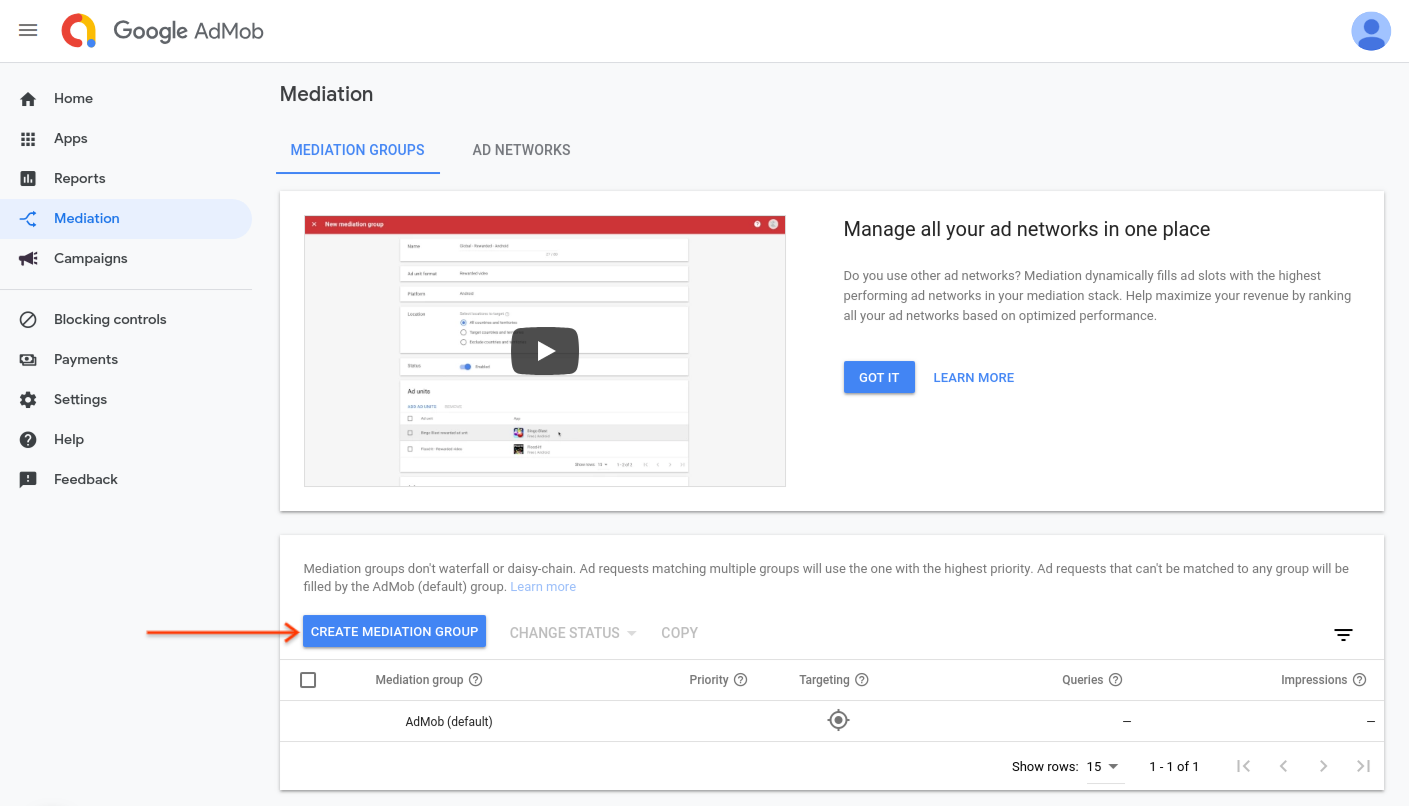
Enter your ad format and platform, then click **Continue**.
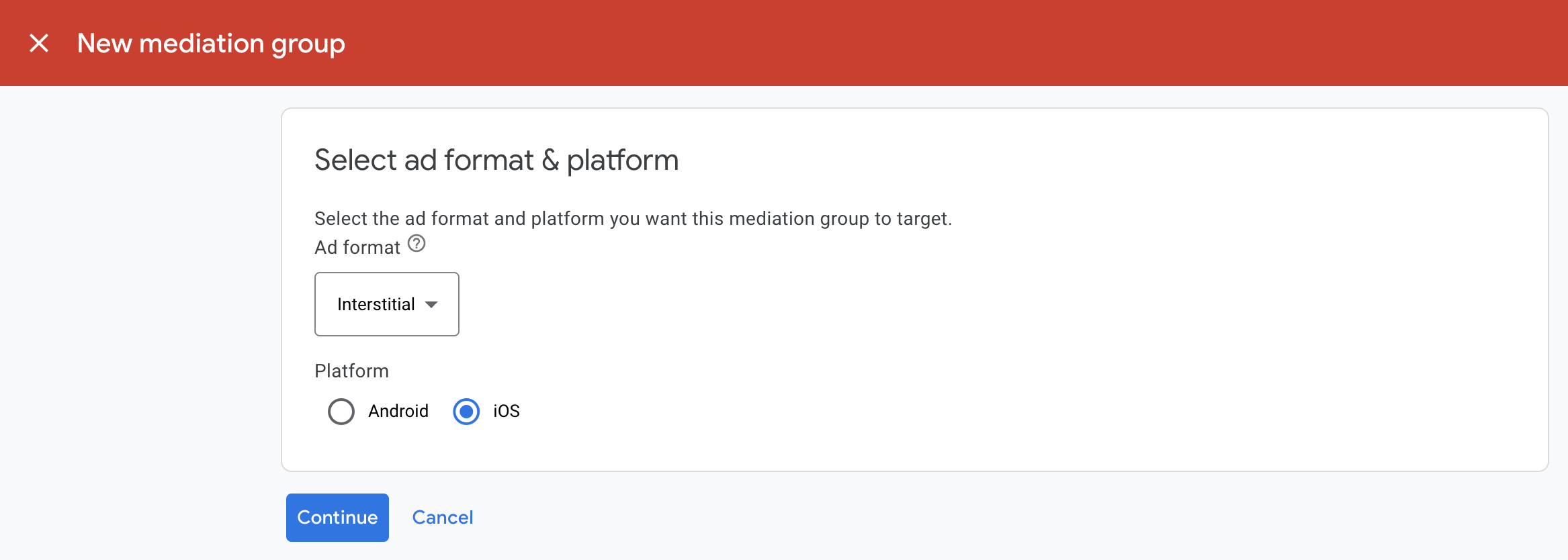
Give your mediation group a name, and select locations to target. Next, set the
mediation group status to **Enabled** , and then click **Add Ad Units**.
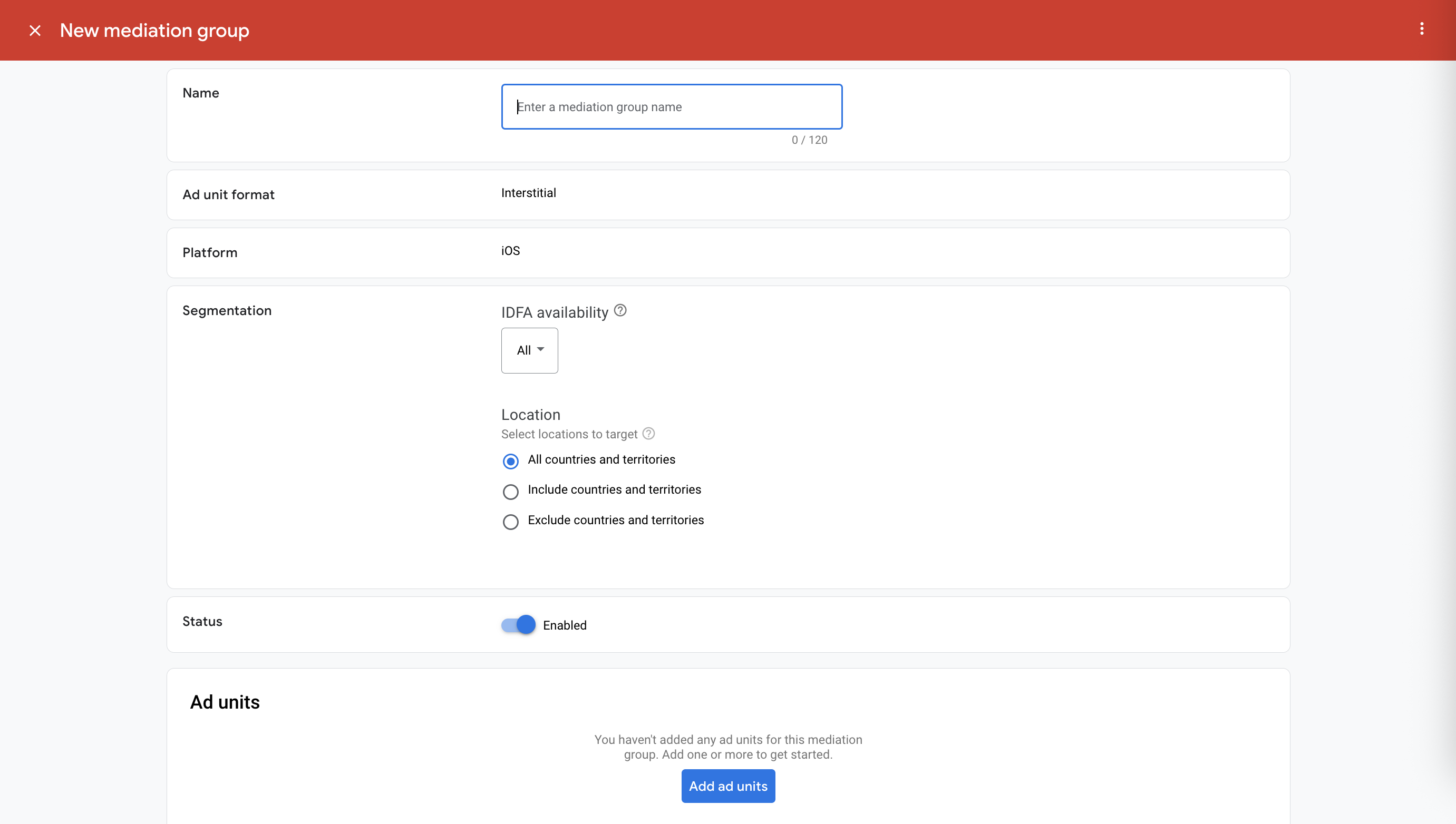
Associate this mediation group with one or more of your existing
AdMob ad units. Then click **Done**.
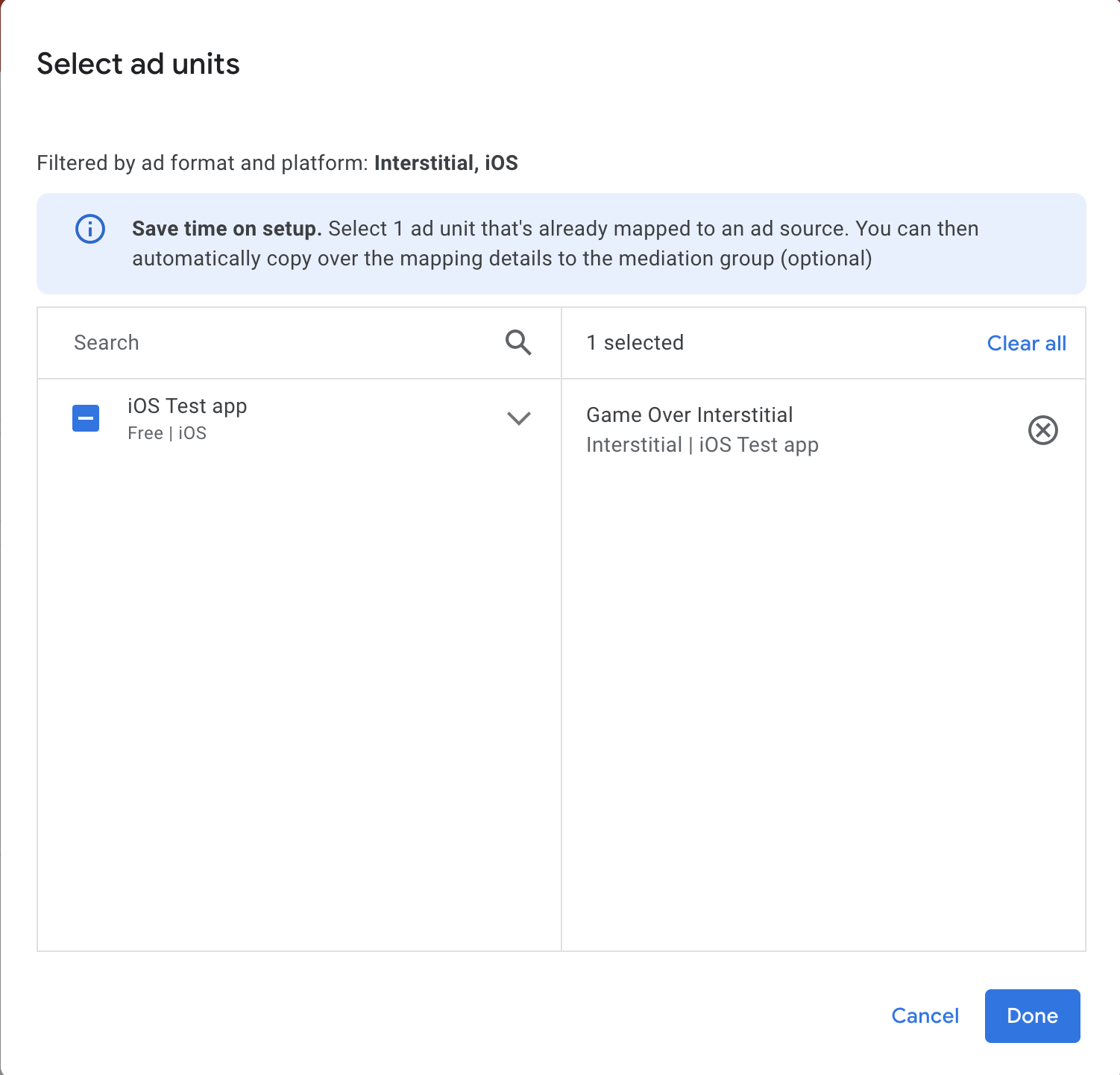
You should now see the ad units card populated with the ad units you selected:

### Add Mintegral as an ad source
### Bidding
In the **Ad Sources** section, find the **Bidding** card and select **Add
ad source** . Then select **Mintegral** .
Click **How to sign a partnership agreement** and [set up a bidding partnership](https://support.google.com/admob/answer/9842838) with Mintegral.

Click **Acknowledge \& agree** , then click **Continue** .

If you already have a mapping for Mintegral, you can select it. Otherwise, click **Add mapping** .

Next, enter the **App Key** , **App ID** , **Placement ID** , and **Ad Unit ID** obtained in the previous section. Then click **Done** .
**Important** : The **App ID** and **App Key** must be associated with the targeted app as in the Mintegral UI.

### Waterfall
Under the **Waterfall** card in the **Ad Sources** section, select **Add Ad
Source** .
Select **Mintegral** . Then enter an **eCPM value** for Mintegral and click **Continue** .

> [!NOTE]
> **Note**: You only need to set up ad source optimization once per network.
If you already have a mapping for Mintegral, you can select it. Otherwise, click **Add mapping** .

Next, enter the **App Key** , **App ID** , **Placement ID** , and **Ad Unit ID** obtained in the previous section. Then click **Done** .
**Important** : The **App ID** and **App Key** must be associated with the targeted app as in the Mintegral UI.

### Add Mobvista/Mintegral to GDPR and US state regulations ad partners list
> [!IMPORTANT]
> **Important:** Verify that you have **Account Management** permission to complete the configuration for EU Consent and GDPR, US State regulations, and User Messaging Platform. See [Manage user access to your
> account](https://support.google.com/admob/answer/2784628) for details.
Follow the steps in
[European regulations settings](https://support.google.com/admob/answer/10113004#adding_ad_partners_to_published_gdpr_messages)
and
[US state regulations settings](https://support.google.com/admob/answer/14125907)
to add **Mobvista/Mintegral** to the
European and US state regulations ad partners list in the AdMob UI.
## Step 3: Import the Mintegral SDK and adapter
> [!NOTE]
> **Note:** Failure to integrate the compatible Mintegral and Google Mobile Ads SDK versions might lead to build issues.
### Recommended: Use Swift Package Manager
Before you continue, you must have the minimum supported adapter version
7.7.9.0.
To [add a package dependency](https://developer.apple.com/documentation/xcode/adding-package-dependencies-to-your-app#Add-a-package-dependency)
to your project, follow these steps:
1. In Xcode, navigate to **File \> Add Package Dependencies...**.
2. In the prompt that appears, search the following package URL:
https://github.com/googleads/googleads-mobile-ios-mediation-mintegral.git
3. In **Dependency Rule** , select **Branch**.
4. In the text field, enter `main`.
### Manual integration
- Download the latest version of the [Mintegral SDK for iOS](https://github.com/Mintegral-official/MintegralAdSDK-iOS-new/releases) and link all the `.framework` files and bundles in your project.
- Download the latest version of the Mintegral adapter from the download link in the [Changelog](https://developers.google.com/admob/ios/mediation/mintegral.md.txt#mintegral-ios-mediation-adapter-changelog) and link `MintegralAdapter.xcframework` in your project.
### Use CocoaPods
> [!CAUTION]
> **Caution:** Starting December 2, 2026, the [CocoaPods Specs
> repository](https://blog.cocoapods.org/CocoaPods-Specs-Repo/) is in read-only mode. As of this date, Google Mobile Ads SDK no longer publishes updated versions of mediation adapters for iOS to CocoaPods.
- Add the following line to your project's Podfile:
pod 'GoogleMobileAdsMediationMintegral'
- From the command line run:
```bash
pod install --repo-update
```
## Step 4: Implement privacy settings on Mintegral SDK
### EU consent and GDPR
To [comply with
the Google EU User Consent Policy](https://www.google.com/about/company/consentstaging.html), you must make certain disclosures to your
users in the European Economic Area (EEA), the UK, and Switzerland, and obtain
their consent for the use of cookies or other local storage where legally
required, and for the collection, sharing, and use of personal data for ads
personalization. This policy reflects the requirements of the EU ePrivacy
Directive and the General Data Protection Regulation (GDPR). You are
responsible for verifying that consent is propagated to each ad source in your
mediation chain.
Mintegral iOS adapter version
7.7.9.0
and later supports passing GDPR consent signals from consent management
platforms that integrate with IAB's Transparency and Consent Framework (TCF)
to Mintegral SDK.
For more information, see
[SDK Privacy Compliance Statement](https://dev.mintegral.com/doc/index.html?file=sdk-m_sdk-ios&lang=en#sdkprivacycompliancestatement).
### US states privacy laws
[US states privacy laws](https://support.google.com/admob/answer/9561022)
require giving users the right
to opt out of the "sale" of their "personal information" (as the law defines
those terms), with the opt-out offered through a prominent "Do Not Sell My Personal
Information" link on the "selling" party's homepage. The
[US states privacy
laws compliance guide](https://developers.google.com/admob/ios/privacy/us-states) offers the ability to enable
[restricted data processing](https://privacy.google.com/businesses/rdp/)
for Google ad serving, but Google is unable to apply this setting to each ad
network in your mediation chain. Therefore, you must identify each ad network
in your mediation chain that may participate in the sale of personal
information and follow guidance from each of those networks to ensure
compliance.
The Mintegral SDK includes `setDoNotTrackStatus` method to pass consent
information to the Mintegral SDK.
The following sample code shows how to pass consent information to the Mintegral
SDK. If you need to call this method, call it
before
[initializing Google Mobile Ads SDK](https://developers.google.com/admob/ios/quick-start.md.txt#initialize_the_mobile_ads_sdk)
to ensure they get forwarded properly to the Mintegral SDK.
### Swift
```swift
import MTGSDK
// ...
MTGSDK.sharedInstance().setDoNotTrackStatus(false)
```
### Objective-C
```objective-c
#import
// ...
[[MTGSDK sharedInstance] setDoNotTrackStatus:NO];
```
See [Mintegral's Privacy documentation](https://dev.mintegral.com/doc/index.html?file=sdk-m_sdk-ios&lang=en#sdkprivacycompliancestatement)
for more information.
## Step 5: Add required code
### Implement SKAdNetwork
Follow [Mintegral's documentation](https://dev.mintegral.com/doc/index.html?file=sdk-m_sdk-ios&lang=en)
to add the SKAdNetwork identifiers to your project's `Info.plist` file.
## Step 6: Test your implementation
### Enable test ads
Make sure you
[register your test device](https://developers.google.com/admob/ios/test-ads.md.txt#enable_test_devices)
for
AdMob.
To get Mintegral test ads for banners, interstitials, rewarded and native ad
formats, Mintegral recommends using the App Keys, App IDs, Placement IDs and Ad
Unit IDs provided in the
[Mintegral Test ID page](https://dev.mintegral.com/doc/index.html?file=sdk-m_sdk-ios&lang=en#testid).
> [!IMPORTANT]
> **Important:** Disable test mode for AdMob and Mintegral before releasing your app.
### Verify test ads
To verify that you are receiving test ads from
Mintegral,
enable
[single ad source testing](https://developers.google.com/admob/ios/ad-inspector.md.txt#single_ad_source_testing)
in ad inspector using the
**Mintegral (Bidding) and Mintegral (Waterfall)** ad source(s).
## Optional steps
#### Add Mintegral to CCPA ad partners list
Follow the steps in
[CCPA settings](https://support.google.com/admob/answer/10860309)
to add **Mintegral** to the CCPA ad partners list in the
AdMob UI.
### Native ads
#### Ad rendering
The Mintegral adapter returns its native ads as
`GADNativeAd`
objects. It populates the following
[fields](https://support.google.com/admob/answer/6240809)
for a
[`GADNativeAd`](https://developers.google.com/admob/ios/api/reference/Classes/GADNativeAd.md.txt).
| Field | Assets always included by Mintegral adapter |
|---|---|
| Headline | Yes |
| Image | [1](https://developers.google.com/admob/ios/mediation/mintegral.md.txt#native-image-footnote) |
| Body | Yes |
| Icon | Yes |
| Call to action | Yes |
| Star rating | Yes |
| Store | |
| Price | |
| Advertiser |
^1^ The Mintegral adapter does not
provide direct access to the main image asset for its native ads. Instead, the
adapter populates the
[`GADMediaView`](https://developers.google.com/admob/ios/api/reference/Classes.md.txt#gadmediaview)
with a video or an image.
## Error codes
If the adapter fails to receive an ad from Mintegral, you can check the
underlying error from the ad response using
[`GADResponseInfo.adNetworkInfoArray`](https://developers.google.com/admob/ios/api/reference/Classes/GADResponseInfo.md.txt#adnetworkinfoarray)
under the following classes:
GADMediationAdapterMintegral
Here are the codes and accompanying messages thrown by the Mintegral adapter
when an ad fails to load:
| Error code | Domain | Reason |
|---|---|---|
| 101 | com.google.mediation.mintegral | Invalid server parameters (e.g. Missing app ID or placement ID). |
| 102 | com.google.mediation.mintegral | Mintegral SDK returned a no fill error. |
| 103 | com.google.mediation.mintegral | Mintegral SDK failed to show an ad. |
| 104 | com.google.mediation.mintegral | The requested ad size does not match a Mintegral supported banner size. |
## Mintegral iOS Mediation Adapter Changelog
#### [Version 8.1.9.0](https://dl.google.com/googleadmobadssdk/mediation/ios/mintegral/MintegralAdapter-8.1.9.0.zip)
- Verified compatibility with Mintegral SDK version 8.1.9.
Built and tested with:
- Google Mobile Ads SDK version 13.12.0.
- Mintegral SDK version 8.1.9.
#### [Version 8.1.8.0](https://dl.google.com/googleadmobadssdk/mediation/ios/mintegral/MintegralAdapter-8.1.8.0.zip)
- Verified compatibility with Mintegral SDK version 8.1.8.
Built and tested with:
- Google Mobile Ads SDK version 13.11.0.
- Mintegral SDK version 8.1.8.
#### [Version 8.1.7.0](https://dl.google.com/googleadmobadssdk/mediation/ios/mintegral/MintegralAdapter-8.1.7.0.zip)
- Verified compatibility with Mintegral SDK version 8.1.7.
Built and tested with:
- Google Mobile Ads SDK version 13.8.0.
- Mintegral SDK version 8.1.7.
#### [Version 8.1.6.0](https://dl.google.com/googleadmobadssdk/mediation/ios/mintegral/MintegralAdapter-8.1.6.0.zip)
- Verified compatibility with Mintegral SDK version 8.1.6.
Built and tested with:
- Google Mobile Ads SDK version 13.7.0.
- Mintegral SDK version 8.1.6.
#### [Version 8.1.5.0](https://dl.google.com/googleadmobadssdk/mediation/ios/mintegral/MintegralAdapter-8.1.5.0.zip)
- Verified compatibility with Mintegral SDK version 8.1.5.
- Update the minimum iOS version to relax Google Mobile Ads SDK dependency to allow minor versions.
Built and tested with:
- Google Mobile Ads SDK version 13.4.0.
- Mintegral SDK version 8.1.5.
#### [Version 8.1.4.0](https://dl.google.com/googleadmobadssdk/mediation/ios/mintegral/MintegralAdapter-8.1.4.0.zip)
- Verified compatibility with Mintegral SDK version 8.1.4.
Built and tested with:
- Google Mobile Ads SDK version 13.4.0.
- Mintegral SDK version 8.1.4.
#### [Version 8.1.3.1](https://dl.google.com/googleadmobadssdk/mediation/ios/mintegral/MintegralAdapter-8.1.3.1.zip)
- Adapter now forwards the `ageRestrictedTreatment` Google Mobile Ads SDK flag to Mintegral SDK's COPPA API.
Built and tested with:
- Google Mobile Ads SDK version 13.3.0.
- Mintegral SDK version 8.1.3.
#### [Version 8.1.3.0](https://dl.google.com/googleadmobadssdk/mediation/ios/mintegral/MintegralAdapter-8.1.3.0.zip)
- Verified compatibility with Mintegral SDK version 8.1.3.
Built and tested with:
- Google Mobile Ads SDK version 13.3.0.
- Mintegral SDK version 8.1.3.
#### [Version 8.1.1.0](https://dl.google.com/googleadmobadssdk/mediation/ios/mintegral/MintegralAdapter-8.1.1.0.zip)
- Verified compatibility with Mintegral SDK version 8.1.1.
Built and tested with:
- Google Mobile Ads SDK version 13.2.0.
- Mintegral SDK version 8.1.1.
#### [Version 8.0.9.0](https://dl.google.com/googleadmobadssdk/mediation/ios/mintegral/MintegralAdapter-8.0.9.0.zip)
- Verified compatibility with Mintegral SDK version 8.0.9.
Built and tested with:
- Google Mobile Ads SDK version 13.2.0.
- Mintegral SDK version 8.0.9.
#### [Version 8.0.8.0](https://dl.google.com/googleadmobadssdk/mediation/ios/mintegral/MintegralAdapter-8.0.8.0.zip)
- Verified compatibility with Mintegral SDK version 8.0.8.
Built and tested with:
- Google Mobile Ads SDK version 13.1.0.
- Mintegral SDK version 8.0.8.
#### [Version 8.0.7.0](https://dl.google.com/googleadmobadssdk/mediation/ios/mintegral/MintegralAdapter-8.0.7.0.zip)
- Verified compatibility with Mintegral SDK version 8.0.7.
- Updated the Google Mobile Ads SDK dependency to version 13.0.0.
Built and tested with:
- Google Mobile Ads SDK version 13.0.0.
- Mintegral SDK version 8.0.7.
#### [Version 8.0.5.2](https://dl.google.com/googleadmobadssdk/mediation/ios/mintegral/MintegralAdapter-8.0.5.2.zip)
- Updated the CocoaPods minimum iOS version to `13.0`.
Built and tested with:
- Google Mobile Ads SDK version 13.0.0.
- Mintegral SDK version 8.0.5.
#### [Version 8.0.5.1](https://dl.google.com/googleadmobadssdk/mediation/ios/mintegral/MintegralAdapter-8.0.5.1.zip)
- Added support for forwarding the `tagForUnderAgeOfConsent` Google Mobile Ads SDK parameter to the Mintegral SDK.
Built and tested with:
- Google Mobile Ads SDK version 12.14.0.
- Mintegral SDK version 8.0.5.
#### [Version 8.0.5.0](https://dl.google.com/googleadmobadssdk/mediation/ios/mintegral/MintegralAdapter-8.0.5.0.zip)
- Verified compatibility with Mintegral SDK version 8.0.5.
Built and tested with:
- Google Mobile Ads SDK version 12.14.0.
- Mintegral SDK version 8.0.5.
#### [Version 8.0.4.0](https://dl.google.com/googleadmobadssdk/mediation/ios/mintegral/MintegralAdapter-8.0.4.0.zip)
- Verified compatibility with Mintegral SDK version 8.0.4.
Built and tested with:
- Google Mobile Ads SDK version 12.14.0.
- Mintegral SDK version 8.0.4.
#### [Version 8.0.3.0](https://dl.google.com/googleadmobadssdk/mediation/ios/mintegral/MintegralAdapter-8.0.3.0.zip)
- Verified compatibility with Mintegral SDK version 8.0.3.
Built and tested with:
- Google Mobile Ads SDK version 12.13.0.
- Mintegral SDK version 8.0.3.
#### [Version 8.0.2.0](https://dl.google.com/googleadmobadssdk/mediation/ios/mintegral/MintegralAdapter-8.0.2.0.zip)
- Verified compatibility with Mintegral SDK version 8.0.2.
Built and tested with:
- Google Mobile Ads SDK version 12.13.0.
- Mintegral SDK version 8.0.2.
#### [Version 7.7.9.1](https://dl.google.com/googleadmobadssdk/mediation/ios/mintegral/MintegralAdapter-7.7.9.1.zip)
- Removed banner ad size checks from the adapter for bidding banner ads.
Built and tested with:
- Google Mobile Ads SDK version 12.11.0.
- Mintegral SDK version 7.7.9.
#### [Version 7.7.9.0](https://dl.google.com/googleadmobadssdk/mediation/ios/mintegral/MintegralAdapter-7.7.9.0.zip)
- Verified compatibility with Mintegral SDK version 7.7.9.
Built and tested with:
- Google Mobile Ads SDK version 12.8.0.
- Mintegral SDK version 7.7.9.
#### [Version 7.7.8.0](https://dl.google.com/googleadmobadssdk/mediation/ios/mintegral/MintegralAdapter-7.7.8.0.zip)
- Added support for COPPA. The adapter now forwards the `GADRequestConfiguration.tagForChildDirectedTreatment` flag to the Mintegral SDK.
- Verified compatibility with Mintegral SDK version 7.7.8.
Built and tested with:
- Google Mobile Ads SDK version 12.4.0.
- Mintegral SDK version 7.7.8.
#### [Version 7.7.7.0](https://dl.google.com/googleadmobadssdk/mediation/ios/mintegral/MintegralAdapter-7.7.7.0.zip)
- Verified compatibility with Mintegral SDK version 7.7.7.
Built and tested with:
- Google Mobile Ads SDK version 12.0.0.
- Mintegral SDK version 7.7.7.
#### [Version 7.7.6.0](https://dl.google.com/googleadmobadssdk/mediation/ios/mintegral/MintegralAdapter-7.7.6.0.zip)
- Verified compatibility with Mintegral SDK version 7.7.6.
Built and tested with:
- Google Mobile Ads SDK version 12.0.0.
- Mintegral SDK version 7.7.6.
#### [Version 7.7.5.1](https://dl.google.com/googleadmobadssdk/mediation/ios/mintegral/MintegralAdapter-7.7.5.1.zip)
- Now requires Google Mobile Ads SDK version 12.0.0 or higher.
Built and tested with:
- Google Mobile Ads SDK version 12.0.0.
- Mintegral SDK version 7.7.5.
#### [Version 7.7.5.0](https://dl.google.com/googleadmobadssdk/mediation/ios/mintegral/MintegralAdapter-7.7.5.0.zip)
- Verified compatibility with Mintegral SDK version 7.7.5.
Built and tested with:
- Google Mobile Ads SDK version 11.13.0.
- Mintegral SDK version 7.7.5.
#### [Version 7.7.4.0](https://dl.google.com/googleadmobadssdk/mediation/ios/mintegral/MintegralAdapter-7.7.4.0.zip)
- Verified compatibility with Mintegral SDK version 7.7.4.
- Updated the adapter to follow Google's Objective-C best practices.
Built and tested with:
- Google Mobile Ads SDK version 11.13.0.
- Mintegral SDK version 7.7.4.
#### [Version 7.7.3.0](https://dl.google.com/googleadmobadssdk/mediation/ios/mintegral/MintegralAdapter-7.7.3.0.zip)
- Verified compatibility with Mintegral SDK version 7.7.3.
Built and tested with:
- Google Mobile Ads SDK version 11.10.0.
- Mintegral SDK version 7.7.3.
#### [Version 7.7.2.1](https://dl.google.com/googleadmobadssdk/mediation/ios/mintegral/MintegralAdapter-7.7.2.1.zip)
- Adapter no longer checks if interstitial and rewarded ads are ready before they are shown.
- Updated `CFBundleShortVersionString` to have three components instead of four.
Built and tested with:
- Google Mobile Ads SDK version 11.10.0.
- Mintegral SDK version 7.7.2.
#### [Version 7.7.2.0](https://dl.google.com/googleadmobadssdk/mediation/ios/mintegral/MintegralAdapter-7.7.2.0.zip)
- Verified compatibility with Mintegral SDK version 7.7.2.
Built and tested with:
- Google Mobile Ads SDK version 11.9.0.
- Mintegral SDK version 7.7.2.
#### [Version 7.7.1.0](https://dl.google.com/googleadmobadssdk/mediation/ios/mintegral/MintegralAdapter-7.7.1.0.zip)
- Verified compatibility with Mintegral SDK version 7.7.1.
Built and tested with:
- Google Mobile Ads SDK version 11.8.0.
- Mintegral SDK version 7.7.1.
#### [Version 7.7.0.0](https://dl.google.com/googleadmobadssdk/mediation/ios/mintegral/MintegralAdapter-7.7.0.0.zip)
- Verified compatibility with Mintegral SDK version 7.7.0.
Built and tested with:
- Google Mobile Ads SDK version 11.8.0.
- Mintegral SDK version 7.7.0.
#### [Version 7.6.9.0](https://dl.google.com/googleadmobadssdk/mediation/ios/mintegral/MintegralAdapter-7.6.9.0.zip)
- Verified compatibility with Mintegral SDK version 7.6.9.
Built and tested with:
- Google Mobile Ads SDK version 11.7.0.
- Mintegral SDK version 7.6.9.
#### [Version 7.6.8.0](https://dl.google.com/googleadmobadssdk/mediation/ios/mintegral/MintegralAdapter-7.6.8.0.zip)
- Verified compatibility with Mintegral SDK version 7.6.8.
Built and tested with:
- Google Mobile Ads SDK version 11.7.0.
- Mintegral SDK version 7.6.8.
#### [Version 7.6.7.0](https://dl.google.com/googleadmobadssdk/mediation/ios/mintegral/MintegralAdapter-7.6.7.0.zip)
- Verified compatibility with Mintegral SDK version 7.6.7.
Built and tested with:
- Google Mobile Ads SDK version 11.6.0.
- Mintegral SDK version 7.6.7.
#### [Version 7.6.6.0](https://dl.google.com/googleadmobadssdk/mediation/ios/mintegral/MintegralAdapter-7.6.6.0.zip)
- Verified compatibility with Mintegral SDK version 7.6.6.
Built and tested with:
- Google Mobile Ads SDK version 11.5.0.
- Mintegral SDK version 7.6.6.
#### [Version 7.6.4.0](https://dl.google.com/googleadmobadssdk/mediation/ios/mintegral/MintegralAdapter-7.6.4.0.zip)
- Verified compatibility with Mintegral SDK version 7.6.4.
Built and tested with:
- Google Mobile Ads SDK version 11.4.0.
- Mintegral SDK version 7.6.4.
#### [Version 7.6.3.0](https://dl.google.com/googleadmobadssdk/mediation/ios/mintegral/MintegralAdapter-7.6.3.0.zip)
- Verified compatibility with Mintegral SDK version 7.6.3.
Built and tested with:
- Google Mobile Ads SDK version 11.3.0.
- Mintegral SDK version 7.6.3.
#### [Version 7.6.2.0](https://dl.google.com/googleadmobadssdk/mediation/ios/mintegral/MintegralAdapter-7.6.2.0.zip)
- Verified compatibility with Mintegral SDK version 7.6.2.
Built and tested with:
- Google Mobile Ads SDK version 11.3.0.
- Mintegral SDK version 7.6.2.
#### [Version 7.6.1.0](https://dl.google.com/googleadmobadssdk/mediation/ios/mintegral/MintegralAdapter-7.6.1.0.zip)
- Verified compatibility with Mintegral SDK version 7.6.1.
Built and tested with:
- Google Mobile Ads SDK version 11.3.0.
- Mintegral SDK version 7.6.1.
#### [Version 7.6.0.0](https://dl.google.com/googleadmobadssdk/mediation/ios/mintegral/MintegralAdapter-7.6.0.0.zip)
- Verified compatibility with Mintegral SDK version 7.6.0.
Built and tested with:
- Google Mobile Ads SDK version 11.2.0.
- Mintegral SDK version 7.6.0.
#### [Version 7.5.9.0](https://dl.google.com/googleadmobadssdk/mediation/ios/mintegral/MintegralAdapter-7.5.9.0.zip)
- Verified compatibility with Mintegral SDK version 7.5.9.
Built and tested with:
- Google Mobile Ads SDK version 11.2.0.
- Mintegral SDK version 7.5.9.
#### [Version 7.5.8.0](https://dl.google.com/googleadmobadssdk/mediation/ios/mintegral/MintegralAdapter-7.5.8.0.zip)
- Verified compatibility with Mintegral SDK version 7.5.8.
Built and tested with:
- Google Mobile Ads SDK version 11.1.0.
- Mintegral SDK version 7.5.8.
#### [Version 7.5.7.0](https://dl.google.com/googleadmobadssdk/mediation/ios/mintegral/MintegralAdapter-7.5.7.0.zip)
- Verified compatibility with Mintegral SDK version 7.5.7.
- Now requires minimum iOS version 12.0.
- Now requires Google Mobile Ads SDK version 11.0 or higher.
- Included `Info.plist` in the frameworks within `MintegralAdapter.xcframework`.
Built and tested with:
- Google Mobile Ads SDK version 11.0.1.
- Mintegral SDK version 7.5.7.
#### [Version 7.5.6.0](https://dl.google.com/googleadmobadssdk/mediation/ios/mintegral/MintegralAdapter-7.5.6.0.zip)
- Verified compatibility with Mintegral SDK version 7.5.6.
- Made `GADMediationAdapterMintegral.h` a public header.
Built and tested with:
- Google Mobile Ads SDK version 11.0.0.
- Mintegral SDK version 7.5.6.
#### [Version 7.5.3.0](https://dl.google.com/googleadmobadssdk/mediation/ios/mintegral/MintegralAdapter-7.5.3.0.zip)
- Verified compatibility with Mintegral SDK version 7.5.3.
- Added bidding support for app open ad format.
Built and tested with:
- Google Mobile Ads SDK version 10.14.0.
- Mintegral SDK version 7.5.3.
#### [Version 7.4.8.0](https://dl.google.com/googleadmobadssdk/mediation/ios/mintegral/MintegralAdapter-7.4.8.0.zip)
- Verified compatibility with Mintegral SDK version 7.4.8.
Built and tested with:
- Google Mobile Ads SDK version 10.13.0.
- Mintegral SDK version 7.4.8.
#### [Version 7.4.7.0](https://dl.google.com/googleadmobadssdk/mediation/ios/mintegral/MintegralAdapter-7.4.7.0.zip)
- Updated the podspec file to depend on `MintegralAdSDK/All` instead of `MintegralAdSDK`.
- Verified compatibility with Mintegral SDK version 7.4.7.
- Added waterfall support for app open ad format.
Built and tested with:
- Google Mobile Ads SDK version 10.12.0.
- Mintegral SDK version 7.4.7.
#### [Version 7.4.4.0](https://dl.google.com/googleadmobadssdk/mediation/ios/mintegral/MintegralAdapter-7.4.4.0.zip)
- Added watermark support for bidding ads.
- Verified compatibility with Mintegral SDK version 7.4.4.
Built and tested with:
- Google Mobile Ads SDK version 10.10.0.
- Mintegral SDK version 7.4.4.
#### [Version 7.4.3.0](https://dl.google.com/googleadmobadssdk/mediation/ios/mintegral/MintegralAdapter-7.4.3.0.zip)
- Verified compatibility with Mintegral SDK version 7.4.3.
Built and tested with:
- Google Mobile Ads SDK version 10.9.0.
- Mintegral SDK version 7.4.3.
#### [Version 7.4.1.0](https://dl.google.com/googleadmobadssdk/mediation/ios/mintegral/MintegralAdapter-7.4.1.0.zip)
- Verified compatibility with Mintegral SDK version 7.4.1.
Built and tested with:
- Google Mobile Ads SDK version 10.7.0.
- Mintegral SDK version 7.4.1.
#### [Version 7.3.9.0](https://dl.google.com/googleadmobadssdk/mediation/ios/mintegral/MintegralAdapter-7.3.9.0.zip)
- Verified compatibility with Mintegral SDK version 7.3.9.
Built and tested with:
- Google Mobile Ads SDK version 10.7.0.
- Mintegral SDK version 7.3.9.
#### [Version 7.3.8.0](https://dl.google.com/googleadmobadssdk/mediation/ios/mintegral/MintegralAdapter-7.3.8.0.zip)
- Verified compatibility with Mintegral SDK version 7.3.8.
Built and tested with:
- Google Mobile Ads SDK version 10.6.0.
- Mintegral SDK version 7.3.8.
#### [Version 7.3.7.0](https://dl.google.com/googleadmobadssdk/mediation/ios/mintegral/MintegralAdapter-7.3.7.0.zip)
- Verified compatibility with Mintegral SDK version 7.3.7.
Built and tested with:
- Google Mobile Ads SDK version 10.5.0.
- Mintegral SDK version 7.3.7.
#### [Version 7.3.6.0](https://dl.google.com/googleadmobadssdk/mediation/ios/mintegral/MintegralAdapter-7.3.6.0.zip)
- Verified compatibility with Mintegral SDK version 7.3.6.
- Removed support of the `armv7` architecture.
- Now requires minimum iOS version 11.0.
- Now requires Google Mobile Ads SDK version 10.4.0 or higher.
Built and tested with:
- Google Mobile Ads SDK version 10.5.0.
- Mintegral SDK version 7.3.6.
#### [Version 7.3.4.0](https://dl.google.com/googleadmobadssdk/mediation/ios/mintegral/MintegralAdapter-7.3.4.0.zip)
- Verified compatibility with Mintegral SDK version 7.3.4.
Built and tested with:
- Google Mobile Ads SDK version 10.2.0.
- Mintegral SDK version 7.3.4.
#### [Version 7.3.3.0](https://dl.google.com/googleadmobadssdk/mediation/ios/mintegral/MintegralAdapter-7.3.3.0.zip)
- Verified compatibility with Mintegral SDK version 7.3.3.
Built and tested with:
- Google Mobile Ads SDK version 10.2.0.
- Mintegral SDK version 7.3.3.
#### [Version 7.3.0.0](https://dl.google.com/googleadmobadssdk/mediation/ios/mintegral/MintegralAdapter-7.3.0.0.zip)
- Verified compatibility with Mintegral SDK version 7.3.0.
Built and tested with:
- Google Mobile Ads SDK version 10.1.0.
- Mintegral SDK version 7.3.0.
#### [Version 7.2.9.1](https://dl.google.com/googleadmobadssdk/mediation/ios/mintegral/MintegralAdapter-7.2.9.1.zip)
- Added waterfall support for banner (includes MREC), interstitial, rewarded and native ad formats.
- Requires Google Mobile Ads SDK version 10.0.0 or higher.
Built and tested with:
- Google Mobile Ads SDK version 10.0.0.
- Mintegral SDK version 7.2.9.
#### [Version 7.2.9.0](https://dl.google.com/googleadmobadssdk/mediation/ios/mintegral/MintegralAdapter-7.2.9.0.zip)
- Verified compatibility with Mintegral SDK version 7.2.9.
Built and tested with:
- Google Mobile Ads SDK version 9.14.0.
- Mintegral SDK version 7.2.9.
#### [Version 7.2.8.0](https://dl.google.com/googleadmobadssdk/mediation/ios/mintegral/MintegralAdapter-7.2.8.0.zip)
- Verified compatibility with Mintegral SDK version 7.2.8.
Built and tested with:
- Google Mobile Ads SDK version 9.14.0.
- Mintegral SDK version 7.2.8.
#### [Version 7.2.6.0](https://dl.google.com/googleadmobadssdk/mediation/ios/mintegral/MintegralAdapter-7.2.6.0.zip)
- Initial release!
- Added bidding support for banner (includes MREC), interstitial, rewarded and native ad formats.
- Verified compatibility with Mintegral SDK version 7.2.6.
- Requires Google Mobile Ads SDK version 9.8.0 or higher.
Built and tested with:
- Google Mobile Ads SDK version 9.13.0.
- Mintegral SDK version 7.2.6.