For key considerations when preparing your app for iOS privacy changes, see
[Privacy strategies for iOS](https://support.google.com/admanager/answer/9997589).
## Enable SKAdNetwork to track conversions
**Prerequisites: Google Mobile Ads SDK 7.64.0 or higher**
The Google Mobile Ads SDK supports conversion tracking using Apple's
[`SKAdNetwork`](https://developer.apple.com/documentation/storekit/skadnetwork),
which lets Google and participating third-party buyers attribute an app install
even when the IDFA is not available.
To enable this capability, update the `SKAdNetworkItems` key with an additional
dictionary that defines Google and participating third-party buyers'
`SKAdNetworkIdentifier` values in your
[`Info.plist`](https://developer.apple.com/documentation/storekit/skadnetwork/configuring_a_source_app).
The following example includes Google (`cstr6suwn9.skadnetwork`) and select
additional [buyer SKAdNetwork
identifiers](https://developers.google.com/ad-manager/mobile-ads-sdk/ios/3p-skadnetworks) that have been
provided to Google. Google is committed to updating this list to include
additional buyers and to working with the industry on solutions to share
`SKAdNetworkIdentifier` values more broadly. This page contains the latest
updates.
```xml
SKAdNetworkItems
SKAdNetworkIdentifier
cstr6suwn9.skadnetwork
SKAdNetworkIdentifier
4fzdc2evr5.skadnetwork
SKAdNetworkIdentifier
2fnua5tdw4.skadnetwork
SKAdNetworkIdentifier
ydx93a7ass.skadnetwork
SKAdNetworkIdentifier
p78axxw29g.skadnetwork
SKAdNetworkIdentifier
v72qych5uu.skadnetwork
SKAdNetworkIdentifier
ludvb6z3bs.skadnetwork
SKAdNetworkIdentifier
cp8zw746q7.skadnetwork
SKAdNetworkIdentifier
3sh42y64q3.skadnetwork
SKAdNetworkIdentifier
c6k4g5qg8m.skadnetwork
SKAdNetworkIdentifier
s39g8k73mm.skadnetwork
SKAdNetworkIdentifier
wg4vff78zm.skadnetwork
SKAdNetworkIdentifier
3qy4746246.skadnetwork
SKAdNetworkIdentifier
f38h382jlk.skadnetwork
SKAdNetworkIdentifier
hs6bdukanm.skadnetwork
SKAdNetworkIdentifier
mlmmfzh3r3.skadnetwork
SKAdNetworkIdentifier
v4nxqhlyqp.skadnetwork
SKAdNetworkIdentifier
wzmmz9fp6w.skadnetwork
SKAdNetworkIdentifier
su67r6k2v3.skadnetwork
SKAdNetworkIdentifier
yclnxrl5pm.skadnetwork
SKAdNetworkIdentifier
t38b2kh725.skadnetwork
SKAdNetworkIdentifier
7ug5zh24hu.skadnetwork
SKAdNetworkIdentifier
gta9lk7p23.skadnetwork
SKAdNetworkIdentifier
vutu7akeur.skadnetwork
SKAdNetworkIdentifier
y5ghdn5j9k.skadnetwork
SKAdNetworkIdentifier
v9wttpbfk9.skadnetwork
SKAdNetworkIdentifier
n38lu8286q.skadnetwork
SKAdNetworkIdentifier
47vhws6wlr.skadnetwork
SKAdNetworkIdentifier
kbd757ywx3.skadnetwork
SKAdNetworkIdentifier
9t245vhmpl.skadnetwork
SKAdNetworkIdentifier
a2p9lx4jpn.skadnetwork
SKAdNetworkIdentifier
22mmun2rn5.skadnetwork
SKAdNetworkIdentifier
44jx6755aq.skadnetwork
SKAdNetworkIdentifier
k674qkevps.skadnetwork
SKAdNetworkIdentifier
4468km3ulz.skadnetwork
SKAdNetworkIdentifier
2u9pt9hc89.skadnetwork
SKAdNetworkIdentifier
8s468mfl3y.skadnetwork
SKAdNetworkIdentifier
klf5c3l5u5.skadnetwork
SKAdNetworkIdentifier
ppxm28t8ap.skadnetwork
SKAdNetworkIdentifier
kbmxgpxpgc.skadnetwork
SKAdNetworkIdentifier
uw77j35x4d.skadnetwork
SKAdNetworkIdentifier
578prtvx9j.skadnetwork
SKAdNetworkIdentifier
4dzt52r2t5.skadnetwork
SKAdNetworkIdentifier
tl55sbb4fm.skadnetwork
SKAdNetworkIdentifier
c3frkrj4fj.skadnetwork
SKAdNetworkIdentifier
e5fvkxwrpn.skadnetwork
SKAdNetworkIdentifier
8c4e2ghe7u.skadnetwork
SKAdNetworkIdentifier
3rd42ekr43.skadnetwork
SKAdNetworkIdentifier
97r2b46745.skadnetwork
SKAdNetworkIdentifier
3qcr597p9d.skadnetwork
```
### Mediation
If you use [mediation](https://developers.google.com/ad-manager/mobile-ads-sdk/ios/mediation.md.txt), check each [ad
network partner's documentation](https://developers.google.com/ad-manager/mobile-ads-sdk/ios/choose-networks#network_details)
for any additional `SKAdNetworkIdentifier` values they require.
For unlisted ad sources, reach out to your account team for their required
`SKAdNetworkIdentifier` values.
## Request App Tracking Transparency authorization
**Prerequisites: Google Mobile Ads SDK 7.64.0 or higher**
> [!IMPORTANT]
> **Key Point:** If you decide to include App Tracking Transparency (ATT) in your app, you can use the User Messaging Platform (UMP) SDK to [trigger an IDFA
> explainer](https://developers.google.com/ad-manager/mobile-ads-sdk/ios/privacy/idfa) that gives users some context of why you're asking for this permission. Be aware that the usage of the UMP SDK affects all users of your app.
>
>
> If you aren't using the UMP SDK, the rest of this section shows you how to
> implement the OS-level ATT authorization request manually.
To display the App Tracking Transparency authorization request for accessing the
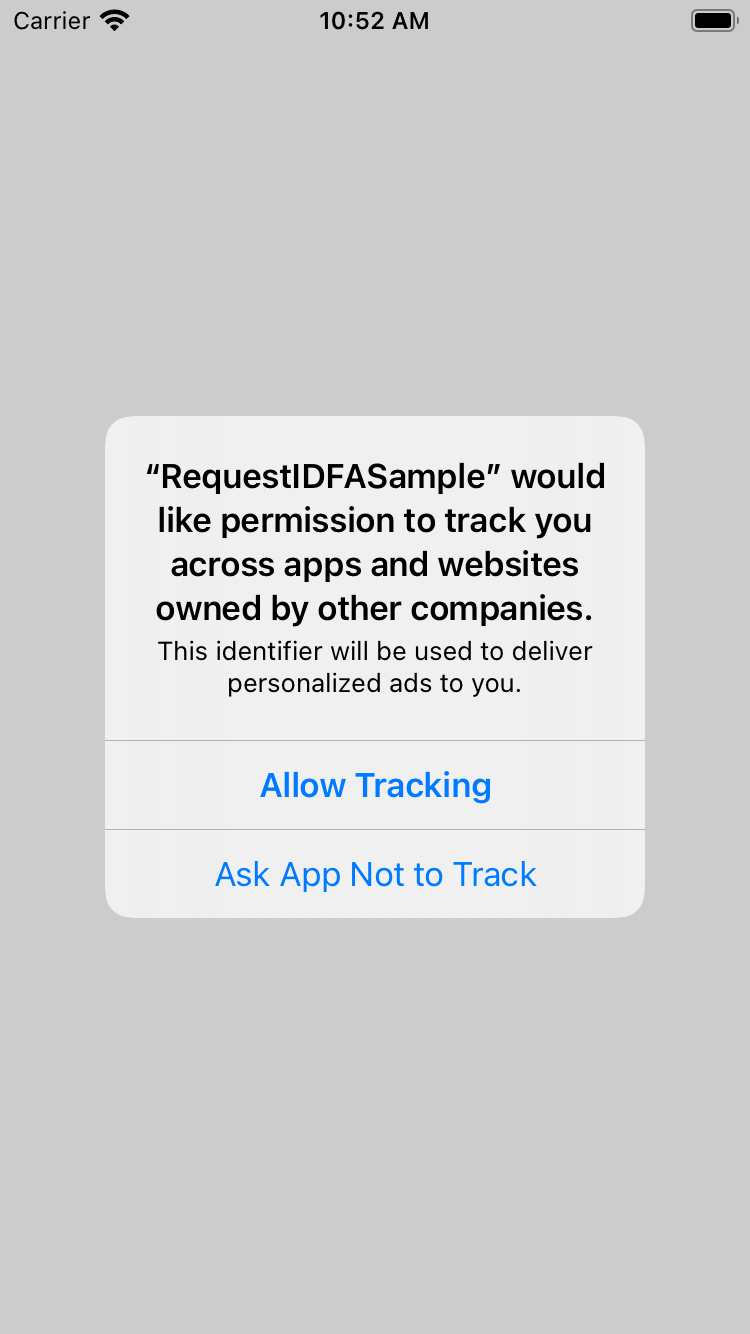
IDFA, update your `Info.plist` to add the `NSUserTrackingUsageDescription` key
with a custom message describing your usage. Here is an example description
text:
```xml
NSUserTrackingUsageDescription
This identifier will be used to deliver personalized ads to you.
```

The usage description appears in the App Tracking Transparency dialog:
To present the authorization request, call
[`requestTrackingAuthorizationWithCompletionHandler:`](https://developer.apple.com/documentation/apptrackingtransparency/attrackingmanager/3547037-requesttrackingauthorization).
We recommend waiting for the completion callback prior to loading ads so that if
the user grants the App Tracking Transparency permission, the Google Mobile Ads
SDK can use the IDFA in ad requests.
### Swift
```swift
@available(iOS 14, *)
private func requestIDFA() {
ATTrackingManager.requestTrackingAuthorization { status in
// Tracking authorization completed. Start loading ads here.
}
}
```
### Objective-C
```objective-c
- (void)requestIDFA {
if (@available(iOS 14, *)) {
[ATTrackingManager requestTrackingAuthorizationWithCompletionHandler:^(
ATTrackingManagerAuthorizationStatus status){
// Tracking authorization completed. Start loading ads here.
}];
}
}
```
For more information about the possible status values, see
[`ATTrackingManager.AuthorizationStatus`](https://developer.apple.com/documentation/apptrackingtransparency/attrackingmanager/authorizationstatus).
> [!TIP]
> **Tip:** For a better user experience, we recommend adding an explainer preceding the call to `requestTrackingAuthorizationWithCompletionHandler:` to clarify the permission and data usage to users.
## SKOverlay
**Prerequisites: Google Mobile Ads SDK 8.5.0 or higher**
[SKOverlay](https://developer.apple.com/documentation/storekit/skoverlay)
presents a recommended app as an overlay on top of an ad, so users can
install it without leaving your app.
If you use Google Mobile Ads SDK 8.5.0 or higher, you don't need to take
any action to enable SKOverlay for your app. When there is a positive
performance benefit for users and advertisers, ads are automatically enhanced
with SKOverlay.
## App-Bound Domains
In June 2020, Apple introduced [App-Bound
Domains](https://webkit.org/blog/10882/app-bound-domains/) as an opt-in feature for
developers to limit the domains for all `WKWebView` in an app to 10 or fewer,
through the `WKAppBoundDomains` `Info.plist` key.
If you add the `WKAppBoundDomains` key to your `Info.plist` file,
Google Mobile Ads SDK might fail to load ads.
## Publisher first-party ID
**Prerequisites:
Google Mobile Ads SDK
10.14.0 or
higher**
The
Google Mobile Ads SDK
introduced
[Publisher first-party ID](https://support.google.com/admanager/answer/9997589#publisher-first-party-id),
to help you deliver more relevant and personalized ads by using data collected
from your apps.
Publisher first-party ID is enabled by default, but you can disable it using the
following method.
### Swift
```swift
// Disables Publisher first-party ID.
MobileAds.shared.requestConfiguration.setPublisherFirstPartyIDEnabled(false)
```
### Objective-C
```objective-c
// Disables Publisher first-party ID.
[GADMobileAds.sharedInstance.requestConfiguration setPublisherFirstPartyIDEnabled:NO];
```