Adaptive banners are the next generation of responsive ads, maximizing
performance by optimizing ad size for each device. Improving on fixed-size
banners, which only supported fixed heights, adaptive banners let developers
specify the ad-width and use this to determine the optimal ad size.
To pick the best ad size, inline adaptive banners use maximum instead of fixed
heights. This results in opportunities for improved performance.
## When to use inline adaptive banners
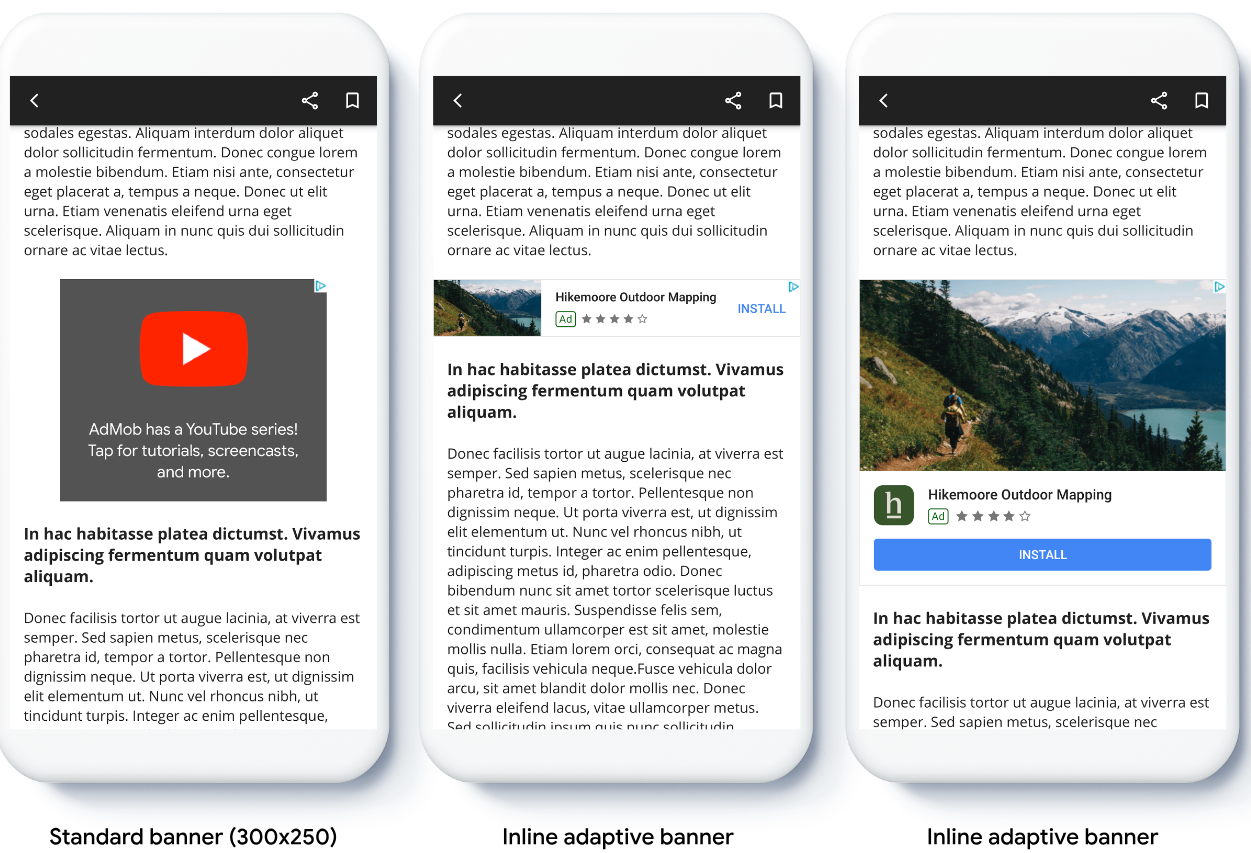
Inline adaptive banners are larger, taller banners compared to anchored adaptive
banners. They are of variable height, and can be as tall as the device screen.
They are intended to be placed in scrolling content, for example:
## Prerequisites
- Follow the instructions from the [Get Started guide](https://developers.google.com/ad-manager/mobile-ads-sdk/flutter/quick-start.md.txt) on how to [Import Google Mobile Ads Flutter Plugin](https://developers.google.com/ad-manager/mobile-ads-sdk/flutter/quick-start.md.txt#import_the_mobile_ads_sdk).
## Before you begin
> [!IMPORTANT]
> **Important:** You must know the width of the view that the ad will be placed in, **and this should take into account the device width and any safe areas that are
> applicable**.
When implementing adaptive banners in your app, note these points:
- Ensure you are using the latest version of Google Mobile Ads Flutter Plugin, and if
using mediation, the latest versions of your mediation adapters.
- The inline adaptive banner sizes are designed to work best when using the
full available width. In most cases, this will be the full width of the
screen of the device in use. Be sure to take into account applicable safe areas.
- You may need to update or create new line items to work with adaptive sizes.
[Learn more](https://support.google.com/admanager/answer/9464128).
- The methods for getting the ad size are
- `AdSize.getCurrentOrientationInlineAdaptiveBannerAdSize(int width)`
- `AdSize.getLandscapeInlineAdaptiveBannerAdSize(int width)`
- `AdSize.getPortraitInlineAdaptiveBannerAdSize(int width)`
- `AdSize.getInlineAdaptiveBannerAdSize(int width, int maxHeight)`
- When using the inline adaptive banner APIs, Google Mobile Ads Flutter Plugin
returns an `AdSize` with the given width and an
inline flag. The height is either zero or `maxHeight`, depending on which
API you're using. The actual height of the ad is made available when it's
returned.
- An inline adaptive banner is designed to be placed in scrollable content.
The banner can be as tall as the device screen or limited by a maximum
height, depending on the API.
## Implementation
Follow the steps below to implement a simple inline adaptive banner.
1. **Get an inline adaptive banner ad size.** The size you get will be used to request the adaptive banner. To get the adaptive ad size make sure that you:
1. Get the width of the device in use in density independent pixels, or set your own width if you don't want to use the full width of the screen. You can use `MediaQuery.of(context)` to get the screen width.
2. Use the appropriate static methods on the ad size class, such as `AdSize.getCurrentOrientationInlineAdaptiveBannerAdSize(int width)` to get an inline adaptive `AdSize` object for the current orientation.
3. If you wish to limit the height of the banner, you can use the static method `AdSize.getInlineAdaptiveBannerAdSize(int width, int maxHeight)`.
2. Create an `AdManagerBannerAd` object with your ad unit ID, the adaptive ad size, and an ad request object.
3. Load the ad.
4. In the `onAdLoaded` callback, use `AdManagerBannerAd.getPlatformAdSize()` to get the updated platform ad size and update the `AdWidget` container height.
5. Before rendering the ad in a scrollable list, check the `AdManagerBannerAd.isMounted` property. This process makes sure the ad instance isn't mounted in the widget tree.
## Code example
Here's an example widget that loads an inline adaptive banner to fit the
width of the screen, accounting for insets:
```dart
import 'package:flutter/material.dart';
import 'package:google_mobile_ads/google_mobile_ads.dart';
/// This example demonstrates inline adaptive banner ads.
///
/// Loads and shows an inline adaptive banner ad in a scrolling view,
/// and reloads the ad when the orientation changes.
class InlineAdaptiveExample extends StatefulWidget {
@override
_InlineAdaptiveExampleState createState() => _InlineAdaptiveExampleState();
}
class _InlineAdaptiveExampleState extends State {
static const _insets = 16.0;
AdManagerBannerAd? _inlineAdaptiveAd;
bool _isLoaded = false;
AdSize? _adSize;
late Orientation _currentOrientation;
double get _adWidth => MediaQuery.of(context).size.width - (2 * _insets);
@override
void didChangeDependencies() {
super.didChangeDependencies();
_currentOrientation = MediaQuery.of(context).orientation;
_loadAd();
}
void _loadAd() async {
await _inlineAdaptiveAd?.dispose();
setState(() {
_inlineAdaptiveAd = null;
_isLoaded = false;
});
// Get an inline adaptive size for the current orientation.
AdSize size = AdSize.getCurrentOrientationInlineAdaptiveBannerAdSize(
_adWidth.truncate());
_inlineAdaptiveAd = AdManagerBannerAd(
// TODO: replace with your own ad unit.
adUnitId: '/21775744923/example/adaptive-banner',
size: size,
request: AdManagerAdRequest(),
listener: AdManagerBannerAdListener(
onAdLoaded: (Ad ad) async {
print('Inline adaptive banner loaded: ${ad.responseInfo}');
// After the ad is loaded, get the platform ad size and use it to
// update the height of the container. This is necessary because the
// height can change after the ad is loaded.
AdManagerBannerAd bannerAd = (ad as AdManagerBannerAd);
final AdSize? size = await bannerAd.getPlatformAdSize();
if (size == null) {
print('Error: getPlatformAdSize() returned null for $bannerAd');
return;
}
setState(() {
_inlineAdaptiveAd = bannerAd;
_isLoaded = true;
_adSize = size;
});
},
onAdFailedToLoad: (Ad ad, LoadAdError error) {
print('Inline adaptive banner failedToLoad: $error');
ad.dispose();
},
),
);
await _inlineAdaptiveAd!.load();
}
/// Gets a widget containing the ad, if one is loaded.
///
/// Returns an empty container if no ad is loaded, or the orientation
/// has changed. Also loads a new ad if the orientation changes.
Widget _getAdWidget() {
return OrientationBuilder(
builder: (context, orientation) {
if (_currentOrientation == orientation &&
_inlineAdaptiveAd != null &&
!_inlineAdaptiveAd!.isMounted &&
_isLoaded &&
_adSize != null) {
return Align(
child: Container(
width: _adWidth,
height: _adSize!.height.toDouble(),
child: AdWidget(
ad: _inlineAdaptiveAd!,
),
));
}
// Reload the ad if the orientation changes.
if (_currentOrientation != orientation) {
_currentOrientation = orientation;
_loadAd();
}
return Container();
},
);
}
@override
Widget build(BuildContext context) => Scaffold(
appBar: AppBar(
title: Text('Inline adaptive banner example'),
),
body: Center(
child: Padding(
padding: const EdgeInsets.symmetric(horizontal: _insets),
child: ListView.separated(
itemCount: 20,
separatorBuilder: (BuildContext context, int index) {
return Container(
height: 40,
);
},
itemBuilder: (BuildContext context, int index) {
if (index == 10) {
return _getAdWidget();
}
return Text(
'Placeholder text',
style: TextStyle(fontSize: 24),
);
},
),
),
));
@override
void dispose() {
super.dispose();
_inlineAdaptiveAd?.dispose();
}
}
```