This guide shows you how to use Google Mobile Ads SDK (Legacy) to load and display
ads from i-mobile using [mediation](https://developers.google.com/ad-manager/mobile-ads-sdk/android/mediation.md.txt),
covering waterfall integrations. It covers how to add i-mobile to an ad unit's
mediation configuration, and how to integrate the i-mobile SDK and adapter into
an Android app.
The dashboard interface for i-mobile uses Japanese text for its labels,
buttons, and descriptions. The screenshots in this guide have not been
translated. In this guide's descriptions and instructions however, labels and
buttons are translated with their English language equivalents in parentheses.
## Supported integrations and ad formats
The mediation adapter for i-mobile has the following capabilities:
| Integration ||
|---|---|
| Bidding | |
| Waterfall | Yes |
| Banner | Yes |
| Interstitial | Yes |
| Rewarded | |
| Native | Yes |
## Prerequisites
Before you continue, verify the following:
- Android API level 24 or later.
- Latest Google Mobile Ads SDK (Legacy) version.
- [Set up mediation](https://developers.google.com/ad-manager/mobile-ads-sdk/android/mediation.md.txt).
## Step 1: Set up configurations in i-mobile UI
[Sign up](https://www2.i-mobile.co.jp/pre_register_partner.aspx) or [log
in](https://sppartner.i-mobile.co.jp/login.aspx) to your i-mobile account.
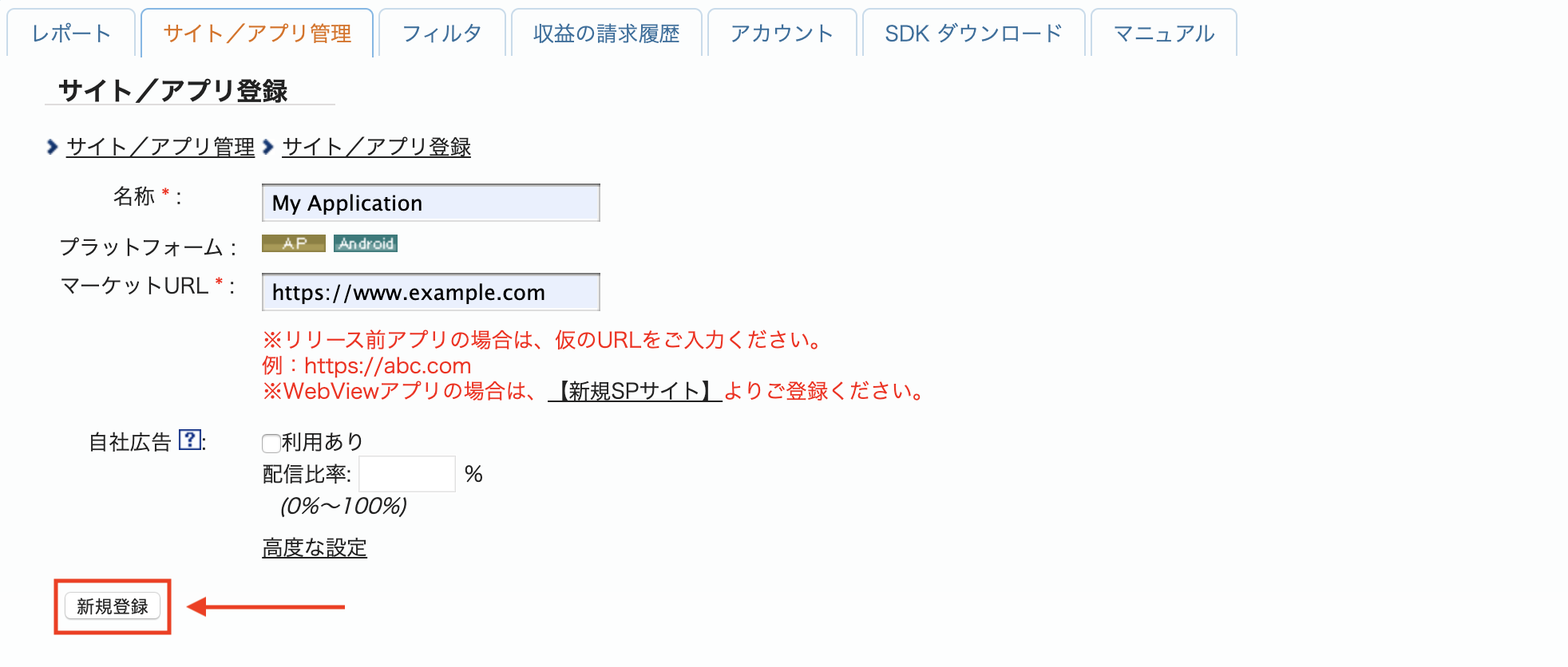
Add your app to the i-mobile dashboard by clicking the
**サイト/アプリ管理 (Site/Application Management)** tab and the button for your
app's platform.

Fill out the form and click the **新規登録 (Sign up)** button.
> [!NOTE]
> **Note:** i-mobile has to approve your registration. Once you are approved, you can create an **Advertising Spot**.
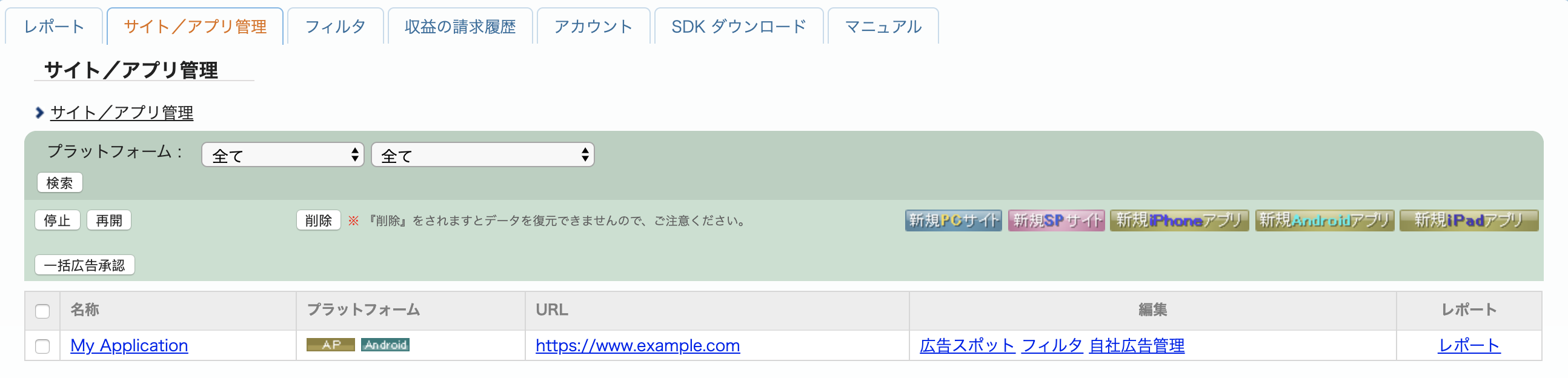
To create a new Advertising Spot, select your app under the
**サイト/アプリ管理 (Site/Application Management)** tab.
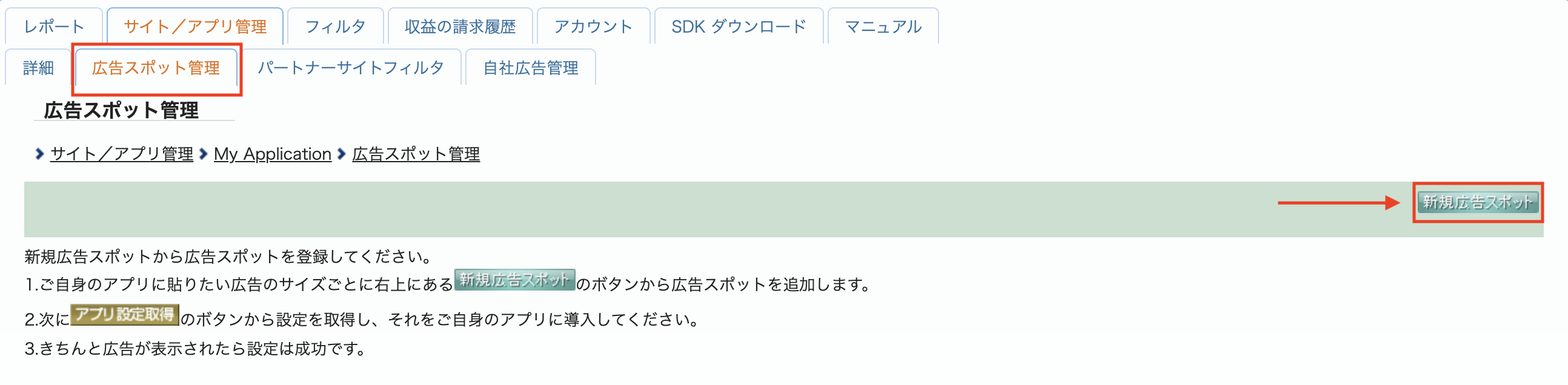
Navigate to the **広告スポット管理 (Ad Spot Management)** tab and click the
**新規広告スポット (New Ad Spot)** button.
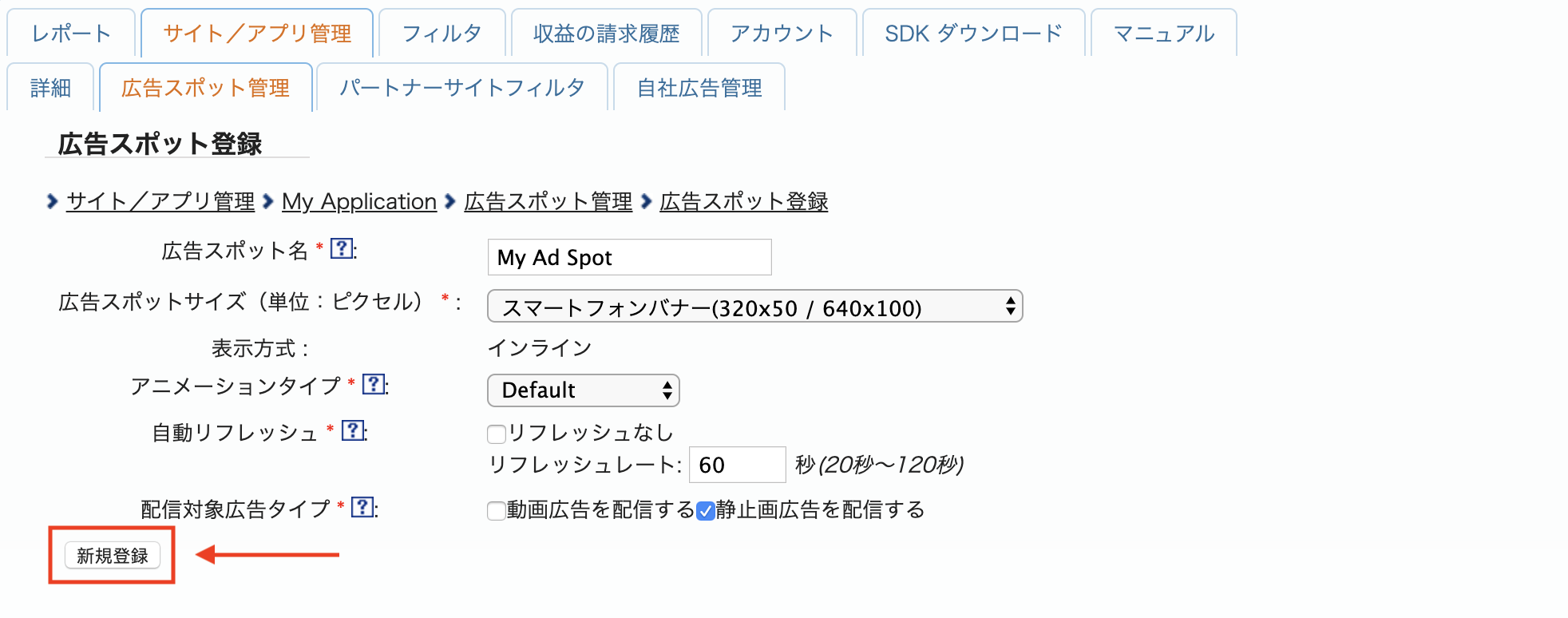
Next, fill out the form by providing the **広告スポット名 (Ad Spot name)** ,
**広告スポットサイズ (Ad Spot size)** and other details. Then, click the
**新規登録 (Sign up)** button.
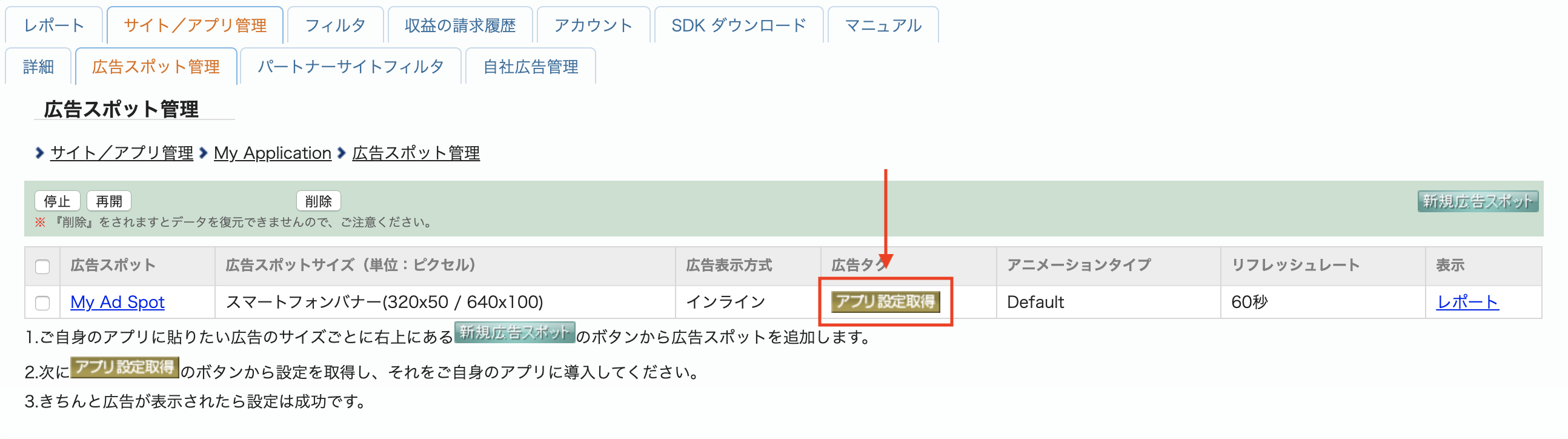
Your new **Ad spot** is ready. To view its integration details, click the
**アプリ設定取得 (Get App settings)** button.
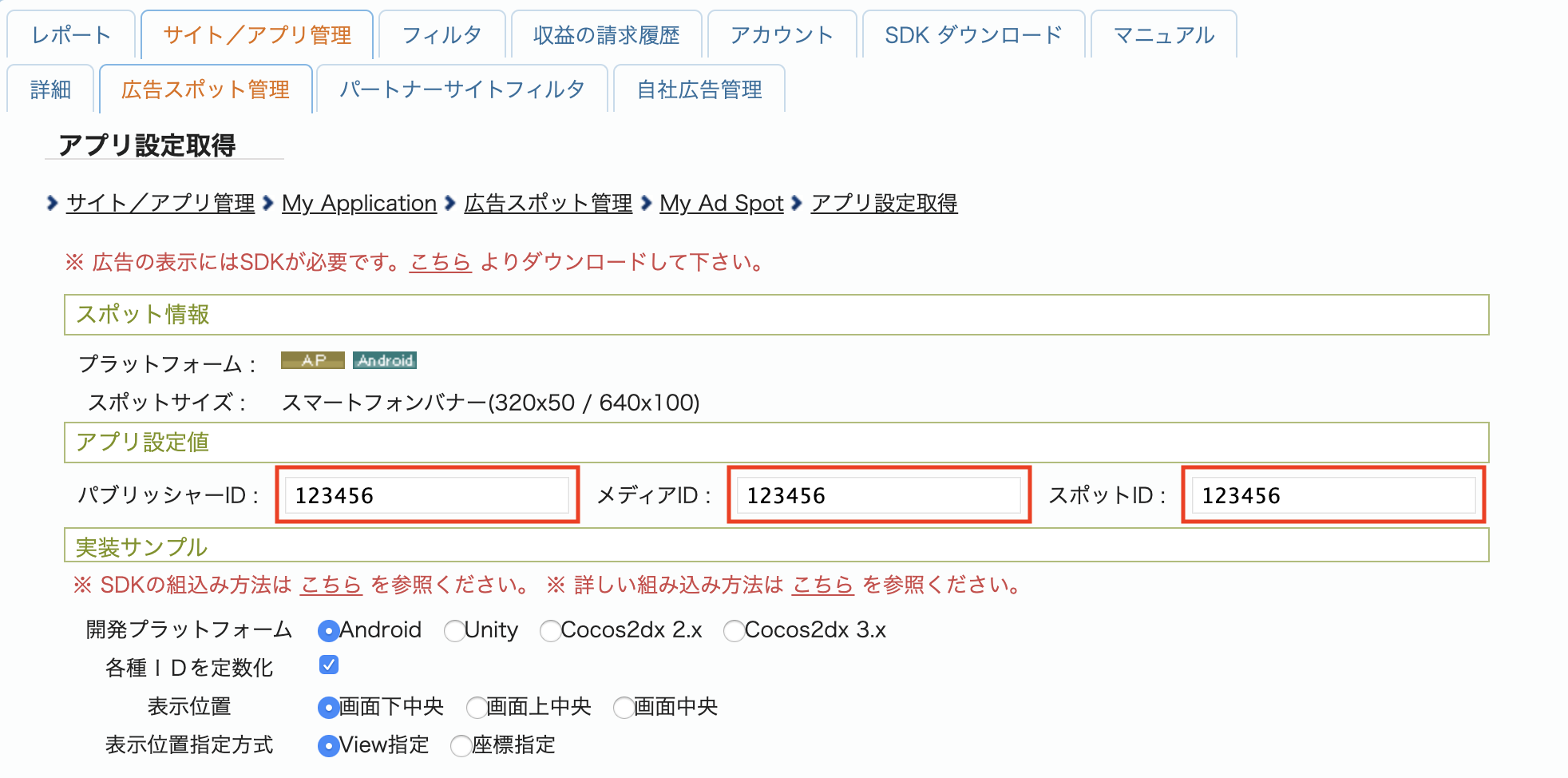
Take note of the **パブリッシャーID (Publisher ID)** , **メディアID (Media ID)** ,
and **スポットID (Spot ID)**. You'll need these parameters later when configuring
i-mobile for mediation in the Ad Manager UI.
### Update your app-ads.txt
[Authorized Sellers for Apps app-ads.txt](https://iabtechlab.com/wp-content/uploads/2019/03/app-ads.txt-v1.0-final-.pdf) is an IAB Tech Lab initiative that helps ensure your
app ad inventory is only sold through channels you've identified as authorized. To prevent a
significant loss in ad revenue, you'll need to implement an `app-ads.txt` file.
If you haven't done so already,
[create an app-ads.txt file for Ad Manager](https://support.google.com/admanager/answer/7544382).
To implement `app-ads.txt` for i-mobile, see their
[Frequently Asked Questions](https://www.i-mobile.co.jp/help_partner_sp.html#3-10).
## Step 2: Set up i-mobile demand in Ad Manager UI
### Configure mediation settings for your ad unit
Sign in to your [Ad Manager account](https://admanager.google.com/home/).
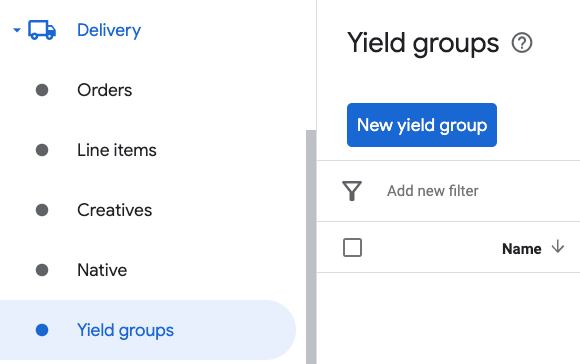
Navigate to **Delivery \> Yield groups** and click the **New yield group**
button.
Enter a unique **Name** for your yield group, set the **Status** to **Active** ,
select your **Ad Format** , and set the **Inventory type** to **Mobile App** .
Under the **Targeting \> Inventory** section, select the ad unit under
**Inventory** and **Mobile application** to which you want to add mediation.
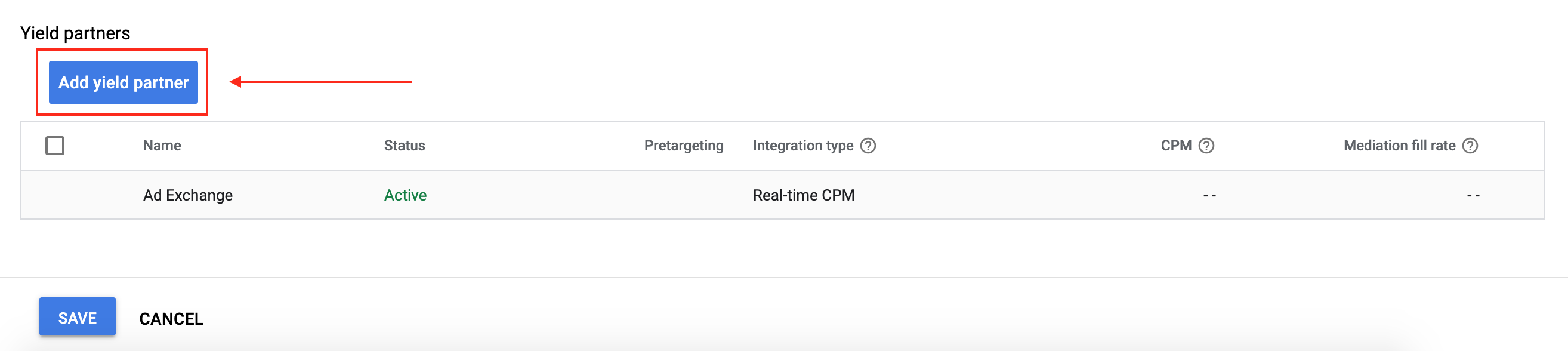
Next, click the **Add yield partner** button.
If you already have a **Yield partner** for
i-mobile, you can select it. Otherwise,
select **Create a new yield partner**.
Select **i-mobile** as the
**Ad network** , enter a unique **Name** and enable **Mediation**.
Turn on **Automatic data collection** , and enter the
**Login name** and **API Password**

Once the **Yield partner** is selected, choose **Mobile SDK Mediation**
as the **Integration type** , **Android** as the
**Platform** , and **Active** as the **Status** . Enter the
**Publisher ID** , **Media ID** and **Spot ID**
obtained in the previous section. Then, enter a **Default CPM** value.

Click **Save** at the bottom of the page when done.
> [!NOTE]
> **Note:** Automatic data collection takes a few days to gather data before it can accurately calculate a Dynamic CPM value for a mediation network. Once the eCPM can be calculated, it will be automatically updated on your behalf.
## Step 3: Import the i-mobile SDK and Adapter
> [!NOTE]
> **Note:** Failure to integrate the compatible i-mobile and Google Mobile Ads SDK (Legacy) versions might lead to build issues.
### Android Studio integration (recommended)
In your project-level `settings.gradle.kts` file, add the following
repositories:
```kotlin
dependencyResolutionManagement {
repositories {
google()
mavenCentral()
maven {
url = uri("https://imobile.github.io/adnw-sdk-android")
}
}
}
```
In your app-level gradle file, add the following implementation dependencies:
### Kotlin
```kotlin
dependencies {
implementation("com.google.android.gms:play-services-ads:25.5.0")
implementation("com.google.ads.mediation:imobile:2.3.2.5")
}
```
### Groovy
```groovy
dependencies {
implementation 'com.google.android.gms:play-services-ads:25.5.0'
implementation 'com.google.ads.mediation:imobile:2.3.2.5'
}
```
### Manual integration
1. Download the latest version of the
[i-mobile SDK](https://sppartner.i-mobile.co.jp/sdk_download.aspx) and extract the
`android-ad-sdk.aar` under the `sdk` folder and add it to your project.
2. Navigate to the [i-mobile adapter artifacts](https://maven.google.com/web/index.html#com.google.ads.mediation:imobile)
on Google's Maven Repository. Select the latest version, download the i-mobile
adapter's `.aar` file, and add it to your project.
## Step 4: Add required code
### Load ad with activity context
Pass `Activity` context when loading Banner, Interstitial, Rewarded and Native
ad formats.Without activity context, ad load will fail.
## Step 5: Test your implementation
### Enable test ads
Make sure you
[register your test device](https://developers.google.com/ad-manager/mobile-ads-sdk/android/test-ads.md.txt#enable_test_devices)
for
Ad Manager.
i-mobile provides test **Spot ID** , **Media ID** ,
and **Publisher ID** for testing, you can find them
[here](https://sppartner.i-mobile.co.jp/webdoc/common/test-id.html).
> [!IMPORTANT]
> **Important:** Disable test mode for Ad Manager and i-mobile before releasing your app.
### Verify test ads
To verify that you are receiving test ads from
i-mobile,
enable
[single ad source testing](https://developers.google.com/ad-manager/mobile-ads-sdk/android/ad-inspector.md.txt#single_ad_source_testing)
in ad inspector using the
**i-mobile (Waterfall)** ad source(s).
## Optional steps
### Using native ads
#### Ad rendering
The i-mobile adapter populates the following
[fields](https://support.google.com/admanager/answer/6075370#appinstall)
for a
[`NativeAd`](https://developers.google.com/ad-manager/mobile-ads-sdk/android/reference/com/google/android/gms/ads/nativead/NativeAd.md.txt).
| Field | Assets always included by i-mobile adapter |
|---|---|
| Headline | Yes |
| Image | Yes |
| Body | Yes |
| App icon | ^[1](https://developers.google.com/ad-manager/mobile-ads-sdk/android/mediation/imobile.md.txt#app-icon-footnote)^ |
| Call to action | Yes |
| Star rating | |
| Store | |
| Price | |
^1^ For native ads, the i-mobile SDK does not provide an app icon asset. Instead,
the i-mobile adapter populates the app icon with a transparent image.
## Error codes
If the adapter fails to receive an ad from i-mobile,
publishers can check the underlying error from the ad response using
[`ResponseInfo.getAdapterResponses()`](https://developers.google.com/ad-manager/mobile-ads-sdk/android/reference/com/google/android/gms/ads/ResponseInfo.md.txt#getAdapterResponses())
under the following classes:
| Format | Class name |
|---|---|
| Banner | com.google.ads.mediation.imobile.IMobileAdapter |
| Interstitial | com.google.ads.mediation.imobile.IMobileAdapter |
| Native | com.google.ads.mediation.imobile.IMobileMediationAdapter |
Here are the codes and accompanying messages thrown by the i-mobile adapter
when an ad fails to load:
| Error code | Reason |
|---|---|
| 0-99 | i-mobile SDK returned an error. See [code](https://github.com/googleads/googleads-mobile-android-mediation/blob/master/ThirdPartyAdapters/imobile/imobile/src/main/java/com/google/ads/mediation/imobile/AdapterHelper.java) for more details. |
| 101 | i-mobile requires an `Activity` context to load ads. |
| 102 | i-mobile server parameters configured in the Ad Manager UI are missing/invalid. |
| 103 | The requested ad size does not match an i-mobile supported banner size. |
| 104 | i-mobile's native ad load success callback returned an empty native ads list. |
| 105 | The request had age-restricted treatment, but i-mobile SDK cannot receive age-restricted signals |
## i-mobile Android Mediation Adapter Changelog
#### Next Version
- Updated the adapter to use the `InitializationCompleteCallback.onInitializationFailed(AdError)` API.
- Updated the minimum required Android API level to 24.
- Fixed an issue where interstitial ad load and presentation callbacks were not forwarded because an empty listener was registered with the i-mobile SDK.
#### Version 2.3.2.5
- Pin the adapter's Kotlin dependency to 1.9.0 (the min Kotlin version supported by GMA NextGen SDK).
- Fixed fall-through behavior on age-restricted failure branches during ad initialization and ad load requests.
Built and tested with:
- Google Mobile Ads SDK version 25.4.0.
- Google Mobile Ads Next-Gen SDK version 1.4.0.
- IMobile SDK version 2.3.2.
#### Version 2.3.2.4
- Filter age-restricted requests for i-mobile SDK when new `AgeRestrictedTreatment` is set to `CHILD`.
Built and tested with:
- Google Mobile Ads SDK version 25.4.0.
- Google Mobile Ads Next-Gen SDK version 1.2.0.
- IMobile SDK version 2.3.2.
#### Version 2.3.2.3
- Filter age-restricted requests for i-mobile SDK because it cannot receive age-restricted signals.
Built and tested with:
- Google Mobile Ads SDK version 25.1.0.
- Google Mobile Ads Next-Gen SDK version 1.1.0.
- IMobile SDK version 2.3.2.
#### Version 2.3.2.2
- Added property to build the adapter with GMA Next-Gen SDK dependency.
- Migrated banner, interstitial and native ad implementations from old API to new API.
Built and tested with:
- Google Mobile Ads SDK version 25.1.0.
- IMobile SDK version 2.3.2.
#### Version 2.3.2.1
- Updated the minimum required Android API level to 23.
- Updated the minimum required Google Mobile Ads SDK version to 24.0.0.
Built and tested with:
- Google Mobile Ads SDK version 24.0.0.
- IMobile SDK version 2.3.2.
#### Version 2.3.2.0
- Verified compatibility with i-mobile SDK v2.3.2.
Built and tested with:
- Google Mobile Ads SDK version 23.1.0.
- IMobile SDK version 2.3.2.
#### Version 2.3.1.2
- Updated the minimum required Google Mobile Ads SDK version to 23.0.0.
- Verified compatibility with i-mobile SDK v2.3.1.
Built and tested with:
- Google Mobile Ads SDK version 23.0.0.
- IMobile SDK version 2.3.1.
#### Version 2.3.1.1
- Updated adapter to use new `VersionInfo` class.
- Updated the minimum required Google Mobile Ads SDK version to 22.0.0.
Built and tested with:
- Google Mobile Ads SDK version 22.0.0.
- IMobile SDK version 2.3.1.
#### Version 2.3.1.0
- Verified compatibility with i-mobile SDK v2.3.1.
- Updated the minimum required Google Mobile Ads SDK version to 21.5.0.
Built and tested with:
- Google Mobile Ads SDK version 21.5.0.
- IMobile SDK version 2.3.1.
#### Version 2.3.0.0
- Verified compatibility with i-mobile SDK v2.3.0.
- Updated the minimum required Google Mobile Ads SDK version to 21.3.0.
Built and tested with:
- Google Mobile Ads SDK version 21.3.0.
- IMobile SDK version 2.3.0.
#### Version 2.0.23.1
- Updated `compileSdkVersion` and `targetSdkVersion` to API 31.
- Updated the minimum required Google Mobile Ads SDK version to 21.0.0.
- Updated the minimum required Android API level to 19.
Built and tested with:
- Google Mobile Ads SDK version 21.0.0.
- IMobile SDK version 2.0.23.
#### Version 2.0.23.0
- Verified compatibility with i-mobile SDK v2.0.23.
- Updated the minimum required Google Mobile Ads SDK version to 20.5.0.
Built and tested with
- Google Mobile Ads SDK version 20.5.0.
- IMobile SDK version 2.0.23.
#### Version 2.0.22.2
- Added standardized adapter error codes and messages.
- Updated the minimum required Google Mobile Ads SDK version to 20.1.0.
Built and tested with
- Google Mobile Ads SDK version 20.1.0.
- IMobile SDK version 2.0.22.
#### Version 2.0.22.1
- Updated the minimum required Google Mobile Ads SDK version to 20.0.0.
Built and tested with
- Google Mobile Ads SDK version 20.0.0.
- IMobile SDK version 2.0.22.
#### Version 2.0.22.0
- Verified compatibility with i-mobile SDK v2.0.22.
- Updated the adapter to support inline adaptive banner requests.
Built and tested with
- Google Mobile Ads SDK version 19.1.0.
- IMobile SDK version 2.0.22.
#### Version 2.0.21.0
- Verified compatibility with i-mobile SDK v2.0.21.
- Updated the minimum required Google Mobile Ads SDK version to 19.1.0.
- Added support for scaling adaptive banner ads.
Built and tested with
- Google Mobile Ads SDK version 19.1.0.
- IMobile SDK version 2.0.21.
#### Version 2.0.20.2
- Added support for flexible banner ad sizes.
- Updated the minimum required Google Mobile Ads SDK version to 18.3.0.
Built and tested with
- Google Mobile Ads SDK version 18.3.0.
- IMobile SDK version 2.0.20.
#### Version 2.0.20.1
- Adapter now returns a non-zero `mediaContent` aspect ratio.
Built and tested with
- Google Mobile Ads SDK version 18.2.0.
- IMobile SDK version 2.0.20.
#### Version 2.0.20.0
- Initial release!
- Added support for banner, interstitial, and native ads.