> [!NOTE]
> **Note:** Fyber Marketplace is now DT Exchange.
This guide shows you how to use Google Mobile Ads SDK (Legacy) to load and display
ads from DT Exchange using [mediation](https://developers.google.com/ad-manager/mobile-ads-sdk/android/mediation.md.txt),
covering waterfall integrations. It covers how to add DT Exchange to an ad
unit's mediation configuration and how to integrate the DT SDK and
adapter into an Android app.
## Supported integrations and ad formats
The mediation adapter for DT Exchange has the following capabilities:
| Integration ||
|---|---|
| Bidding | Yes |
| Waterfall | Yes |
| Banner | Yes |
| Interstitial | Yes |
| Rewarded | Yes |
| Native | Yes |
## Prerequisites
Before you continue, verify the following:
- Android API level 24 or later.
- \[For bidding\]: To integrate all supported ad formats in bidding, use the
DT Exchange adapter 8.4.2.0 or later
([latest version recommended](https://developers.google.com/ad-manager/mobile-ads-sdk/android/mediation/dtexchange#dt-exchange-android-mediation-adapter-changelog)).
- Latest Google Mobile Ads SDK (Legacy) version.
- [Set up mediation](https://developers.google.com/ad-manager/mobile-ads-sdk/android/mediation.md.txt).
## Step 1: Set up configurations in DT Exchange UI
### Add new app and ad placement
[Sign up](https://console.fyber.com/sign-up) or [log in](https://console.fyber.com/login) to
DT Exchange Console.
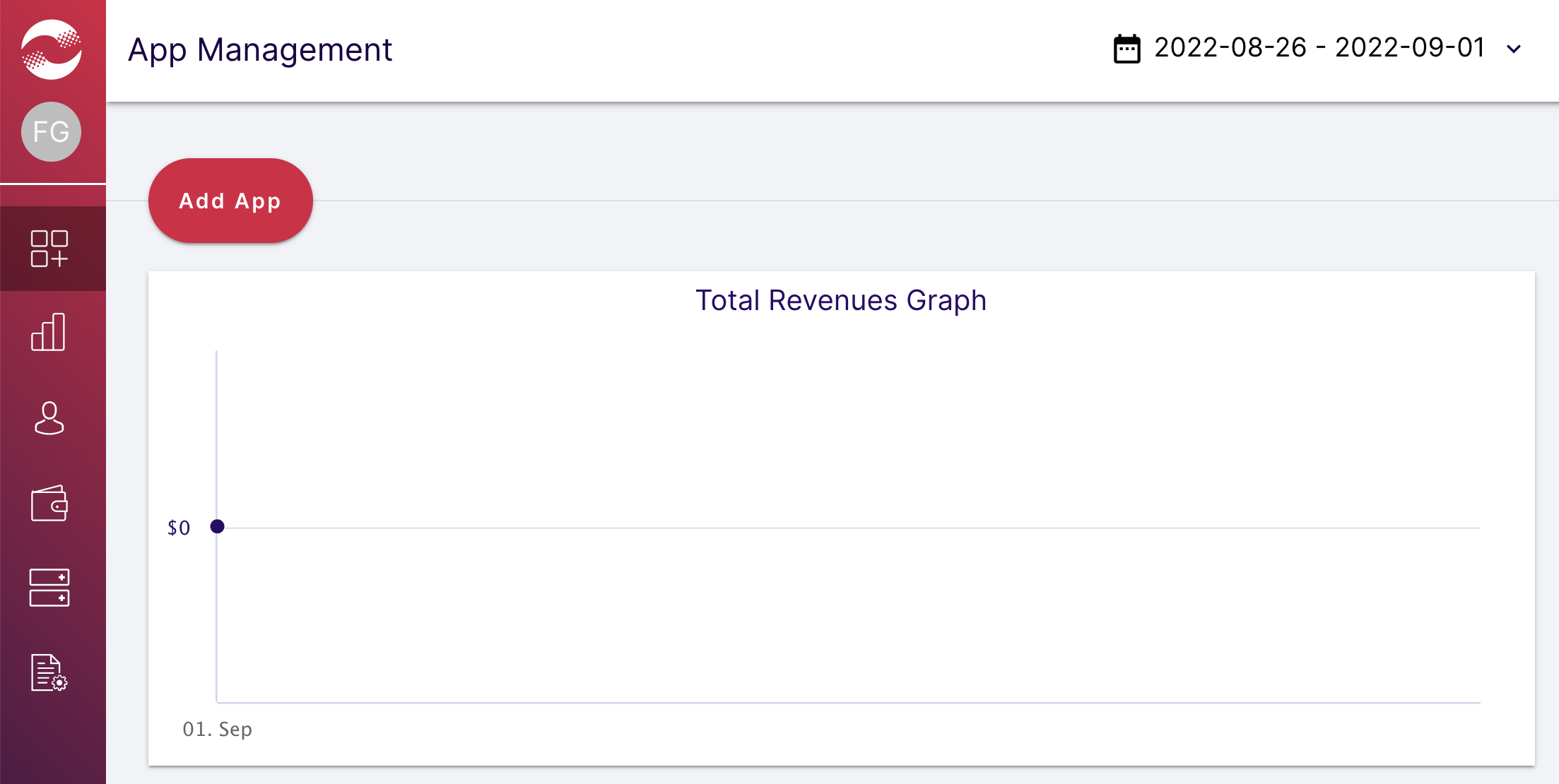
Click **Add App**.
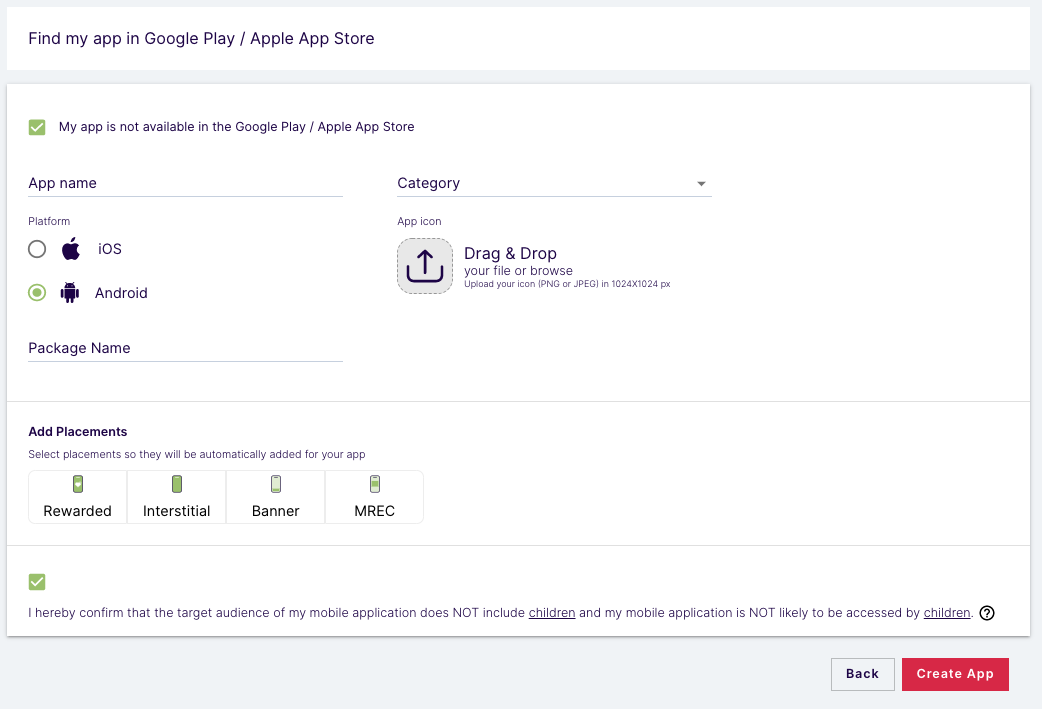
Choose your platform and placements, fill out the rest of the form, and then
click **Create App**.
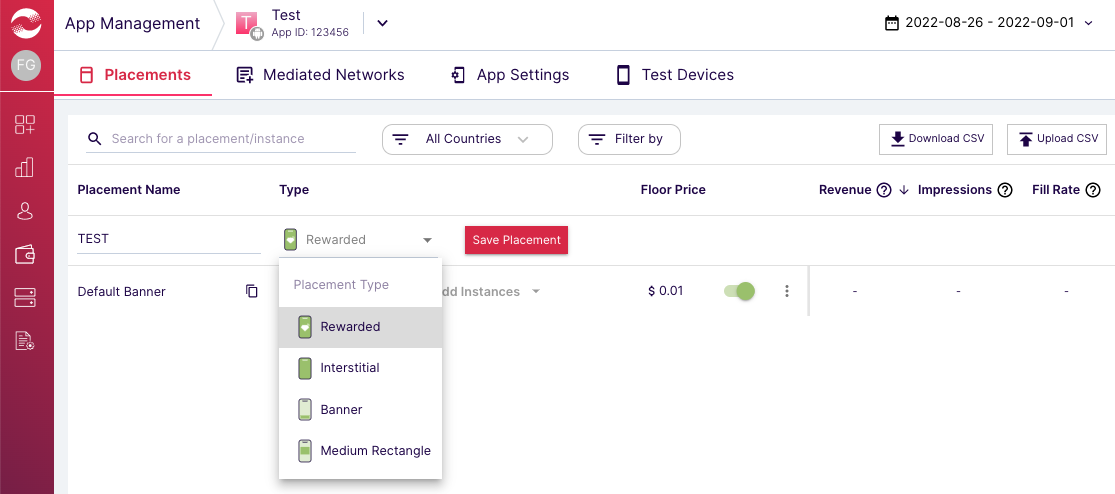
Enter the names and select the types for your placements. Then, click
**Save Placement**.
### App ID and Placement ID
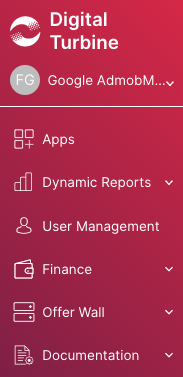
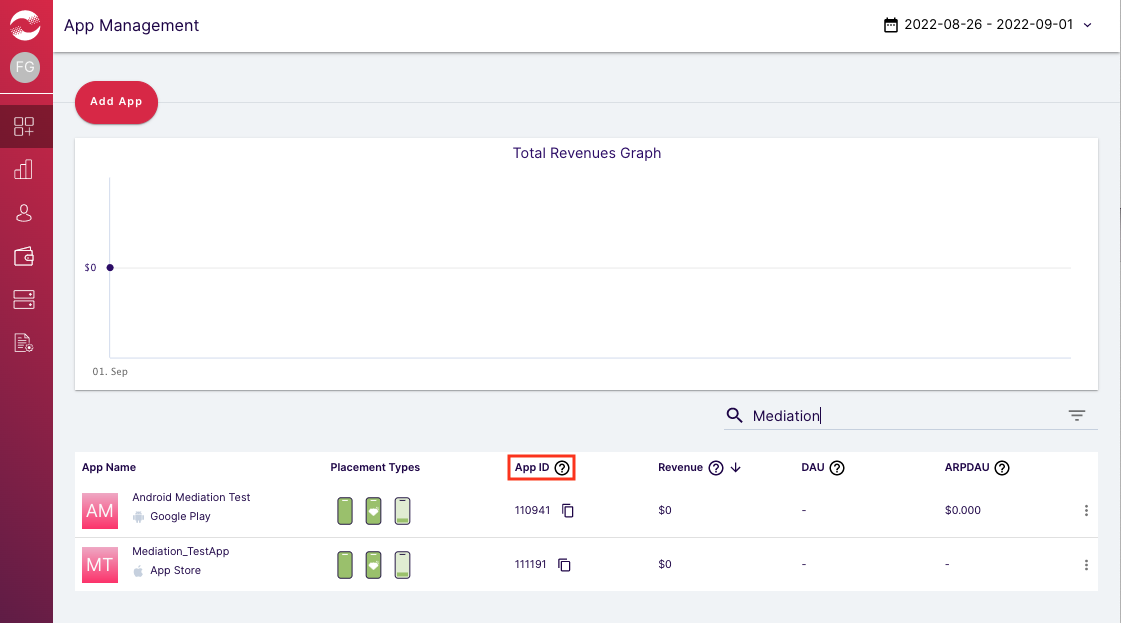
Hover over the left navigation bar to open it, then click **App Management**.
On the **App Management** page, take note of the **App ID** next to your app.
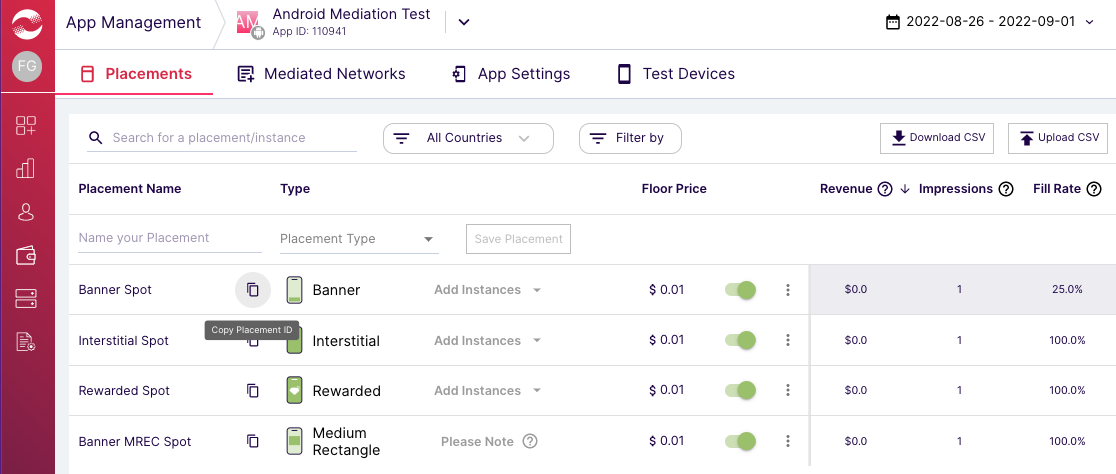
Select your app and navigate to the **Placements** tab.
Take note of the **Placement ID**..
### Publisher ID, Consumer Key and Consumer Secret
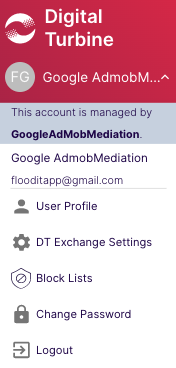
Click your username from the left menu and select **User Profile**.
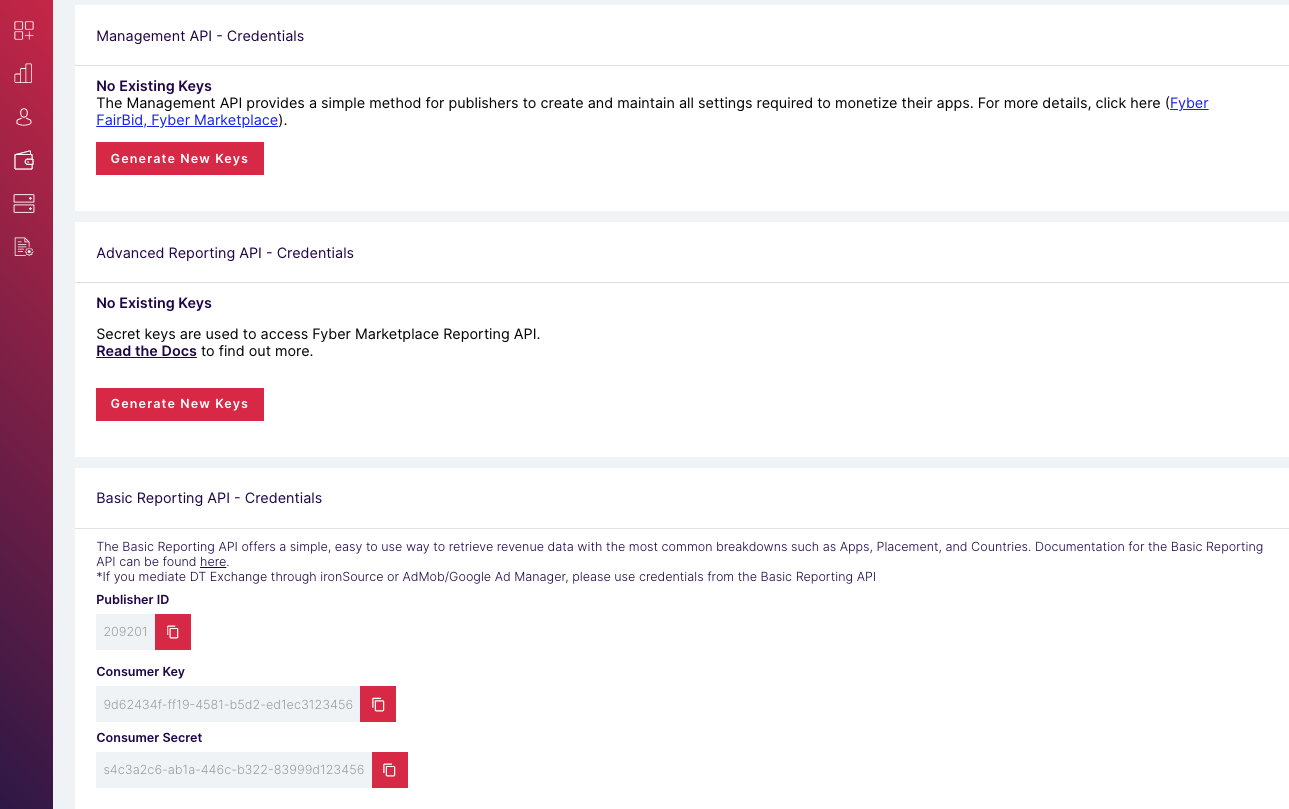
Take note of the **Publisher ID** , **Consumer Key** , and **Consumer Secret** as
these are needed in the next step.
### Update your app-ads.txt
[Authorized Sellers for Apps app-ads.txt](https://iabtechlab.com/wp-content/uploads/2019/03/app-ads.txt-v1.0-final-.pdf) is an IAB Tech Lab initiative that helps ensure your
app ad inventory is only sold through channels you've identified as authorized. To prevent a
significant loss in ad revenue, you'll need to implement an `app-ads.txt` file.
If you haven't done so already,
[create an app-ads.txt file for Ad Manager](https://support.google.com/admanager/answer/7544382).
To implement `app-ads.txt` for DT Exchange,
[Add DT to your app-ads.txt file](https://developer.digitalturbine.com/hc/en-us/articles/360009975198-app-ads-txt#01FN8J1SFM3HS6YBNZTG07HYYE).
## Step 2: Set up DT Exchange demand in Ad Manager UI
Sign in to your [Ad Manager account](https://admanager.google.com/home/).
### Add DT Exchange in Companies
### Bidding
This step isn't required for bidding integrations.
### Waterfall
Navigate to **Admin** \> **Companies** , then click the **New company** button
in the **All companies** tab. Select **Ad network**.

Select
**DT SDK**
as the **Ad network** , enter a unique **Name** and enable **Mediation** .
Turn on **Automatic data collection** , and enter the
**Publisher ID** , **Consumer Secret** and **Consumer Key** obtained in the
previous section.
You don't need to enter a **Username** or **Password** . Click **Save** when
done.

### Enable secure signal sharing
### Bidding
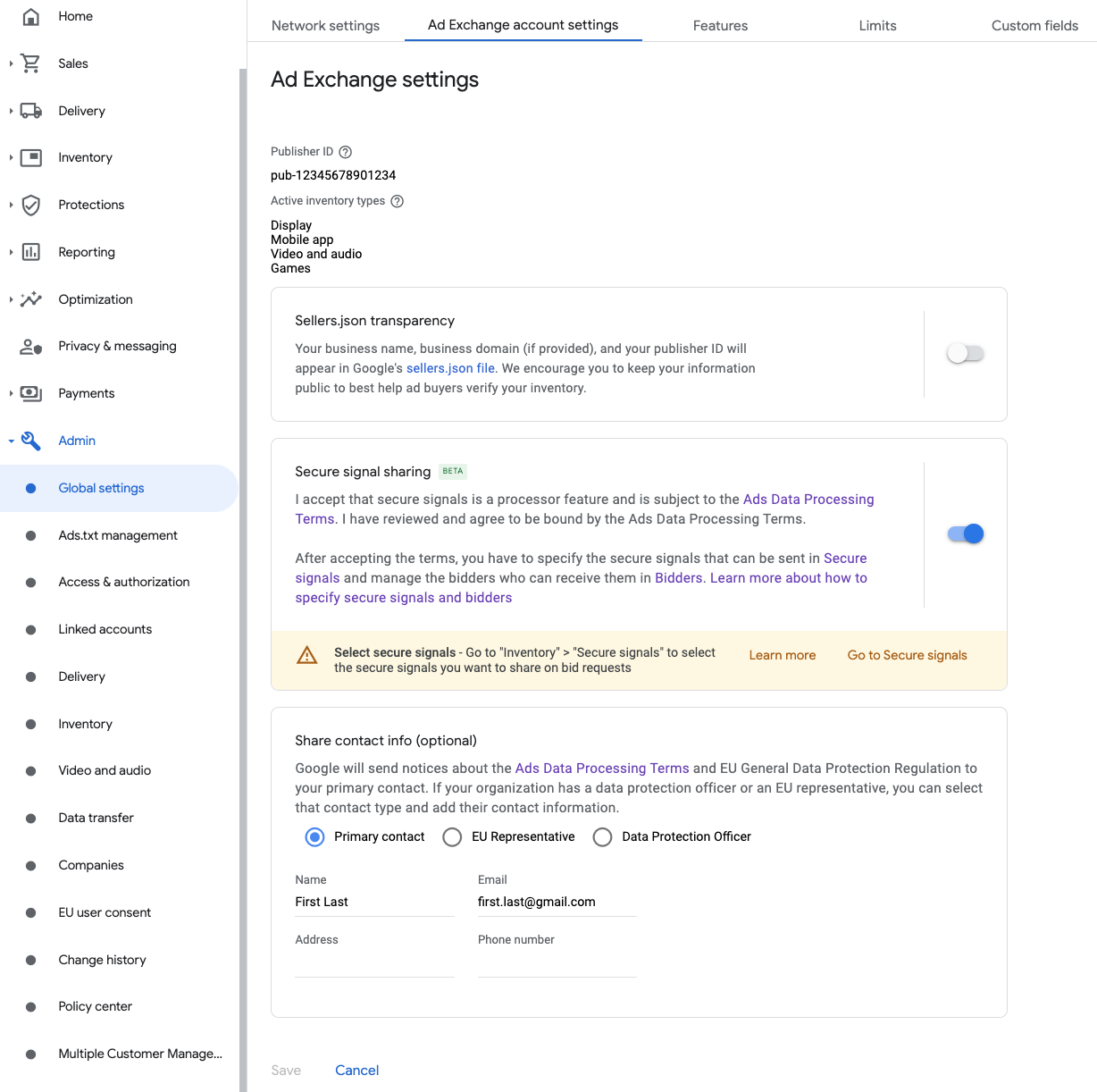
Navigate to **Admin** \> **Global settings** . Go to the
**Ad Exchange account settings** tab and review and turn on
**Secure signal sharing** . Click **Save**.
### Waterfall
This step isn't required for waterfall integrations.
### Share secure signal on bid requests
### Bidding
Navigate to **Inventory** \> **Secure Signals** . Under **Secure signals** ,
search for DT Exchange (Fyber Monetization) and
turn on **Enable app integration**.

Click **Save**.
### Waterfall
This step isn't required for waterfall integrations.
### Allow secure signal sharing for SDK Bidding
### Bidding
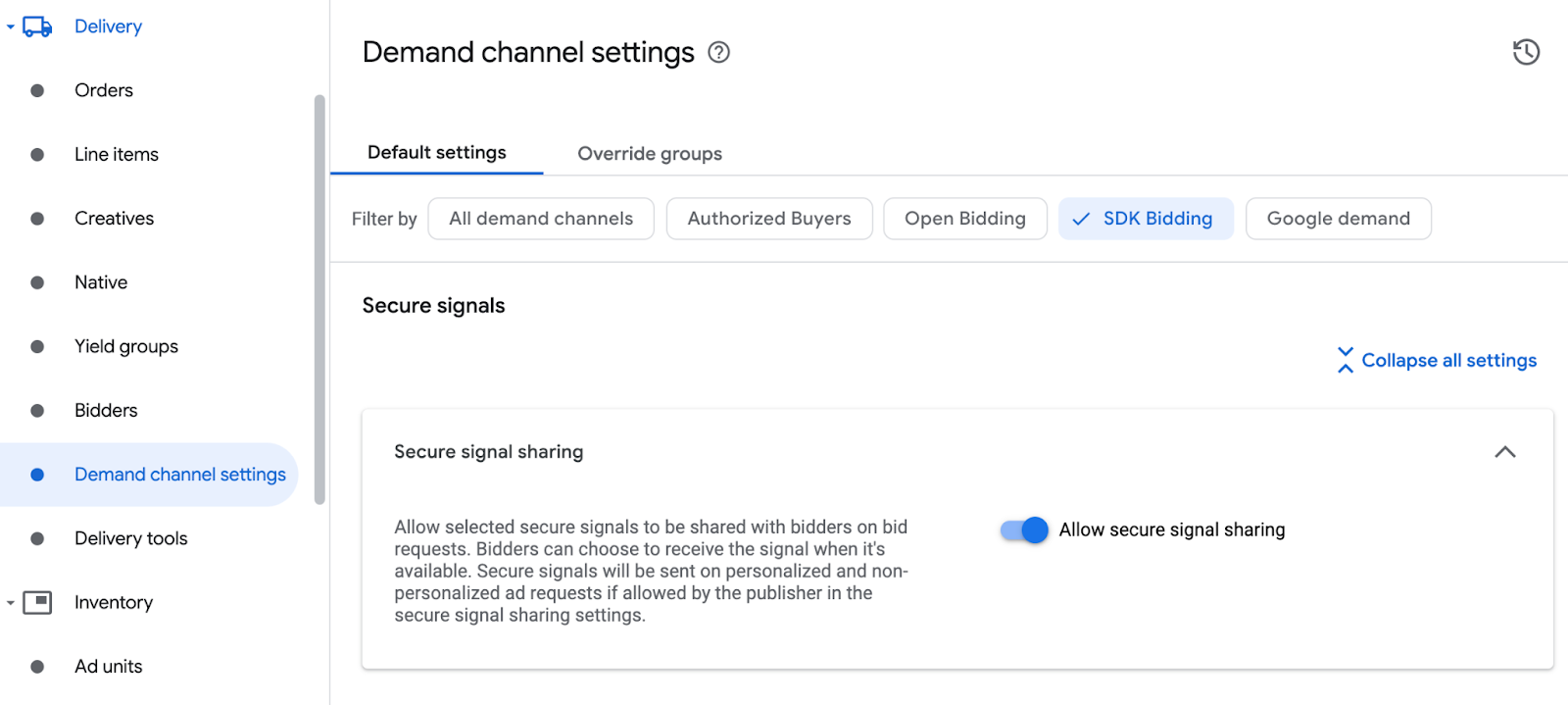
Navigate to **Delivery** \> **Demand channel settings** . In the **Default
settings** tab, turn on **Allow secure signal sharing** for **SDK
Bidding**.
Click **Save**.
### Waterfall
This step isn't required for waterfall integrations.
### Configure DT Exchange bidding
### Bidding
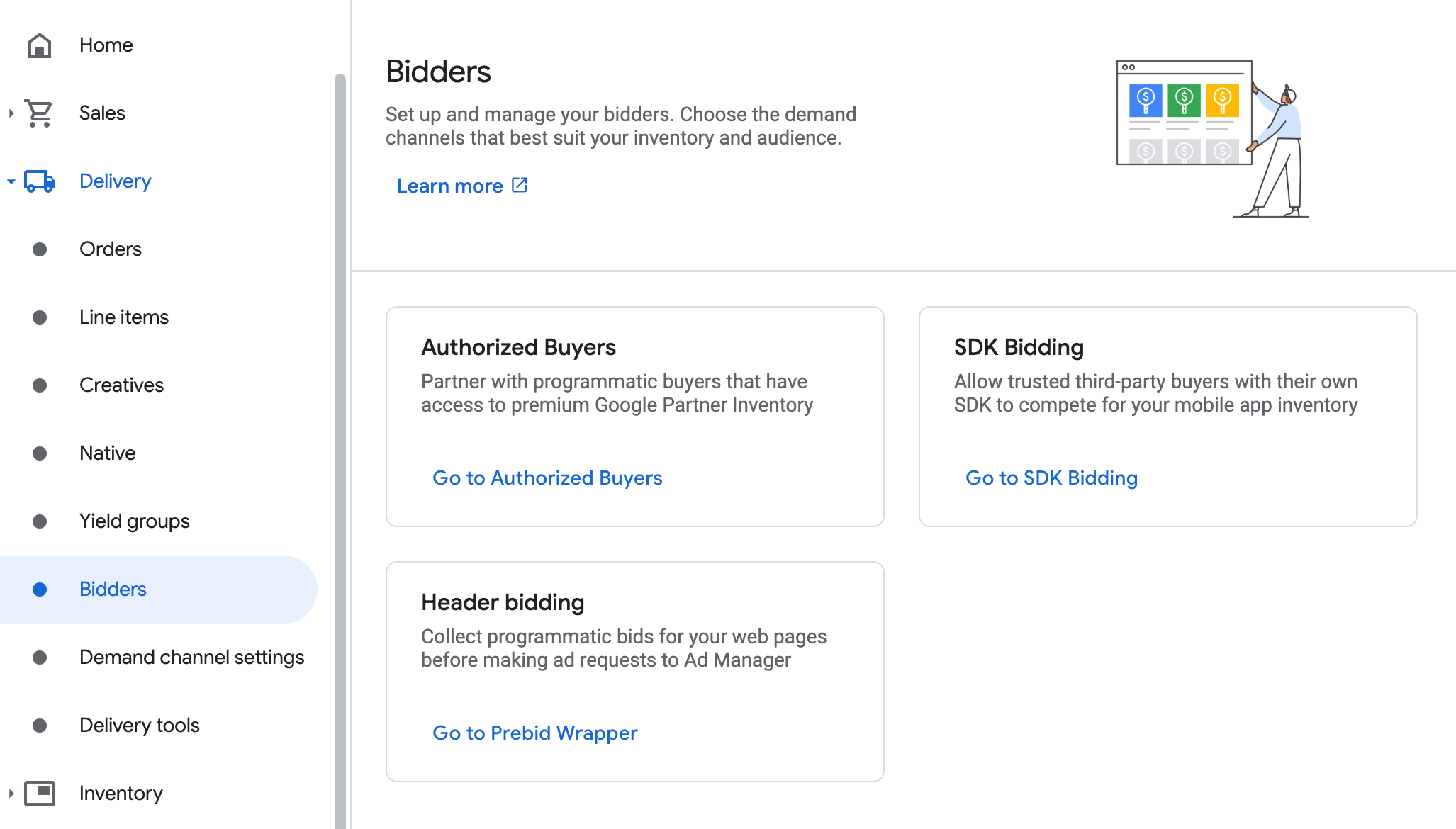
Navigate to **Delivery** \> **Bidders** , and click **Go to SDK Bidding**.
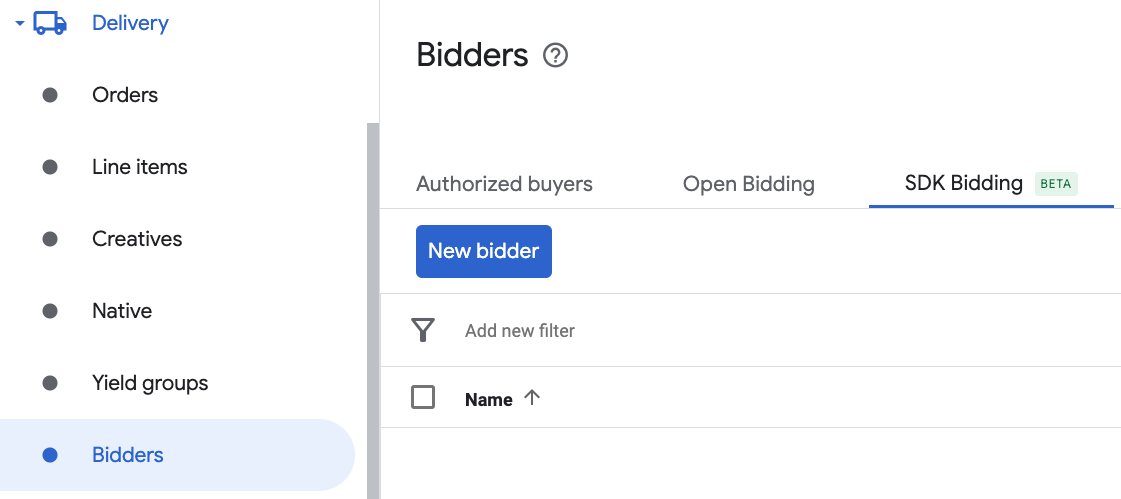
Click **New bidder**.
Select **DT Exchange** as the bidder.

Click **Continue** to enable SDK Bidding for this bidder.
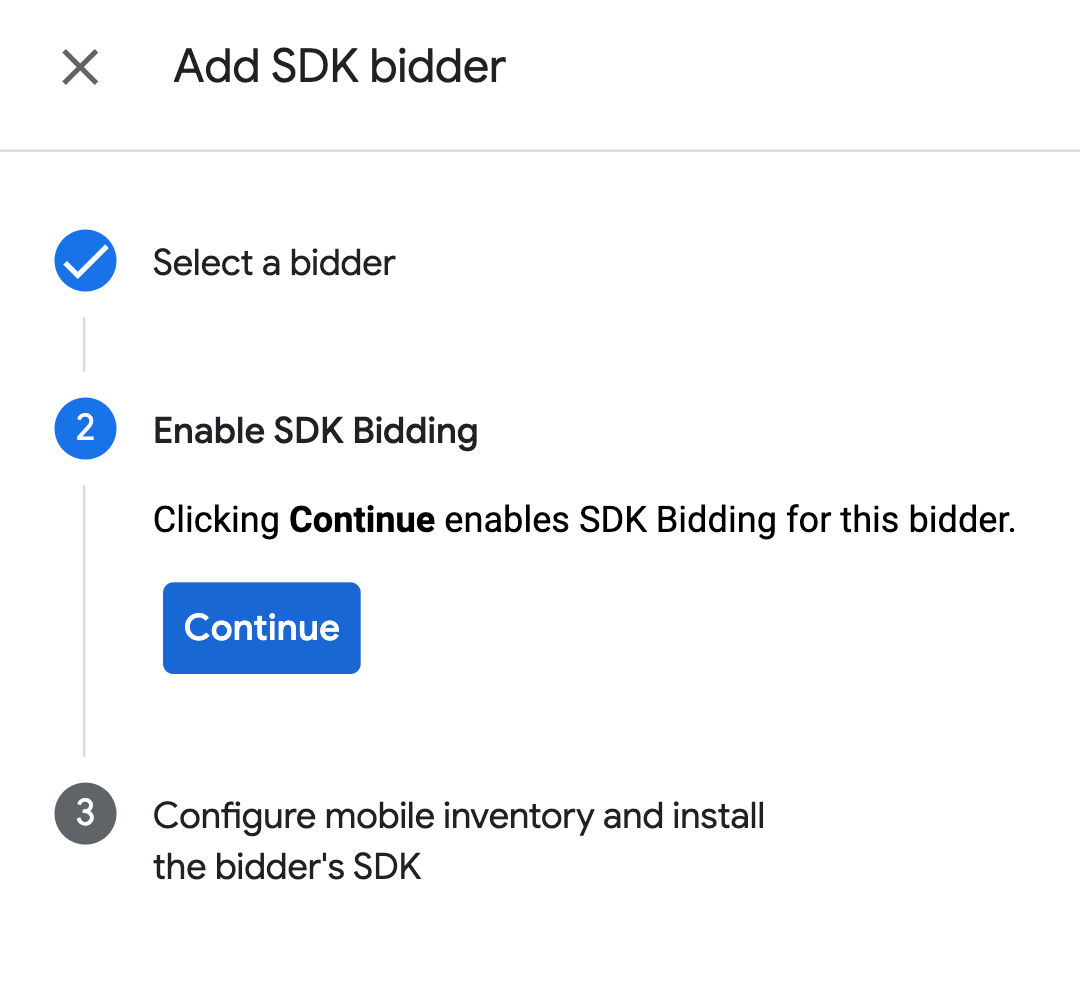
Click **Done**.
### Waterfall
This step isn't required for waterfall integrations.
### Configure ad unit mapping
### Bidding
Navigate to **Delivery** \> **Bidders** , and click **Go to SDK Bidding**.

Select the company for DT Exchange.

Go to the **Ad unit mapping** tab and click **New ad unit mapping**.
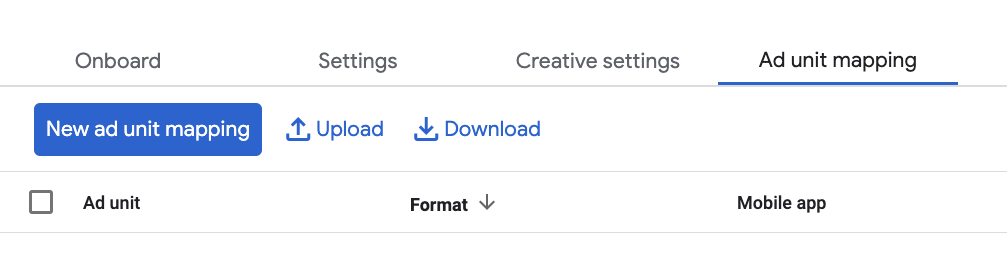
Choose **Specific ad unit** . Select an ad unit and format, **Mobile app** as
the **Inventory type** , and your **Mobile application** . Then, enter
**Application ID** and **Placement ID**
obtained in the previous section.
Finally, click **Save**.
> [!IMPORTANT]
> **Important:** Target the selected ad unit by at least one yield group, and the **Application ID** must be associated with the targeted app as in the DT Exchange UI.

### Waterfall
Navigate to **Delivery** \> **Yield groups** and click the **New yield
group** button. Select your **Inventory** and **App**.
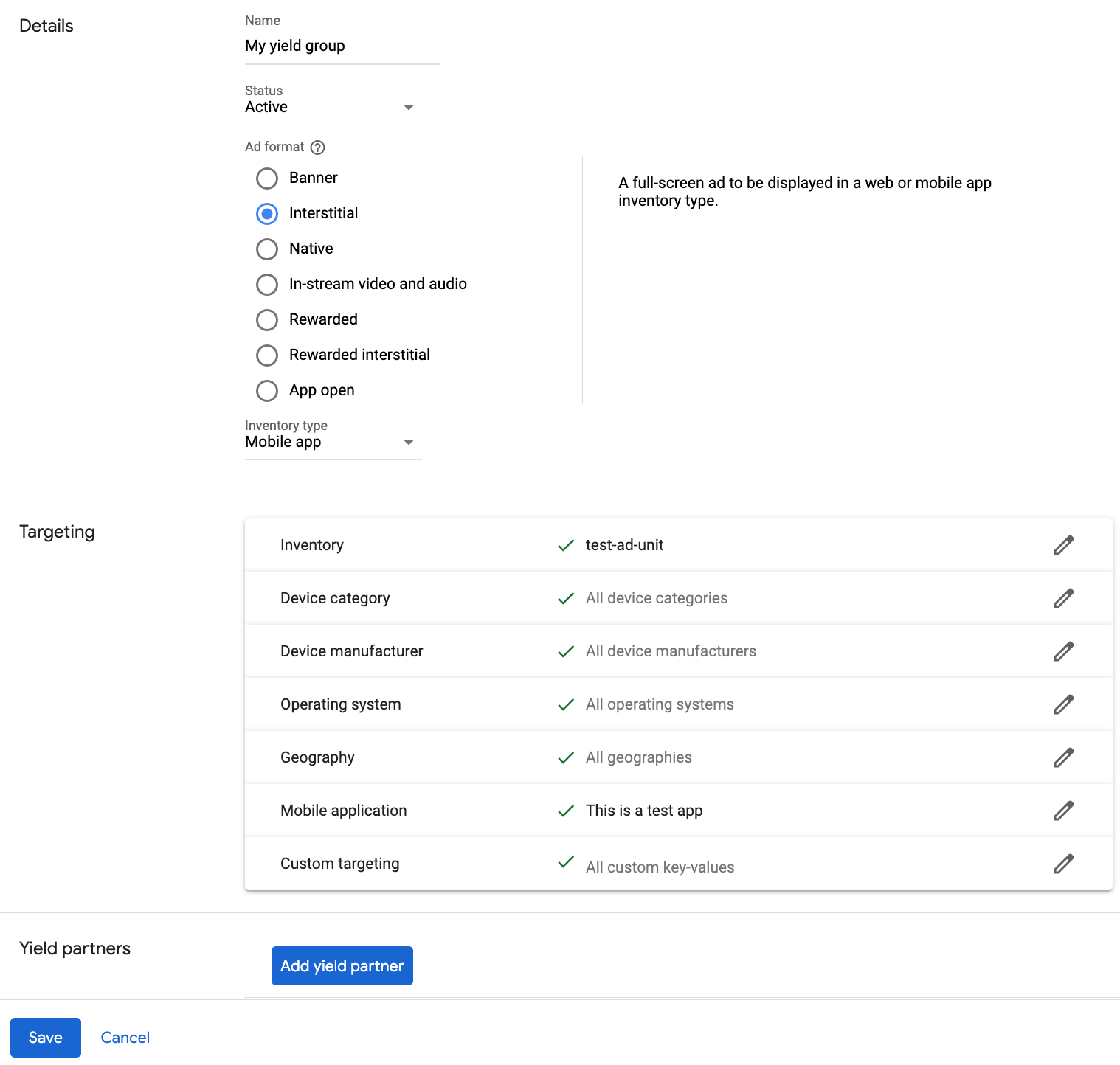
Scroll to **Yield partners** and click **Add mediation partner**.

Select the company you created for
DT Exchange in the previous section.
Choose **Mobile SDK mediation** as the **Integration type** ,
**Android** as the **Platform** , and **Active** as the **Status**.
Enter the
**Application ID** and **Placement ID**
obtained in the previous section, and the **Default CPM** value. Click
**Save**.
> [!IMPORTANT]
> **Important:** The **Application ID** must be associated with the targeted app as in the DT Exchange UI.

> [!NOTE]
> **Note:** Automatic data collection takes a few days to gather data before it can accurately calculate a Dynamic CPM value for a mediation network. Once the eCPM can be calculated, it is automatically updated on your behalf.
### Add DT Exchange (Fyber Monetization) to GDPR and US state regulations ad partners list
> [!IMPORTANT]
> **Important:** Verify that you have **Account Management** permission to complete the configuration for EU Consent and GDPR, US State regulations, and User Messaging Platform. See [Manage user access to your
> account](https://support.google.com/admob/answer/2784628) for details.
Follow the steps in
[European regulations settings](https://support.google.com/admanager/answer/10113006#adding_ad_partners_to_published_gdpr_messages)
and
[US state regulations settings](https://support.google.com/admanager/answer/14117973)
to add **DT Exchange (Fyber Monetization)** to the
European and US state regulations ad partners list in the Ad Manager UI.
## Step 3: Import the DT SDK and adapter
> [!NOTE]
> **Note:** Failure to integrate the compatible DT Exchange and Google Mobile Ads SDK (Legacy) versions might lead to build issues.
### Android Studio integration (recommended)
In your app-level gradle file, add the following implementation dependencies:
### Kotlin
```kotlin
dependencies {
implementation("com.google.android.gms:play-services-ads:25.5.0")
implementation("com.google.ads.mediation:fyber:8.5.1.0")
}
```
### Groovy
```groovy
dependencies {
implementation 'com.google.android.gms:play-services-ads:25.5.0'
implementation 'com.google.ads.mediation:fyber:8.5.1.0'
}
```
### Manual integration
- Download the latest version of the [DT SDK for Android](https://developer.digitalturbine.com/hc/en-us/articles/360010822437-Integrating-the-Android-SDK#h_01J296GZXK9PT3PZWYDDCWBHB6) and add `fyber-marketplace-x.y.z.aar` to your project.
- Navigate to the [DT Exchange adapter artifacts](https://maven.google.com/web/index.html#com.google.ads.mediation:fyber) on Google's Maven Repository. Select the latest version, download the DT Exchange adapter's `.aar` file, and add it to your project.
## Step 4: Implement privacy settings on DT SDK
### EU consent and GDPR
To [comply with
the Google EU User Consent Policy](https://www.google.com/about/company/consentstaging.html), you must make certain disclosures to your
users in the European Economic Area (EEA), the UK, and Switzerland, and obtain
their consent for the use of cookies or other local storage where legally
required, and for the collection, sharing, and use of personal data for ads
personalization. This policy reflects the requirements of the EU ePrivacy
Directive and the General Data Protection Regulation (GDPR). You are
responsible for verifying that consent is propagated to each ad source in your
mediation chain.
DT Exchange Android adapter version
8.3.0.0
and later supports passing GDPR consent signals from consent management
platforms that integrate with IAB's Transparency and Consent Framework (TCF)
to DT Exchange SDK.
For more information, see
[GDPR](https://docs.digitalturbine.com/dt-exchange/sdk-configuration/integrating-the-android-sdk#gdpr).
### US states privacy laws
[US states privacy laws](https://support.google.com/admanager/answer/9561023)
require giving users the right
to opt out of the "sale" of their "personal information" (as the law defines
those terms), with the opt-out offered through a prominent "Do Not Sell My Personal
Information" link on the "selling" party's homepage. The
[US states privacy
laws compliance guide](https://developers.google.com/ad-manager/mobile-ads-sdk/android/privacy/us-states) offers the ability to enable
[restricted data processing](https://privacy.google.com/businesses/rdp/)
for Google ad serving, but Google is unable to apply this setting to each ad
network in your mediation chain. Therefore, you must identify each ad network
in your mediation chain that may participate in the sale of personal
information and follow guidance from each of those networks to ensure
compliance.
DT Exchange contains an API that lets you forward user consent to their SDK. The
following sample code shows how to pass consent information to the DT SDK
manually. Should you choose to pass consent information to the DT SDK manually,
it is recommended that this code is called prior to requesting ads through
Google Mobile Ads SDK (Legacy).
### Java
```java
InneractiveAdManager.setUSPrivacyString(US_PRIVACY_STRING);
```
### Kotlin
```kotlin
InneractiveAdManager.setUSPrivacyString(US_PRIVACY_STRING)
```
Replace US_PRIVACY_STRING with your US privacy
string.
Visit DT Exchange's
[CCPA implementation guide](https://developer.digitalturbine.com/hc/en-us/articles/360010822437-Integrating-the-Android-SDK#01H8VGNGENHQ84WW6K15J0Q2M1)
for more details and the values that may be provided in the method.
## Step 5: Add required code
### Load ad with activity context
Pass `Activity` context when loading Interstitial ad formats. Without activity
context, ad load will fail.
## Step 6: Test your implementation
### Enable test ads
Make sure you
[register your test device](https://developers.google.com/ad-manager/mobile-ads-sdk/android/test-ads.md.txt#enable_test_devices)
for
Ad Manager.
> [!IMPORTANT]
> **Important:** Disable test mode for Ad Manager and DT Exchange before releasing your app.
### Verify test ads
To verify that you are receiving test ads from
DT Exchange,
enable
[single ad source testing](https://developers.google.com/ad-manager/mobile-ads-sdk/android/ad-inspector.md.txt#single_ad_source_testing)
in ad inspector using the
**DT Exchange (Bidding) and DT Exchange (Waterfall)** ad source(s).
## Optional steps
### Network-specific parameters
The DT Exchange adapter supports additional request parameters that can be
passed to the adapter as an Android Bundle. The adapter looks for the following
keys in the bundle:
| Request parameters and values ||
|---|---|
| `InneractiveMediationDefs.KEY_AGE` | **Integer**. The age of the user |
| `FyberMediationAdapter.KEY_MUTE_VIDEO` | **Boolean**. Mute or unmute video |
Here's a code example of how to set these ad request parameters:
### Java
```java
Bundle extras = new Bundle();
extras.putInt(InneractiveMediationDefs.KEY_AGE, 10);
extras.putBoolean(FyberMediationAdapter.KEY_MUTE_VIDEO, false);
AdRequest request =
new AdRequest.Builder().addNetworkExtrasBundle(FyberMediationAdapter.class, extras).build();
```
### Kotlin
```kotlin
val extras = Bundle()
extras.putInt(InneractiveMediationDefs.KEY_AGE, 10)
extras.putBoolean(FyberMediationAdapter.KEY_MUTE_VIDEO, false)
val request =
AdRequest.Builder().addNetworkExtrasBundle(FyberMediationAdapter::class.java, extras).build()
```
## Error codes
If the adapter fails to receive an ad from DT Exchange, you can check the
underlying error from the ad response using
[`ResponseInfo.getAdapterResponses()`](https://developers.google.com/ad-manager/mobile-ads-sdk/android/reference/com/google/android/gms/ads/ResponseInfo.md.txt#getAdapterResponses())
under the following class:
```java
com.google.ads.mediation.fyber.FyberMediationAdapter
```
Here are the codes and accompanying messages thrown by the DT Exchange adapter
when an ad fails to load:
| Error code | Reason |
|---|---|
| 101 | DT Exchange server parameters configured in the Ad Manager UI are missing/invalid. |
| 103 | The requested ad size does not match a DT Exchange supported banner size. |
| 105 | DT SDK loaded an ad but returned an unexpected controller. |
| 106 | Ad is not ready to display. |
| 107 | Context is not an activity instance. |
| 108 | Ad failed to be displayed. |
| 200-399 | DT SDK returned an error. See [code](https://github.com/googleads/googleads-mobile-android-mediation/blob/main/ThirdPartyAdapters/dtexchange/dtexchange/src/main/java/com/google/ads/mediation/fyber/FyberAdapterUtils.java#L30-L118) for more details. |
## DT Exchange Android Mediation Adapter Changelog
#### Version 8.5.1.0
- Updated the adapter to use the `InitializationCompleteCallback.onInitializationFailed(AdError)` API.
- Added missing `InneractiveAdSpot.destroy()` calls on ad dismissal, errors, and subsequent ad loads, and removed redundant `NativeAdContent.destroy()` call during native ad cleanup.
- Forwarded `onAdFailedToShow()` callback when `onAdEnteredErrorState()` is invoked for bidding interstitial and rewarded ads.
- Verified compatibility with DT Exchange SDK 8.5.1.
Built and tested with:
- Google Mobile Ads SDK version 25.5.0.
- Google Mobile Ads Next-Gen SDK version 1.6.0.
- DT Exchange SDK version 8.5.1.
#### Version 8.5.0.0
- Fixed an issue where native ads invoked the `onAdOpened()` callback on impression.
- Verified compatibility with DT Exchange SDK 8.5.0.
Built and tested with:
- Google Mobile Ads SDK version 25.5.0.
- Google Mobile Ads Next-Gen SDK version 1.5.0.
- DT Exchange SDK version 8.5.0.
#### Version 8.4.7.1
- Pin the adapter's Kotlin dependency to 1.9.0 (the min Kotlin version supported by GMA NextGen SDK).
Built and tested with:
- Google Mobile Ads SDK version 25.4.0.
- Google Mobile Ads Next-Gen SDK version 1.4.0.
- DT Exchange SDK version 8.4.7.
#### Version 8.4.7.0
- Verified compatibility with DT Exchange SDK 8.4.7.
Built and tested with:
- Google Mobile Ads SDK version 25.4.0.
- Google Mobile Ads Next-Gen SDK version 1.3.1.
- DT Exchange SDK version 8.4.7.
#### Version 8.4.6.0
- Verified compatibility with DT Exchange SDK 8.4.6.
Built and tested with:
- Google Mobile Ads SDK version 25.4.0.
- Google Mobile Ads Next-Gen SDK version 1.2.1.
- DT Exchange SDK version 8.4.6.
#### Version 8.4.5.1
- Maps `AgeRestrictedTreatment` to DT Exchange's COPPA API.
- Removed the old API implementations for the following waterfall ad formats: Banner, Interstitial.
- Updated the adapter to use `loadBannerAd` for Waterfall Banner ads and `loadInterstitialAd` for Waterfall Interstitial ads.
Built and tested with:
- Google Mobile Ads SDK version 25.4.0.
- Google Mobile Ads Next-Gen SDK version 1.2.1.
- DT Exchange SDK version 8.4.5.
#### Version 8.4.5.0
- Added watermark on bidding ads.
- Verified compatibility with DT Exchange SDK 8.4.5.
Built and tested with:
- Google Mobile Ads SDK version 25.2.0.
- Google Mobile Ads Next-Gen SDK version 0.25.0-beta01.
- DT Exchange SDK version 8.4.5.
#### Version 8.4.4.0
- Added property to build the adapter with GMA Next-Gen SDK dependency.
- Verified compatibility with DT Exchange SDK 8.4.4.
Built and tested with:
- Google Mobile Ads SDK version 25.1.0.
- Google Mobile Ads Next-Gen SDK version 0.25.0-beta01.
- DT Exchange SDK version 8.4.4.
#### Version 8.4.3.0
- Added updated API calls for banner ad implementation.
- Verified compatibility with DT Exchange SDK 8.4.3.
Built and tested with:
- Google Mobile Ads SDK version 24.9.0.
- DT Exchange SDK version 8.4.3.
#### Version 8.4.2.2
- Added support to display banner ads within a wrapper view, bounded by a specified width and height. This change prevents banner ads from covering app content.
Built and tested with:
- Google Mobile Ads SDK version 24.9.0.
- DT Exchange SDK version 8.4.2.
#### Version 8.4.2.1
- Added support for forwarding the `tagForChildDirectedTreatment` and `tagForUnderAgeOfConsent` Google Mobile Ads SDK parameters to the DT Exchange SDK.
- Verified compatibility with DT Exchange SDK 8.4.2.
Built and tested with:
- Google Mobile Ads SDK version 24.9.0.
- DT Exchange SDK version 8.4.2.
#### Version 8.4.2.0
- Added null protection to Native Ad's fields
- Verified compatibility with DT Exchange SDK 8.4.2.
Built and tested with:
- Google Mobile Ads SDK version 24.9.0.
- DT Exchange SDK version 8.4.2.
#### Version 8.4.1.0
- Verified compatibility with DT Exchange SDK 8.4.1.
Built and tested with:
- Google Mobile Ads SDK version 24.8.0.
- DT Exchange SDK version 8.4.1.
#### Version 8.4.0.1
- Added support for Native Ads
- Verified compatibility with DT Exchange SDK 8.4.0.
Built and tested with:
- Google Mobile Ads SDK version 24.7.0.
- DT Exchange SDK version 8.4.0.
#### Version 8.4.0.0
- Removed class-level references to Context. Can help reduce memory leak issues.
- Verified compatibility with DT Exchange SDK 8.4.0.
Built and tested with:
- Google Mobile Ads SDK version 24.6.0.
- DT Exchange SDK version 8.4.0.
#### Version 8.3.8.0
- Refactored the error codes into a new DTExchangeErrorCodes.kt file.
- Verified compatibility with DT Exchange SDK 8.3.8.
Built and tested with:
- Google Mobile Ads SDK version 24.5.0.
- DT Exchange SDK version 8.3.8.
#### Version 8.3.7.0
- Updated adapter to support bidding for banner, interstitial and rewarded ad formats.
- Verified compatibility with DT Exchange SDK 8.3.7.
Built and tested with:
- Google Mobile Ads SDK version 24.1.0.
- DT Exchange SDK version 8.3.7.
#### Version 8.3.6.1
- Updated the minimum required Android API level to 23.
- Updated the minimum required Google Mobile Ads SDK version to 24.0.0.
Built and tested with:
- Google Mobile Ads SDK version 24.0.0.
- DT Exchange SDK version 8.3.6.
#### Version 8.3.6.0
- Verified compatibility with DT Exchange SDK 8.3.6.
Built and tested with:
- Google Mobile Ads SDK version 23.6.0.
- DT Exchange SDK version 8.3.6.
#### Version 8.3.5.0
- Verified compatibility with DT Exchange SDK 8.3.5.
Built and tested with:
- Google Mobile Ads SDK version 23.6.0.
- DT Exchange SDK version 8.3.5.
#### Version 8.3.4.0
- Verified compatibility with DT Exchange SDK 8.3.4.
Built and tested with:
- Google Mobile Ads SDK version 23.6.0.
- DT Exchange SDK version 8.3.4.
#### Version 8.3.3.0
- Verified compatibility with DT Exchange SDK 8.3.3.
Built and tested with:
- Google Mobile Ads SDK version 23.5.0.
- DT Exchange SDK version 8.3.3.
#### Version 8.3.2.0
- Verified compatibility with DT Exchange SDK 8.3.2.
Built and tested with:
- Google Mobile Ads SDK version 23.4.0.
- DT Exchange SDK version 8.3.2.
#### Version 8.3.1.0
- Verified compatibility with DT Exchange SDK 8.3.1.
Built and tested with:
- Google Mobile Ads SDK version 23.3.0.
- DT Exchange SDK version 8.3.1.
#### Version 8.3.0.0
- Added support for passing the Google Mobile Ads SDK version to DT Exchange SDK.
- Verified compatibility with DT Exchange SDK 8.3.0.
Built and tested with:
- Google Mobile Ads SDK version 23.2.0.
- DT Exchange SDK version 8.3.0.
#### Version 8.2.7.0
- Verified compatibility with DT Exchange SDK 8.2.7.
Built and tested with:
- Google Mobile Ads SDK version 23.0.0.
- DT Exchange SDK version 8.2.7.
#### Version 8.2.6.1
- Updated the minimum required Google Mobile Ads SDK version to 23.0.0.
- Verified compatibility with DT Exchange SDK 8.2.6.
Built and tested with:
- Google Mobile Ads SDK version 23.0.0.
- DT Exchange SDK version 8.2.6.
#### Version 8.2.6.0
- Verified compatibility with DT Exchange SDK 8.2.6.
Built and tested with:
- Google Mobile Ads SDK version 22.6.0.
- DT Exchange SDK version 8.2.6.
#### Version 8.2.5.0
- Verified compatibility with DT Exchange SDK 8.2.5.
Built and tested with:
- Google Mobile Ads SDK version 22.5.0.
- DT Exchange SDK version 8.2.5.
#### Version 8.2.4.0
- Verified compatibility with DT Exchange SDK 8.2.4.
Built and tested with:
- Google Mobile Ads SDK version 22.3.0.
- DT Exchange SDK version 8.2.4.
#### Version 8.2.3.0
- Updated adapter to use new `VersionInfo` class.
- Updated the minimum required Google Mobile Ads SDK version to 22.0.0.
Built and tested with:
- Google Mobile Ads SDK version 22.0.0.
- DT Exchange SDK version 8.2.3.
#### Version 8.2.2.1
- Added support for passing `muteVideo` key in mediation extra to mute interstitial ads.
Built and tested with:
- Google Mobile Ads SDK version 21.5.0.
- DT Exchange SDK version 8.2.2.
#### Version 8.2.2.0
- Verified compatibility with DT Exchange SDK 8.2.2.
- Updated the minimum required Google Mobile Ads SDK version to 21.5.0.
Built and tested with:
- Google Mobile Ads SDK version 21.5.0.
- DT Exchange SDK version 8.2.2.
#### Version 8.2.1.0
- Rebranded adapter name to "DT Exchange".
- Verified compatibility with DT Exchange SDK 8.2.1.
- Updated the minimum required Google Mobile Ads SDK version to 21.3.0.
Built and tested with:
- Google Mobile Ads SDK version 21.3.0.
- DT Exchange SDK version 8.2.1.
#### Version 8.2.0.0
- Verified compatibility with Fyber SDK 8.2.0.
- Updated the minimum required Google Mobile Ads SDK version to 21.1.0.
Built and tested with:
- Google Mobile Ads SDK version 21.1.0.
- Fyber SDK version 8.2.0.
#### Version 8.1.5.0
- Verified compatibility with Fyber SDK 8.1.5.
Built and tested with:
- Google Mobile Ads SDK version 21.0.0.
- Fyber SDK version 8.1.5.
#### Version 8.1.4.0
- Verified compatibility with Fyber SDK 8.1.4.
Built and tested with:
- Google Mobile Ads SDK version 21.0.0.
- Fyber SDK version 8.1.4.
#### Version 8.1.3.1
- Updated `compileSdkVersion` and `targetSdkVersion` to API 31.
- Updated the minimum required Google Mobile Ads SDK version to 21.0.0.
- Updated the minimum required Android API level to 19.
Built and tested with:
- Google Mobile Ads SDK version 21.0.0.
- Fyber SDK version 8.1.3.
#### Version 8.1.3.0
- Verified compatibility with Fyber SDK 8.1.3.
- Updated the minimum required Google Mobile Ads SDK version to 20.6.0.
Built and tested with:
- Google Mobile Ads SDK version 20.6.0.
- Fyber SDK version 8.1.3.
#### Version 8.1.2.0
- Verified compatibility with Fyber SDK 8.1.2.
- Updated the minimum required Google Mobile Ads SDK version to 20.5.0.
Built and tested with:
- Google Mobile Ads SDK version 20.5.0.
- Fyber SDK version 8.1.2.
#### Version 8.1.0.0
- Verified compatibility with Fyber SDK 8.1.0.
Built and tested with:
- Google Mobile Ads SDK version 20.4.0.
- Fyber SDK version 8.1.0.
#### Version 7.8.4.1
- Fixed an issue where the adapter would not initialize if there is a duplicate or more than one unique app ID from the mediation configurations.
- Updated the minimum required Google Mobile Ads SDK version to 20.4.0.
Built and tested with:
- Google Mobile Ads SDK version 20.4.0.
- Fyber SDK version 7.8.4.
#### Version 7.8.4.0
- Verified compatibility with Fyber SDK 7.8.4.
- Updated the minimum required Google Mobile Ads SDK version to 20.3.0.
- Fixed an issue with rewarded display ads, where `onVideoComplete()` was not called.
- Fyber now requires an Activity context to show ads.
Built and tested with:
- Google Mobile Ads SDK version 20.3.0.
- Fyber SDK version 7.8.4.
#### Version 7.8.3.0
- Verified compatibility with Fyber SDK 7.8.3.
- Added standardized adapter error codes and messages.
- Updated the minimum required Google Mobile Ads SDK version to 20.1.0.
Built and tested with:
- Google Mobile Ads SDK version 20.1.0.
- Fyber SDK version 7.8.3.
#### Version 7.8.2.0
- Verified compatibility with Fyber SDK 7.8.2.
- Updated the minimum required Google Mobile Ads SDK version to 20.0.0.
Built and tested with:
- Google Mobile Ads SDK version 20.0.0.
- Fyber SDK version 7.8.2.
#### Version 7.8.1.0
- Verified compatibility with Fyber SDK 7.8.1.
Built and tested with:
- Google Mobile Ads SDK version 19.7.0.
- Fyber SDK version 7.8.1.
#### Version 7.8.0.0
- Verified compatibility with Fyber SDK 7.8.0.
- Updated the minimum required Google Mobile Ads SDK version to 19.7.0.
Built and tested with:
- Google Mobile Ads SDK version 19.7.0.
- Fyber SDK version 7.8.0.
#### Version 7.7.4.0
- Verified compatibility with Fyber SDK 7.7.4.
- Fixed an issue where `onUserEarnedReward()` is forwarded twice for rewarded ads.
Built and tested with:
- Google Mobile Ads SDK version 19.5.0.
- Fyber SDK version 7.7.4.
#### Version 7.7.3.0
- Verified compatibility with Fyber SDK 7.7.3.
Built and tested with:
- Google Mobile Ads SDK version 19.5.0.
- Fyber SDK version 7.7.3.
#### Version 7.7.2.0
- Verified compatibility with Fyber SDK 7.7.2.
- Updated the minimum required Google Mobile Ads SDK version to 19.5.0.
Built and tested with:
- Google Mobile Ads SDK version 19.5.0.
- Fyber SDK version 7.7.2.
#### Version 7.7.1.0
- Verified compatibility with Fyber SDK 7.7.1.
- Updated the minimum required Google Mobile Ads SDK version to 19.4.0.
Built and tested with:
- Google Mobile Ads SDK version 19.4.0.
- Fyber SDK version 7.7.1.
#### Version 7.7.0.0
- Verified compatibility with Fyber SDK 7.7.0.
Built and tested with:
- Google Mobile Ads SDK version 19.3.0.
- Fyber SDK version 7.7.0.
#### Version 7.6.1.0
- Verified compatibility with Fyber SDK 7.6.1.
Built and tested with:
- Google Mobile Ads SDK version 19.3.0.
- Fyber SDK version 7.6.1.
#### Version 7.6.0.0
- Verified compatibility with Fyber SDK 7.6.0.
- Updated the adapter to support inline adaptive banner requests.
- Updated the minimum required Google Mobile Ads SDK version to 19.3.0.
- Fixed a bug where onAdOpened()/onAdClosed() methods were not being called for banner ads.
Built and tested with:
- Google Mobile Ads SDK version 19.3.0.
- Fyber SDK version 7.6.0.
#### Version 7.5.4.0
- Verified compatibility with Fyber SDK 7.5.4.
- Updated the minimum required Google Mobile Ads SDK version to 19.1.0.
Built and tested with:
- Google Mobile Ads SDK version 19.1.0.
- Fyber SDK version 7.5.4.
#### Version 7.5.3.0
- Verified compatibility with Fyber SDK 7.5.3.
Built and tested with:
- Google Mobile Ads SDK version 19.0.1.
- Fyber SDK version 7.5.3.
#### Version 7.5.2.0
- Verified compatibility with Fyber SDK 7.5.2.
- Updated the minimum required Google Mobile Ads SDK version to 19.0.1.
Built and tested with:
- Google Mobile Ads SDK version 19.0.1.
- Fyber SDK version 7.5.2.
#### Version 7.5.0.0
- Verified compatibility with Fyber SDK 7.5.0.
- Fixed NullPointerException crash during Fyber ad loading.
Built and tested with:
- Google Mobile Ads SDK version 18.3.0.
- Fyber SDK version 7.5.0.
#### Version 7.4.1.0
- Verified compatibility with Fyber SDK 7.4.1.
- Updated the minimum required Google Mobile Ads SDK version to 18.3.0.
Built and tested with:
- Google Mobile Ads SDK version 18.3.0.
- Fyber SDK version 7.4.1.
#### Version 7.3.4.0
- Initial release!
- Supports Banner, Interstitial and Rewarded ads.
Built and tested with:
- Google Mobile Ads SDK version 18.2.0.
- Fyber SDK version 7.3.4.