Select platform: [HTML5](https://developers.google.com/ad-manager/dynamic-ad-insertion/sdk/html5/omsdk.md.txt "View this page for the HTML5 platform docs.") [Android](https://developers.google.com/ad-manager/dynamic-ad-insertion/sdk/android/omsdk.md.txt "View this page for the Android platform docs.") [iOS](https://developers.google.com/ad-manager/dynamic-ad-insertion/sdk/ios/omsdk.md.txt "View this page for the iOS platform docs.")
The IMA SDK for Android includes the
[Open Measurement (OM) SDK](https://iabtechlab.com/standards/open-measurement-sdk/),
an industry standard developed by the
[Interactive Advertising Bureau (IAB)](https://www.iab.com/) to enable third-party
viewability and verification measurement. When using the IMA SDK for
Android, the included OM SDK automatically parses
the `` tag within VAST ad tags and sends viewability data to
the specified measurement vendors using the OMID API. The IMA SDK supports
OM SDK v1.6, GAM AdVerifications extensions on VAST 2+,
and the AdVerifications node on VAST 4+.To take advantage of Open Measurement,
keep the following points in mind:
- To use Open Measurement you must have version
3.11.0 or
greater of the IMA SDK for Android.
However, the sample in this guide is designed for the newest version of the SDK
and includes APIs introduced in version 3.16.5.
- Ads must be configured to traffic `` in their VAST as per
the [VAST 4.1 spec](https://iabtechlab.com/wp-content/uploads/2018/06/VAST4.1-June7-FINAL.pdf)
if using VAST 4.1+; otherwise, ``
should be used.
- Refrain from covering the `AdDisplayContainer` with any overlays
(transparent or opaque), since these will be flagged as obstructions by the OM
SDK and reduce viewability.
## Prerequisites
- If your ads are trafficked through Ad Manager, [configure a viewability
provider for your Ad Manager network](https://support.google.com/admanager/answer/9025968#configure-a-viewability-provider) and assign that viewability provider to your line item.
## Testing
To test Open Measurement using the IMA SDK, use a version of IMA that
supports the OM SDK, along with a
[test ad tag](https://pubads.g.doubleclick.net/gampad/ads?iu=/21775744923/external/omid_ad_samples&env=vp&gdfp_req=1&output=vast&sz=640x480&description_url=http://test_site.com/homepage&vpmute=0&vpa=0&vad_format=linear&url=http://test_site.com&vpos=preroll&unviewed_position_start=1&correlator).
You should see the `` returned in your VAST response.
## Register video controls overlay obstructions
Video controls such as pause buttons or progress bars provide essential playback
information and actions to users. On mobile, imprecise taps and user
expectations have made it common practice to render large, touch-friendly
controls over the media element. These controls usually fade in and out on a
user tap and are not visible for the vast majority of playback time.
For an example of overlaying video controls, see the following image on the
YouTube app rendering controls:
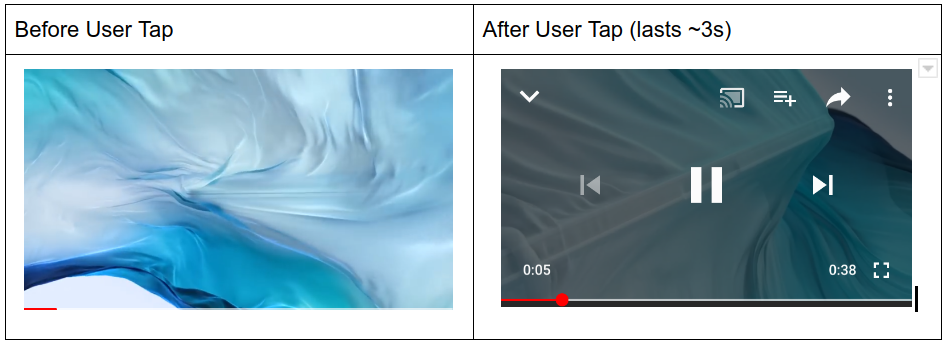
When using the IMA SDK, most publishers implement these controls by adding a
view above the ad display container that is mostly transparent. Usually, the
controls are child elements of this view that fully occludes the underlying
video player. This transparent overlay is used to capture tap events and then
render the controls to users when tapped.
When ad viewability using the Open Measurement SDK is calculated, all views
overlaying the media element are considered obstructions and reduce the
viewability rate. In the case where a transparent tap overlay sits above the
entire ad display container, it is possible for inventory to be declared
completely unviewable.
The Open Measurement SDK makes provisions for video controls to be considered
"friendly" obstructions that are essential to the user's experience. Once
registered as friendly, these controls are excluded from ad viewability
measurement.
With IAB and MRC support, the IMA SDK introduces an API for registering these
overlays with the Open Measurement SDK. These controls must be fully transparent
overlays or small buttons. Any other views not related to video controls must
not be registered.
| DO register | DO NOT register |
|---|---|
| - Transparent overlay to capture user taps - Transient buttons - Pause - Play - Fullscreen - Cast/AirPlay - Collapse - Progress/Seek - Other playback relevant actions | - Watermarks - Pop ups - Dialogs - Non-transient buttons - Other obscuring views |
The following sample code demonstrates how to register video controls overlays
on the ad display container:
> [!IMPORTANT]
> **Key Point:** The `detailedReason` string used when calling [`ImaSdkFactory.createFriendlyObstruction()`](https://developers.google.com/interactive-media-ads/docs/sdks/android/client-side/api/reference/com/google/ads/interactivemedia/v3/api/ImaSdkFactory.md.txt#public-friendlyobstruction-createfriendlyobstruction-view-view,-friendlyobstructionpurpose-purpose,-string-detailedreason) must follow the IAB standard by:
>
> - Being 50 characters or less.
> - Only contain characters `A-z`, `0-9`, or spaces.
> - The string can be nil.
```java
myTransparentTapOverlay = (ViewGroup) rootView.findViewById(R.id.overlay);
myPauseButton = (ImageButton) rootView.findViewById(R.id.pauseButton);
// Substitute "myTransparentTapOverlay" and "myPauseButton" with the
// elements you want to register as video controls overlays.
// Make sure to register before ad playback starts.
overlayObstruction = ImaSdkFactory.createFriendlyObstruction(
myTransparentTapOverlay,
FriendlyObstructionPurpose.NOT_VISIBLE,
"This overlay is transparent"
);
pauseButtonObstruction = ImaSdkFactory.createFriendlyObstruction(
myPauseButton,
FriendlyObstructionPurpose.VIDEO_CONTROLS,
"This is the video player pause button"
);
displayContainer.registerFriendlyObstruction(overlayObstruction);
displayContainer.registerFriendlyObstruction(pauseButtonObstruction);
```
When you're done with them, these obstructions can be removed by calling the
following method:
```java
displayContainer.unregisterAllFriendlyObstructions();
```
> [!NOTE]
> **Note:** For information on measurement and verification providers that have committed to the development of this new viewability standard, see the [IAB open measurement documentation](https://iabtechlab.com/working-groups/open-measurement-working-group/).