

Introdução
Este guia detalha como usar os recursos de publicidade nativa do Google Ad Manager com a API. Antes de começar, entenda os conceitos básicos da publicidade nativa com o Ad Manager.
Recuperar um formato de anúncio nativo
Os formatos de anúncios nativos são representados por um
CreativeTemplate
na API do Ad Manager. Para recuperar formatos nativos da sua rede, use o
CreativeTemplateService.
Para diferenciar modelos de criativos e formatos de anúncios nativos, use o campo
isNativeEligible. Quando esse campo é verdadeiro, o modelo de criativo representa um formato de anúncio nativo.
Java
StatementBuilder statementBuilder = new StatementBuilder()
    .where("isNativeEligible = :isNativeEligible")
    .orderBy("id DESC")
    .limit(StatementBuilder.SUGGESTED_PAGE_LIMIT)
    .withBindVariableValue("isNativeEligible", true);;

CreativeTemplatePage page = creativeTemplateService.getCreativeTemplatesByStatement(
    statementBuilder.toStatement());
Python
query = 'WHERE isNativeEligible = :isNativeEligible'
values = [
    {'key': 'isNativeEligible',
     'value': {
         'xsi_type': 'BooleanValue',
         'value': 'true'
     }},
]
statement = ad_manager.FilterStatement(query, values)

response = creative_template_service.getCreativeTemplatesByStatement(
    statement.ToStatement())
PHP
$pageSize = StatementBuilder::SUGGESTED_PAGE_LIMIT;
$statementBuilder = (new StatementBuilder())
    ->where('isNativeEligible = :isNativeEligible')
    ->orderBy('id ASC')
    ->limit($pageSize)
    ->withBindVariableValue('isNativeEligible', true);

$page = $creativeTemplateService->getCreativeTemplatesByStatement(
    $statementBuilder->ToStatement());
.NET
StatementBuilder statementBuilder = new StatementBuilder()
    .Where("isNativeEligible = :isNativeEligible")
    .OrderBy("id ASC")
    .Limit(StatementBuilder.SUGGESTED_PAGE_LIMIT)
    .AddValue("isNativeEligible", true);

CreativeTemplatePage page = creativeTemplateService.getCreativeTemplatesByStatement(
      statementBuilder.ToStatement());
Ruby
query = 'WHERE isNativeEligible = :isNativeEligible'
values = [
  {
    :key => 'isNativeEligible',
    :value => {
      :xsi_type => 'BooleanValue',
      :value => 'true'
    }
  },
]
statement = AdManagerApi::FilterStatement.new(query, values)

page = creative_template_service.get_creative_templates_by_statement(
  statement.toStatement())
Criar um criativo nativo
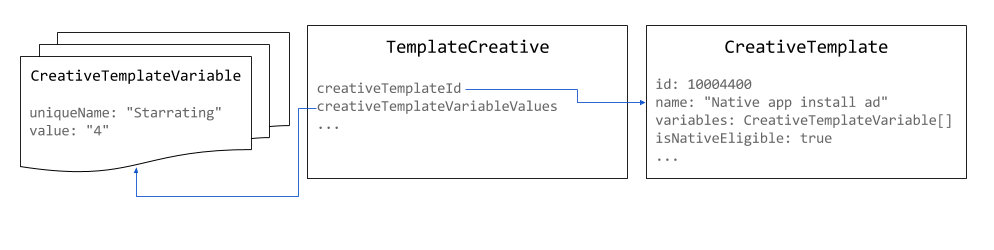
Os criativos nativos são compatíveis com
TemplateCreatives
na API Ad Manager. Elas não são uma entidade distinta. Para criar criativos
nativos, crie um TemplateCreative para um
CreativeTemplate
qualificado para nativo. Os componentes do criativo nativo são armazenados em objetos
CreativeTemplateVariable.
Use pixels 1x1 como tamanho para criativos nativos. O tamanho do anúncio renderizado pode
ser definido no
NativeStyle
ou definido por renderização personalizada.
Java
// Use the system defined native app install creative template.
long nativeAppInstallTemplateId = 10004400L;

// Use 1x1 as the size for native creatives.
Size size = new Size();
size.setWidth(1);
size.setHeight(1);
size.setIsAspectRatio(false);

TemplateCreative nativeAppInstallCreative = new TemplateCreative();
nativeAppInstallCreative.setName("Native creative #" + new Random().nextInt(Integer.MAX_VALUE));
nativeAppInstallCreative.setCreativeTemplateId(nativeAppInstallTemplateId);
nativeAppInstallCreative.setSize(size);

List<BaseCreativeTemplateVariableValue> templateVariables = Lists.newArrayList();

// Set the star rating.
StringCreativeTemplateVariableValue starRatingVariableValue =
    new StringCreativeTemplateVariableValue();
starRatingVariableValue.setUniqueName("Starrating");
starRatingVariableValue.setValue("4");
templateVariables.add(starRatingVariableValue);
Python
# Use the system defined native app install creative template.
native_app_install_template_id = '10004400'

creative = {
    'xsi_type': 'TemplateCreative',
    'name': 'Native creative',
    'creativeTemplateId': native_app_install_template_id,
    'size': {'width': 1, 'height': 1, 'isAspectRatio': false},
    'creativeTemplateVariableValues': [
        {
            'xsi_type': 'StringCreativeTemplateVariableValue',
            'uniqueName': 'Starrating',
            'value': '4'
        }
    ]
}
PHP
// Use the system defined native app install creative template.
$nativeAppInstallTemplateId = 10004400;

// Use 1x1 as the size for native creatives.
$size = new Size();
$size->width = 1;
$size->height = 1;
$size->isAspectRatio = false;

$nativeAppInstallCreative = new TemplateCreative();
$nativeAppInstallCreative->name = 'Native creative #' . uniqid();
$nativeAppInstallCreative->creativeTemplateId = $nativeAppInstallTemplateId;
$nativeAppInstallCreative->size = $size;

$starRatingVariableValue = new StringCreativeTemplateVariableValue();
$starRatingVariableValue->uniqueName = 'Starrating';
$starRatingVariableValue->value = '4';
$nativeAppInstallCreative->creativeTemplateVariableValues[] =
    $starRatingVariableValue;
C#
// Use the system defined native app install creative template.
long nativeAppInstallTemplateId = 10004400L;

TemplateCreative nativeAppInstallCreative = new TemplateCreative();
nativeAppInstallCreative.name =
    String.Format("Native creative #{0}", new Random().Next(int.MaxValue));
nativeAppInstallCreative.creativeTemplateId = nativeAppInstallTemplateId;

// Use 1x1 as the size for native creatives.
Size size = new Size();
size.width = 1;
size.height = 1;
size.isAspectRatio = false;
nativeAppInstallCreative.size = size;

List<BaseCreativeTemplateVariableValue> templateVariables =
    new List<BaseCreativeTemplateVariableValue>();

templateVariables.Add(new StringCreativeTemplateVariableValue() {
  uniqueName = "Starrating",
  value = "4"
});
Ruby
# Use the system defined native app install creative template.
creative_template_id = 10004400

creative = {
    :xsi_type => 'TemplateCreative',
    :name => "Native creative %d" % Time.new.to_i,
    :creative_template_id => creative_template_id,
    :size => {:width => 1, :height => 1, :is_aspect_ratio => false}
}

starrating_variable_value = {
    :xsi_type => 'StringCreativeTemplateVariableValue',
    :unique_name => 'Starrating',
    :value => '4'
}

creative[:creative_template_variable_values] = [
    starrating_variable_value
]
Criar um estilo nativo
Os estilos nativos podem ser criados usando o
NativeStyleService.
No momento, a API não realiza a validação dos snippets de CSS e HTML que você
fornece. Ao definir as informações de segmentação, os únicos campos aceitos são
inventoryTargeting
e
customTargeting.
Java
long nativeAppInstallTemplateId = 10004400L;

// Create a native style for native app install ads.
NativeStyle nativeStyle = new NativeStyle();
nativeStyle.setName("Native style #" + new Random().nextInt(Integer.MAX_VALUE));
nativeStyle.setCreativeTemplateId(nativeAppInstallTemplateId);
nativeStyle.setSize(size);
nativeStyle.setHtmlSnippet(htmlSnippet);
nativeStyle.setCssSnippet(cssSnippet);
Python
native_app_install_template_id = '10004400'

# Create a style for native app install ads.
native_style = {
    'name': 'Native style #%d' % uuid.uuid4(),
    'htmlSnippet': html_snippet,
    'cssSnippet': css_snippet,
    'creativeTemplateId': native_app_install_template_id,
    'size': {
        'width': width,
        'height': height,
        'isAspectRatio': False
    }
}
PHP
$nativeAppInstallTemplateId = 10004400;

// Create a style for native app install ads.
$nativeStyle = new NativeStyle();
$nativeStyle->setName('Native style #'. uniqid());
$nativeStyle->setCreativeTemplateId($nativeAppInstallTemplateId);
$nativeStyle->setSize($size);
$nativeStyle->setHtmlSnippet($htmlSnippet);
$nativeStyle->setCssSnippet($cssSnippet);
C#
long nativeAppInstallTemplateId = 10004400L;

// Create a style for native app install ads.
NativeStyle nativeStyle = new NativeStyle();
nativeStyle.name = string.Format("Native style #{0}", new Random().Next());
nativeStyle.creativeTemplateId = nativeAppInstallTemplateId;
nativeStyle.size = size;
nativeStyle.htmlSnippet = htmlSnippet;
nativeStyle.cssSnippet = cssSnippet;
Ruby
native_app_install_template_id = 10004400

# Create a style for native app install ads.
native_style = {
  :name => 'Native style #%d' % (Time.new.to_f * 1000),
  :html_snippet => html_snippet,
  :css_snippet => css_snippet,
  :creative_template_id => native_app_install_template_id,
  :size => size
}
Se o estilo for para um tamanho fluido, defina o campo
isFluid
como verdadeiro e defina o
size
como 1x1 pixel.
Programar um anúncio nativo
Ao criar um
LineItem para um
anúncio nativo, o
CreativePlaceholder
precisa definir um
CreativeSizeType
tipo de NATIVE e definir o
creativeTemplateId
do formato de anúncio nativo desejado.
Java
// Create creative placeholder size.
Size size = new Size();
size.setWidth(1);
size.setHeight(1);
size.setIsAspectRatio(false);

long nativeAppInstallTemplateId = 10004400L;

// Create the creative placeholder.
CreativePlaceholder creativePlaceholder = new CreativePlaceholder();
creativePlaceholder.setSize(size);
creativePlaceholder.setCreativeTemplateId(nativeAppInstallTemplateId);
creativePlaceholder.setCreativeSizeType(CreativeSizeType.NATIVE);
Python
native_app_install_template_id = '10004400'

# Create the creative placeholder.
creative_placeholder = {
    'size': {
        'width': '1',
        'height': '1'
    },
    'creativeTemplateId': native_app_install_template_id,
    'creativeSizeType': 'NATIVE'
}
PHP
$nativeAppInstallTemplateId = 10004400;

// Create the creative placeholder.
$creativePlaceholder = new CreativePlaceholder();
$creativePlaceholder->setSize(new Size(1, 1, false));
$creativePlaceholder->setCreativeTemplateId($nativeAppInstallTemplateId);
$creativePlaceholder->setCreativeSizeType(CreativeSizeType::NATIVE);
C#
// Create the creative placeholder size.
Size size = new Size();
size.width = 1;
size.height = 1;
size.isAspectRatio = false;

long nativeAppInstallTemplateId = 10004400L;

// Create the creative placeholder.
CreativePlaceholder creativePlaceholder = new CreativePlaceholder();
creativePlaceholder.size = size;
creativePlaceholder.creativeTemplateId = nativeAppInstallTemplateId;
creativePlaceholder.creativeSizeType = CreativeSizeType.NATIVE;
Ruby
# Create the creative placeholder.
creative_placeholder = {
    :size => {:width => 1, :height => 1, :is_aspect_ratio => false},
    :creative_template_id => 10004400,
    :creative_size_type => 'NATIVE'
}