

Introduzione
Questa guida descrive in dettaglio come utilizzare le funzionalità di pubblicità nativa di Google Ad Manager con l'API. Prima di iniziare, assicurati di comprendere le nozioni di base della pubblicità nativa con Ad Manager.
Recuperare un formato dell'annuncio nativo
I formati degli annunci nativi sono rappresentati da un
CreativeTemplate
nell'API Ad Manager. Per recuperare i formati nativi dalla tua rete, utilizza
CreativeTemplateService.
Per distinguere i modelli di creatività dai formati degli annunci nativi, utilizza il campo
isNativeEligible. Se questo campo è true, il modello di creatività rappresenta un formato di annuncio nativo.
Java
StatementBuilder statementBuilder = new StatementBuilder()
    .where("isNativeEligible = :isNativeEligible")
    .orderBy("id DESC")
    .limit(StatementBuilder.SUGGESTED_PAGE_LIMIT)
    .withBindVariableValue("isNativeEligible", true);;

CreativeTemplatePage page = creativeTemplateService.getCreativeTemplatesByStatement(
    statementBuilder.toStatement());
Python
query = 'WHERE isNativeEligible = :isNativeEligible'
values = [
    {'key': 'isNativeEligible',
     'value': {
         'xsi_type': 'BooleanValue',
         'value': 'true'
     }},
]
statement = ad_manager.FilterStatement(query, values)

response = creative_template_service.getCreativeTemplatesByStatement(
    statement.ToStatement())
PHP
$pageSize = StatementBuilder::SUGGESTED_PAGE_LIMIT;
$statementBuilder = (new StatementBuilder())
    ->where('isNativeEligible = :isNativeEligible')
    ->orderBy('id ASC')
    ->limit($pageSize)
    ->withBindVariableValue('isNativeEligible', true);

$page = $creativeTemplateService->getCreativeTemplatesByStatement(
    $statementBuilder->ToStatement());
.NET
StatementBuilder statementBuilder = new StatementBuilder()
    .Where("isNativeEligible = :isNativeEligible")
    .OrderBy("id ASC")
    .Limit(StatementBuilder.SUGGESTED_PAGE_LIMIT)
    .AddValue("isNativeEligible", true);

CreativeTemplatePage page = creativeTemplateService.getCreativeTemplatesByStatement(
      statementBuilder.ToStatement());
Ruby
query = 'WHERE isNativeEligible = :isNativeEligible'
values = [
  {
    :key => 'isNativeEligible',
    :value => {
      :xsi_type => 'BooleanValue',
      :value => 'true'
    }
  },
]
statement = AdManagerApi::FilterStatement.new(query, values)

page = creative_template_service.get_creative_templates_by_statement(
  statement.toStatement())
Creare una creatività nativa
Le creatività native sono supportate da
TemplateCreatives
nell'API Ad Manager. Non sono un'entità distinta. Per creare creatività native, crea un TemplateCreative per un CreativeTemplate idoneo per le native. I componenti della creatività nativa sono archiviati in oggetti
CreativeTemplateVariable.
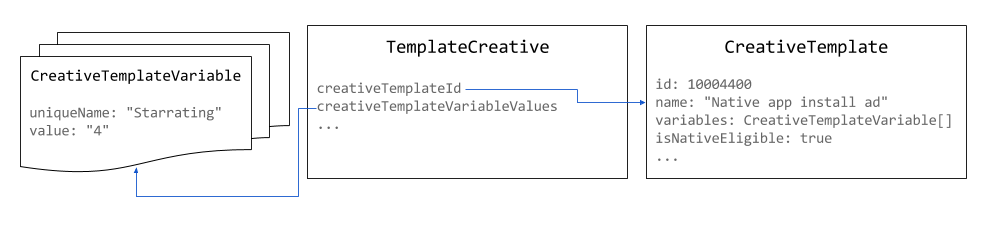
Utilizza pixel 1 x 1 come dimensione per le creatività native. Le dimensioni dell'annuncio visualizzato possono
essere impostate su
NativeStyle
o definite dal rendering personalizzato.
Java
// Use the system defined native app install creative template.
long nativeAppInstallTemplateId = 10004400L;

// Use 1x1 as the size for native creatives.
Size size = new Size();
size.setWidth(1);
size.setHeight(1);
size.setIsAspectRatio(false);

TemplateCreative nativeAppInstallCreative = new TemplateCreative();
nativeAppInstallCreative.setName("Native creative #" + new Random().nextInt(Integer.MAX_VALUE));
nativeAppInstallCreative.setCreativeTemplateId(nativeAppInstallTemplateId);
nativeAppInstallCreative.setSize(size);

List<BaseCreativeTemplateVariableValue> templateVariables = Lists.newArrayList();

// Set the star rating.
StringCreativeTemplateVariableValue starRatingVariableValue =
    new StringCreativeTemplateVariableValue();
starRatingVariableValue.setUniqueName("Starrating");
starRatingVariableValue.setValue("4");
templateVariables.add(starRatingVariableValue);
Python
# Use the system defined native app install creative template.
native_app_install_template_id = '10004400'

creative = {
    'xsi_type': 'TemplateCreative',
    'name': 'Native creative',
    'creativeTemplateId': native_app_install_template_id,
    'size': {'width': 1, 'height': 1, 'isAspectRatio': false},
    'creativeTemplateVariableValues': [
        {
            'xsi_type': 'StringCreativeTemplateVariableValue',
            'uniqueName': 'Starrating',
            'value': '4'
        }
    ]
}
PHP
// Use the system defined native app install creative template.
$nativeAppInstallTemplateId = 10004400;

// Use 1x1 as the size for native creatives.
$size = new Size();
$size->width = 1;
$size->height = 1;
$size->isAspectRatio = false;

$nativeAppInstallCreative = new TemplateCreative();
$nativeAppInstallCreative->name = 'Native creative #' . uniqid();
$nativeAppInstallCreative->creativeTemplateId = $nativeAppInstallTemplateId;
$nativeAppInstallCreative->size = $size;

$starRatingVariableValue = new StringCreativeTemplateVariableValue();
$starRatingVariableValue->uniqueName = 'Starrating';
$starRatingVariableValue->value = '4';
$nativeAppInstallCreative->creativeTemplateVariableValues[] =
    $starRatingVariableValue;
C#
// Use the system defined native app install creative template.
long nativeAppInstallTemplateId = 10004400L;

TemplateCreative nativeAppInstallCreative = new TemplateCreative();
nativeAppInstallCreative.name =
    String.Format("Native creative #{0}", new Random().Next(int.MaxValue));
nativeAppInstallCreative.creativeTemplateId = nativeAppInstallTemplateId;

// Use 1x1 as the size for native creatives.
Size size = new Size();
size.width = 1;
size.height = 1;
size.isAspectRatio = false;
nativeAppInstallCreative.size = size;

List<BaseCreativeTemplateVariableValue> templateVariables =
    new List<BaseCreativeTemplateVariableValue>();

templateVariables.Add(new StringCreativeTemplateVariableValue() {
  uniqueName = "Starrating",
  value = "4"
});
Ruby
# Use the system defined native app install creative template.
creative_template_id = 10004400

creative = {
    :xsi_type => 'TemplateCreative',
    :name => "Native creative %d" % Time.new.to_i,
    :creative_template_id => creative_template_id,
    :size => {:width => 1, :height => 1, :is_aspect_ratio => false}
}

starrating_variable_value = {
    :xsi_type => 'StringCreativeTemplateVariableValue',
    :unique_name => 'Starrating',
    :value => '4'
}

creative[:creative_template_variable_values] = [
    starrating_variable_value
]
Creare uno stile nativo
Gli stili nativi possono essere creati utilizzando
NativeStyleService.
Al momento, l'API non esegue la convalida degli snippet CSS e HTML che
fornisci. Quando imposti le informazioni sul targeting, gli unici campi supportati sono
inventoryTargeting
e
customTargeting.
Java
long nativeAppInstallTemplateId = 10004400L;

// Create a native style for native app install ads.
NativeStyle nativeStyle = new NativeStyle();
nativeStyle.setName("Native style #" + new Random().nextInt(Integer.MAX_VALUE));
nativeStyle.setCreativeTemplateId(nativeAppInstallTemplateId);
nativeStyle.setSize(size);
nativeStyle.setHtmlSnippet(htmlSnippet);
nativeStyle.setCssSnippet(cssSnippet);
Python
native_app_install_template_id = '10004400'

# Create a style for native app install ads.
native_style = {
    'name': 'Native style #%d' % uuid.uuid4(),
    'htmlSnippet': html_snippet,
    'cssSnippet': css_snippet,
    'creativeTemplateId': native_app_install_template_id,
    'size': {
        'width': width,
        'height': height,
        'isAspectRatio': False
    }
}
PHP
$nativeAppInstallTemplateId = 10004400;

// Create a style for native app install ads.
$nativeStyle = new NativeStyle();
$nativeStyle->setName('Native style #'. uniqid());
$nativeStyle->setCreativeTemplateId($nativeAppInstallTemplateId);
$nativeStyle->setSize($size);
$nativeStyle->setHtmlSnippet($htmlSnippet);
$nativeStyle->setCssSnippet($cssSnippet);
C#
long nativeAppInstallTemplateId = 10004400L;

// Create a style for native app install ads.
NativeStyle nativeStyle = new NativeStyle();
nativeStyle.name = string.Format("Native style #{0}", new Random().Next());
nativeStyle.creativeTemplateId = nativeAppInstallTemplateId;
nativeStyle.size = size;
nativeStyle.htmlSnippet = htmlSnippet;
nativeStyle.cssSnippet = cssSnippet;
Ruby
native_app_install_template_id = 10004400

# Create a style for native app install ads.
native_style = {
  :name => 'Native style #%d' % (Time.new.to_f * 1000),
  :html_snippet => html_snippet,
  :css_snippet => css_snippet,
  :creative_template_id => native_app_install_template_id,
  :size => size
}
Se lo stile è per una dimensione fluida, imposta il campo
isFluid
su true e imposta
size
su 1x1 pixel.
Gestire il traffico di un annuncio nativo
Quando crei un
LineItem per un
annuncio nativo, il
CreativePlaceholder
deve impostare un
CreativeSizeType
tipo di NATIVE e impostare il
creativeTemplateId
del formato dell'annuncio nativo desiderato.
Java
// Create creative placeholder size.
Size size = new Size();
size.setWidth(1);
size.setHeight(1);
size.setIsAspectRatio(false);

long nativeAppInstallTemplateId = 10004400L;

// Create the creative placeholder.
CreativePlaceholder creativePlaceholder = new CreativePlaceholder();
creativePlaceholder.setSize(size);
creativePlaceholder.setCreativeTemplateId(nativeAppInstallTemplateId);
creativePlaceholder.setCreativeSizeType(CreativeSizeType.NATIVE);
Python
native_app_install_template_id = '10004400'

# Create the creative placeholder.
creative_placeholder = {
    'size': {
        'width': '1',
        'height': '1'
    },
    'creativeTemplateId': native_app_install_template_id,
    'creativeSizeType': 'NATIVE'
}
PHP
$nativeAppInstallTemplateId = 10004400;

// Create the creative placeholder.
$creativePlaceholder = new CreativePlaceholder();
$creativePlaceholder->setSize(new Size(1, 1, false));
$creativePlaceholder->setCreativeTemplateId($nativeAppInstallTemplateId);
$creativePlaceholder->setCreativeSizeType(CreativeSizeType::NATIVE);
C#
// Create the creative placeholder size.
Size size = new Size();
size.width = 1;
size.height = 1;
size.isAspectRatio = false;

long nativeAppInstallTemplateId = 10004400L;

// Create the creative placeholder.
CreativePlaceholder creativePlaceholder = new CreativePlaceholder();
creativePlaceholder.size = size;
creativePlaceholder.creativeTemplateId = nativeAppInstallTemplateId;
creativePlaceholder.creativeSizeType = CreativeSizeType.NATIVE;
Ruby
# Create the creative placeholder.
creative_placeholder = {
    :size => {:width => 1, :height => 1, :is_aspect_ratio => false},
    :creative_template_id => 10004400,
    :creative_size_type => 'NATIVE'
}