

Introducción
En esta guía, se detalla cómo utilizar las funciones de publicidad nativa de Google Ad Manager con la API. Antes de comenzar, asegúrate de comprender los conceptos básicos de la publicidad nativa con Ad Manager.
Recupera un formato de anuncio nativo
Los formatos de anuncios nativos se representan con un CreativeTemplate en la API de Ad Manager. Para recuperar formatos nativos de tu red, usa CreativeTemplateService.
Para diferenciar las plantillas de creatividades de los formatos de anuncios nativos, usa el campo isNativeEligible. Cuando este campo es verdadero, la plantilla de creatividad representa un formato de anuncio nativo.
Java
StatementBuilder statementBuilder = new StatementBuilder()
    .where("isNativeEligible = :isNativeEligible")
    .orderBy("id DESC")
    .limit(StatementBuilder.SUGGESTED_PAGE_LIMIT)
    .withBindVariableValue("isNativeEligible", true);;

CreativeTemplatePage page = creativeTemplateService.getCreativeTemplatesByStatement(
    statementBuilder.toStatement());
Python
query = 'WHERE isNativeEligible = :isNativeEligible'
values = [
    {'key': 'isNativeEligible',
     'value': {
         'xsi_type': 'BooleanValue',
         'value': 'true'
     }},
]
statement = ad_manager.FilterStatement(query, values)

response = creative_template_service.getCreativeTemplatesByStatement(
    statement.ToStatement())
PHP
$pageSize = StatementBuilder::SUGGESTED_PAGE_LIMIT;
$statementBuilder = (new StatementBuilder())
    ->where('isNativeEligible = :isNativeEligible')
    ->orderBy('id ASC')
    ->limit($pageSize)
    ->withBindVariableValue('isNativeEligible', true);

$page = $creativeTemplateService->getCreativeTemplatesByStatement(
    $statementBuilder->ToStatement());
.NET
StatementBuilder statementBuilder = new StatementBuilder()
    .Where("isNativeEligible = :isNativeEligible")
    .OrderBy("id ASC")
    .Limit(StatementBuilder.SUGGESTED_PAGE_LIMIT)
    .AddValue("isNativeEligible", true);

CreativeTemplatePage page = creativeTemplateService.getCreativeTemplatesByStatement(
      statementBuilder.ToStatement());
Ruby
query = 'WHERE isNativeEligible = :isNativeEligible'
values = [
  {
    :key => 'isNativeEligible',
    :value => {
      :xsi_type => 'BooleanValue',
      :value => 'true'
    }
  },
]
statement = AdManagerApi::FilterStatement.new(query, values)

page = creative_template_service.get_creative_templates_by_statement(
  statement.toStatement())
Crea una creatividad nativa
Las creatividades nativas se respaldan con TemplateCreatives en la API de Ad Manager. No son una entidad distinta. Para crear creatividades nativas, crea un objeto TemplateCreative para un objeto CreativeTemplate que sea apto para la publicidad nativa. Los componentes de la creatividad nativa se almacenan en objetos CreativeTemplateVariable.
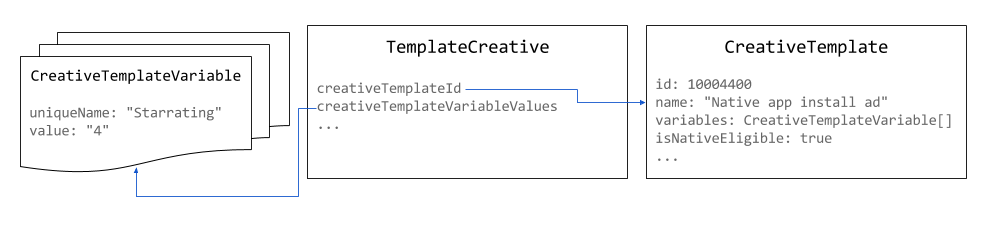
Usa píxeles de 1 x 1 como tamaño para las creatividades nativas. El tamaño del anuncio renderizado se puede establecer en NativeStyle o definir mediante la renderización personalizada.
Java
// Use the system defined native app install creative template.
long nativeAppInstallTemplateId = 10004400L;

// Use 1x1 as the size for native creatives.
Size size = new Size();
size.setWidth(1);
size.setHeight(1);
size.setIsAspectRatio(false);

TemplateCreative nativeAppInstallCreative = new TemplateCreative();
nativeAppInstallCreative.setName("Native creative #" + new Random().nextInt(Integer.MAX_VALUE));
nativeAppInstallCreative.setCreativeTemplateId(nativeAppInstallTemplateId);
nativeAppInstallCreative.setSize(size);

List<BaseCreativeTemplateVariableValue> templateVariables = Lists.newArrayList();

// Set the star rating.
StringCreativeTemplateVariableValue starRatingVariableValue =
    new StringCreativeTemplateVariableValue();
starRatingVariableValue.setUniqueName("Starrating");
starRatingVariableValue.setValue("4");
templateVariables.add(starRatingVariableValue);
Python
# Use the system defined native app install creative template.
native_app_install_template_id = '10004400'

creative = {
    'xsi_type': 'TemplateCreative',
    'name': 'Native creative',
    'creativeTemplateId': native_app_install_template_id,
    'size': {'width': 1, 'height': 1, 'isAspectRatio': false},
    'creativeTemplateVariableValues': [
        {
            'xsi_type': 'StringCreativeTemplateVariableValue',
            'uniqueName': 'Starrating',
            'value': '4'
        }
    ]
}
PHP
// Use the system defined native app install creative template.
$nativeAppInstallTemplateId = 10004400;

// Use 1x1 as the size for native creatives.
$size = new Size();
$size->width = 1;
$size->height = 1;
$size->isAspectRatio = false;

$nativeAppInstallCreative = new TemplateCreative();
$nativeAppInstallCreative->name = 'Native creative #' . uniqid();
$nativeAppInstallCreative->creativeTemplateId = $nativeAppInstallTemplateId;
$nativeAppInstallCreative->size = $size;

$starRatingVariableValue = new StringCreativeTemplateVariableValue();
$starRatingVariableValue->uniqueName = 'Starrating';
$starRatingVariableValue->value = '4';
$nativeAppInstallCreative->creativeTemplateVariableValues[] =
    $starRatingVariableValue;
C#
// Use the system defined native app install creative template.
long nativeAppInstallTemplateId = 10004400L;

TemplateCreative nativeAppInstallCreative = new TemplateCreative();
nativeAppInstallCreative.name =
    String.Format("Native creative #{0}", new Random().Next(int.MaxValue));
nativeAppInstallCreative.creativeTemplateId = nativeAppInstallTemplateId;

// Use 1x1 as the size for native creatives.
Size size = new Size();
size.width = 1;
size.height = 1;
size.isAspectRatio = false;
nativeAppInstallCreative.size = size;

List<BaseCreativeTemplateVariableValue> templateVariables =
    new List<BaseCreativeTemplateVariableValue>();

templateVariables.Add(new StringCreativeTemplateVariableValue() {
  uniqueName = "Starrating",
  value = "4"
});
Ruby
# Use the system defined native app install creative template.
creative_template_id = 10004400

creative = {
    :xsi_type => 'TemplateCreative',
    :name => "Native creative %d" % Time.new.to_i,
    :creative_template_id => creative_template_id,
    :size => {:width => 1, :height => 1, :is_aspect_ratio => false}
}

starrating_variable_value = {
    :xsi_type => 'StringCreativeTemplateVariableValue',
    :unique_name => 'Starrating',
    :value => '4'
}

creative[:creative_template_variable_values] = [
    starrating_variable_value
]
Crea un estilo nativo
Los estilos nativos se pueden crear con NativeStyleService.
Actualmente, la API no realiza validaciones en los fragmentos de CSS y HTML que proporcionas. Cuando configures la información de segmentación, los únicos campos admitidos serán inventoryTargeting y customTargeting.
Java
long nativeAppInstallTemplateId = 10004400L;

// Create a native style for native app install ads.
NativeStyle nativeStyle = new NativeStyle();
nativeStyle.setName("Native style #" + new Random().nextInt(Integer.MAX_VALUE));
nativeStyle.setCreativeTemplateId(nativeAppInstallTemplateId);
nativeStyle.setSize(size);
nativeStyle.setHtmlSnippet(htmlSnippet);
nativeStyle.setCssSnippet(cssSnippet);
Python
native_app_install_template_id = '10004400'

# Create a style for native app install ads.
native_style = {
    'name': 'Native style #%d' % uuid.uuid4(),
    'htmlSnippet': html_snippet,
    'cssSnippet': css_snippet,
    'creativeTemplateId': native_app_install_template_id,
    'size': {
        'width': width,
        'height': height,
        'isAspectRatio': False
    }
}
PHP
$nativeAppInstallTemplateId = 10004400;

// Create a style for native app install ads.
$nativeStyle = new NativeStyle();
$nativeStyle->setName('Native style #'. uniqid());
$nativeStyle->setCreativeTemplateId($nativeAppInstallTemplateId);
$nativeStyle->setSize($size);
$nativeStyle->setHtmlSnippet($htmlSnippet);
$nativeStyle->setCssSnippet($cssSnippet);
C#
long nativeAppInstallTemplateId = 10004400L;

// Create a style for native app install ads.
NativeStyle nativeStyle = new NativeStyle();
nativeStyle.name = string.Format("Native style #{0}", new Random().Next());
nativeStyle.creativeTemplateId = nativeAppInstallTemplateId;
nativeStyle.size = size;
nativeStyle.htmlSnippet = htmlSnippet;
nativeStyle.cssSnippet = cssSnippet;
Ruby
native_app_install_template_id = 10004400

# Create a style for native app install ads.
native_style = {
  :name => 'Native style #%d' % (Time.new.to_f * 1000),
  :html_snippet => html_snippet,
  :css_snippet => css_snippet,
  :creative_template_id => native_app_install_template_id,
  :size => size
}
Si el estilo es para un tamaño fluido, establece el campo isFluid como verdadero y size como píxeles de 1 x 1.
Publica un anuncio nativo
Cuando crees un objeto LineItem para un anuncio nativo, el objeto CreativePlaceholder debe establecer un tipo CreativeSizeType de NATIVE y establecer el objeto creativeTemplateId del formato de anuncio nativo deseado.
Java
// Create creative placeholder size.
Size size = new Size();
size.setWidth(1);
size.setHeight(1);
size.setIsAspectRatio(false);

long nativeAppInstallTemplateId = 10004400L;

// Create the creative placeholder.
CreativePlaceholder creativePlaceholder = new CreativePlaceholder();
creativePlaceholder.setSize(size);
creativePlaceholder.setCreativeTemplateId(nativeAppInstallTemplateId);
creativePlaceholder.setCreativeSizeType(CreativeSizeType.NATIVE);
Python
native_app_install_template_id = '10004400'

# Create the creative placeholder.
creative_placeholder = {
    'size': {
        'width': '1',
        'height': '1'
    },
    'creativeTemplateId': native_app_install_template_id,
    'creativeSizeType': 'NATIVE'
}
PHP
$nativeAppInstallTemplateId = 10004400;

// Create the creative placeholder.
$creativePlaceholder = new CreativePlaceholder();
$creativePlaceholder->setSize(new Size(1, 1, false));
$creativePlaceholder->setCreativeTemplateId($nativeAppInstallTemplateId);
$creativePlaceholder->setCreativeSizeType(CreativeSizeType::NATIVE);
C#
// Create the creative placeholder size.
Size size = new Size();
size.width = 1;
size.height = 1;
size.isAspectRatio = false;

long nativeAppInstallTemplateId = 10004400L;

// Create the creative placeholder.
CreativePlaceholder creativePlaceholder = new CreativePlaceholder();
creativePlaceholder.size = size;
creativePlaceholder.creativeTemplateId = nativeAppInstallTemplateId;
creativePlaceholder.creativeSizeType = CreativeSizeType.NATIVE;
Ruby
# Create the creative placeholder.
creative_placeholder = {
    :size => {:width => 1, :height => 1, :is_aspect_ratio => false},
    :creative_template_id => 10004400,
    :creative_size_type => 'NATIVE'
}