> [!NOTE]
> **Note:** Please fill out [this](https://tables.area120.google.com/u/0/form/9C6jXsBTJ-H87lYbmAA4L_/t/bfEXtCjIOfN88524UMV4zX8n1lccicZLz1xpvLdMmkGpbSm8og5CHXHdrn2heNl_Sp) form if you are interested in enabling menus for your existing Reservations End-to-End integration.
Google partners can provide structured menu data to Google through the Reservations End-to-End
integration for use in the **Menu** section of a restaurant's Google Business Profile and other
entry points across Google consumer surfaces.
Menu data are ingested using the Generic Feeds. Before you begin:
1. Make sure that you have completed [account setup](https://developers.google.com/actions-center/verticals/reservations/e2e/integration-steps/setup)
2. Understand the [Generic Feed upload process](https://developers.google.com/actions-center/verticals/reservations/e2e/add-ons/add-menus/generic-sftp)
3. Understand how to [configure](https://developers.google.com/actions-center/verticals/reservations/e2e/add-ons/add-menus/generic-sftp) your account for Generic Feed uploads
## Creating and uploading Menu Feeds
When creating and uploading Menu Feeds, follow these guidelines and conventions:
- To provide restaurant details, follow the data specification described in [Merchant Feed](https://developers.google.com/actions-center/verticals/ordering/reservations/e2e/reference/feeds/merchants-feed). For example JSON file refer to the [sample JSON](https://developers.google.com/actions-center/verticals/reservations/e2e/reference/feeds/merchants-feed#samples). Data file names should be unique between uploads. It is recommended to include a timestamp in the filename, for example, `menu1_1633621547.json`
- In the fileset descriptor for the menu feed, set the `name` field to `google.food_menu`. To see an example of the descriptor file contents, refer to the [Descriptor File JSON sample](https://developers.google.com/actions-center/verticals/reservations/e2e/add-ons/add-menus/menus-feed#descriptor-file). The names of descriptor files should be unique between uploads. It is recommended to include a timestamp in the filename, for example, `descriptor_1633621547.filesetdesc.json`. The descriptor file must be uploaded to the generic SFTP server as part of the menu feed.
- Feeds must be uploaded to the generic SFTP server on a daily cadence as full refreshes.
- Limit feeds to 1000 shards (files) as mentioned in [Using the Generic Feed sftp](https://developers.google.com/actions-center/verticals/reservations/e2e/add-ons/add-menus/generic-sftp)
Feed ingestion status can be found in the [Ingestion \> History](https://partnerdash.google.com/apps/reservewithgoogle/ingestions)
section of the partner portal. Feed SFTP server info can be found in the [Configuration \> Feeds](https://partnerdash.google.com/apps/reservewithgoogle/configuration/feeds)
section of the Partner Portal.
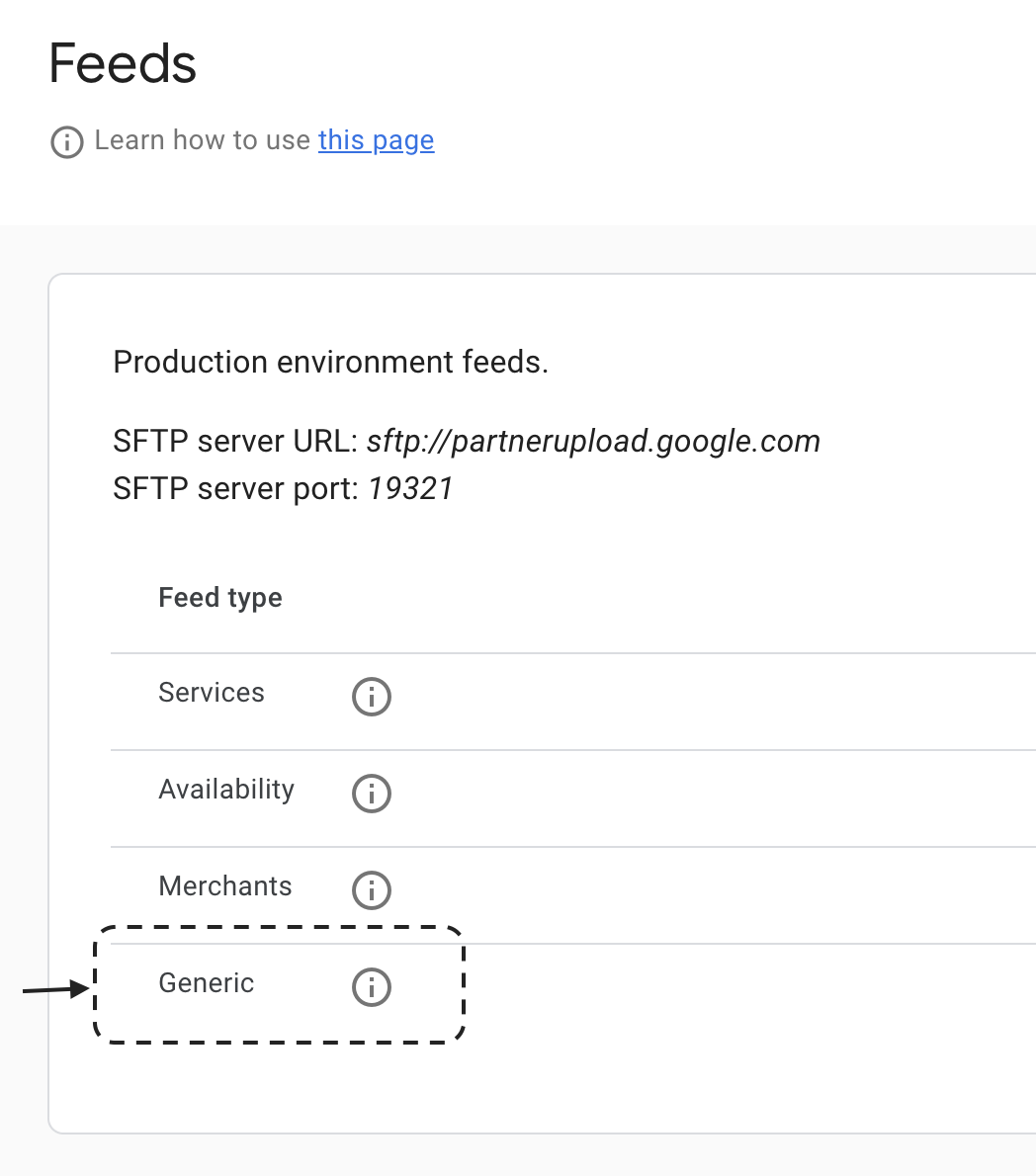
**Figure 1:** Generic SFTP server info
Feed ingestion status can be found in the [Ingestion \> History](https://partnerdash.google.com/apps/reservewithgoogle/ingestions)
section of the Partner Portal. Feed SFTP server info can be found in the [Configuration \> Feeds](https://partnerdash.google.com/apps/reservewithgoogle/configuration/feeds)
section of the Partner Portal.
## Working with menu item options
Menu item options can be specified using the
[`MenuItemOption`](https://developers.google.com/actions-center/verticals/reservations/e2e/add-ons/add-menus/menus-feed#MenuItemOption-definition) proto.
> [!NOTE]
> **Note:** The exact user experience will depend on the Google surface. In Google Search, only the lowest priced MenuItemOption will be displayed to the user.
Partners with multiple sets of
required options for a single menu item (for example, a latte with size options and milk options)
must decide how best to display those options in Google. Google recommends the following:
- The menu feed should match the partner's ordering site (or the restaurant's dine-in menu if you don't have an ordering site for the location). If the item is displayed with an individual price on the ordering site, a [`MenuItem`](https://developers.google.com/actions-center/verticals/reservations/e2e/add-ons/add-menus/menus-feed#MenuItem-definition) should be used. If the item is displayed with a base price and multiple options, a [`MenuItemOption`](https://developers.google.com/actions-center/verticals/reservations/e2e/add-ons/add-menus/menus-feed#MenuItemOption-definition) should be used.
- Avoid including a long list of options, for example:
- Chicken burrito
- Chicken burrito with cheese
- Chicken burrito with salsa
- Chicken burrito with salsa and cheese
- Chicken burrito with guacamole
- Chicken burrito with guacamole and salsa
- Menu item options are only supported if the dish **requires** one of the options to be selected. For example, when ordering a pizza, size is a required option. Menu item options that are for add-ons (i.e. "option to add avocado") are not supported and shouldn't be included in feeds.
The menu item option price should be the full price of the item with that option selected.
The price should be set for the menu item or for its options, but not for both.
## Restaurants with multiple menus
A single restaurant (Entity) can only have one menu. For a restaurant which has multiple menus (i.e.
separate Lunch and Dinner menus) you can combine all menus into a single menu with [MenuSections](https://developers.google.com/actions-center/verticals/ordering/redirect/reference/menu-feeds/menus-feed#MenuSection-definition)
(i.e. one menu with a section for Lunch and a section for dinner). The resulting menu would have
the following structure:
- Menu
- Lunch section
- Soups
- Soup 1
- Soup 2
- Sandwiches
- Sandwich 1
- Sandwich 2
- Dinner section
- Starters
- Starter 1
- Starter 2
- Mains
- Main dish 1
- Main dish 2
## Sharing menus across restaurants
A single menu can be shared across multiple restaurants by including all restaurants in the
menu's `merchant_ids` list. Note that this list accepts entity ids for partners using
the [Entity](https://developers.google.com/actions-center/verticals/ordering/redirect/reference/feeds/entity-feed)
feed.
## Best Practices
The following are best practices to follow when developing menu feeds.
- Associate only one [menu](https://developers.google.com/actions-center/verticals/reservations/e2e/add-ons/add-menus/menus-feed#Menu-definition) to a restaurant.
> [!NOTE]
> **Note:** The Menu section on a merchant's Google Business Profile does not differentiate between pickup and delivery menus. We recommend listing the menu information that most closely aligns with the merchant's in-store menu.
- A maximum of 3,000 unique `MenuItem` objects in total (across all sections and nested sub-sections) is allowed.
- A maximum of 100,000 unique entities per entity type (`MenuSection`, `MenuItem`, `MenuItemOption`) within a single `Menu` is allowed.
- The fully assembled `Menu` (with all of its sections, items, and options combined after deduplication) must not exceed 3.8 MB.
- All ID fields (`menu_id`, `merchant_ids`, `menu_section_ids`, `menu_item_ids`, `menu_item_option_ids`, `addon_menu_section_ids`) must be 580 characters or fewer.
> [!NOTE]
> **Note:** If a Menu exceeds the above limits, only that specific Menu entity is rejected during ingestion while other valid menus in the feed and the restaurant entity itself remain active.
- Provide the preferred language as the first language in the [TextField](https://developers.google.com/actions-center/verticals/reservations/e2e/add-ons/add-menus/menus-feed#TextField-definition). If you are sending multiple [LocalizedText](https://developers.google.com/actions-center/verticals/reservations/e2e/add-ons/add-menus/menus-feed-proto-bundle#Localized-text-definition) objects, the first object in the text list is displayed to users.
- All [menu items](https://developers.google.com/actions-center/verticals/reservations/e2e/add-ons/add-menus/menus-feed#MenuItem-definition) must be added to [menu sections](https://developers.google.com/actions-center/verticals/reservations/e2e/add-ons/add-menus/menus-feed#MenuSection-definition). Don't add menu items directly to the menu object.
- Provide content using utf-8 encoding. It is not necessary to escape non-ascii characters.
- If you are launching in multiple regions, ensure you are using the correct currency codes and denominations in the units and nanos field - pay extra caution to the nanos field which is 10\^-9 of a unit. Use Menu Visualizer in [Inventory Viewer](https://actionscenter.google.com/inventory/fo-epa) to confirm you have correctly set prices.
- Providing users with visually rich, comprehensive, and fresh menus is key to providing a helpful and engaging user experience. Prices, descriptions, photos, and dietary information are all key elements in driving decision making and partners are encouraged to provide as much of this data as possible to provide an optimal user \& merchant experience.
- To show no price include an empty [Price](https://developers.google.com/actions-center/verticals/reservations/e2e/add-ons/add-menus/menus-feed#Offer-definition) proto in the [Offer](https://developers.google.com/actions-center/verticals/reservations/e2e/add-ons/add-menus/menus-feed#Offer-definition) proto.
## Development \& Testing Tools
After menu feeds are [launched](https://developers.google.com/actions-center/verticals/reservations/e2e/add-ons/add-menus/onboarding-process#launch), your menu feed data will be eligible to surface on discovery experiences and may be
visible on the restaurant placesheet "Menu" tab. The menu tab is supported on Google
Search (mobile \& desktop), and the experience will be expanding to additional surfaces including
Google Maps. The rendered experience may differ depending on the surface.

**Figure 3:** An example of how menu feed content is displayed on Business Profile on mobile
To ensure your menu is structured correctly use Menu Visualizer in [Inventory Viewer](https://actionscenter.google.com/inventory/fo-epa)
to preview your menus.
> [!NOTE]
> **Note:** The menu from your feed may not appear for a restaurant if there are multiple menu providers for the restaurant.
Restaurant menus can come from many sources, including from restaurants themselves via their
Google Business Profile, food ordering and reservations partners, user photos of menus, and more.
If multiple sources are providing menus for the same restaurant, the merchant can [choose a preferred provider](https://support.google.com/business/answer/9455840?sjid=3456950423954086848-NA#zippy=%2Cselect-preferred-menu)
in the Google Business Profile menu editor.
## Schema
The full menu schema can be found [here](https://developers.google.com/actions-center/verticals/reservations/e2e/add-ons/add-menus/menus-feed).
### FoodMenuFeed
| Field Name | Type | Requirement | Description |
|---|---|---|---|
| `data` | array of object [`(MenuComponent)`](https://developers.google.com/actions-center/verticals/reservations/e2e/add-ons/add-menus/overview#description-table-madden.ingestion.MenuComponent) |
| |
### MenuComponent
| Field Name | Type | Requirement | Description |
|---|---|---|---|
| | oneOf [`(type)`](https://developers.google.com/actions-center/verticals/reservations/e2e/add-ons/add-menus/overview#description-table-madden.ingestion.MenuComponent.type) |
| Only one of the fields in this oneOf can be set. |
### Menu
Top-level catalog of food items offered by a Food establishment. Menu
contains a list of merchant ids and the menu that apply to those merchants.
A Menu can be used to represent single merchant with the menu, or multiple
merchants (typically chain restaurants) with the menus.
| Field Name | Type | Requirement | Description |
|---|---|---|---|
| `menu_id` | string | Required | An opaque string from a partner which uniquely identifies the Menu within the partner feed. Required. |
| `merchant_ids` | array of string | Required | The merchants to whom the menu apply. Note: This field is repeated so chain restaurants can share the same menu across multiple locations, each of which is a separate merchant. Required. |
| `display_name` | object [`(TextField)`](https://developers.google.com/actions-center/verticals/reservations/e2e/add-ons/add-menus/overview#description-table-food.menu.v1.TextField) |
| The name that can identify the Menu when a user is browsing the menu. Optional. |
| `language` | string |
| The default language code associated with the text labels contained in the menu. Expects BCP-47 language code, such as "en-US" or "sr-Latn". For more information, see http://www.unicode.org/reports/tr35/#Unicode_locale_identifier. Optional. |
### TextField
A text payload that contains one or more localized values.
| Field Name | Type | Requirement | Description |
|---|---|---|---|
| `text` | array of object [`(LocalizedText)`](https://developers.google.com/actions-center/verticals/reservations/e2e/add-ons/add-menus/overview#description-table-google.type.LocalizedText) | Required | Per-locale text values. If there is only one desired locale support, then the language_code within each text is not required to be set and the language will be inferred from the default language of the menu. If there are multiple texts across different locales, then the language_code must be set for each text. The first text in the list is considered the preferred representation. Required. |
### LocalizedText
Localized variant of a text in a particular language.
| Field Name | Type | Requirement | Description |
|---|---|---|---|
| `text` | string |
| Localized string in the language corresponding to \[language_code\]\[google.type.LocalizedText.language_code\] below. |
| `language_code` | string |
| The text's BCP-47 language code, such as "en-US" or "sr-Latn". For more information, see http://www.unicode.org/reports/tr35/#Unicode_locale_identifier. |
### MenuSection
A menu section is a grouping of items on a menu. Separate MenuSections are
usually created for each logical grouping of items on a menu. For example,
meal course type (Appetizer, Main, Dessert) and food categories (Burgers,
Drinks) are typical sections.
| Field Name | Type | Requirement | Description |
|---|---|---|---|
| `menu_section_id` | string | Required | An opaque string from a partner that uniquely identifies the MenuSection within the partner feed. Required. |
| `display_name` | object [`(TextField)`](https://developers.google.com/actions-center/verticals/reservations/e2e/add-ons/add-menus/overview#description-table-food.menu.v1.TextField) | Required | The name that can identify the MenuSection when a user is browsing the menu. Required. |
| `description` | object [`(TextField)`](https://developers.google.com/actions-center/verticals/reservations/e2e/add-ons/add-menus/overview#description-table-food.menu.v1.TextField) |
| A description of the menu section. Optional. |
| `images` | array of object [`(Image)`](https://developers.google.com/actions-center/verticals/reservations/e2e/add-ons/add-menus/overview#description-table-food.menu.v1.Image) |
| Image(s) of the menu section. Optional. |
### Image
Represents an image associated with a menu entity.
| Field Name | Type | Requirement | Description |
|---|---|---|---|
| `uri` | string | Required | URL containing the raw pixels of the image. Required. |
### MenuItem
Represents a single food or drink item offered by a Food establishment.
| Field Name | Type | Requirement | Description |
|---|---|---|---|
| `menu_item_id` | string | Required | An opaque string from a partner that uniquely identifies the MenuItem within the partner feed. Required. |
| `display_name` | object [`(TextField)`](https://developers.google.com/actions-center/verticals/reservations/e2e/add-ons/add-menus/overview#description-table-food.menu.v1.TextField) | Required | The name that can identify the MenuItem when a user is browsing the menu. Required. |
| `description` | object [`(TextField)`](https://developers.google.com/actions-center/verticals/reservations/e2e/add-ons/add-menus/overview#description-table-food.menu.v1.TextField) |
| A description of the menu item. Optional. |
| `images` | array of object [`(Image)`](https://developers.google.com/actions-center/verticals/reservations/e2e/add-ons/add-menus/overview#description-table-food.menu.v1.Image) |
| Image(s) of the menu item. Optional. |
| | oneOf [`(pricing)`](https://developers.google.com/actions-center/verticals/reservations/e2e/add-ons/add-menus/overview#description-table-food.menu.v1.MenuItem.pricing) | Required | Only one of the fields in this oneOf can be set. |
| `item_attributes` | object [`(MenuItemAttributes)`](https://developers.google.com/actions-center/verticals/reservations/e2e/add-ons/add-menus/overview#description-table-food.menu.v1.MenuItemAttributes) |
| Attributes about this menu item. Optional. |
### OfferSet
Container for a list of offers available on a menu item / option.
Only one offer should be applicable/valid at one particular time.
For example, a drink can have 2 offers where one is applicable in the morning
while the other is applicable in the evening during happy hours.
| Field Name | Type | Requirement | Description |
|---|---|---|---|
| `offers` | array of object [`(Offer)`](https://developers.google.com/actions-center/verticals/reservations/e2e/add-ons/add-menus/overview#description-table-food.menu.v1.Offer) | Required | List of possible offers. Required. |
### Offer
Represents pricing and availability information for MenuItems and
MenuItemOptions.
| Field Name | Type | Requirement | Description |
|---|---|---|---|
| `price` | object [`(Money)`](https://developers.google.com/actions-center/verticals/reservations/e2e/add-ons/add-menus/overview#description-table-google.type.Money) |
| The following cases are invalid and will result in the menu item being dropped: Price with no currency code but with unit or nanos or both: price {units: 100, nanos: 1000000} price {units: 100} price {nanos: 1000000} Price with invalid currency code but with unit or nanos or both: price {currency_code: 'gXYZ', units: 100, nanos: 1000000} price {currency_code: 'gXYZ', units: 100} price {currency_code: 'gXYZ', nanos: 1000000} Price with currency code but invalid units or nanos price {currency_code: 'USD', units: 100, nanos: -100} price {currency_code: 'USD', units: -100, nanos: 100} |
### Money
Represents an amount of money with its currency type.
| Field Name | Type | Requirement | Description |
|---|---|---|---|
| `currency_code` | string |
| The three-letter currency code defined in ISO 4217. |
| `units` | number |
| The whole units of the amount. For example if `currencyCode` is `"USD"`, then 1 unit is one US dollar. |
| `nanos` | number |
| Number of nano (10\^-9) units of the amount. The value must be between -999,999,999 and +999,999,999 inclusive. If `units` is positive, `nanos` must be positive or zero. If `units` is zero, `nanos` can be positive, zero, or negative. If `units` is negative, `nanos` must be negative or zero. For example $-1.75 is represented as `units`=-1 and `nanos`=-750,000,000. |
### MenuItemOptionSet
Container that specifies a list of options available on an item.
| Field Name | Type | Requirement | Description |
|---|---|---|---|
| `menu_item_option_ids` | array of string | Required | IDs of menu item options that are applicable to this menu item. Required. |
### MenuItemAttributes
Describes attributes about a particular menu item or option.
| Field Name | Type | Requirement | Description |
|---|---|---|---|
| `number_of_servings` | number |
| Number of servings available in a given menu item. Optional. |
| `nutrition_information` | object [`(NutritionInformation)`](https://developers.google.com/actions-center/verticals/reservations/e2e/add-ons/add-menus/overview#description-table-food.menu.v1.NutritionInformation) |
| Describes all the nutritional information of the item, e.g. calories, fat content. Optional. |
| `suitable_diets` | array of enum [`(DietaryRestriction)`](https://developers.google.com/actions-center/verticals/reservations/e2e/add-ons/add-menus/overview#description-table-food.menu.v1.DietaryRestriction) |
| The dietary restrictions that this menu item complies with. Optional. |
| `additive` | array of object [`(Additive)`](https://developers.google.com/actions-center/verticals/reservations/e2e/add-ons/add-menus/overview#description-table-food.menu.v1.Additive) |
| Additives of this menu item. Optional. |
| `allergen` | array of object [`(Allergen)`](https://developers.google.com/actions-center/verticals/reservations/e2e/add-ons/add-menus/overview#description-table-food.menu.v1.Allergen) |
| Allergens of this menu item. Optional. |
| `packaging_deposit_info` | object [`(DepositInfo)`](https://developers.google.com/actions-center/verticals/reservations/e2e/add-ons/add-menus/overview#description-table-food.menu.v1.DepositInfo) |
| Packaging and recycling information of this menu item. Optional. |
### NutritionInformation
Describes all the nutritional measurements of a MenuItem or add-on.
| Field Name | Type | Requirement | Description |
|---|---|---|---|
| `energy` | object [`(NutritionValue)`](https://developers.google.com/actions-center/verticals/reservations/e2e/add-ons/add-menus/overview#description-table-food.menu.v1.NutritionInformation.NutritionValue) |
| The amount of nutritional energy of the serving of food. Can be defined in Calories or kilojoules. Optional. |
| `sodium_content` | object [`(NutritionValue)`](https://developers.google.com/actions-center/verticals/reservations/e2e/add-ons/add-menus/overview#description-table-food.menu.v1.NutritionInformation.NutritionValue) |
| The amount of sodium content, measured in grams or milligrams. Optional. |
| `serving_size` | number |
| The number of servings the nutrition value applies to. Optional. |
| `description` | object [`(TextField)`](https://developers.google.com/actions-center/verticals/reservations/e2e/add-ons/add-menus/overview#description-table-food.menu.v1.TextField) |
| Nutrition information in free text. For example "Contains preservatives". Optional. |
### NutritionValue
Describes a single nutritional measurement of the serving of food.
| Field Name | Type | Requirement | Description |
|---|---|---|---|
| | oneOf [`(value)`](https://developers.google.com/actions-center/verticals/reservations/e2e/add-ons/add-menus/overview#description-table-food.menu.v1.NutritionInformation.NutritionValue.value) |
| Only one of the fields in this oneOf can be set. |
| `unit` | enum [`(NutritionValueUnit)`](https://developers.google.com/actions-center/verticals/reservations/e2e/add-ons/add-menus/overview#description-table-food.menu.v1.NutritionValueUnit) | Required | The unit associated with the amount as specified from the partner. We will validate the feed so that the unit for each type of nutrition value is expected for that type of value. For example, only ENERGY_CALORIES and ENERGY_KILOJOULES are expected on energy property of NutritionalInformation. Required. |
### Range
Describes a closed range for the nutrition value. E.g. "100-150 cal"
| Field Name | Type | Requirement | Description |
|---|---|---|---|
| `min` | number | Required | The minimum amount of nutrition value. Required. |
| `max` | number | Required | The maximum amount of nutrition value. Required. |
### Additive
Additive shown to the user on the MenuItem. An additive preserves or enhances
the quality of the food.
| Field Name | Type | Requirement | Description |
|---|---|---|---|
| `name` | object [`(TextField)`](https://developers.google.com/actions-center/verticals/reservations/e2e/add-ons/add-menus/overview#description-table-food.menu.v1.TextField) | Required | Descriptive text of the additive, e.g. "preservatives". Required. |
| `containment_level_code` | enum [`(ContainmentLevelCode)`](https://developers.google.com/actions-center/verticals/reservations/e2e/add-ons/add-menus/overview#description-table-food.menu.v1.ContainmentLevelCode) |
| Whether the MenuItem contains, may contain, or is free from this additive. Defaults to contains. Optional. |
### Allergen
Allergen shown to the user on the MenuItem. An allergen relates to qualities
of food that causes allergic reactions.
| Field Name | Type | Requirement | Description |
|---|---|---|---|
| `allergen_type_code` | enum [`(AllergenTypeCode)`](https://developers.google.com/actions-center/verticals/reservations/e2e/add-ons/add-menus/overview#description-table-food.menu.v1.AllergenTypeCode) | Required | Type of allergen. Required. |
| `containment_level_code` | enum [`(ContainmentLevelCode)`](https://developers.google.com/actions-center/verticals/reservations/e2e/add-ons/add-menus/overview#description-table-food.menu.v1.ContainmentLevelCode) |
| Whether the MenuItem contains, may contain, or is free from this allergen. Defaults to contains. Optional. |
### DepositInfo
Partner provided deposit info to instruct the user how to deposit a food item
or bottle and the value of such deposit.
| Field Name | Type | Requirement | Description |
|---|---|---|---|
| `deposit_code` | enum [`(DepositCode)`](https://developers.google.com/actions-center/verticals/reservations/e2e/add-ons/add-menus/overview#description-table-food.menu.v1.DepositCode) |
| The deposit strategy to employ, e.g. "reusable". Optional. |
| `deposit_value` | object [`(Money)`](https://developers.google.com/actions-center/verticals/reservations/e2e/add-ons/add-menus/overview#description-table-google.type.Money) |
| Value refunded for depositing the item properly. Optional. |
### MenuItemOption
Describes choices that a user would be required to make when selecting a
dish / combo. The user must select an option, otherwise the order is
considered invalid (e.g. the user must choose small, medium, or large for a
pizza).
| Field Name | Type | Requirement | Description |
|---|---|---|---|
| `menu_item_option_id` | string | Required | An opaque string from a partner that uniquely identifies the MenuItemOption within the partner feed. Required. |
| `value` | object [`(MenuItemOptionProperty)`](https://developers.google.com/actions-center/verticals/reservations/e2e/add-ons/add-menus/overview#description-table-food.menu.v1.MenuItemOptionProperty) | Required | Option property and value e.g. Size: Small. Required. |
### MenuItemOptionProperty
Describes the property of a menu item option and its value.
| Field Name | Type | Requirement | Description |
|---|---|---|---|
| `property_type` | enum [`(PropertyType)`](https://developers.google.com/actions-center/verticals/reservations/e2e/add-ons/add-menus/overview#description-table-food.menu.v1.MenuItemOptionProperty.PropertyType) | Required | The type of this option property. Required. |
| | oneOf [`(value)`](https://developers.google.com/actions-center/verticals/reservations/e2e/add-ons/add-menus/overview#description-table-food.menu.v1.MenuItemOptionProperty.value) | Required | Only one of the fields in this oneOf can be set. |
### NutritionValueUnit
| Name | Description |
|---|---|
| `NUTRITION_VALUE_UNIT_UNSPECIFIED` | Do not use. The nutrition value unit is not explicitly set. |
| `ENERGY_CALORIES` | Units used to express the amount of energy in a menu item. |
| `ENERGY_KILOJOULES` | |
| `WEIGHT_MILLIGRAMS` | Units used to express the amount in weight a substance is present in the menu item. |
| `WEIGHT_GRAMS` | |
### DietaryRestriction
Indicates a dietary restriction or guideline adhered to during
food preparation.
| Name | Description |
|---|---|
| `DIET_UNSPECIFIED` | Do not use. The dietary restriction is not explicitly specified. |
| `DIET_DIABETIC` | |
| `DIET_GLUTEN_FREE` | |
| `DIET_HALAL` | |
| `DIET_HINDU` | |
| `DIET_KOSHER` | |
| `DIET_LOW_CALORIE` | |
| `DIET_LOW_FAT` | |
| `DIET_LOW_LACTOSE` | |
| `DIET_LOW_SALT` | |
| `DIET_VEGAN` | |
| `DIET_VEGETARIAN` | |
### ContainmentLevelCode
Indicates the level of containment a food item has of a certain attribute,
such as allergens or additives.
| Name | Description |
|---|---|
| `CONTAINMENT_LEVEL_CODE_UNSPECIFIED` | Do not use. The containment level code is not explicitly specified. |
| `CONTAINMENT_LEVEL_CODE_CONTAINS` | |
| `CONTAINMENT_LEVEL_CODE_DOES_NOT_CONTAIN` | |
| `CONTAINMENT_LEVEL_CODE_MAY_CONTAIN` | |
### AllergenTypeCode
Allergen type derived from GS1: http://gs1.org/voc/AllergenTypeCode
| Name | Description |
|---|---|
| `ALLERGEN_TYPE_CODE_UNSPECIFIED` | Do not use. The allergen type code is not explicitly specified. |
| `ALLERGEN_TYPE_CODE_ALMONDS` | |
| `ALLERGEN_TYPE_CODE_ALPHA_ISOMETHYL_IONONE` | |
| `ALLERGEN_TYPE_CODE_ALCOHOL` | |
| `ALLERGEN_TYPE_CODE_AMYL_CINNAMAL` | |
| `ALLERGEN_TYPE_CODE_ANISE_ALCOHOL` | |
| `ALLERGEN_TYPE_CODE_BARLEY` | |
| `ALLERGEN_TYPE_CODE_BENZYL_ALCOHOL` | |
| `ALLERGEN_TYPE_CODE_BENZYL_BENZOATE` | |
| `ALLERGEN_TYPE_CODE_BENZYL_CINNAMATE` | |
| `ALLERGEN_TYPE_CODE_BENZYL_SALICYLATE` | |
| `ALLERGEN_TYPE_CODE_BRAZIL_NUTS` | |
| `ALLERGEN_TYPE_CODE_BUTYLPHENYL_METHYLPROPIONATE` | |
| `ALLERGEN_TYPE_CODE_CARROTS` | |
| `ALLERGEN_TYPE_CODE_CASHEW_NUTS` | |
| `ALLERGEN_TYPE_CODE_CELERY` | |
| `ALLERGEN_TYPE_CODE_CEREALS_CONTAINING_GLUTEN` | |
| `ALLERGEN_TYPE_CODE_CINNAMAL` | |
| `ALLERGEN_TYPE_CODE_CINNAMYL_ALCOHOL` | |
| `ALLERGEN_TYPE_CODE_CITRAL` | |
| `ALLERGEN_TYPE_CODE_CITRONELLOL` | |
| `ALLERGEN_TYPE_CODE_COCOA` | |
| `ALLERGEN_TYPE_CODE_CORIANDER` | |
| `ALLERGEN_TYPE_CODE_CORN` | |
| `ALLERGEN_TYPE_CODE_COUMARIN` | |
| `ALLERGEN_TYPE_CODE_CRUSTACEANS` | |
| `ALLERGEN_TYPE_CODE_EGGS` | |
| `ALLERGEN_TYPE_CODE_EUGENOL` | |
| `ALLERGEN_TYPE_CODE_EVERNIA_FURFURACEA` | |
| `ALLERGEN_TYPE_CODE_EVERNIA_PRUNASTRI` | |
| `ALLERGEN_TYPE_CODE_FARNESOL` | |
| `ALLERGEN_TYPE_CODE_FISH` | |
| `ALLERGEN_TYPE_CODE_GERANIOL` | |
| `ALLERGEN_TYPE_CODE_GLUTEN` | |
| `ALLERGEN_TYPE_CODE_HAZELNUTS` | |
| `ALLERGEN_TYPE_CODE_HEXYL_CINNAMAL` | |
| `ALLERGEN_TYPE_CODE_HYDROXYCITRONELLAL` | |
| `ALLERGEN_TYPE_CODE_HYDROXYISOHEXYL_3_CYCLOHEXENE_CARBOXALDEHYDE_ISOEUGENOL_LIMONENE_LINAL` | |
| `ALLERGEN_TYPE_CODE_KAMUT` | |
| `ALLERGEN_TYPE_CODE_LACTOSE` | |
| `ALLERGEN_TYPE_CODE_LUPINE` | |
| `ALLERGEN_TYPE_CODE_MACADAMIA_NUTS` | |
| `ALLERGEN_TYPE_CODE_METHYL_2_OCTYNOATE` | |
| `ALLERGEN_TYPE_CODE_MILK` | |
| `ALLERGEN_TYPE_CODE_MOLLUSCS` | |
| `ALLERGEN_TYPE_CODE_MUSTARD` | |
| `ALLERGEN_TYPE_CODE_NO_DECLARED_ALLERGENS` | |
| `ALLERGEN_TYPE_CODE_OAT` | |
| `ALLERGEN_TYPE_CODE_PEANUTS` | |
| `ALLERGEN_TYPE_CODE_PEAS` | |
| `ALLERGEN_TYPE_CODE_PECAN_NUTS` | |
| `ALLERGEN_TYPE_CODE_PISTACHIOS` | |
| `ALLERGEN_TYPE_CODE_POD_FRUITS` | |
| `ALLERGEN_TYPE_CODE_QUEENSLAND_NUTS` | |
| `ALLERGEN_TYPE_CODE_RYE` | |
| `ALLERGEN_TYPE_CODE_SESAME_SEEDS` | |
| `ALLERGEN_TYPE_CODE_SOYBEANS` | |
| `ALLERGEN_TYPE_CODE_SPELT` | |
| `ALLERGEN_TYPE_CODE_SULPHUR_DIOXIDE` | |
| `ALLERGEN_TYPE_CODE_TREE_NUTS` | |
| `ALLERGEN_TYPE_CODE_TREE_NUT_TRACES` | |
| `ALLERGEN_TYPE_CODE_WALNUTS` | |
| `ALLERGEN_TYPE_CODE_WHEAT` | |
### DepositCode
Indicates how to properly deposit a food item or bottle.
| Name | Description |
|---|---|
| `DEPOSIT_CODE_UNSPECIFIED` | Do not use. The deposite code is not explicitly specified. |
| `DEPOSIT_CODE_REUSABLE` | |
| `DEPOSIT_CODE_RECYCLABLE` | |
### PropertyType
Types of property that the option is for.
| Name | Description |
|---|---|
| `UNKNOWN_PROPERTY_TYPE` | Do not use. The property type is not explicitly specified. |
| `OPTION` | A generic menu item option property, which is not one of the more specific types below. Use this if the property is not of type SIZE or PIZZA_SIDE. |
| `SIZE` | Denotes the menu item option property of size (e.g. small, medium, or large). |
| `PIZZA_SIDE` | Property specific to pizzas. For example: this MenuItemOption is only valid for a portion/whole pizza, such as mushroom toppings on the left side, right side, or whole pizza). |
### PropertyValue
Well-defined values for the option property.
| Name | Description |
|---|---|
| `UNKNOWN_PROPERTY_VALUE` | Do not use. The property value is not explicitly specified. |
| `PIZZA_SIDE_LEFT` | The MenuItemOption applies only to the left side of a pizza. |
| `PIZZA_SIDE_RIGHT` | The MenuItemOption applies only to the right side of a pizza. |
| `PIZZA_SIDE_WHOLE` | The MenuItemOption applies to the entire pizza. |
### type
| Field Name | Type | Requirement | Description |
|---|---|---|---|
| `menu` | object [`(Menu)`](https://developers.google.com/actions-center/verticals/reservations/e2e/add-ons/add-menus/overview#description-table-food.menu.v1.Menu) | Mutally exclusive with `section`, `item`, `option` | |
| `section` | object [`(MenuSection)`](https://developers.google.com/actions-center/verticals/reservations/e2e/add-ons/add-menus/overview#description-table-food.menu.v1.MenuSection) | Mutally exclusive with `menu`, `item`, `option` | |
| `item` | object [`(MenuItem)`](https://developers.google.com/actions-center/verticals/reservations/e2e/add-ons/add-menus/overview#description-table-food.menu.v1.MenuItem) | Mutally exclusive with `menu`, `section`, `option` | |
| `option` | object [`(MenuItemOption)`](https://developers.google.com/actions-center/verticals/reservations/e2e/add-ons/add-menus/overview#description-table-food.menu.v1.MenuItemOption) | Mutally exclusive with `menu`, `section`, `item` | |
### pricing
The menu item must either have a price, or a set of menu item options.
Required.
| Field Name | Type | Requirement | Description |
|---|---|---|---|
| `offer_set` | object [`(OfferSet)`](https://developers.google.com/actions-center/verticals/reservations/e2e/add-ons/add-menus/overview#description-table-food.menu.v1.OfferSet) | Mutally exclusive with `menu_item_option_set` | Available offers to purchase this food item. |
| `menu_item_option_set` | object [`(MenuItemOptionSet)`](https://developers.google.com/actions-center/verticals/reservations/e2e/add-ons/add-menus/overview#description-table-food.menu.v1.MenuItem.MenuItemOptionSet) | Mutally exclusive with `offer_set` | Available options for this menu item. |
### value
Required oneof.
| Field Name | Type | Requirement | Description |
|---|---|---|---|
| `amount` | number | Mutally exclusive with `range` | A single number representing the amount of nutritional value. |
| `range` | object [`(Range)`](https://developers.google.com/actions-center/verticals/reservations/e2e/add-ons/add-menus/overview#description-table-food.menu.v1.NutritionInformation.NutritionValue.Range) | Mutally exclusive with `amount` | A range representing the amount of nutritional value. |
### value
Required.
| Field Name | Type | Requirement | Description |
|---|---|---|---|
| `property_val` | enum [`(PropertyValue)`](https://developers.google.com/actions-center/verticals/reservations/e2e/add-ons/add-menus/overview#description-table-food.menu.v1.MenuItemOptionProperty.PropertyValue) | Mutally exclusive with `text_val` | A well-defined value for the option property. Currently only expected if the property_type is PIZZA_SIDE. |
| `text_val` | object [`(TextField)`](https://developers.google.com/actions-center/verticals/reservations/e2e/add-ons/add-menus/overview#description-table-food.menu.v1.TextField) | Mutally exclusive with `property_val` | A free-form text for the value of the property. Expected for property_type OPTION and SIZE. |